
The Linux Boot Process
The Boot Process
Section titled “The Boot Process”Procedure for initializing the system.
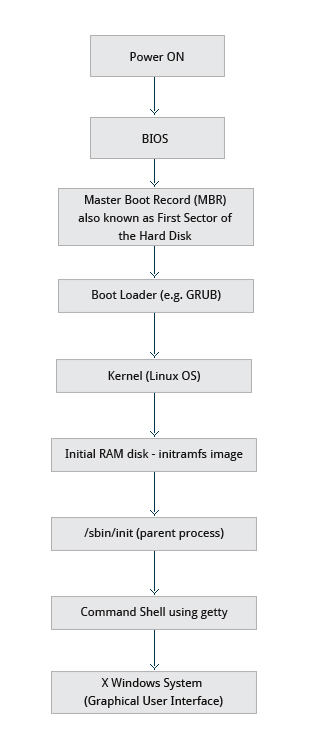
- When the computer is powered on, the Basic Input Output System (BIOS) initializes the hardware, including the screen and keyboard, and tests the main memory. This process is also called POST (Power On Self Test).
- The BIOS software is stored on a ROM chip on the motherboard. After this, the remainder of the boot process is controlled by the operating system (OS).
- Once the POST is completed, the system control passes from the BIOS to the boot loader.
Boot Loader
Section titled “Boot Loader”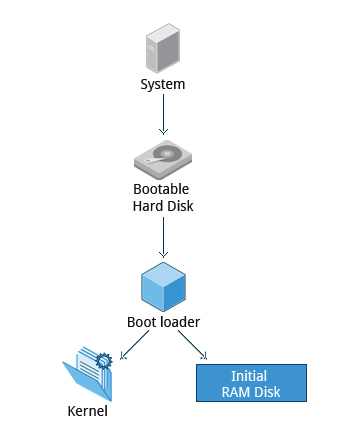
- The boot loader is usually stored on one of the hard disks in the system, either in the
- boot sector (for traditional BIOS/MBR systems) or
- the EFI partition (for more recent (Unified) Extensible Firmware Interface or EFI/UEFI systems).
- Up to this stage, the machine does not access any mass storage media. Thereafter, information on date, time, and the most important peripherals are loaded from the CMOS (Complementary Metal-Oxide Semiconductor) values (after a technology used for the battery-powered memory store which allows the system to keep track of the date and time even when it is powered off).
- A number of boot loaders exist for Linux; the most common ones are
- GRUB (for GRand Unified Boot loader),
- ISOLINUX (for booting from removable media), and
- DAS U-Boot (for booting on embedded devices/appliances).
- Most Linux boot loaders can present a user interface for choosing alternative options for booting Linux, and even other operating systems that might be installed. (Dual boot or Triple Boot)
- When booting Linux, the boot loader is responsible for loading the kernel image and the initial RAM disk or file-system (which contains some critical files and device drivers needed to start the system) into memory.
Working of Boot Loader
Section titled “Working of Boot Loader”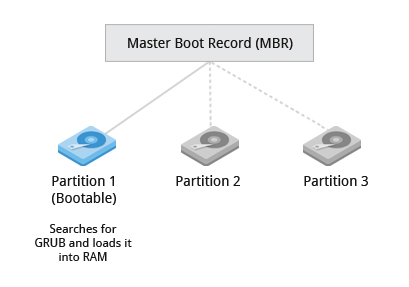
The boot loader has two distinct stages:
Stage 1
Section titled “Stage 1”BIOS/MBR method: For systems using the BIOS/MBR method,
- The boot loader resides at the 1st sector of the hard disk, also known as the Master Boot Record (MBR).
- The size of the MBR is just 512 bytes. This 512-byte space is divided into three parts:
- Bootloader Code: The first 446 bytes.
- Partition Table: The next 64 bytes.
- Boot Signature: The final 2 bytes.
- In this stage, the boot loader examines the partition table and finds a bootable partition.
- Once it finds a bootable partition, it then searches for the second stage boot loader, for example GRUB, and loads it into RAM (Random Access Memory).
EFI/UEFI method: For systems using the EFI/UEFI method,
- UEFI firmware reads its Boot Manager data to determine which UEFI application is to be launched and from where (i.e. from which disk and partition the EFI partition can be found).
- The firmware then launches the UEFI application, for example GRUB, as defined in the boot entry in the firmware’s boot manager. This procedure is more complicated, but more versatile than the older MBR methods.
Stage 2
Section titled “Stage 2”The second stage boot loader resides under /boot.
- A splash screen is displayed, which allows us to choose which operating system (OS) to boot.
- After choosing the OS, the boot loader loads the kernel of the selected operating system into RAM and passes control to it.
- Kernels are almost always compressed, so its first job is to un-compress itself.
- After this, it will check and analyze the system hardware and initialize any hardware device drivers built into the kernel.
Initial RAM Disk
Section titled “Initial RAM Disk”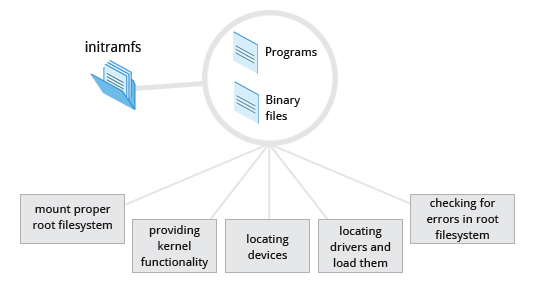
-
The initramfs (initial RAM–based file system) image contains programs and binary files that perform all actions needed to mount the proper root file-system, like providing kernel functionality for the needed file-system and device drivers for mass storage controllers with a facility called
udev(for user device), after the root file-system has been found, it is checked for errors and mounted. -
The mount program instructs the operating system that a file-system is ready for use, and associates it with a particular point in the overall hierarchy of the file-system (the mount point). If this is successful, the
initramfsis cleared from RAM and the init program on the root file-system (/sbin/init) is executed.
inithandles the mounting and pivoting over to the final real root filesystem. If special hardware drivers are needed before the mass storage can be accessed, they must be in the initramfs image.
Text-Mode Login
Section titled “Text-Mode Login”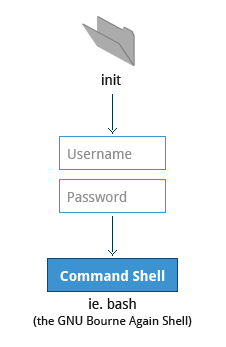
- Near the end of the boot process, init starts a number of text-mode login prompts. These enable you to type your username, followed by your password, and to eventually get a command shell. Not visible if running Graphical Login Interface.
- The terminals which run the command shells can be accessed using the
ALT key + function key. - Most distributions start 6 text terminals and 1 graphics terminal starting with
F1orF2. - Within a graphical environment, switching to a text console requires pressing
CTRL-ALT + the appropriate function key (with F7 or F1 leading to the GUI). - Usually, the default command shell is bash (the GNU Bourne Again Shell), but there are a number of other advanced command shells available.
- The shell prints a text prompt, indicating it is ready to accept commands; after the user types the command and presses Enter, the command is executed, and another prompt is displayed after the command is done.
After Boot: Kernel, init and systemd
Section titled “After Boot: Kernel, init and systemd”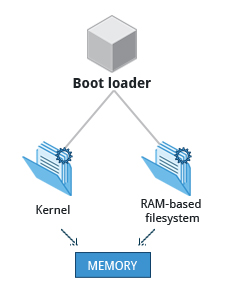
Once the boot loader hands off to the kernel:
- The kernel initializes hardware, configures memory, and loads device drivers.
- The kernel mounts the root filesystem and runs
/sbin/init— the first user-space process (PID 1). - On modern systems,
/sbin/initis a symlink to systemd, which takes over service management with aggressive parallelization.
Historically, Linux used SysVinit (sequential runlevels) and later Upstart (Ubuntu, 2006). Today, virtually all major distributions use systemd.