
Finding Documentation
Documentation Sources
Section titled “Documentation Sources”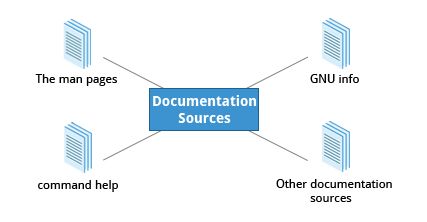
Linux documentation exists at multiple levels. When you don’t know how to use something, check these in order:
manpages - in-depth reference for commands, config files, syscalls, library functions--help/-h- quick summary, always at your fingertipshelp- for bash built-in commands (cd,echo,read, etc.)- GNU Info - hyperlinked, comprehensive documentation; often more thorough than man
/usr/share/doc/- package-specific documentation installed alongside software- Online resources - distro wikis, official docs, community forums
man Pages
Section titled “man Pages”The man (manual) pages are the most-used Linux documentation source. They are present on every Linux system, and cover:
- Programs and shell commands
- System calls (kernel APIs)
- Library functions
- Configuration file formats (
/etc/passwd,/etc/fstab) - Special files and devices
The man pages infrastructure dates to the early UNIX versions of the 1970s. They are formatted text, pipe through less for paging, and support search.
man ls                # open the ls manual pageman 8 useradd         # section 8 (admin commands) specificallyman -a socket         # show all pages named 'socket' across all sections
# Equivalent pairs:man -f sysctl         # = whatis sysctl → list sections availableman -k sysctl         # = apropos sysctl → search all pages for keywordman -w ls             # show path to the man page file
Man Page Sections
Section titled “Man Page Sections”| Section | Contents |
|---|---|
| 1 | Executable programs and shell commands |
| 2 | System calls (kernel-provided functions) |
| 3 | Library calls (within program libraries) |
| 4 | Special files (usually in /dev) |
| 5 | File formats and conventions (e.g., /etc/passwd) |
| 6 | Games |
| 7 | Miscellaneous (macro packages, conventions) |
| 8 | System administration commands (typically root only) |
| 9 | Kernel routines (non-standard) |
Some sections have a letter suffix - for example, chapter 3X covers X Window API functions.
# intro pages exist in every section:man -f intro# intro (1)  - introduction to user commands# intro (2)  - introduction to system calls# ...
man 1 intro    # user commands introman 5 intro    # file formats intro
Searching Man Pages
Section titled “Searching Man Pages”man -k password # all pages mentioning "password" = apropos passwordman -k "^ls" # pages whose name starts with ls (regex)whatis and apropos
Section titled “whatis and apropos”whatis ls# ls (1) - list directory contents
whatis sysctl# sysctl (2) - read/write system parameters# sysctl (8) - configure kernel parameters at runtime
apropos sysctl# proc (5) - process information, system information...# sysctl (2) - read/write system parameters# sysctl (8) - configure kernel parameters at runtime# sysctl.d (5) - Configure kernel parameters at boot--help and the help Built-in
Section titled “--help and the help Built-in”--help
Section titled “--help”Most commands support --help (or -h) for a brief usage summary. This is faster than opening a full man page when you just need a syntax reminder:
man --helptar --help | lessgrep --helphelp (bash built-ins)
Section titled “help (bash built-ins)”When run inside a bash shell, commands like echo and cd are actually bash built-in versions - more efficient than the external binaries under /bin because they require fewer resources and no subprocess fork.
To get documentation for these built-ins:
help # list all bash built-inshelp cd # usage for the cd built-inhelp echo # usage for the echo built-inhelp read # usage for the read built-inFor built-ins, help does what -h does for standalone programs.
GNU Info
Section titled “GNU Info”The GNU Info system is the GNU Project’s standard documentation format. It’s an alternative to man and preferred by GNU projects. Info pages:
- Are free-form (not divided into fixed sections like man pages)
- Support linked subsections (nodes) - similar in concept to hyperlinks
- Are often more comprehensive and tutorial-like than man pages
info # browse the index of all topicsinfo ls # Info page for lsinfo coreutils # full GNU coreutils documentationinfo bash # very detailed bash referenceNavigating Info Pages
Section titled “Navigating Info Pages”Each topic in info is called a node. Nodes are sections and subsections of the documentation. Items that act as links are marked with * at the start of their name (in menus) or :: at the end (inline references).
| Key | Function |
|---|---|
n | Go to next node |
p | Go to previous node |
u | Move up one level in the index |
Enter | Follow a menu link |
q | Quit |
h | Help (key reference) |
s | Search within info |
Package Documentation
Section titled “Package Documentation”Software installed via your package manager often ships with additional documentation under /usr/share/doc/:
ls /usr/share/doc/ # all packages' doc directoriesls /usr/share/doc/openssh-client/ # example: openssh docsless /usr/share/doc/bash/READMEContent varies by package - may include README files, changelogs, example configs, and upstream documentation.
Graphical Help Systems
Section titled “Graphical Help Systems”Desktop environments also include graphical help browsers:
| Desktop | Tool |
|---|---|
| GNOME | gnome-help (Yelp) |
| KDE | khelpcenter |
These typically contain custom desktop help plus graphically-rendered info and man pages.
Online Resources
Section titled “Online Resources”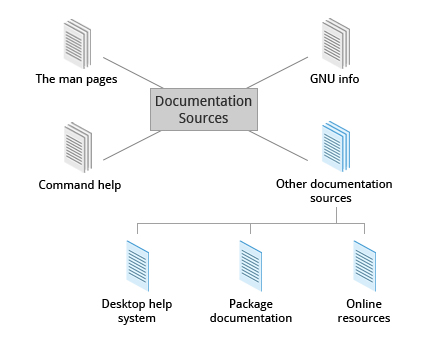
| Resource | URL |
|---|---|
| Arch Wiki (excellent for all distros) | wiki.archlinux.org |
| Ubuntu Documentation | help.ubuntu.com |
| RHEL Documentation | access.redhat.com/documentation |
| Gentoo Handbook | wiki.gentoo.org/wiki/Handbook |
| Linux man pages online | man7.org/linux/man-pages |
| TLDR pages (short examples) | tldr.sh |