
The Transport and Application Layers
The Transport Layer
Section titled “The Transport Layer”The transport layer is layer 4 in the TCP/IP model. Its job is to take data from the application layer above and deliver it to the right application on the right host - reliably (TCP) or as-fast-as-possible (UDP).
Two core responsibilities:
- Multiplexing - combining data streams from multiple sockets into one transmission channel, tagging each with a port number so the receiver knows where to send it.
- Demultiplexing - at the receiving end, reading that port number and routing each segment to the correct application socket.
A port is a 16-bit number (0-65535) that identifies which application on a host should receive incoming traffic. IP addresses get you to the right machine; ports get you to the right program.
| Port Range | Category | Description |
|---|---|---|
| 1 - 1023 | System / Well-known | Reserved for standard services (HTTP, SSH, DNS). Binding requires root/admin. |
| 1024 - 49151 | User / Registered | Vendor-registered ports. Not as strict. |
| 49152 - 65535 | Ephemeral / Dynamic | OS-assigned temporary ports for outgoing client connections. |
Common Ports Quick Reference
Section titled “Common Ports Quick Reference”| Port | Protocol | Service |
|---|---|---|
| 20 / 21 | TCP | FTP (data / control) |
| 22 | TCP | SSH |
| 23 | TCP | Telnet (unencrypted - avoid) |
| 25 | TCP | SMTP (email sending) |
| 53 | TCP/UDP | DNS |
| 67 / 68 | UDP | DHCP (server / client) |
| 80 | TCP | HTTP |
| 110 | TCP | POP3 |
| 143 | TCP | IMAP |
| 443 | TCP | HTTPS (TLS) |
| 3306 | TCP | MySQL |
| 3389 | TCP | RDP (Remote Desktop) |
| 5432 | TCP | PostgreSQL |
| 6443 | TCP | Kubernetes API server |
| 8080 | TCP | HTTP alternate / dev servers |
TCP - The Reliable Protocol
Section titled “TCP - The Reliable Protocol”Transmission Control Protocol (TCP) is a connection-oriented, reliable transport protocol. Before any data moves, the two sides agree to communicate. Along the way, every segment is acknowledged. Lost segments are retransmitted.
TCP Segment Structure
Section titled “TCP Segment Structure”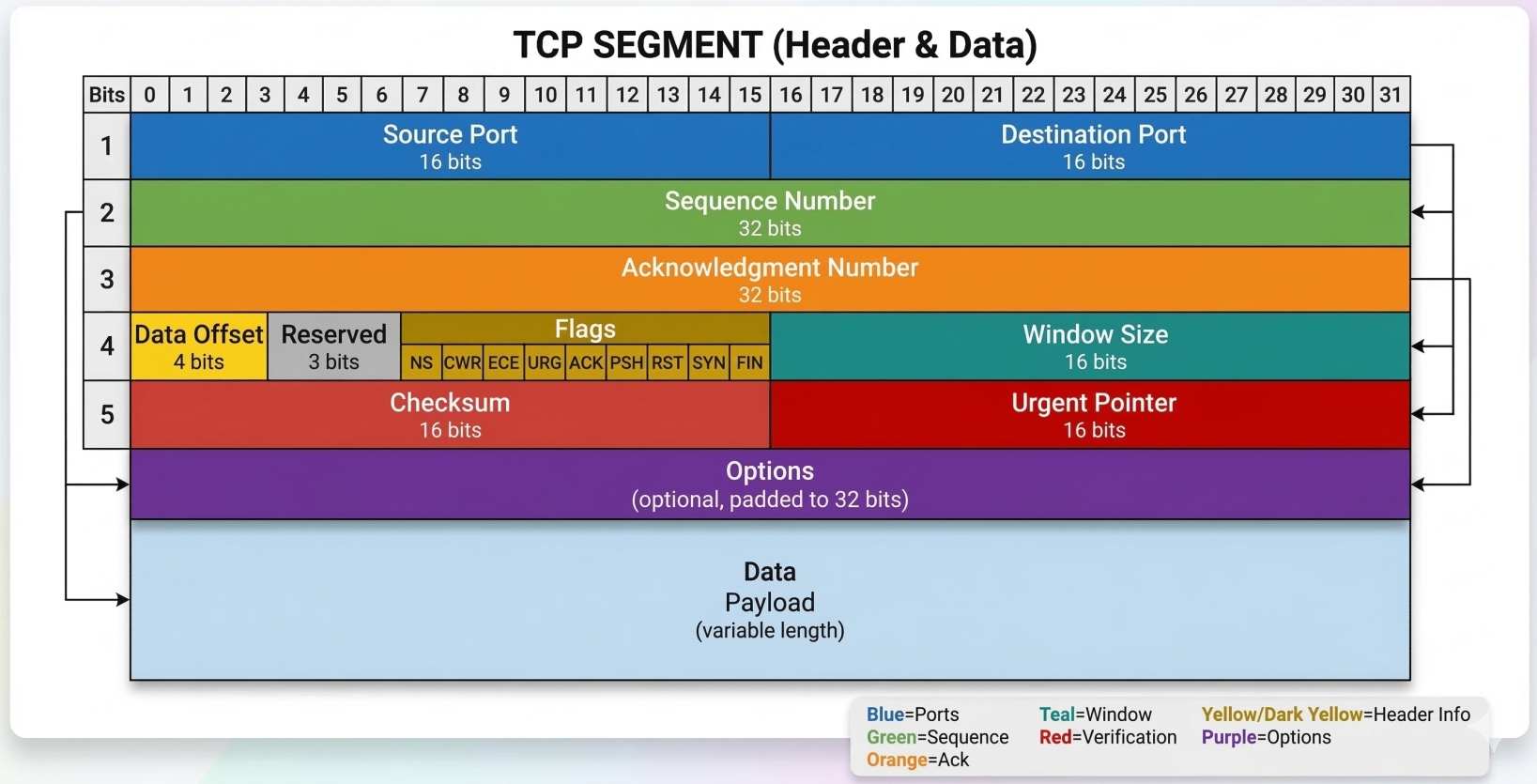
A TCP segment has a mandatory header followed by the data payload. The header contains 10 mandatory fields:
| Field | Size | Purpose |
|---|---|---|
| Source Port | 16 bits | Sending application’s port |
| Destination Port | 16 bits | Receiving application’s port |
| Sequence Number | 32 bits | Byte offset in the data stream - used for ordering |
| Acknowledgment Number | 32 bits | Next expected byte from the other side |
| Header Length (Data Offset) | 4 bits | Header size in 32-bit words (tells OS where data starts) |
| Control Flags | 6-8 bits | URG, ACK, PSH, RST, SYN, FIN (+ ECE, CWR for ECN) |
| Window Size | 16 bits | How many bytes the receiver can accept before needing an ACK (flow control) |
| Checksum | 16 bits | Integrity check over header + data + IP pseudoheader |
| Urgent Pointer | 16 bits | Only relevant when URG flag is set. Rarely used in practice. |
| Options | 0-40 bytes | Extensions: MSS, Window Scaling, SACK, Timestamps |
Key TCP Options:
- MSS (Maximum Segment Size) - negotiated at connection setup; the largest chunk of data TCP will send in one segment
- Window Scaling - allows the 16-bit window field to be multiplied (necessary for high-bandwidth long-distance links)
- SACK (Selective Acknowledgement) - receiver tells sender exactly which out-of-order segments were received, avoiding retransmitting already-delivered data
- Timestamps - used for RTT measurement and PAWS (Protection Against Wrapped Sequence numbers)
TCP Control Flags
Section titled “TCP Control Flags”Six flags you’ll see constantly:
| Flag | What it does |
|---|---|
| SYN | Initiates a connection. Synchronizes sequence numbers. |
| ACK | Acknowledges received data. Set on almost every segment after the first SYN. |
| FIN | Begins graceful connection teardown. “I’m done sending.” |
| RST | Abruptly terminates a connection. No graceful close. |
| PSH | Tell the receiver: flush this to the application now, don’t buffer. |
| URG | Urgent data present (pointer field valid). Almost never used in practice. |
The Three-Way Handshake
Section titled “The Three-Way Handshake”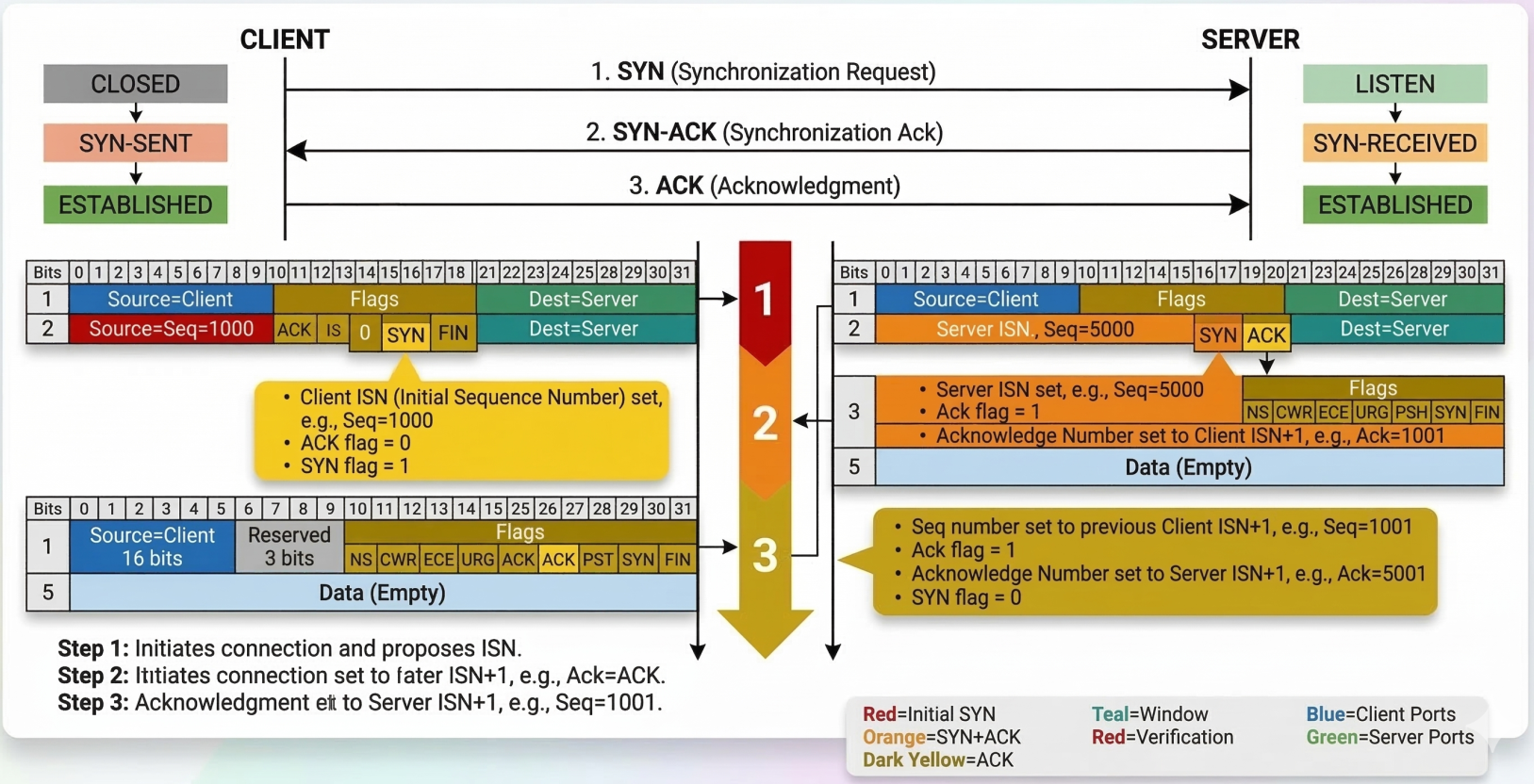
TCP requires a handshake before any application data flows. The goal: both sides synchronize sequence numbers and confirm they can reach each other.
Client Server | | |------ SYN (seq=1000) -------->| Client picks ISN (Initial Sequence Number) | | |<-- SYN-ACK (seq=5000, | Server picks its own ISN, ACKs client's SYN | ack=1001) --------| | | |------ ACK (ack=5001) -------->| Client ACKs server's SYN | | |====== Data flows now =========|After the handshake, the connection is full-duplex - both sides can send simultaneously, and every segment gets an ACK.
Four-Way Teardown
Section titled “Four-Way Teardown”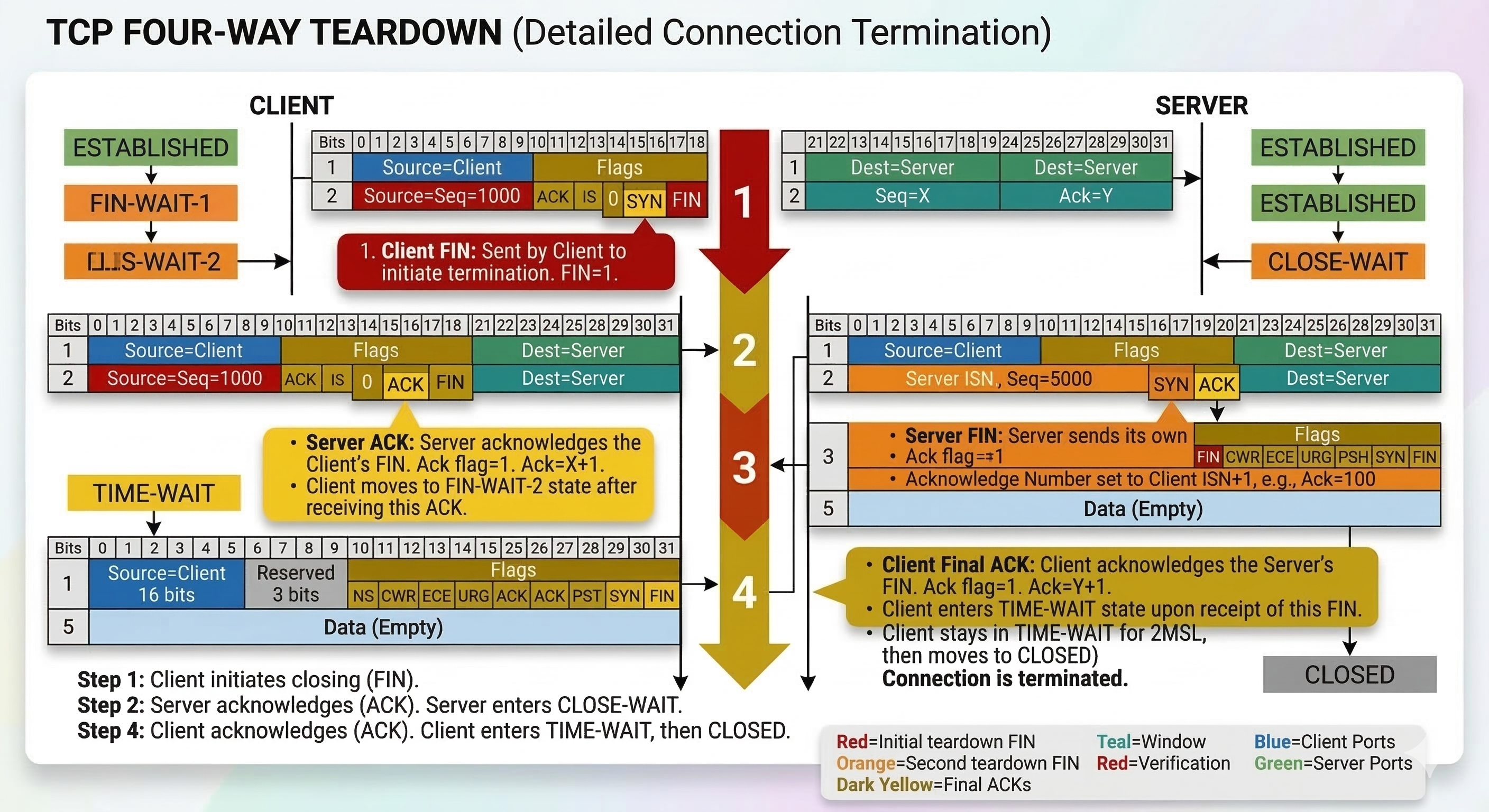
Closing is also graceful - each side independently signals it’s done sending:
Client Server | | |-------- FIN ----------------->| "I'm done sending" |<-------- ACK -----------------| "Got it" | | (Server may still send data here) |<-------- FIN -----------------| "I'm also done sending" |--------- ACK ---------------->| "Got it" | | |===== Connection closed =======|TCP Socket States
Section titled “TCP Socket States”A socket is an instantiated endpoint - a port that a program has actually opened and is listening on. You can send to any port, but only get a response if a socket is open there.
TCP connections move through a state machine:
Connection Establishment States
Section titled “Connection Establishment States”| State | Who | Meaning |
|---|---|---|
CLOSED | Both | No connection exists |
LISTEN | Server only | Waiting for incoming SYN |
SYN-SENT | Client only | Sent SYN, waiting for SYN-ACK |
SYN-RECEIVED | Server only | Got SYN, sent SYN-ACK, waiting for ACK |
ESTABLISHED | Both | Connection open, data flows |
Connection Termination States
Section titled “Connection Termination States”| State | Meaning |
|---|---|
FIN-WAIT-1 | Sent FIN, waiting for ACK |
FIN-WAIT-2 | Got ACK for our FIN, waiting for remote FIN |
CLOSE-WAIT | Received FIN, notified application to close |
LAST-ACK | Sent our FIN, waiting for final ACK |
TIME-WAIT | Both sides closed; lingering to catch any late packets (lasts 2x MSL) |
TCP vs UDP
Section titled “TCP vs UDP”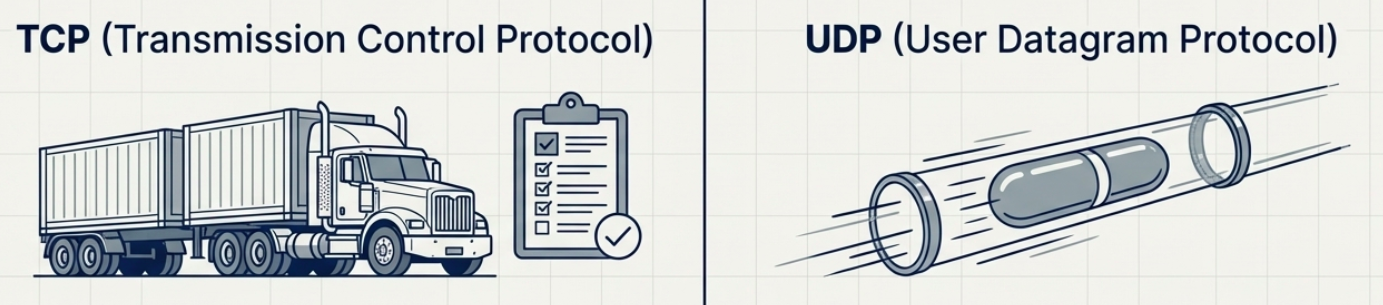
| Property | TCP | UDP |
|---|---|---|
| Connection | Yes (3-way handshake) | No |
| Reliability | Guaranteed delivery + ordering | Best-effort |
| Overhead | Higher (headers, ACKs, retransmits) | Lower |
| Speed | Slower (wait for ACKs) | Faster |
| Flow control | Yes (window size) | No |
| Use cases | HTTP, SSH, FTP, databases | DNS, video streaming, VoIP, gaming |
Firewalls
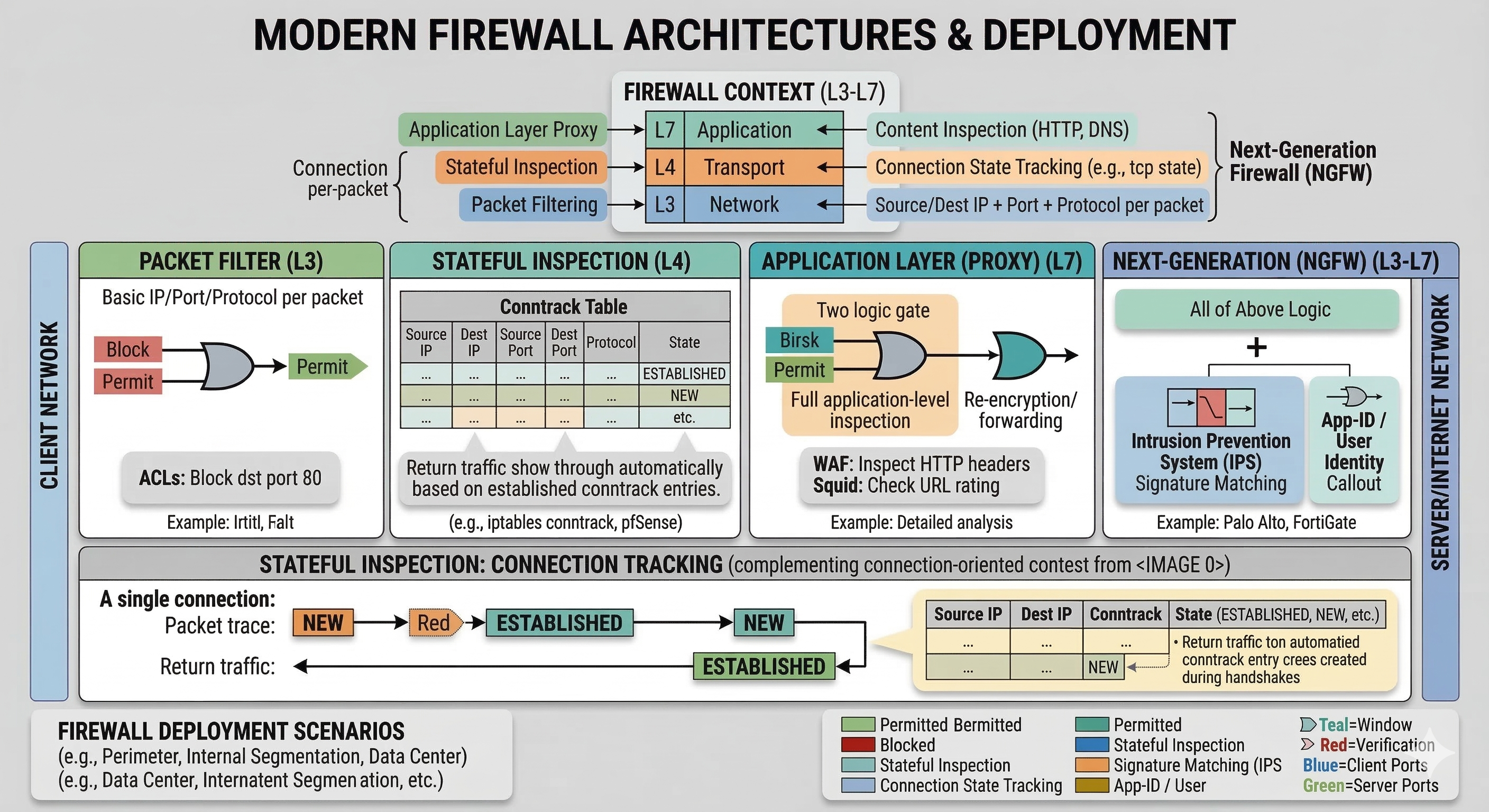
Section titled “Firewalls”A firewall blocks or permits network traffic based on rules. Most commonly deployed at the transport layer, making decisions based on ports and connection state.
Firewall Types
Section titled “Firewall Types”| Type | Works at | How it decides | Example |
|---|---|---|---|
| Packet filter | Network layer (L3) | Source/dest IP + port + protocol per-packet | Router ACLs |
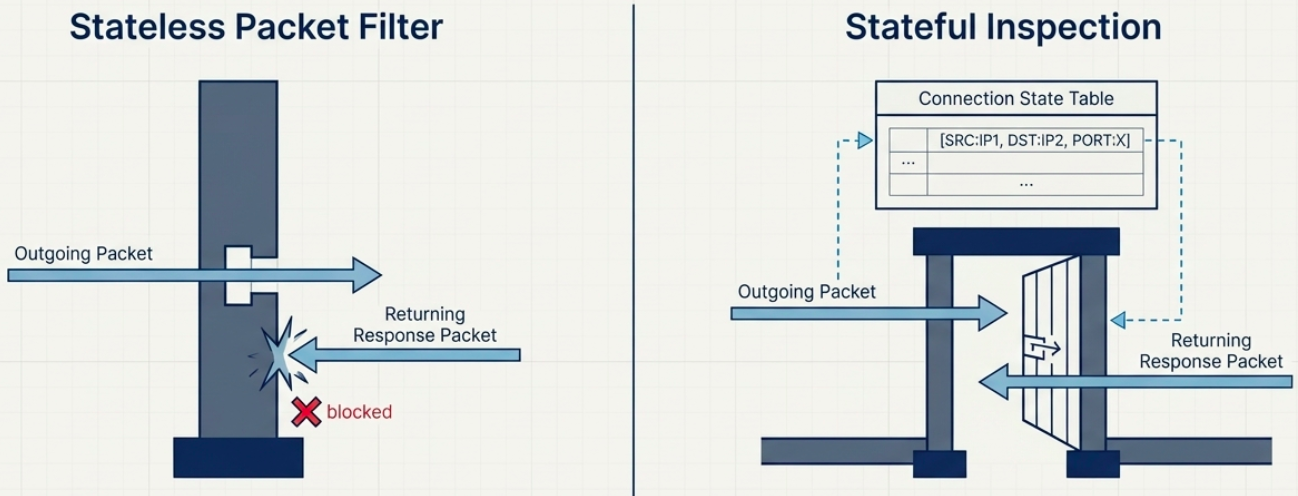
| Stateful inspection | Transport layer (L4) | Tracks connection state; allows return traffic automatically | iptables conntrack, pfSense |
| Application layer (proxy) | Application layer (L7) | Inspects content - HTTP headers, DNS payloads | WAF, squid proxy |
| Next-generation (NGFW) | L3-L7 | All of above + IPS, app identification, user identity | Palo Alto, FortiGate |
Common Linux firewall tools:
# iptables - classic stateful firewall (older but ubiquitous)# Allow established/related return trafficsudo iptables -A INPUT -m state --state ESTABLISHED,RELATED -j ACCEPT
# Allow SSH inboundsudo iptables -A INPUT -p tcp --dport 22 -j ACCEPT
# nftables - modern replacement for iptables# List all rulessudo nft list ruleset
# ufw - user-friendly frontend for iptables (Ubuntu/Debian)sudo ufw allow 22/tcpsudo ufw allow 443/tcpsudo ufw status verbose
# firewalld - zone-based firewall (RHEL/CentOS/Fedora)sudo firewall-cmd --list-allsudo firewall-cmd --add-service=https --permanentsudo firewall-cmd --reload
Firewalls also appear at other layers now: cloud security groups (AWS/GCP/Azure), Kubernetes NetworkPolicies, and container-level rules - same concept, different control plane.
The Application Layer
Section titled “The Application Layer”The application layer (Layer 5 in TCP/IP) is where actual applications exchange data. It sits on top of transport - it doesn’t care how the data got there, just whether it arrived.
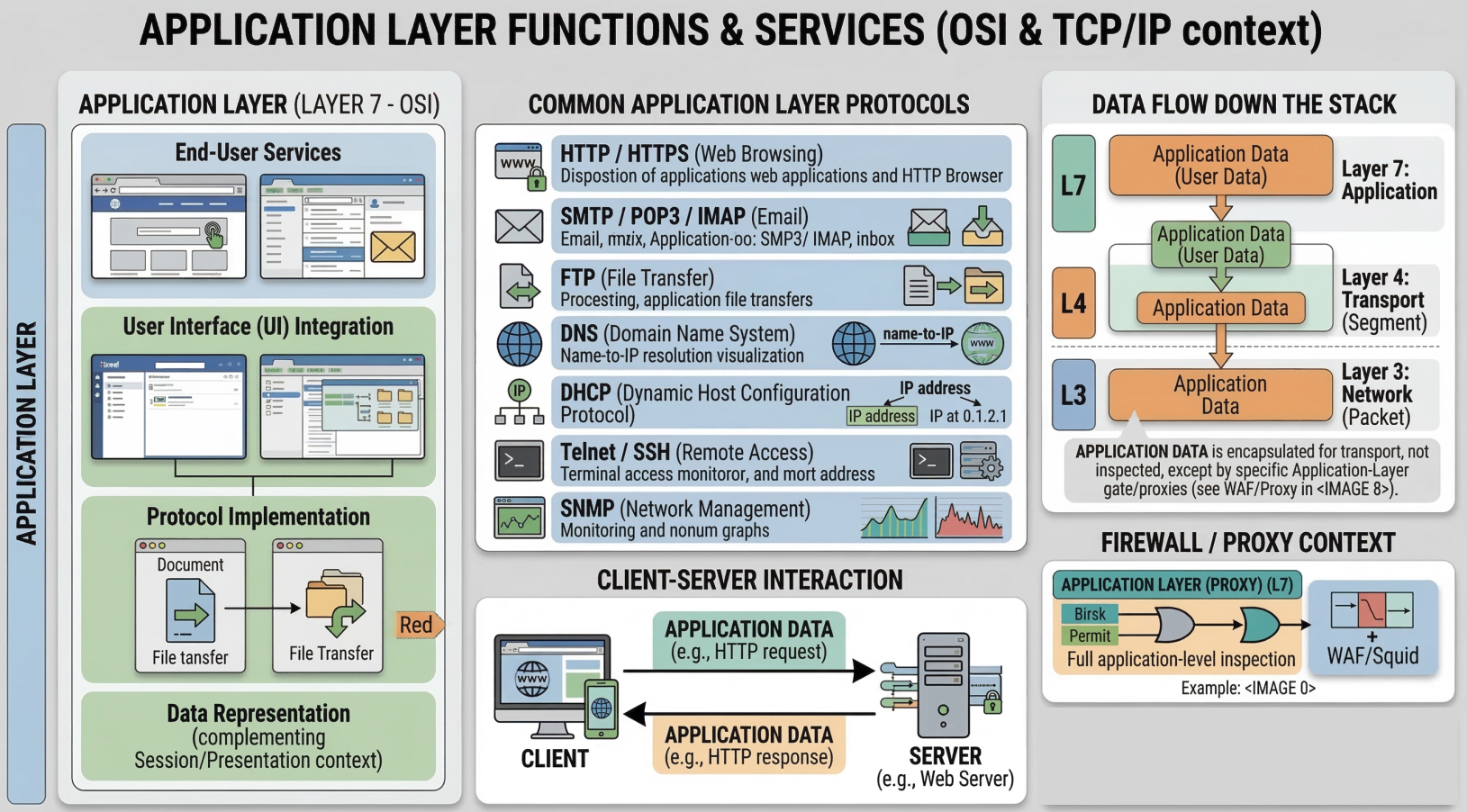
Key principle: interoperability through protocol standardization. Chrome and Firefox both speak HTTP. Apache and Nginx both speak HTTP. Any browser can talk to any web server because they all implement the same HTTP spec. The same logic applies to FTP clients, SMTP mail servers, SSH clients vs servers.
TCP segments carry the full application-layer payload in their data section.
Application Layer and the OSI Model
Section titled “Application Layer and the OSI Model”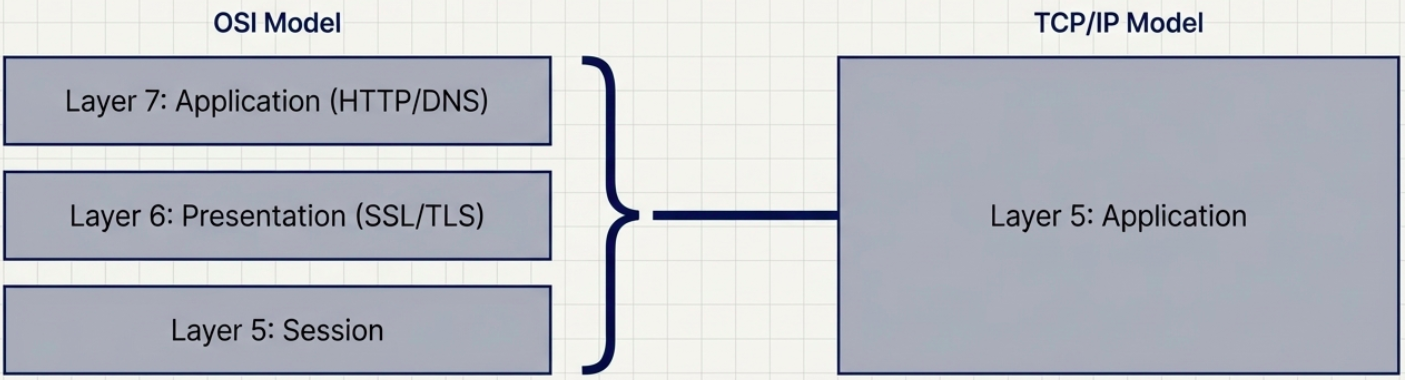
The TCP/IP model’s application layer (layer 5) maps to three layers in the 7-layer OSI model:
| OSI Layer | Name | What it does | TCP/IP equivalent |
|---|---|---|---|
| 7 | Application | User-facing protocols: HTTP, FTP, SMTP, DNS | Application layer |
| 6 | Presentation | Encryption, encoding, compression (SSL/TLS lives here conceptually) | Application layer |
| 5 | Session | Managing sessions, checkpoints, reconnects | Application layer / TCP |
Troubleshooting Transport Layer Issues
Section titled “Troubleshooting Transport Layer Issues”# Test TCP connectivity to a specific port (the "is this port open?" check)nc -zv example.com 443 # Linux/Mac - verbose, zero i/o mode# -z = scan only, don't send data# -v = verbose output# Exit code 0 = success, non-zero = failed
# Windows equivalentTest-NetConnection -ComputerName example.com -Port 443
# Quick port scan of common ports on a host (use only on hosts you own)nc -zv 192.168.1.1 20-25 80 443 8080
# Test UDP connectivity (harder - nc sends a probe, may or may not get response)nc -zuv 8.8.8.8 53
# Trace a TCP connection - see where it dropstraceroute -T -p 443 example.com # TCP traceroute (bypasses ICMP blocks)sudo tcptraceroute example.com 443 # alternative tool
# Watch live TCP connectionswatch -n1 'ss -tan | grep ESTABLISHED'