
Package Management
Why Package Management?
Section titled “Why Package Management?”Package managers solve the problem of software distribution and dependency tracking at scale:
| Without a package manager | With a package manager |
|---|---|
| Manually download tarballs; build from source | apt install nginx - done |
| Manually track and update each dependency | Dependencies resolved automatically |
| No record of what’s installed or why | Full audit: who installed what, when |
| Remove software by deleting files (hoping you get them all) | apt remove removes exactly the right files |
| No integrity verification | Checksums and GPG signatures verified on every install |
Package Types
Section titled “Package Types”| Type | Description |
|---|---|
| Binary | Pre-compiled; architecture-specific (amd64, arm64). Ready to run; most common. |
| Source | Code + build instructions; architecture-independent. Reproducible builds. |
| Architecture-independent | Scripts, docs, configs; no compiled code. Runs on any arch. |
| Meta-package | No files itself; just dependency declarations. Installs a whole ecosystem (e.g., ubuntu-desktop). |
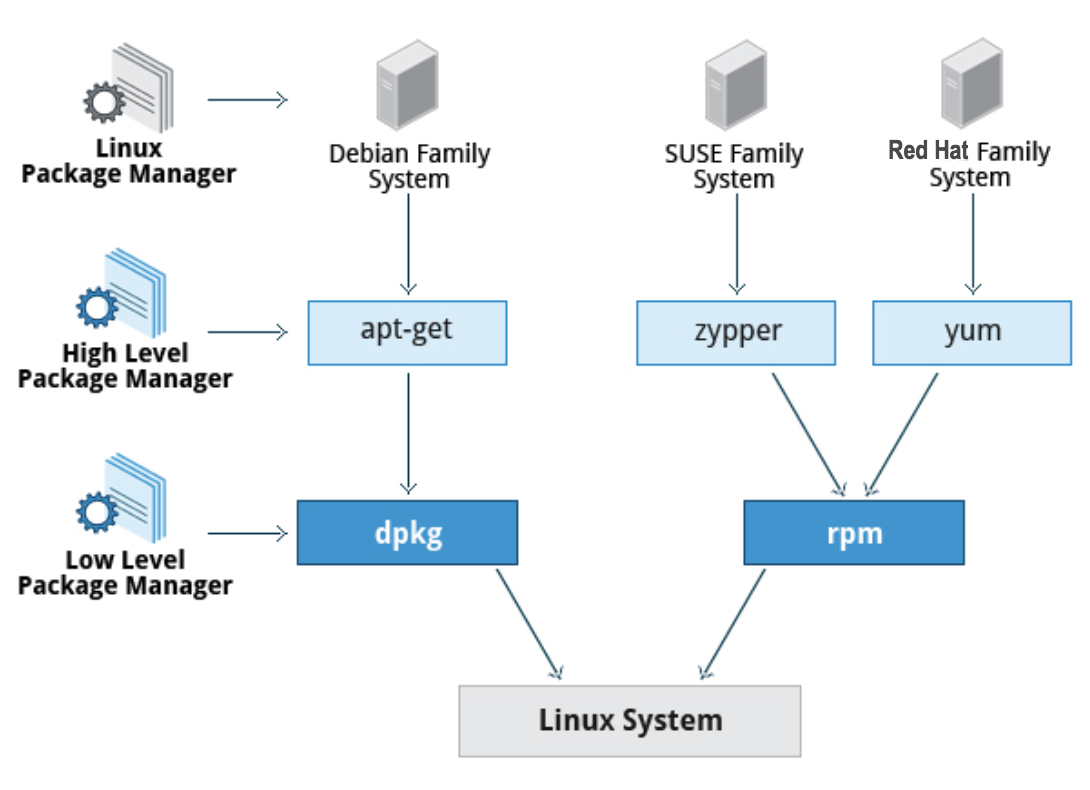
The Two Package Families
Section titled “The Two Package Families”| Debian family | RPM family | |
|---|---|---|
| Distros | Debian, Ubuntu, Mint, Raspberry Pi OS | RHEL, CentOS, Fedora, SUSE, Rocky, AlmaLinux |
| Low-level tool | dpkg | rpm |
| High-level tool | apt (also apt-get, apt-cache) | dnf (also yum on older systems) |
| Package format | .deb | .rpm |
| Package DB location | /var/lib/dpkg/ | /var/lib/rpm/ |
| Repo config | /etc/apt/sources.list, /etc/apt/sources.list.d/ | /etc/yum.repos.d/*.repo |
Debian Family: dpkg and apt
Section titled “Debian Family: dpkg and apt”Package File Naming
Section titled “Package File Naming”<name>_<version>-<revision>_<architecture>.deblogrotate_3.14.0-4_amd64.debNote: 64-bit x86 is called amd64 in Debian/Ubuntu (not x86_64).
dpkg - Low-level Debian Package Manager
Section titled “dpkg - Low-level Debian Package Manager”dpkg installs, removes, and queries .deb files directly. It does not resolve dependencies.
# Install a .deb filesudo dpkg -i package.deb
# Remove package (keep config files)sudo dpkg -r package
# Purge package (remove config files too)sudo dpkg -P package
# List all installed packagesdpkg -l
# Check if a specific package is installed and get versiondpkg -s wget
# List files installed by a packagedpkg -L wget
# Show which package owns a filedpkg -S /usr/bin/wget
# Inspect a .deb file without installingdpkg -I package.deb          # package info/metadatadpkg -c package.deb          # list contents
# Verify integrity of installed packagesdpkg -Vdpkg -V package              # verify one package
apt - High-level Debian Package Manager
Section titled “apt - High-level Debian Package Manager”apt wraps dpkg with dependency resolution, repository management, and network downloads.
# Update the local package index (before install/upgrade)sudo apt update
# Install a package (and its dependencies)sudo apt install nginx
# Install a specific versionsudo apt install nginx=1.18.0-0ubuntu1
# Remove (keep config files)sudo apt remove nginx
# Purge (remove + config files)sudo apt purge nginx# or:sudo apt remove --purge nginx
# Upgrade all installed packagessudo apt upgrade
# Upgrade + remove obsolete packages and add new dependenciessudo apt full-upgrade        # safe, interactivesudo apt dist-upgrade        # same thing
# Remove auto-installed packages no longer neededsudo apt autoremove
# Clean downloaded package cachesudo apt clean               # remove all cached .deb filessudo apt autoclean           # remove only outdated cached files
# Search for a packageapt search keywordapt-cache search keyword
# Show package informationapt show nginxapt-cache show nginxapt-cache showpkg nginx      # detailed with reverse deps
# List all versions availableapt-cache madison nginx
# Find which package provides a specific file/commandapt-file search /usr/bin/wget   # requires: sudo apt install apt-file; apt-file update
# List direct dependencies of a packageapt-cache depends nginx
RPM Family: rpm and dnf
Section titled “RPM Family: rpm and dnf”Package File Naming
Section titled “Package File Naming”Binary:
<name>-<version>-<release>.<distro>.<arch>.rpmsed-4.5-2.el8.x86_64.rpmSource: same format but ends in .src.rpm
rpm - Low-level RPM Package Manager
Section titled “rpm - Low-level RPM Package Manager”# Install a package file (verbose + progress bars)sudo rpm -ivh package.rpm
# Upgrade (install if not present, upgrade if present)sudo rpm -Uvh package.rpm
# Uninstall (erase) a packagesudo rpm -e package-name # note: package NAME, not filename
# Test uninstall without doing itsudo rpm --test -e package-name
# Freshen: upgrade only already-installed packagessudo rpm -Fvh *.rpmRPM Queries (-q)
Section titled “RPM Queries (-q)”All query options start with -q:
| Query | Command |
|---|---|
| Is this package installed? What version? | rpm -q bash |
| Which package owns this file? | rpm -qf /bin/bash |
| What files did this package install? | rpm -ql bash |
| Package info (description, size, etc.) | rpm -qi bash |
| Query against a .rpm file (not the DB) | rpm -qip package.rpm |
| List ALL installed packages | rpm -qa |
| What does this package require? | rpm -q --requires bash |
| What package provides this library? | rpm -q --whatprovides libc.so.6 |
RPM Verification
Section titled “RPM Verification”rpm -V package # verify one packagerpm -Va # verify all packages
# Output key: each character is a field that differs from the installed DB# S=filesize, M=mode (permissions), 5=MD5 checksum, D=device, L=readLink# U=user owner, G=group owner, T=mtime# Example: S.5....T. c /etc/logrotate.conf (size, md5, mtime differ; it's a config file)No output = everything OK.
Extracting Files from an RPM (Without Installing)
Section titled “Extracting Files from an RPM (Without Installing)”# Method 1: rpm2cpio (older, classic)rpm2cpio package.rpm | cpio --extract --make-directories -v
# Extract just one filerpm2cpio package.rpm | cpio -ivd ./usr/bin/bash
# Method 2: rpm2archive (newer)rpm2archive package.rpm # creates package.rpm.tgzcat package.rpm | rpm2archive - | tar -xvz # one-liner to extract
# List files in an .rpm before extractingrpm -qilp package.rpmdnf - High-level RPM Package Manager
Section titled “dnf - High-level RPM Package Manager”dnf replaced yum as the default on RHEL 8, Fedora. Most yum commands still work with dnf.
Repository Configuration
Section titled “Repository Configuration”# View configured repossudo dnf repolist
# Repo config files locationls /etc/yum.repos.d/
# Sample .repo file format# [repo-name]# name=My Repository# baseurl=https://example.com/rpms/# enabled=1# gpgcheck=1# gpgkey=https://example.com/RPM-GPG-KEYdnf Commands
Section titled “dnf Commands”# Update package indexsudo dnf check-update
# Installsudo dnf install nginxsudo dnf localinstall package.rpm # install from a local filesudo dnf groupinstall "Development Tools"
# Removesudo dnf remove nginx
# Updatesudo dnf update # update all packagessudo dnf update nginx # update one package
# Search and infodnf search keyworddnf info nginxdnf list installeddnf list availablednf list updates
# Dependency queriesdnf provides /usr/bin/wget # what package gives this file?dnf repoquery --requires nginx # what does nginx require?dnf repoquery --whatrequires nginx # what requires nginx?
# Groupsdnf grouplistdnf groupinfo "Development Tools"dnf groupinstall "Development Tools"
# History (can undo!)sudo dnf historysudo dnf history info 5 # details of transaction #5sudo dnf history undo 5 # undo transaction #5
# Maintenancesudo dnf autoremove # remove unused dependenciessudo dnf clean all # clean all cached datasudo dnf clean packages # remove only cached packages
# Download without installingsudo dnf install --downloadonly --downloaddir=/tmp nginxKernel Upgrades
Section titled “Kernel Upgrades”On Debian/Ubuntu
Section titled “On Debian/Ubuntu”# List available kernelsapt search linux-image
# Install a new kernel (apt does NOT remove the old one)sudo apt install linux-image-6.5.0-18-generic
# Old kernel stays; GRUB shows both; remove when confidentsudo apt remove linux-image-OLD-VERSIONsudo apt autoremove # also removes related headers/modulessudo update-grubOn RHEL/Fedora
Section titled “On RHEL/Fedora”# Use -i (install), NOT -U (upgrade) for kernels# -U would remove the old kernel; -i keeps it alongsidesudo rpm -ivh kernel-6.x.x-x.el9.x86_64.rpm# ORsudo dnf install kernel-6.x.x # dnf also keeps old kernel (by policy)
# Remove older kernelssudo dnf remove --oldinstallonly # keeps the newest N kernels (set in dnf.conf)Quick Reference: Common Tasks
Section titled “Quick Reference: Common Tasks”| Task | Debian/Ubuntu | RHEL/Fedora |
|---|---|---|
| Update repo index | apt update | dnf check-update |
| Install package | apt install PKG | dnf install PKG |
| Remove package | apt remove PKG | dnf remove PKG |
| Purge + config | apt purge PKG | dnf remove PKG (no config) |
| List installed | dpkg -l | rpm -qa |
| Search | apt search KW | dnf search KW |
| Package of file | dpkg -S /path/file | rpm -qf /path/file |
| Files in package | dpkg -L PKG | rpm -ql PKG |
| Package info | apt show PKG | dnf info PKG |
| Update all | apt upgrade | dnf update |
| Clean cache | apt clean | dnf clean all |
| Unneeded deps | apt autoremove | dnf autoremove |