
Pipeline Structures
A CI/CD pipeline is a series of steps that converts raw source code into a released artifact. But the shape of that pipeline - how stages connect, depend on each other, and scale - varies significantly based on the team’s needs, the repository structure, and the tooling in use.
Structural Design Patterns
Section titled “Structural Design Patterns”Structural CI/CD design patterns define how pipeline components are arranged, composed, and connected. Their goal is to remove inherent complexity while enabling the system to scale as the organization grows.
All structural pipeline designs fall into one of two overarching approaches:
| Approach | Description | Trade-off |
|---|---|---|
| Monolithic | All components of a project live in a single pipeline definition | Simple to reason about; becomes unmanageable as the project grows |
| Polylithic | Clear, enforced separation between different pipeline execution types or concerns | More initial design effort; dramatically easier to scale and maintain |
Regardless of the approach, structural patterns are built on three layers:
- Common components layer - The foundational reusable elements: shared templates, configured tools, repository structures, and metadata schemas. This layer defines the vocabulary the rest of the pipeline speaks.
- Pipeline layer - The fundamental structure of a project’s CI process: build, test, and deliver stages. This layer also defines how new projects or services can extend the base without duplicating it.
- Deployment layer - The specific techniques and patterns used to release software to target environments (rolling, blue-green, canary, etc.).
Pipeline Topology Patterns
Section titled “Pipeline Topology Patterns”The same logical pipeline (build → test → deploy) can be shaped in fundamentally different ways:
| Pattern | How it works | Best for |
|---|---|---|
| Basic (Linear) | Stages run sequentially, one after the other. Simple and predictable. | Small projects, single-service repos |
| Fan-Out / Parallel | Independent stages run simultaneously. Reduces total pipeline time. | Tests split by type, multi-platform builds |
| DAG (Directed Acyclic Graph) | Stages run based on declared job dependencies. Maximum flexibility. | Complex multi-stage pipelines with mixed dependencies |
| Merge Request Pipeline | Runs only on proposed changes (open PRs). Does not run on direct commits to main. | Feature branch validation, security gates on changes |
| Merged Results Pipeline | Simulates the result of merging the branch before running tests. Catches integration failures before they land. | Reducing broken main branch frequency |
| Merge Train | Queues multiple merge requests to run sequentially with accumulated changes. Each MR tests on top of the previous one. | High-velocity teams, preventing race conditions between concurrent PRs |
Monolithic vs Multi-Pipeline Design
Section titled “Monolithic vs Multi-Pipeline Design”How you structure pipelines per project is one of the highest-leverage design decisions you’ll make, because changing it at scale is extremely expensive.
Monolithic Pipeline
Section titled “Monolithic Pipeline”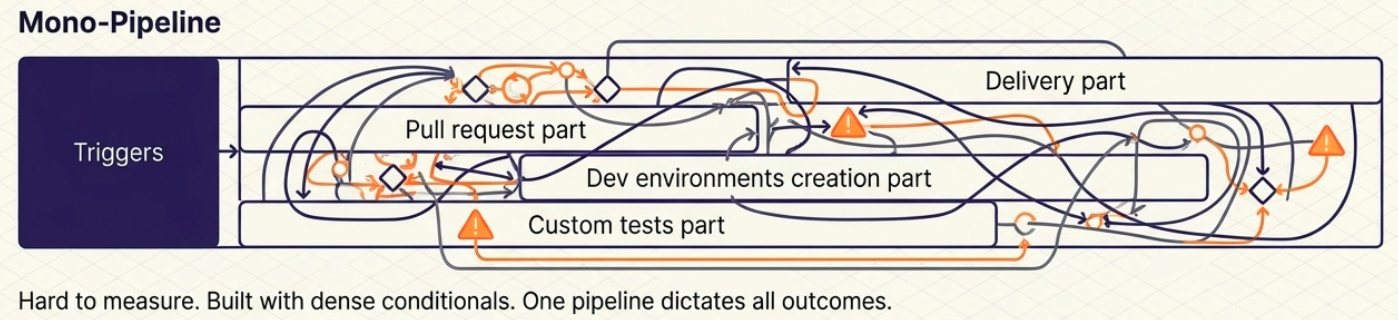
A single pipeline with heavy conditional logic that changes its execution path based on the trigger (e.g., a commit runs a different path than a pull request).
- ✅ Centralized - everything is in one place
- ❌ Highly complex internal logic; hard to test individual paths
- ❌ Failure in one path can mask or block another; metrics are hard to separate
Multi-Pipeline Pattern
Section titled “Multi-Pipeline Pattern”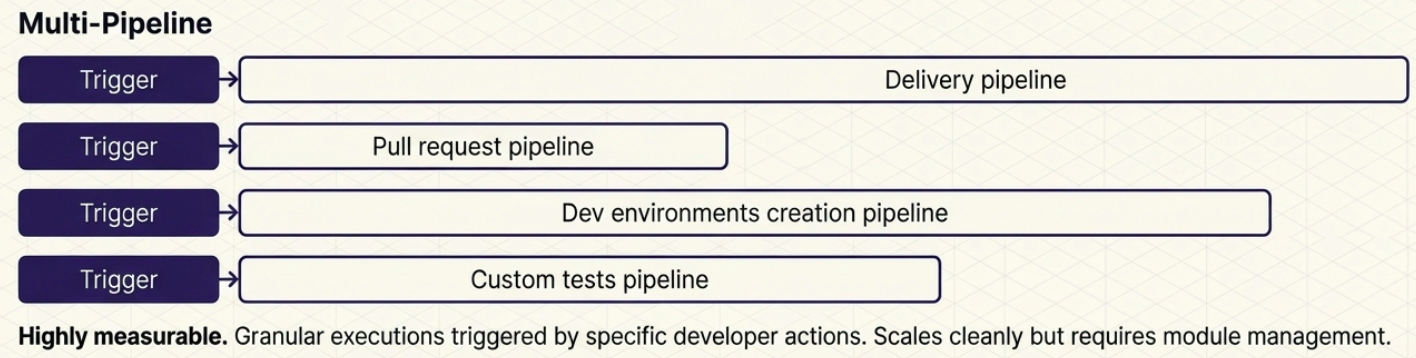
The project relies on multiple purpose-built pipelines, each triggered by a different action:
| Pipeline | Trigger | Purpose |
|---|---|---|
| Delivery pipeline | Merge to main | Core transmission belt - artifact build, quality gates, and environment deployment |
| Pull Request pipeline | PR opened / updated | Code validation, unit tests, coverage checks; blocks or allows the merge |
| Dev environment pipeline | Branch created / deleted | Automatically provisions a dedicated test environment when a branch is opened; tears it down on merge |
| Custom test pipeline | Scheduled or manual | Dedicated to long-running tests (E2E, performance, stability) that shouldn’t block the PR flow |
Scaling Pipelines: Vertical vs Horizontal
Section titled “Scaling Pipelines: Vertical vs Horizontal”As a project grows, pipelines must grow with it. There are two directions a pipeline can grow:
Vertical scaling - Adding new steps, decision points, or test types to an existing pipeline. Makes a single pipeline longer and more complex. Rarely requires changes to the dependency model.
Horizontal scaling - Adding entirely new pipelines instead of extending existing ones. Organizations scale horizontally for two reasons:
- New applications/services: Each new service needs its own delivery pipeline.
- New processes: A new class of concern (like security scanning or E2E testing) gets its own dedicated pipeline rather than being bolted onto an existing one.
Pipeline Dependency Principles
Section titled “Pipeline Dependency Principles”As pipelines multiply, temptation grows to chain them - triggering one pipeline immediately after another finishes. This should be approached carefully.
Two rules for healthy pipeline autonomy:
- Keep the pipeline autonomous. A pipeline should execute its complete logical function from start to finish, independently. If it deploys a microservice, it should handle that deployment end-to-end.
- Keep the process autonomous. Don’t split a single logical process across multiple pipelines (e.g., one pipeline to collect code, a second to build, a third to test). Each pipeline must own a complete, meaningful unit of work.
The CI/CD boundary is the one well-defined dependency that is acceptable: CI ends when an artifact is created and stored in the artifact repository. CD begins when that artifact is retrieved for further processing. This boundary can span tools (Jenkins for CI → Argo CD for CD) or be internal to a single platform.
Consequences of Complex Dependency Chains at Scale
Section titled “Consequences of Complex Dependency Chains at Scale”| Problem | What it looks like |
|---|---|
| Lost visibility | Adding one new workflow requires adding multiple new pipelines; the dependency graph becomes impossible to reason about |
| Monitoring fragmentation | Execution metrics are split across different tools; correlating a single delivery workflow across three pipelines requires manual reconciliation |
| Maintenance overhead | Renaming an artifact or changing a trigger breaks every downstream pipeline that depends on it |
Platform Compute Models
Section titled “Platform Compute Models”Choosing where the pipeline runs is as important as what it runs. There are three primary compute models:
| Model | What it means | Key trade-offs |
|---|---|---|
| SaaS | A dedicated platform managed entirely by a third-party provider (e.g., GitHub Actions hosted runners) | Minimal ops overhead; vendor pricing, concurrent run limits, and throttling must be deeply understood before scaling |
| Hybrid | The platform control plane is SaaS, but execution runners are hosted within the organization’s own infrastructure | Reduces data egress and security concerns; the organization still manages runner security, patching, and scaling |
| On-premises (Self-hosted) | Everything - control plane and runners - is hosted on the organization’s own infrastructure | Maximum control and flexibility; requires the highest investment in skills, infrastructure, and ongoing maintenance |
Modularity
Section titled “Modularity”Large pipeline definitions quickly become unmanageable if written as a single monolithic file. Modularity patterns keep pipelines maintainable as the organization grows.
Pipeline Code Modularity
Section titled “Pipeline Code Modularity”Manually coding every pipeline from scratch leads to code multiplication, inconsistent logic, and maintenance nightmares (updating one artifact path across 100 independent pipelines is a full-team incident).
| Pattern | How it works | Example |
|---|---|---|
| Reusable workflows / templates | Define a common job group once and reference it from any pipeline | GitHub Actions reusable workflows, GitLab CI include templates |
| Pipeline inheritance | A base pipeline defines shared stages; child pipelines extend or override specific stages without duplicating the rest | A base build-and-test template extended by each service’s delivery pipeline |
| Third-party components | Use pre-built modules from vendor marketplaces | GitHub Marketplace actions, GitLab catalog components |
Architectural Modularity
Section titled “Architectural Modularity”Modularity extends beyond pipeline code to the infrastructure and services the pipeline delivers:
- Infrastructure as Code (IaC): Infrastructure changes are delivered separately from application code. Dedicated tools (Terraform Cloud, Spacelift) manage the IaC pipeline independently, preventing infrastructure and application deployments from blocking each other.
- GitOps for microservices: Platform teams define Kubernetes configuration templates (load balancing, storage) once using GitOps tools (Argo CD, Flux), and development teams reference them across services without needing to understand the underlying infrastructure.
Orchestration Tools
Section titled “Orchestration Tools”| Tool | Type | Key Characteristic |
|---|---|---|
| Jenkins | Self-hosted | Open source. Extensive plugin ecosystem. Supports Groovy-based Jenkinsfile declarative and scripted syntax. |
| GitLab CI/CD | Integrated (GitLab) | Pipelines in .gitlab-ci.yml. Native DAG support, Merge Trains, Auto DevOps. |
| GitHub Actions | Integrated (GitHub) | Event-driven, huge marketplace. Reusable workflows for modularity. Ephemeral runners. |
| Azure DevOps | Cloud (Microsoft) | azure-pipelines.yml. Full lifecycle platform with deep Azure integration. |
| CircleCI | Cloud | YAML pipelines, ephemeral Docker runners, strong parallelism and caching. |
| Argo CD | Kubernetes-native (CD) | GitOps controller - continuously reconciles cluster state with Git. Used for the CD layer. |
| Tekton | Kubernetes-native | Pipelines as Kubernetes CRDs. Default CI/CD engine in Red Hat OpenShift. |
| Travis CI | Cloud | GitHub-integrated. Popular for open source. Simple .travis.yml. |
| Bamboo | Self-hosted (Atlassian) | Bamboo Specs (YAML or Java). Deep Jira + Bitbucket integration. |
Logging and Monitoring
Section titled “Logging and Monitoring”Pipelines produce a continuous stream of logs, metrics, and events that need to be captured and acted on:
| Tool | Role |
|---|---|
| ELK Stack | Centralized log aggregation and search across pipeline runs |
| Prometheus + Grafana | Metrics collection and dashboarding - pipeline duration, failure rates, queue depth |
| Datadog | All-in-one observability - logs, metrics, traces, CI Visibility (pipeline analytics) |
| New Relic | Application and infrastructure monitoring with CI/CD integration |
Integrating pipeline observability closes the feedback loop: slow stages, flaky tests, and recurring failures become visible and measurable - which is the foundation of improving delivery performance with DORA Metrics.