
Troubleshooting and the Future of Networking
Troubleshooting Fundamentals
Section titled “Troubleshooting Fundamentals”Network issues can occur at any layer of the stack. Effective troubleshooting means systematically isolating which layer is broken:
| Layer | What to check | Tool |
|---|---|---|
| Physical (L1) | Cable connected? Link light on? | Visual inspection, cable tester |
| Data Link (L2) | MAC address resolving? Switch port up? | ip link, ethtool, ARP table |
| Network (L3) | Can you reach the IP? Route exists? | ping, traceroute, ip route |
| Transport (L4) | Is the port open? Connection established? | nc, ss, telnet, tcpdump |
| Application (L5) | Is the service responding correctly? | curl, dig, openssl s_client |
ICMP and the ping Command
Section titled “ICMP and the ping Command”ICMP (Internet Control Message Protocol) is the “error reporting” protocol of the network layer. When something goes wrong with IP packet delivery, routers send ICMP messages back to the source.
ICMP Packet Structure
Section titled “ICMP Packet Structure”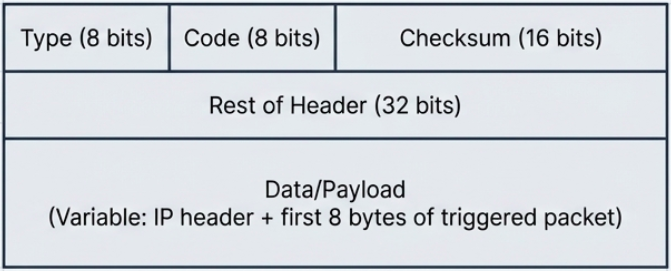
| Field | Size | Purpose |
|---|---|---|
| Type | 8 bits | What kind of ICMP message (see table below) |
| Code | 8 bits | Subtype within the message type |
| Checksum | 16 bits | Integrity check for the ICMP header + data |
| Rest of Header | 32 bits | Varies by type (e.g., sequence number for echo) |
| Data/Payload | Variable | Contains the IP header + first 8 bytes of the packet that triggered the error |
Common ICMP Types
Section titled “Common ICMP Types”| Type | Code | Meaning |
|---|---|---|
| 0 | 0 | Echo Reply (response to ping) |
| 3 | 0 | Destination network unreachable |
| 3 | 1 | Destination host unreachable |
| 3 | 3 | Destination port unreachable |
| 3 | 13 | Communication administratively prohibited (firewall) |
| 8 | 0 | Echo Request (outgoing ping) |
| 11 | 0 | TTL exceeded (used by traceroute) |
ping in Practice
Section titled “ping in Practice”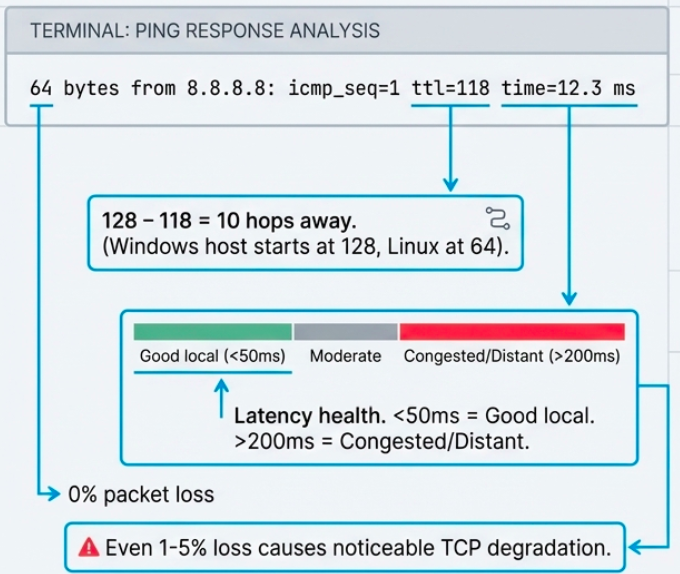
# Basic connectivity test (Linux - 4 packets)ping -c 4 8.8.8.8# PING 8.8.8.8 (8.8.8.8) 56(84) bytes of data.# 64 bytes from 8.8.8.8: icmp_seq=1 ttl=118 time=12.3 ms# 64 bytes from 8.8.8.8: icmp_seq=2 ttl=118 time=11.8 ms# --- 8.8.8.8 ping statistics ---# 4 packets transmitted, 4 received, 0% packet loss, time 3004ms# rtt min/avg/max/mdev = 11.8/12.1/12.3/0.2 ms
# Ping a hostname (tests DNS + connectivity)ping -c 4 google.com
# Continuous ping (stop with Ctrl+C)ping google.com
# Ping with specific packet size (test MTU)ping -c 4 -s 1472 -M do 192.168.1.1# -s 1472 = payload size (1472 + 28 overhead = 1500 MTU)# -M do = don't fragment flag# If "Frag needed" appears, MTU is smaller than expected
# Windows equivalentping -n 4 8.8.8.8ping -t 8.8.8.8 # continuous (Ctrl+C to stop)Traceroute
Section titled “Traceroute”Traceroute maps the path packets take from you to a destination by exploiting TTL behavior. It sends packets with incrementally increasing TTLs (1, 2, 3…), causing each router along the path to send back an ICMP “Time Exceeded” message.
# Linux/Mac - uses UDP probes by defaulttraceroute google.com#  1  gateway (192.168.1.1)  1.234 ms  0.987 ms  1.123 ms#  2  isp-router (10.0.0.1)  5.678 ms  4.321 ms  5.123 ms#  3  * * *                                                     # no response (firewall)#  4  72.14.236.208  12.345 ms  11.234 ms  12.678 ms#  5  google-dns (8.8.8.8)  13.456 ms  12.789 ms  13.234 ms
# TCP traceroute (bypasses ICMP-blocking firewalls)sudo traceroute -T -p 443 example.com
# mtr - combines ping + traceroute in real-time (best tool for diagnosing path issues)mtr google.com# Shows live updating statistics: loss%, sent, last RTT, avg, best, worst
# mtr as a single report (useful for sharing)mtr --report --report-cycles 10 google.com
# Windowstracert google.com # uses ICMP echo by defaultpathping google.com # longer-running trace with statistics per hopTesting Port Connectivity
Section titled “Testing Port Connectivity”When ping (L3) works but a service is unreachable, the issue is likely at the transport layer (L4). Test specific ports:
# netcat (nc) - the Swiss Army knife of networking# Test if a TCP port is open (Linux/Mac)nc -zv example.com 443# Connection to example.com (93.184.216.34) 443 port [tcp/https] succeeded!# -z = scan mode (don't send data)# -v = verbose
# Scan a range of portsnc -zv 192.168.1.1 20-25 80 443
# Test UDP port (harder - may not get a response even if open)nc -zuv 8.8.8.8 53
# Windows equivalentTest-NetConnection -ComputerName example.com -Port 443# ComputerName     : example.com# RemotePort       : 443# InterfaceAlias   : Ethernet# TcpTestSucceeded : True
# Quick multi-port check with bash loopfor port in 22 80 443 3306 5432 8080; do nc -zv myserver.com $port 2>&1 | grep -E "succeeded|refused"doneDNS Troubleshooting
Section titled “DNS Troubleshooting”dig - The Practitioner’s DNS Tool
Section titled “dig - The Practitioner’s DNS Tool”dig (Domain Information Groper) replaced nslookup as the go-to DNS debugging tool on Linux/Mac. It shows the full DNS response including answer section, authority section, and timing.
# Basic lookupdig example.com# ;; ANSWER SECTION:# example.com.    3600  IN  A  93.184.216.34# ;; Query time: 23 msec# ;; SERVER: 127.0.0.53#53(127.0.0.53)
# Short output (just the answer)dig +short example.com# 93.184.216.34
# Query specific record typesdig MX gmail.com           # mail serversdig NS example.com         # nameserversdig TXT example.com        # SPF, DKIM, verificationdig AAAA example.com       # IPv6 addressdig -x 8.8.8.8             # reverse lookup (IP -> name)
# Query a specific DNS serverdig @8.8.8.8 example.comdig @1.1.1.1 example.com
# Trace the full resolution path (root -> TLD -> authoritative)dig +trace example.com
# Check if DNS propagation is complete (compare servers)dig @8.8.8.8 example.com +shortdig @1.1.1.1 example.com +shortdig @ns1.example.com example.com +short
nslookup - Cross-Platform Alternative
Section titled “nslookup - Cross-Platform Alternative”# Basic lookupnslookup example.com
# Query a specific servernslookup example.com 8.8.8.8
# Interactive modenslookup> server 8.8.8.8 # switch DNS server> set type=MX # change record type> gmail.com # query> set debug # show full response packets> exit
# Specific record type (non-interactive)nslookup -type=MX gmail.comnslookup -type=NS example.comDNS Registration
Section titled “DNS Registration”- ICANN sits at the top of the DNS hierarchy, managing the root zone
- Registrars (GoDaddy, Namecheap, Cloudflare, etc.) sell domain names under agreements with ICANN
- Domain transfers between registrars require verification through a special TXT or authorization code
- Domains have expiration dates - if you forget to renew, the domain can be purchased by anyone (domain squatting)
The Hosts File
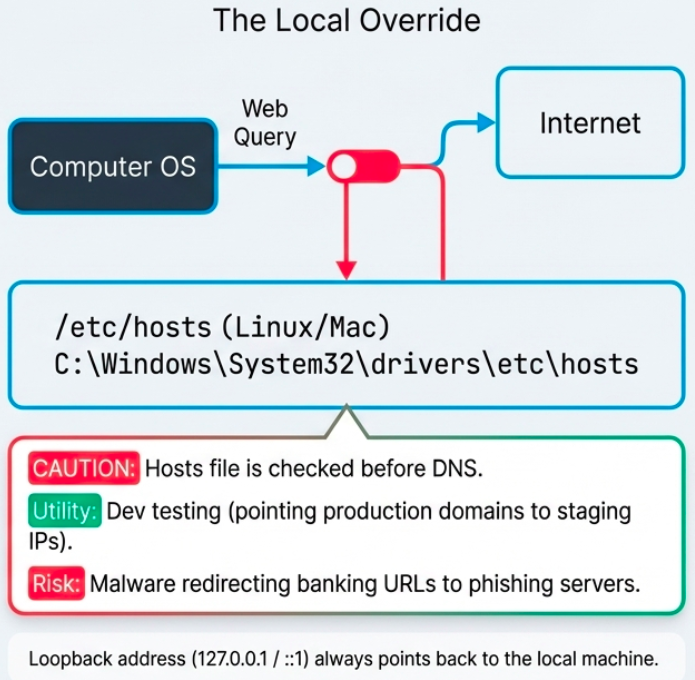
Section titled “The Hosts File”Before DNS existed, all name-to-IP mappings lived in a single flat file - the hosts file. It still exists on every OS:
| OS | Path |
|---|---|
| Linux / Mac | /etc/hosts |
| Windows | C:\Windows\System32\drivers\etc\hosts |
# Hosts file format (IP followed by hostname)127.0.0.1 localhost::1 localhost192.168.1.50 myserver.local10.0.0.5 staging.example.com # override DNS for testingThe loopback address (127.0.0.1 for IPv4, ::1 for IPv6) always points back to the local machine. Used for local development servers and testing without touching the network.
Cloud Computing Models
Section titled “Cloud Computing Models”Cloud computing delivers IT resources over the internet with pay-as-you-go pricing. The underlying technology is hardware virtualization - a hypervisor runs multiple virtual machines on shared physical hardware.
Cloud Deployment Models
Section titled “Cloud Deployment Models”| Model | Who owns it | Accessed by | Pros | Cons |
|---|---|---|---|---|
| Public | Third-party provider (AWS, GCP, Azure) | Anyone over internet | Scalable, cheap, no hardware maintenance | Shared infrastructure, less control |
| Private | Your organization | Internal only | Full control, security, compliance | Expensive, requires own staff |
| Hybrid | Mix of both | Depends on workload | Flexible, keep sensitive data private | Complex to manage |
Cloud Service Models
Section titled “Cloud Service Models”| Model | You manage | Provider manages | Example |
|---|---|---|---|
| IaaS (Infrastructure) | OS, apps, data | Hardware, networking, virtualization | AWS EC2, GCP Compute Engine |
| PaaS (Platform) | Apps, data | OS, runtime, hardware | Heroku, Google App Engine, Azure App Service |
| SaaS (Software) | Just use it | Everything | Gmail, Slack, Salesforce |
IPv6 - The Future of Addressing
Section titled “IPv6 - The Future of Addressing”Why IPv6?
Section titled “Why IPv6?”IPv4’s 32-bit address space provides ~4.2 billion addresses. They’re exhausted. IPv6 uses 128-bit addresses, providing 340 undecillion (3.4 x 10^38) addresses - enough for every atom on Earth to have multiple IPs.
IPv6 Address Format
Section titled “IPv6 Address Format”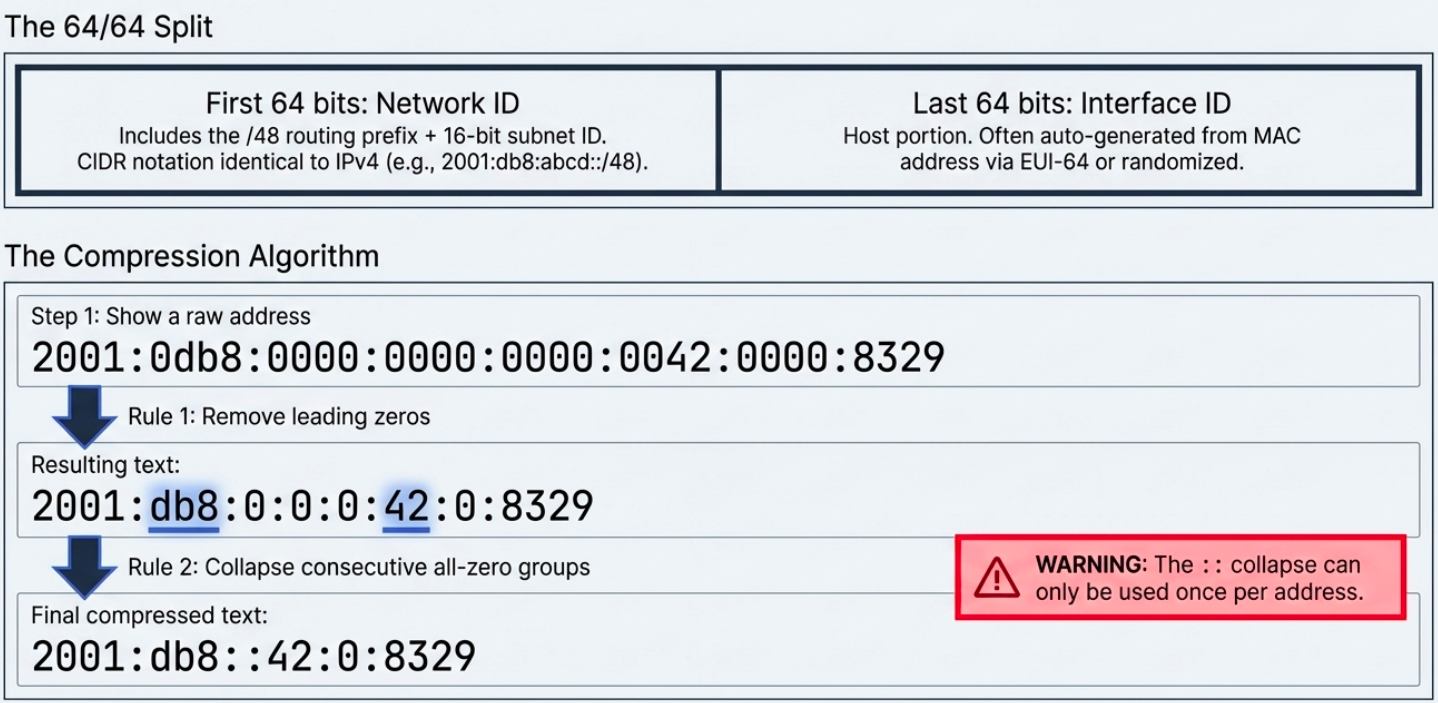
Full: 2001:0db8:0000:0000:0000:ff00:0042:8329Short: 2001:db8::ff00:42:8329Shortening rules:
- Remove leading zeros in each group:
0db8->db8,0042->42 - Replace one consecutive run of all-zero groups with
::(only once per address)
Reserved IPv6 Addresses
Section titled “Reserved IPv6 Addresses”| Prefix | Purpose |
|---|---|
::1/128 | Loopback (equivalent to 127.0.0.1) |
FE80::/10 | Link-local (auto-configured, not routable beyond the local segment) |
FF00::/8 | Multicast |
2001:db8::/32 | Documentation/examples (not routable) |
::ffff:0:0/96 | IPv4-mapped IPv6 addresses |
2000::/3 | Global unicast (routable public addresses) |
IPv6 Subnetting
Section titled “IPv6 Subnetting”IPv6 addresses are divided into two halves:
- First 64 bits = Network ID (includes the /48 routing prefix + 16-bit subnet ID)
- Last 64 bits = Interface ID (host portion, often auto-generated from MAC address via EUI-64 or random)
CIDR notation works the same as IPv4: 2001:db8:abcd::/48 means the first 48 bits are the network prefix.
IPv6 Header vs IPv4
Section titled “IPv6 Header vs IPv4”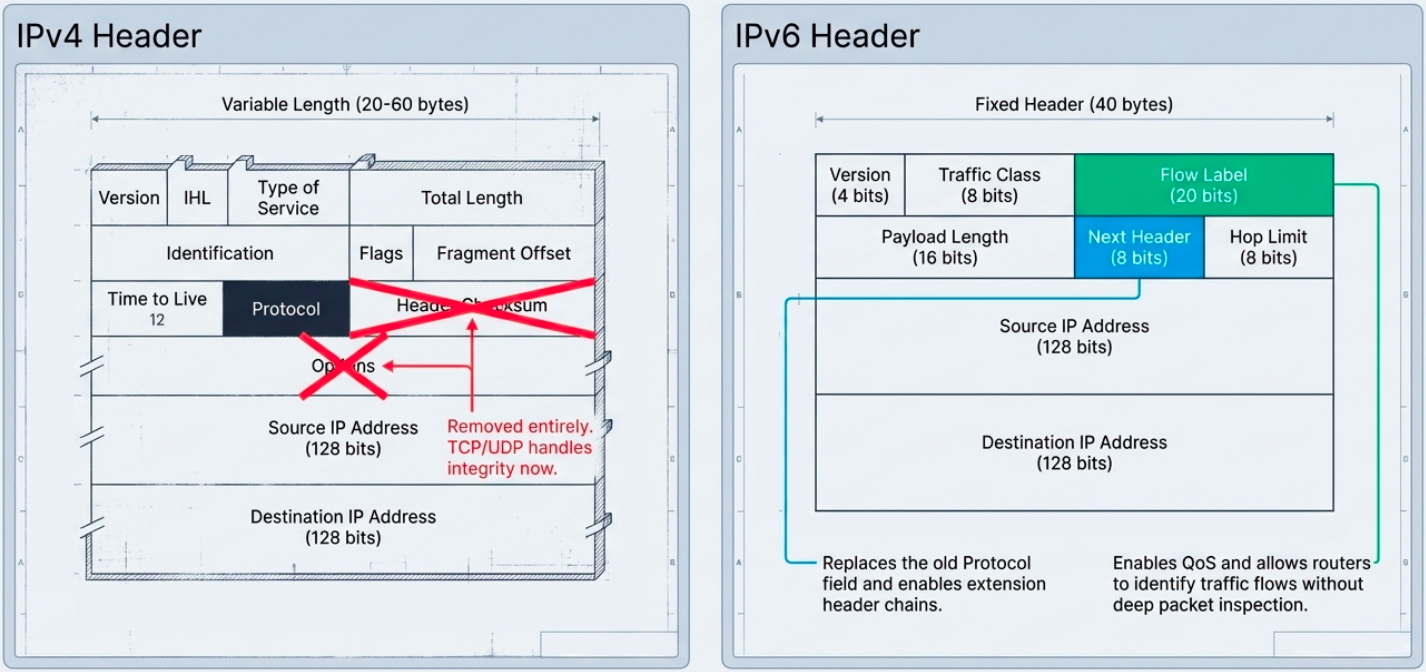
IPv6 simplified the header:
- Removed optional fields and the header checksum (let TCP/UDP handle integrity)
- Fixed header size (40 bytes) instead of variable-length IPv4 headers
- Next Header field replaces IPv4’s Protocol field, enabling a chain of extension headers
- Flow Label (20 bits) - new field for QoS, allowing routers to identify traffic flows without deep packet inspection
# Check your IPv6 addressesip -6 addr show
# Ping via IPv6ping6 google.com# orping -6 google.com
# Traceroute via IPv6traceroute6 google.com
# Check if a host has AAAA (IPv6) recordsdig AAAA google.com +short
# See IPv6 routesip -6 route show
IPv4 to IPv6 Transition
Section titled “IPv4 to IPv6 Transition”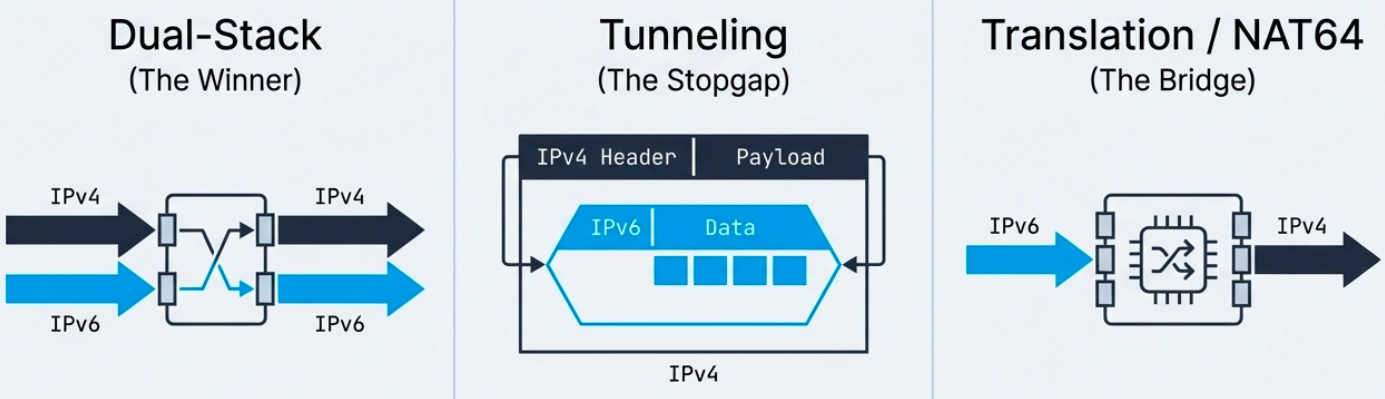
A global switch is impossible - billions of devices need time to migrate. Three approaches exist:
| Method | How it works | When to use |
|---|---|---|
| Dual-stack | Device runs both IPv4 and IPv6 simultaneously | Most common. Preferred approach. |
| Tunneling | IPv6 packets encapsulated inside IPv4 datagrams | When path between two IPv6 nodes crosses IPv4-only networks |
| Translation (NAT64) | Gateway translates between IPv4 and IPv6 headers | When IPv6-only clients need to reach IPv4-only servers |
Tunneling protocols:
| Protocol | How it works | Limitation |
|---|---|---|
| 6in4 (manual) | IPv6 encapsulated directly in IPv4. Simple, predictable performance. | Doesn’t work behind NAT |
| TSP | Negotiates tunnel setup parameters automatically | More complex |
| AYIYA | Encapsulates any protocol in any other. Works behind NAT. | Used primarily by tunnel brokers |
IPv4-mapped IPv6 addresses allow IPv4 traffic to traverse IPv6 networks. Format: ::ffff:192.168.1.1 - the last 32 bits represent the IPv4 address.