
IP Addressing & DNS
What is a Network?
Section titled “What is a Network?”A network is a group of computers and computing devices connected together through communication channels (cables, Wi-Fi, fiber). Networks allow devices to communicate, share resources, and exchange information. Most organizations have both an internal network and an Internet connection - the Internet itself is the largest network in the world, often called “the network of networks”.
IP Addresses
Section titled “IP Addresses”Every device attached to a network must have at least one unique IP (Internet Protocol) address - this is what enables routing packets to the right destination. IP addresses are assigned through RIRs (Regional Internet Registries) and come in two versions:
| IPv4 | IPv6 | |
|---|---|---|
| Size | 32 bits | 128 bits |
| Example | 192.168.1.10 | 2001:db8::1 |
| Total addresses | ~4.3 billion | ~3.4×10³⁸ |
| NAT needed? | Yes (address exhaustion) | No |
| Status | Still dominant | Growing adoption |
Why didn’t we run out of IPv4? - NAT (Network Address Translation) extended IPv4’s life by letting many private addresses share one public IP. Your home router does this: your devices get private 192.168.x.x addresses that are invisible outside your network. The router holds the single public IP from your ISP.
IPv4 Address Types
Section titled “IPv4 Address Types”- Unicast - delivered to a specific host (e.g.,
140.211.169.4) - Network - host portion set to all zeros; identifies the network itself (e.g.,
192.168.1.0) - Broadcast - host portion set to all ones; all members of the network listen (e.g.,
192.168.1.255) - Multicast - appropriately configured nodes subscribe to a group address (e.g.,
224.0.0.2)
Decoding IPv4 Addresses
Section titled “Decoding IPv4 Addresses”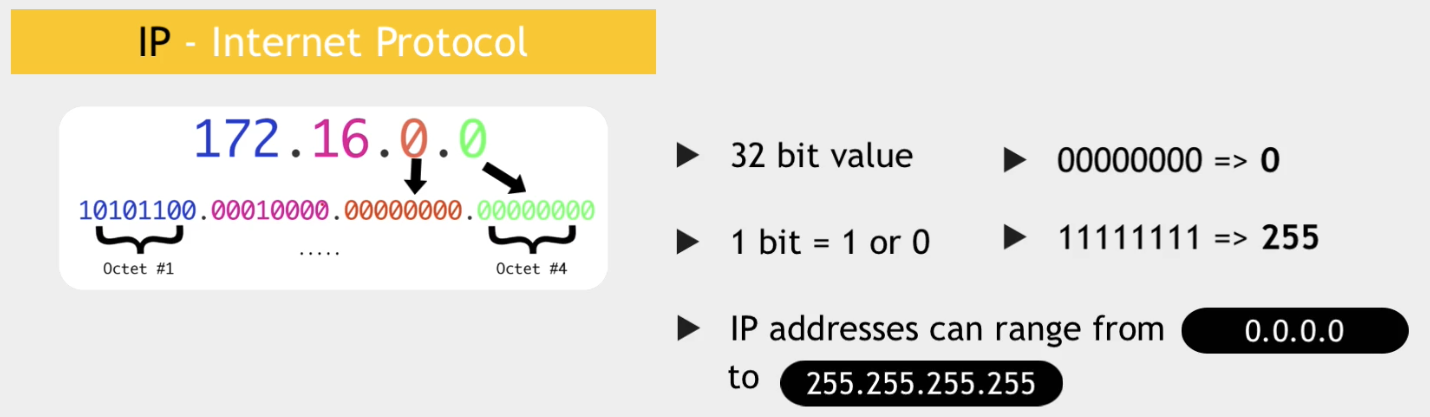
A 32-bit IPv4 address is divided into four 8-bit sections called octets (each ranging 0–255). The address has two parts: a Network ID (Net ID) and a Host ID.
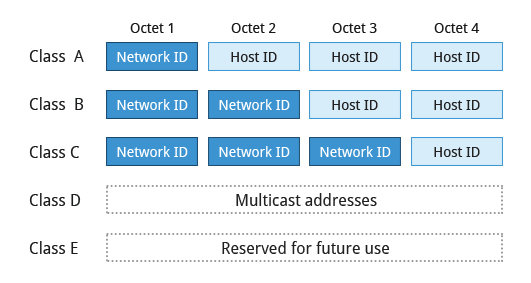
Historically, addresses were divided into classes based on the first few bits of the first octet:
| Network Class | First Octet Range | Netmask | Notes |
|---|---|---|---|
| A | 1–127 | 255.0.0.0 | 126 networks, ~16.7 million hosts each |
| B | 128–191 | 255.255.0.0 | 16,384 networks, 65,534 hosts each |
| C | 192–223 | 255.255.255.0 | ~2.1 million networks, 254 hosts each |
| D | 224–239 | - | Multicast |
| E | 240–254 | - | Reserved |
Class A, B, and C in Detail
Section titled “Class A, B, and C in Detail”Class A (eno1 example: 1.0.0.0–127.255.255.255):
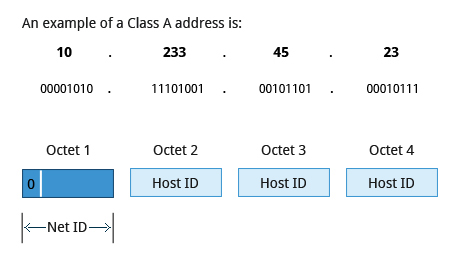
- First octet = Net ID; remaining three = Host ID
- First bit always 0 → 7 bits for network = 126 usable Class A networks
Class B (128.0.0.0–191.255.255.255):
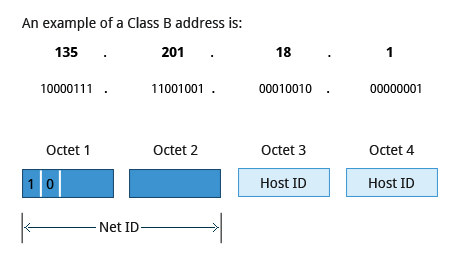
- First two octets = Net ID; last two = Host ID
- First two bits always
10→ 14 bits for network = 16,384 networks
Class C (192.0.0.0–223.255.255.255):
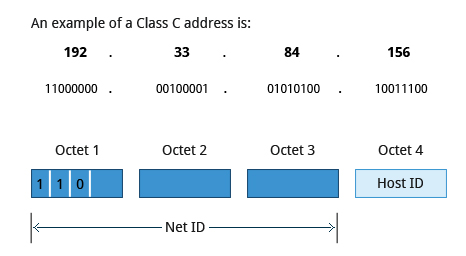
- First three octets = Net ID; last octet = Host ID
- Most common for small networks (254 hosts max)
Subnet Masks
Section titled “Subnet Masks”The netmask defines which bits belong to the network and which to the host. You can AND an IP with the netmask to extract the network address:
172.16.2.17 IP address& 255.255.0.0 netmask (Class B)───────────── 172.16.0.0 network address| Class | Decimal | Binary |
|---|---|---|
| A | 255.0.0.0 | 11111111 00000000 00000000 00000000 |
| B | 255.255.0.0 | 11111111 11111111 00000000 00000000 |
| C | 255.255.255.0 | 11111111 11111111 11111111 00000000 |
Modern CIDR Notation
Section titled “Modern CIDR Notation”Modern networking uses CIDR (Classless Inter-Domain Routing) - the /prefix notation - which is more flexible than classful addressing:
192.168.1.10/24└── Network: 192.168.1.0 (first 24 bits)└── Host: .10 (last 8 bits → 254 usable hosts)| CIDR | Subnet Mask | Usable Hosts |
|---|---|---|
/8 | 255.0.0.0 | ~16.7 million |
/16 | 255.255.0.0 | ~65,534 |
/24 | 255.255.255.0 | 254 |
/28 | 255.255.255.240 | 14 |
/30 | 255.255.255.252 | 2 (point-to-point links) |
Reserved / Private Address Ranges
Section titled “Reserved / Private Address Ranges”| Range | Purpose |
|---|---|
10.0.0.0/8 | Private (Class A space) |
172.16.0.0/12 | Private (Class B space) |
192.168.0.0/16 | Private (Class C space) - most common for home/office |
127.0.0.0/8 | Loopback - 127.0.0.1 is always “this machine” |
0.0.0.0 | Unspecified - used by DHCP before an address is assigned |
255.255.255.255 | Limited broadcast |
169.254.0.0/16 | Link-local (APIPA) - assigned when DHCP fails |
IPv6 Address Types
Section titled “IPv6 Address Types”- Link-local (
fe80::/10) - auto-configured on every interface; not routable outside the local link - Global unicast (
2000::/3) - publicly routable; the IPv6 equivalent of a public IPv4 address - Multicast (
ff00::/8) - one-to-many; replaces IPv4 broadcast - Anycast - assigned to multiple interfaces; packet routed to the nearest one
- IPv4-Mapped -
::FFFF:a.b.c.d/96- represents an IPv4 address in IPv6 space - Loopback -
::1(equivalent of127.0.0.1)
IPv4 Address Allocation
Section titled “IPv4 Address Allocation”- IP ranges are requested from ISPs or RIRs based on network size
- Static assignment: fixed, manually configured; required for servers
- Dynamic (DHCP): automatically assigned at boot; can change on reconnect
ip Command Reference
Section titled “ip Command Reference”ip is the modern replacement for the deprecated ifconfig, route, and arp.
# Interfacesip addr                          # show all interfaces and IPsip addr show eth0                # show specific interfaceip addr add 192.168.1.10/24 dev eth0   # add IP (temporary)ip addr del 192.168.1.10/24 dev eth0   # remove IP
ip link show                     # show interface stateip link set eth0 up              # bring interface upip link set eth0 down            # bring interface down
# Routingip route                         # show routing tableip route show default            # show default gatewayip route add default via 192.168.1.1 dev eth0    # set default route (temporary)ip route add 10.0.0.0/8 via 192.168.1.254        # add static route (temporary)ip route del 10.0.0.0/8                          # delete route
# ARP / Neighboursip neigh # show ARP tableip neigh flush dev eth0 # clear ARP entries for interfaceName Resolution
Section titled “Name Resolution”Name resolution converts numerical IPs to human-readable hostnames (e.g., 104.95.85.15 → whitehouse.gov). Resolution happens in order, controlled by /etc/nsswitch.conf:
/etc/hosts- local static entries (checked first)- DNS servers in
/etc/resolv.conf
/etc/hosts
Section titled “/etc/hosts”127.0.0.1 localhost192.168.1.10 db-server db01 # multiple aliases for same IP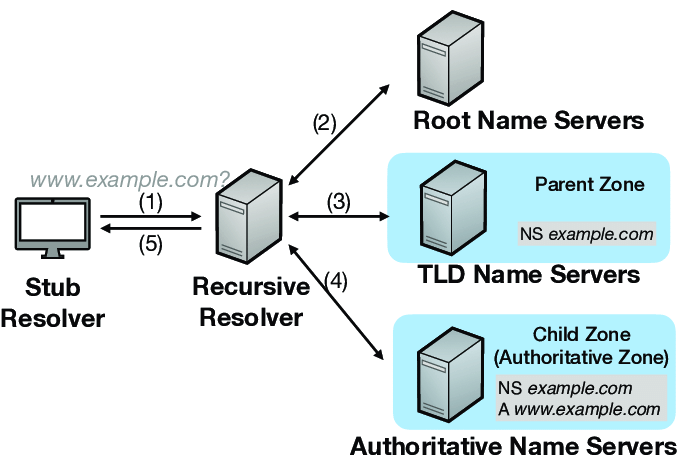
If /etc/hosts can’t resolve a name, the system queries a DNS (Domain Name Server). DNS is a distributed system - any single DNS server only knows its zone of authority, but they cooperate to resolve any name globally.
The machine’s DNS is configured in /etc/resolv.conf:
search example.com aps.org # appended to unqualified namesnameserver 192.168.1.1nameserver 8.8.8.8DNS Query Commands
Section titled “DNS Query Commands”dig example.com # full DNS lookup (most information)dig example.com A # explicit record type: A, AAAA, MX, TXT, CNAME, NSdig -x 1.1.1.1 # reverse lookup (IP → hostname)dig +short example.com # just the answer - great for scriptingdig +trace example.com # trace full resolution chain from root serversdig @8.8.8.8 example.com # query a specific DNS server
host example.com # simpler outputnslookup example.com # older; avoid with DNSSEC (can return wrong answers)Example dig output annotated:
dig linuxfoundation.org
;; QUESTION SECTION:;linuxfoundation.org.    IN    A              ← querying A (IPv4) record
;; ANSWER SECTION:linuxfoundation.org. 524 IN    A  3.13.31.214 ← TTL is 524 seconds
;; SERVER: 10.139.1.1#53                       ← which resolver was used;; Query time: 3 msec
Reverse lookup (IP → hostname) using +short:
dig -x 1.1.1.1 +shortone.one.one.one.Hostname Management
Section titled “Hostname Management”hostname # print current hostnamehostnamectl # full info: static, transient, pretty + OS detailssudo hostnamectl set-hostname myserver # set persistently (stored in /etc/hostname)sudo hostnamectl set-hostname "My Server" --prettyNetwork Troubleshooting - Quick Checklist
Section titled “Network Troubleshooting - Quick Checklist”Work outward from the local host:
| Step | Command | What it tells you |
|---|---|---|
| 1. Interface up? | ip addr show | IP assigned, state UP/DOWN |
| 2. Network driver loaded? | lsmod | grep <driver> | Kernel module present |
| 3. Reach gateway? | ping -c 3 $(ip route | awk '/default/{print $3}') | Local LAN reachable |
| 4. Reach public IP? | ping -c 3 8.8.8.8 | Routing works (bypasses DNS) |
| 5. DNS working? | dig +short google.com | Resolver reachable |
| 6. Trace the path | mtr 8.8.8.8 | Per-hop loss and latency |