
Filesystem Hierarchy
Filesystem Hierarchy Standard (FHS)
Section titled “Filesystem Hierarchy Standard (FHS)”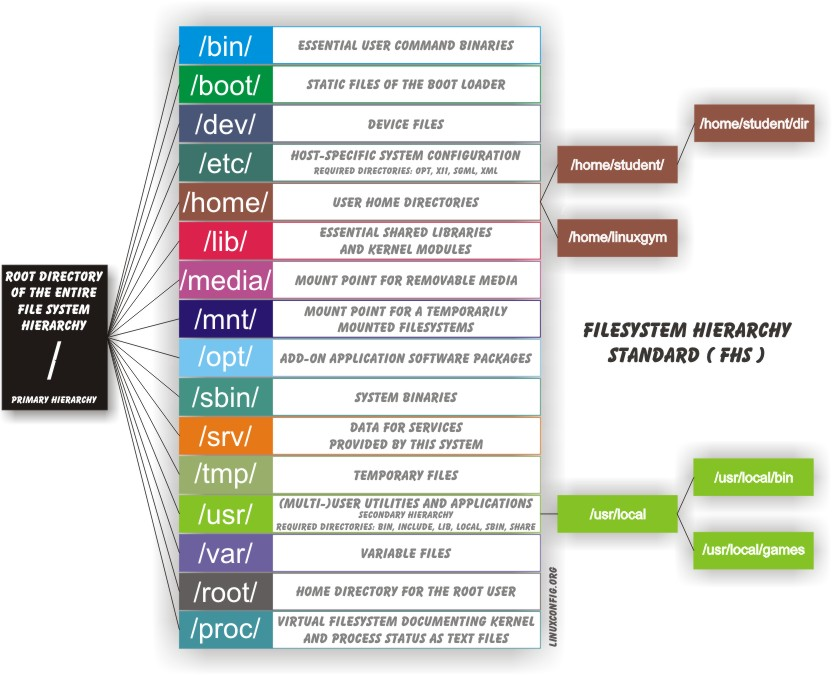
Linux systems store files according to the Filesystem Hierarchy Standard (FHS), maintained by the Linux Foundation. The standard ensures that users, administrators, and developers can move between distributions without re-learning how the system is organized.
Key differences from Windows:
- Uses
/(forward slash) as path separator, not\ - No drive letters - everything is part of a single unified tree
- Multiple drives and partitions are mounted as directories within that tree
- All filesystem names are case-sensitive:
/boot,/Boot, and/BOOTare three different directories - Removable media (USB, CD) appears at
/run/media/username/label(modern) or/media(older distros)
Directory Reference
Section titled “Directory Reference”| Directory | Purpose |
|---|---|
/ | Root of the entire filesystem tree |
/bin | Essential user binaries needed in single-user mode (cat, ls, mv, cp, rm, ps, kill, mount, sh) |
/sbin | Essential system administration binaries (fsck, ip, fdisk, iptables) |
/boot | Kernel (vmlinuz), initramfs, GRUB config, System.map |
/dev | Device nodes - interfaces to hardware and virtual devices |
/etc | System-wide configuration files only; no binaries |
/home | User home directories (/home/alice, /home/bob) |
/lib | Shared libraries for binaries in /bin and /sbin |
/lib64 | 64-bit libraries (on systems that run both 32- and 64-bit) |
/media | Auto-mount points for removable media (older distributions) |
/mnt | Temporary manual mount point (UNIX convention since the beginning) |
/opt | Optional self-contained application packages (keeps files isolated from system dirs) |
/proc | Virtual filesystem - live kernel data, process info, tunables |
/run | Runtime variable data (replaces /var/run); implemented as tmpfs |
/root | Home directory for the root user (not the same as /) |
/srv | Data served by the system (web, FTP); seldom used |
/sys | Virtual filesystem - hardware/device tree, kernel parameters (newer and stricter than /proc) |
/tmp | Temporary files; often cleared on reboot; sometimes a ramdisk |
/usr | Non-essential programs, libraries, headers, man pages; theoretically read-only |
/var | Variable-size data: logs, spool, caches, databases |
Deep Dives on Key Directories
Section titled “Deep Dives on Key Directories”/ - The Root Partition
Section titled “/ - The Root Partition”While the whole system is one tree, the root partition is special. It must contain everything needed to:
- Boot the system (kernel, initramfs, bootloader)
- Restore the system from external media (backup utilities, drivers)
- Recover a damaged system (diagnostic and repair tools)
Separate partitions (e.g., /home, /var, /opt) are mounted later in the boot process. The FHS prohibits applications from creating new top-level directories under /.
/bin and /sbin
Section titled “/bin and /sbin”/bin: commands needed by all users (cat,cp,ls,mv,ps,rm,date,echo,kill,ln,login,mount,umount,sed,sh,su,sync,uname)/sbin: commands for system administration (fsck,fdisk,mkfs,ip,iptables,reboot,shutdown)- Commands not needed at boot go in
/usr/binand/usr/sbin
/etc - Configuration
Section titled “/etc - Configuration”- Contains only text-based configuration files; no binaries
- Only root can modify files here; regular users cannot
- User-specific config always goes in the user’s
~/.configor home directory
Notable contents:
| File/Dir | Purpose |
|---|---|
/etc/passwd | User account database |
/etc/shadow | Hashed passwords |
/etc/group | Group definitions |
/etc/fstab | Filesystem mount table |
/etc/hosts | Static hostname-to-IP mappings |
/etc/resolv.conf | DNS server configuration |
/etc/skel/ | Template files copied to new user home dirs |
/etc/systemd/ | Systemd service and timer unit configurations |
/etc/crontab | System-wide cron jobs |
/proc - The Process Filesystem
Section titled “/proc - The Process Filesystem”/proc is a pseudo-filesystem - it has no presence on disk. It provides a file-interface to live kernel data structures. The information is generated on-demand when you read it.
# Key filescat /proc/cpuinfo             # CPU model, cores, flagscat /proc/meminfo             # memory breakdowncat /proc/mounts              # currently mounted filesystemscat /proc/version             # kernel versioncat /proc/partitions          # block devices and partitionscat /proc/interrupts          # IRQ assignments
# Per-process info (replace PID with actual number)ls /proc/1234/                # directory for process 1234cat /proc/1234/status         # name, state, memory, UIDscat /proc/1234/cmdline        # full command linels /proc/1234/fd/             # open file descriptorscat /proc/1234/maps           # memory map
# The current processls /proc/self/                # always points to the running process
# Kernel tunables (writable)cat /proc/sys/vm/swappinessecho 10 > /proc/sys/vm/swappiness    # change temporarily
/sys - The Device/Hardware Filesystem
Section titled “/sys - The Device/Hardware Filesystem”/sys (sysfs) is newer than /proc and adheres to stricter standards. It exposes the Unified Device Model - the kernel’s view of all hardware and drivers.
# Examplesls /sys/class/net/ # network interfacescat /sys/class/net/eth0/speed # interface speedls /sys/block/ # block devicescat /sys/block/sda/queue/scheduler # I/O schedulercat /sys/block/sda/size # disk size in 512-byte sectors/dev - Device Nodes
Section titled “/dev - Device Nodes”/dev contains device nodes - special files that serve as interfaces to hardware and virtual devices. They are created dynamically by udev when devices are detected.
- Block devices: random-access storage (
/dev/sda,/dev/nvme0n1) - Character devices: sequential streams (
/dev/tty,/dev/null,/dev/urandom,/dev/zero) - Pseudo-devices:
/dev/null(discards writes),/dev/zero(stream of null bytes),/dev/random,/dev/urandom
ls -l /dev/sd* # list SATA disk device nodesls -l /dev/null /dev/zero # pseudo-devices/var - Variable Data
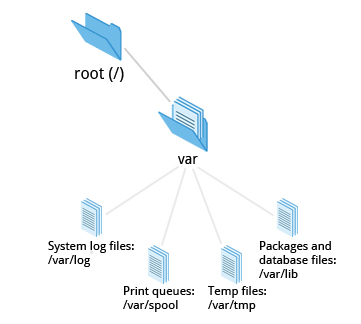
Section titled “/var - Variable Data”/var holds data that grows or changes during normal operation. It is often mounted as its own partition so that runaway growth (e.g., huge log files) doesn’t bring down the root filesystem.
| Subdirectory | Contents |
|---|---|
/var/log | System and application log files |
/var/lib | Persistent application state (databases, package manager data) |
/var/spool | Queued data: print jobs, mail, cron jobs |
/var/tmp | Temp files that survive reboots (unlike /tmp) |
/var/cache | Cached application data (can be rebuilt) |
/var/www | Web server document root (conventional) |
/var/ftp | FTP server root (conventional) |
/boot - Boot Files
Section titled “/boot - Boot Files”For each installed kernel version:
| File | Purpose |
|---|---|
vmlinuz-X.Y.Z | Compressed Linux kernel image |
initramfs-X.Y.Z.img | Initial RAM filesystem (or initrd) |
config-X.Y.Z | Kernel build configuration (debugging only) |
System.map-X.Y.Z | Kernel symbol table (debugging only) |
GRUB bootloader files live at /boot/grub/grub.cfg or /boot/grub2/grub2.cfg.
/usr - User Programs
Section titled “/usr - User Programs”/usr contains programs and data not needed at boot. It can be a separate partition and can even be shared across machines via NFS. It is theoretically read-only.
| Subdirectory | Contents |
|---|---|
/usr/bin | Primary directory for user commands |
/usr/sbin | Non-essential system admin commands |
/usr/lib | Libraries for /usr/bin and /usr/sbin |
/usr/lib64 | 64-bit libraries |
/usr/include | C/C++ header files for development |
/usr/share | Architecture-independent shared data (man pages, icons, locales) |
/usr/share/man | Man page documentation |
/usr/src | Kernel source code |
/usr/local | Locally installed software (outside package manager); mirrors /usr layout |
/home and /root
Section titled “/home and /root”/home/username- Personal files, dotfiles, settings for each regular user/root- Home directory for the root account (superuser)
On multi-user systems, /home is often a separate filesystem (NFS-mounted or on its own partition), so users’ data persists across OS reinstalls.
/run - Runtime Data
Section titled “/run - Runtime Data”/run is implemented as tmpfs (RAM disk). It stores:
- PID files (which process is running as which daemon)
- Sockets and lock files
- Volatile state that must exist early in boot
/var/run and /var/lock are now symlinks to /run and /run/lock.
/tmp vs /var/tmp
Section titled “/tmp vs /var/tmp”/tmp | /var/tmp | |
|---|---|---|
| Cleared on reboot | Yes (usually) | No |
| Typical use | In-session temp files | Temp files that must survive a reboot |
| Implementation | Often tmpfs | Usually on disk |
Key FHS Rules to Remember
Section titled “Key FHS Rules to Remember”- Applications should not create directories directly under
/ /etcis for system configuration; user config goes in~/usrshould be read-only in production- Variable data belongs in
/var, not/usr - Locally-compiled/installed software goes in
/usr/localto avoid conflicts with package manager