
The Linux Boot Process
Overview
Section titled “Overview”The boot process is the sequence of events that takes a powered-off machine to a fully running Linux system. Each stage hands control to the next.
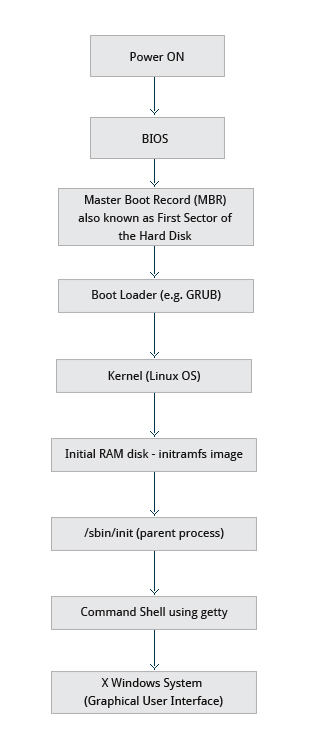
| Stage | Component | Responsibility |
|---|---|---|
| 1 | Firmware (BIOS/UEFI) | POST hardware check; locate and launch bootloader |
| 2 | Bootloader (GRUB) | Load kernel + initramfs into RAM |
| 3 | Kernel | Initialize hardware; mount root filesystem |
| 4 | initramfs | Temporary root; discover real root filesystem |
| 5 | init / systemd | Start all services; bring up multi-user environment |
Stage 1: Firmware (BIOS / UEFI)
Section titled “Stage 1: Firmware (BIOS / UEFI)”When the computer is powered on, the firmware chip on the motherboard runs first:
- BIOS (Basic Input Output System): Stored on a ROM chip. Runs POST (Power-On Self Test) to verify RAM, keyboard, and attached devices are functional.
- CMOS: A battery-backed chip that stores the system clock and basic hardware settings (date, time, boot device order).
After POST passes, the firmware locates a bootable device and hands control to the bootloader.
BIOS/MBR vs. UEFI/GPT
Section titled “BIOS/MBR vs. UEFI/GPT”| Feature | Legacy BIOS/MBR | Modern UEFI/GPT |
|---|---|---|
| Boot code location | First 512 bytes of disk (MBR) | EFI System Partition (FAT32, ~100-512 MB) |
| Partition limit | 4 primary partitions max | 128 partitions (GPT) |
| Disk size limit | 2 TB | 9.4 ZB |
| Security | No Secure Boot | Secure Boot (verifies kernel signature) |
| Boot speed | Slower | Faster (parallel init possible) |
| Standard | Decades old; widely compatible | Modern standard since ~2010 |
Stage 2: Bootloader
Section titled “Stage 2: Bootloader”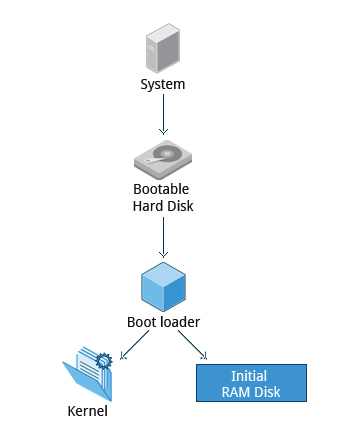
The bootloader is a small program whose sole job is to get the kernel into RAM. Linux uses several bootloaders:
| Bootloader | Use Case |
|---|---|
| GRUB 2 | Default for most desktop/server Linux distributions |
| ISOLINUX | Booting from removable media (USB, DVD) |
| DAS U-Boot | Embedded systems and appliances |
| systemd-boot | Lightweight UEFI-only alternative |
GRUB can present a menu for choosing between different kernels or even different operating systems (dual boot).
How GRUB Works: Two Stages
Section titled “How GRUB Works: Two Stages”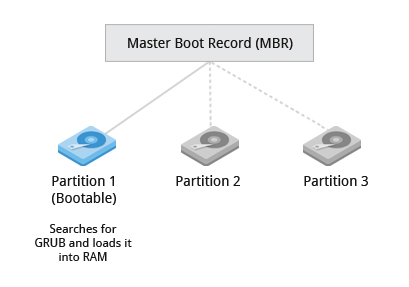
Stage 1 (tiny stub - fits in the MBR or EFI partition):
- BIOS/MBR systems: Only 446 bytes available in the MBR for code. GRUB’s stage 1 just locates and loads the larger stage 2 from the boot partition.
- UEFI systems: Firmware reads the EFI partition directly and loads
grubx64.efifrom there. More sophisticated than MBR; no 446-byte constraint.
Stage 2 (full GRUB, lives under /boot):
- Reads
/boot/grub2/grub.cfg(or/boot/grub/grub.cfg) - Displays the OS selection menu
- Loads the selected kernel image (
vmlinuz-...) and initial RAM disk (initramfs-...) into memory - Passes control to the kernel
GRUB configuration:
cat /boot/grub2/grub.cfg               # auto-generated; never edit directly
# Edit this instead, then regenerate:sudo vim /etc/default/grub             # kernel args, timeout, default entrysudo grub2-mkconfig -o /boot/grub2/grub.cfg   # RHEL/Fedorasudo update-grub                       # Debian/Ubuntu
Stage 3: Kernel Initialization
Section titled “Stage 3: Kernel Initialization”Once GRUB loads the compressed kernel (vmlinuz) into RAM, the kernel:
- Decompresses itself into memory
- Detects hardware: Scans and configures CPUs, memory controllers, I/O subsystems, and storage controllers
- Initializes device drivers built directly into the kernel (
.komodules come later) - Mounts initramfs as a temporary root filesystem in RAM
- Starts
udev(from within initramfs) to detect and load remaining device drivers
Stage 4: initramfs
Section titled “Stage 4: initramfs”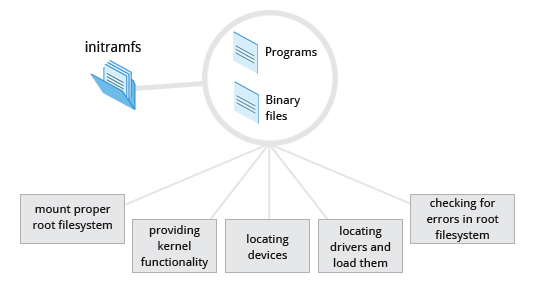
The initramfs (initial RAM-based filesystem) is a tiny temporary root filesystem embedded in a compressed cpio archive. It exists to solve a chicken-and-egg problem:
The kernel needs filesystem driver and storage controller modules to mount the real root filesystem - but those modules are on the real root filesystem.
The initramfs ships with enough tools and drivers to:
- Load any kernel modules needed to access the root partition (LVM, LUKS encryption, RAID, exotic filesystems, etc.)
- Run
udevto discover and initialize block devices - Mount the real root filesystem
- Execute
/sbin/init(orsystemd) from the real filesystem
Once the real root is mounted, the initramfs is cleared from RAM and control transfers to PID 1 on the real filesystem.
Stage 5: init and systemd
Section titled “Stage 5: init and systemd”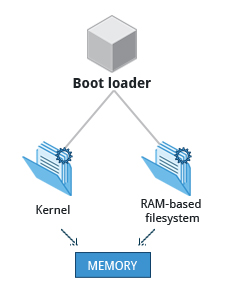
The last stage: PID 1 takes over and starts everything else.
Evolution of init
Section titled “Evolution of init”| System | Era | Approach |
|---|---|---|
| SysVinit | 1980s - 2010s | Sequential runlevels; shell scripts run in order |
| Upstart | Ubuntu 2006, RHEL 6 | Event-driven; some parallelism |
| systemd | Fedora 2011; now universal | Aggressive parallelization; dependency graph; socket activation |
Today, /sbin/init on virtually every major distro is a symlink to /lib/systemd/systemd. systemd makes boot faster by:
- Starting services in parallel (determined by a dependency graph, not a serial queue)
- Using socket activation (open the socket immediately; start the service lazily when something connects)
- Using D-Bus activation (start services on-demand)
SysV Runlevels vs. systemd Targets
Section titled “SysV Runlevels vs. systemd Targets”| SysV Runlevel | systemd Target | Meaning |
|---|---|---|
| 0 | poweroff.target | Halt/shutdown |
| 1 | rescue.target | Single-user recovery mode |
| 3 | multi-user.target | Full multi-user, text/CLI only |
| 5 | graphical.target | Full multi-user with GUI |
| 6 | reboot.target | Reboot |
systemctl get-default # show current default targetsudo systemctl set-default multi-user.target # boot to text mode (no GUI)sudo systemctl isolate rescue.target # switch to rescue mode NOWText-Mode Login
Section titled “Text-Mode Login”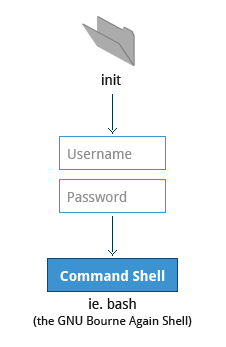
Near the end of the boot process, getty processes start on virtual terminals (VTs) and present login prompts. By default, 6 text VTs are available:
| Key combination | Effect |
|---|---|
Ctrl-Alt-F1 through F6 | Switch to text terminal 1-6 |
Ctrl-Alt-F7 (or F1 on some distros) | Switch back to graphical session |
Alt-F2 through F6 | Switch VTs from within a text session |