
Evolution of Virtualization
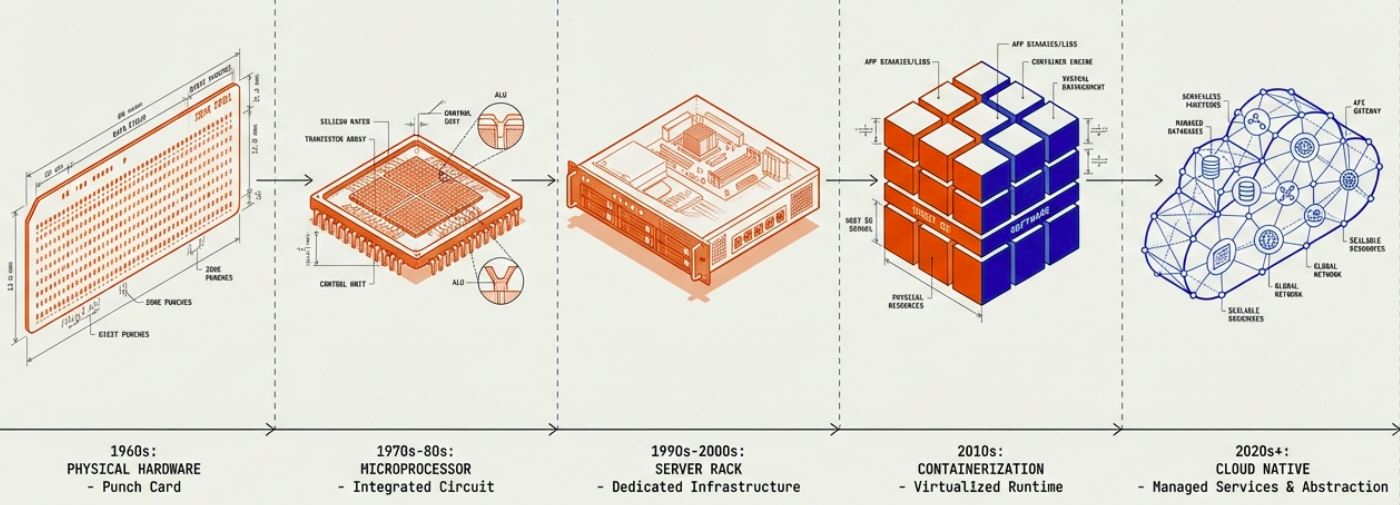
Hardware
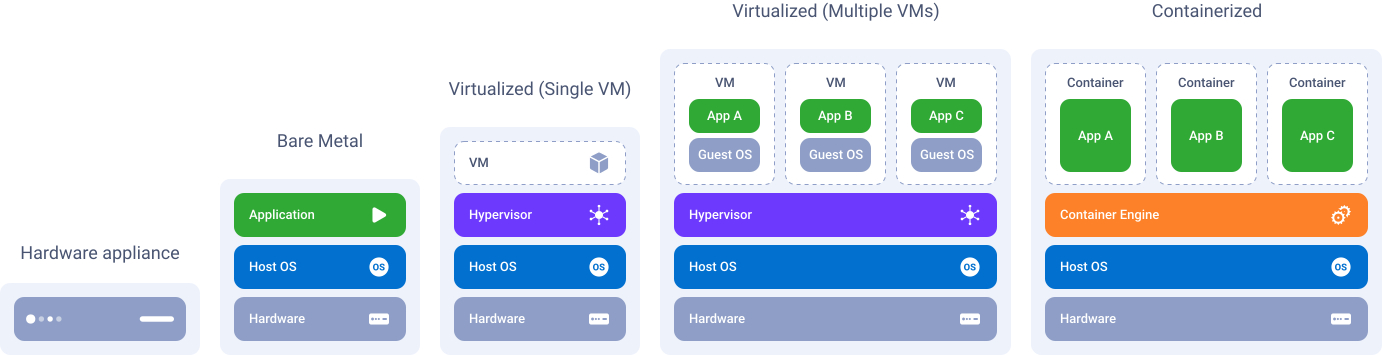
Section titled “Hardware”- a specialized device designed for performing specific tasks within a computing environment.
- a dedicated and purpose-built solution for targeted workloads.
Advantages
Section titled “Advantages”- Purpose-built design -> performance: Engineered with optimized hardware components tailored to the specific requirements of the intended workload, ensuring high performance and reliability.
- Ease of deployment: require minimal setup and configuration effort. Users can simply connect the appliance to power and network infrastructure to begin operations.
Challenges
Section titled “Challenges”- Limited Scalability: cannot be scaled rather than buying a new box.
- Limited Automation: nearly impossible to program hardware boxes as it does not support programming languages
- Higher Upfront Costs: involve higher initial expenses, require the purchase of dedicated hardware devices and usually underutilized, because service providers over-provision the capacity of such hardware to meet the 3-5 years demand.
- End-of-Life Management: face end-of-life (EOL) challenges as they reach the end of their operational lifespan.
- Obsolete Technology: may become obsolete due to advancements in technology or changes in business requirements. Upgrading or replacing outdated appliances can be costly and disruptive, requiring careful planning and investment.
Bare Metal
Section titled “Bare Metal”- Before containerization we just had computers/bare metal.
- Involves deploying an OS directly onto physical hardware without any intermediary layers.
- OS interacts directly with the underlying hardware, utilizing its resources exclusively for running applications and services.
Advantage
Section titled “Advantage”- Performance: no virtualization overhead = high performance.
- Full Hardware Access: direct access to hardware resources, optimized configurations for specific workloads.
- Predictability: no hypervisors = predictable resource allocation and consistent performance.
Challenges
Section titled “Challenges”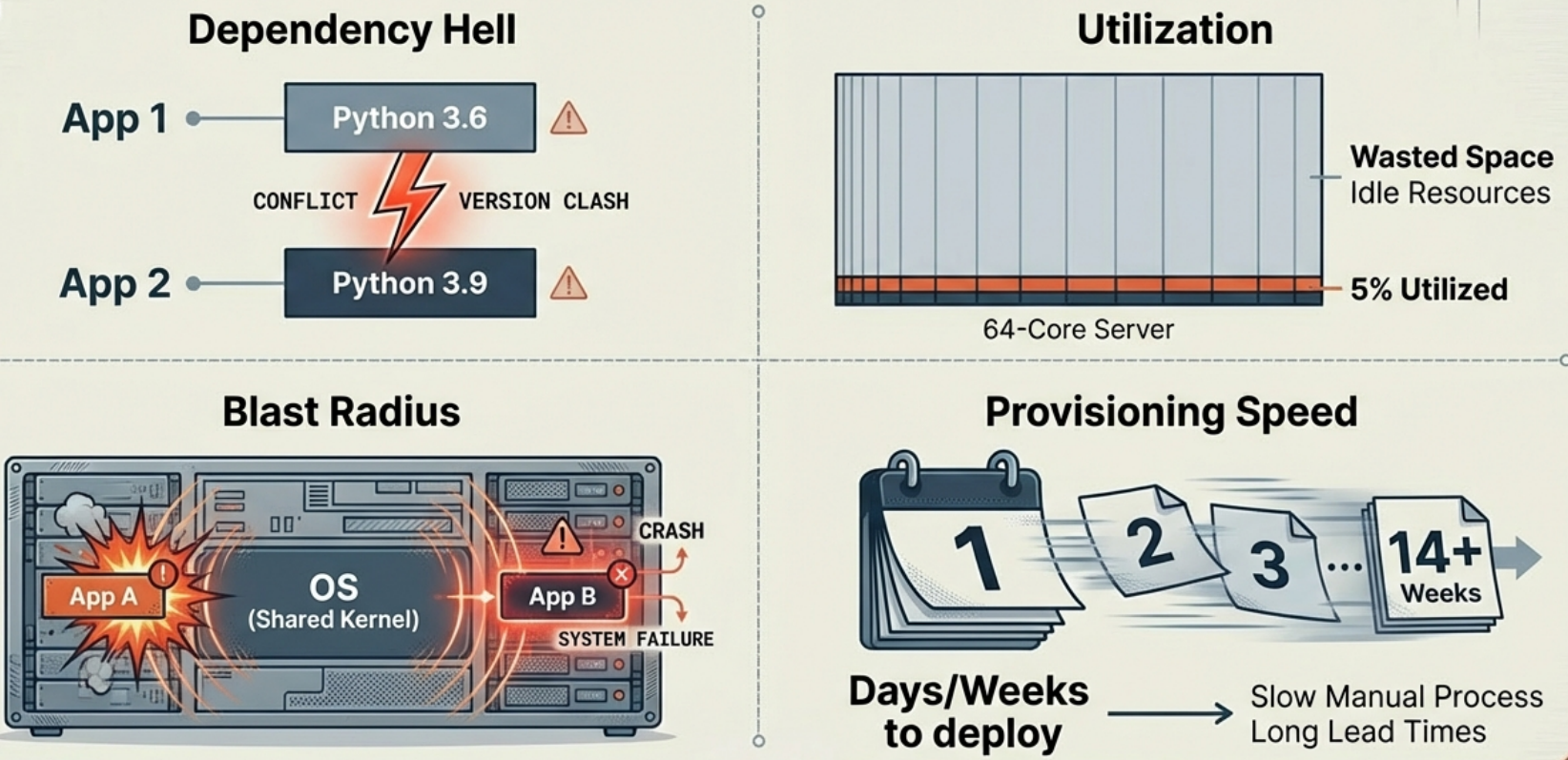
- Not an Easy Deployment: Require software setup and configuration, requires manual setup and configuration of packages. Time-consuming and prone to errors. Additionally, managing and updating individual packages can be challenging, as a single package update could potentially disrupt the entire system.
- Scalability: Cumbersome as it requires provisioning and configuring physical servers.
- Resource Utilization: Under utilize hardware resources, as the lack of scalability makes service providers over provision the capacity of such servers to meet the future demands.
- Flexibility: Adaptability and agility are limited as adding or modifying resources necessitates physical intervention.
- Dependency Problems: Several packages have dependencies on the same shared packages or libraries, but depend on different and incompatible versions of the shared packages. If the shared package or library can only be installed in a single version, the user may need to address the problem by obtaining newer or older versions of the dependent packages. This, in turn, may break other dependencies and push the problem to another set of packages.
Option 1: Single VM on a Dedicated Server
Section titled “Option 1: Single VM on a Dedicated Server”- Deploying a VM on a dedicated server involves installing a single VM on an independent physical server, granting it exclusive access to the server’s resources.
Advantages
Section titled “Advantages”- Performance: use of advanced tech like PCI passthrough, SR-IOV, CPU isolation / pinning etc. VM on a dedicated server offers unparalleled performance.
- Ease of deployment: Easy and quick installation
- Scalability up and down: seamlessly migrate to other servers, without incurring additional costs. At the same time, it can easily transition to a setup with multiple VMs if server resources become available.
- License Extension: gradually increase VM capacity on the same server, reducing costs associated with software licensing.
Challenges
Section titled “Challenges”- Resource Utilization: may under utilize resources, inefficiencies and increased infrastructure costs.
- Scalability: involves provisioning additional hardware, limiting agility in response to changing workload demands.
Option 2: Multiple VMs on a server
Section titled “Option 2: Multiple VMs on a server”- Multiple VMs are sharing one server’s resources is also called Server consolidation. Multiple VMs on a single physical server, leveraging virtualization technology to optimize resource utilization.
Advantages
Section titled “Advantages”- Resource Consolidation: Optimizes hardware utilization by running multiple VMs on a single physical server, reducing hardware costs and space requirements.
- Flexibility: greater flexibility than bare metal, allowing for easier migration, cloning, and snapshotting of VMs.
- Scalability: free up resources by removing other VMs, thereby allocating the server to the most resource-intensive one, as well as to redistribute server resources among different virtual machines to scale the capacity of a particular one.
Challenges
Section titled “Challenges”- Complexity: require expertise in hypervisor configuration, resource allocation, and VM orchestration.
- Limited performance: involves using virtual interfaces instead of physical ones, makes it impossible using advanced technologies like PCI passthrough, CPU isolation, CPU pinning, etc. This results in limited performance of the VMs.
VMs + Containers and the Rise of Orchestrators
Section titled “VMs + Containers and the Rise of Orchestrators”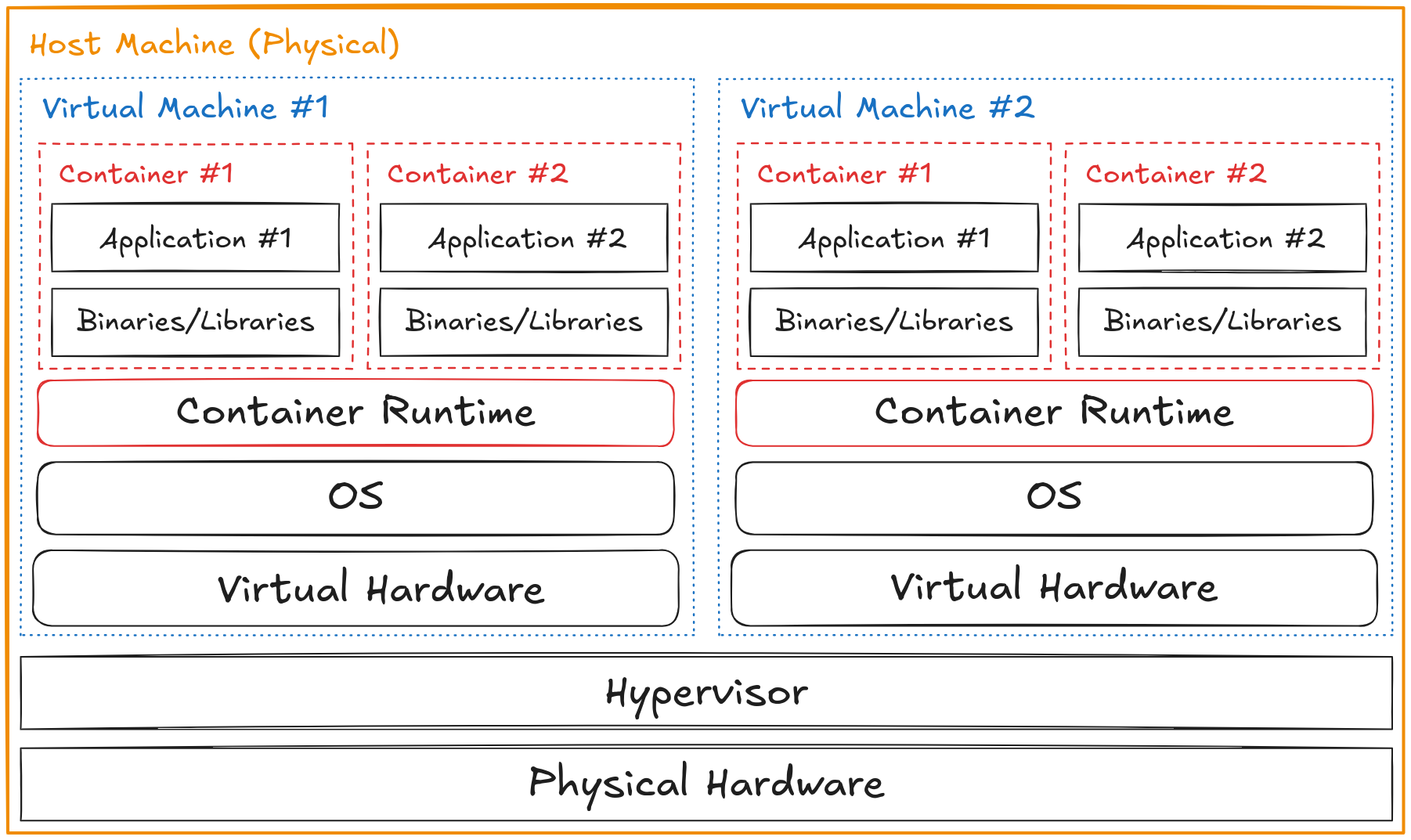
Once containers became mainstream, the standard production pattern became running containers inside virtual machines - combining the hardware isolation of VMs with the lightweight agility of containers. A cloud provider’s physical server runs a Type 1 hypervisor, which carves it into VMs (nodes), and each node runs a container engine hosting many containers.
This introduced a new challenge: who manages all those containers across all those nodes?
Manually tracking which containers are running on which nodes, restarting failed containers, scaling up under load, and routing traffic between services becomes unmanageable at scale. This is what container orchestrators solve.
| Orchestrator | Notes |
|---|---|
| Kubernetes | The industry standard. Open-source, originally from Google. Manages scheduling, scaling, networking, and self-healing across a cluster of nodes. |
| OpenShift | Red Hat’s enterprise Kubernetes distribution. Adds developer tooling, built-in CI/CD, and stricter security defaults. |
| Docker Swarm | Docker’s simpler built-in orchestrator. Easier to set up than Kubernetes but less powerful. Largely superseded by Kubernetes in production. |
Orchestration is the reason Kubernetes exists - the evolution from bare metal to VMs to containers made individual machines easier to manage, but created the new problem of coordinating hundreds or thousands of containers across a fleet of machines.