
Firewalls
What Is a Firewall?
Section titled “What Is a Firewall?”A firewall is a network security system that monitors and controls all network traffic. It applies rules on both incoming and outgoing connections, building flexible barriers depending on the level of trust and network topology of a given connection.
Firewalls can be hardware or software based - found in routers, individual computers, or network nodes. Many also have routing capabilities.
- They protect against intrusions and other attack vectors
- They control the trust level on particular interfaces and/or source addresses
Packet Filtering
Section titled “Packet Filtering”Almost all firewalls are based on packet filtering. Information travels across networks in packets, each containing:
- Header - source/destination addresses, protocol, flags, sequence numbers
- Payload - the actual data
- Footer - error checking
Packet filtering intercepts packets at one or more stages in the network transmission stack (application, transport, network, datalink). A firewall establishes a set of rules by which each packet may be:
- Accepted or rejected based on content, address, or protocol
- Mangled (modified) in some way
- Redirected to another address
- Inspected for security purposes
Firewall Generations
Section titled “Firewall Generations”- 1st gen - Packet filtering (late 1980s): inspects individual packets in isolation; no awareness of connection state. Stateless.
- 2nd gen - Stateful filters: tracks connection state (NEW, ESTABLISHED, RELATED, INVALID). Can detect and block attacks that exploit connection assumptions.
- 3rd gen - Application layer firewalls: understands application protocols (HTTP, FTP, DNS). Can block traffic that doesn’t conform to expected protocol behavior even on allowed ports.
Linux Firewall Stack
Section titled “Linux Firewall Stack”| Tool | Layer | When to use |
|---|---|---|
nftables | Kernel (netfilter) | Modern replacement for iptables; use for new raw setups |
iptables | Kernel (netfilter) | Legacy; still widely documented; translates to nftables on modern kernels |
firewalld | Service (wraps nftables/iptables) | RHEL/Fedora/CentOS - zone-based, persistent, most practical |
ufw | Frontend (wraps iptables) | Debian/Ubuntu - simpler syntax, good for single-host rules |
firewalld and firewall-cmd
Section titled “firewalld and firewall-cmd”firewalld is the Dynamic Firewall Manager. It uses network/firewall zones - defined trust levels for interfaces or source addresses - and separates runtime from permanent (persistent) configuration.
Configuration files live in two locations:
/usr/lib/firewalld/- system defaults (don’t edit)/etc/firewalld/- admin customizations (these override the above)
sudo systemctl enable --now firewalldsudo systemctl status firewalldsudo firewall-cmd --state       # quick check: "running" or "not running"
# IP forwarding (required when acting as a router)sudo sysctl net.ipv4.ip_forward=1# Persistent:echo "net.ipv4.ip_forward=1" | sudo tee /etc/sysctl.d/99-forward.confsudo sysctl -p /etc/sysctl.d/99-forward.confEach interface belongs to a zone. NetworkManager assigns zones automatically, but you can override them.
| Zone | Behavior |
|---|---|
| trusted | All connections allowed |
| home | Selected inbound allowed; hosts trusted |
| work | Selected inbound allowed; nodes not fully trusted |
| public | Default; only explicitly allowed services permitted |
| dmz | Selected services exposed; rest blocked |
| external | Masquerading (NAT) enabled; used for router-facing interfaces |
| block | Inbound rejected with ICMP-reject; own connections allowed |
| drop | Inbound silently dropped; no reply sent |
On installation, most distributions set public as the default zone.
Zone Management
Section titled “Zone Management”# Inspectsudo firewall-cmd --get-default-zonesudo firewall-cmd --get-active-zones # interfaces → which zonesudo firewall-cmd --get-zones # list all available zonessudo firewall-cmd --get-zone-of-interface=eno1
# Inspect a zone in full detailsudo firewall-cmd --zone=public --list-all
# Change zonesudo firewall-cmd --set-default-zone=publicsudo firewall-cmd --zone=internal --change-interface=eno1 # runtimesudo firewall-cmd --permanent --zone=internal --change-interface=eno1 # persistent
# Bind a source subnet to a zonesudo firewall-cmd --permanent --zone=trusted --add-source=192.168.1.0/24sudo firewall-cmd --permanent --zone=trusted --list-sourcesService and Port Management
Section titled “Service and Port Management”firewalld services are named port/protocol combos defined in /usr/lib/firewalld/services/.
# Servicessudo firewall-cmd --get-servicessudo firewall-cmd --list-services --zone=publicsudo firewall-cmd --permanent --zone=public --add-service=httpssudo firewall-cmd --permanent --zone=public --remove-service=httpsudo firewall-cmd --reload                  # apply permanent rules to runtime
# Ports (when no service name exists)sudo firewall-cmd --permanent --zone=public --add-port=8080/tcpsudo firewall-cmd --permanent --zone=public --add-port=5000-5010/tcpsudo firewall-cmd --zone=public --list-ports
# Rich rules (complex matching: IP + port + action)sudo firewall-cmd --permanent --zone=public \ --add-rich-rule='rule family=ipv4 source address="10.0.0.0/8" port port=22 protocol=tcp accept'sudo firewall-cmd --permanent --zone=public \ --add-rich-rule='rule family=ipv4 source address="1.2.3.4" drop'sudo firewall-cmd --reloadPort Redirection and NAT
Section titled “Port Redirection and NAT”# Forward port 80 → 8080 (same host)sudo firewall-cmd --permanent --zone=external \ --add-forward-port=port=80:proto=tcp:toport=8080
# Forward port 80 → different hostsudo firewall-cmd --permanent --zone=external \ --add-forward-port=port=80:proto=tcp:toport=80:toaddr=192.168.1.20
sudo firewall-cmd --zone=external --list-allMasquerading (SNAT for outbound)
Section titled “Masquerading (SNAT for outbound)”sudo firewall-cmd --permanent --zone=external --add-masqueradesudo firewall-cmd --reloadufw - Ubuntu/Debian Firewall
Section titled “ufw - Ubuntu/Debian Firewall”# Enable / statussudo ufw enablesudo ufw status verbosesudo ufw status numbered # numbered rules - useful for deletion
# Allow / denysudo ufw allow sshsudo ufw allow 80/tcpsudo ufw allow 5000:5010/tcpsudo ufw deny 23/tcp
# Source-specific rulessudo ufw allow from 192.168.1.0/24sudo ufw allow from 192.168.1.100 to any port 22
# Deletesudo ufw delete allow 80/tcpsudo ufw delete 3 # by number from 'status numbered'
# Loggingsudo ufw logging onNetwork Address Translation (NAT)
Section titled “Network Address Translation (NAT)”NAT is how a firewall changes the source or destination IP (and optionally port) of packets as they pass through. There are two main types:
DNAT - Destination NAT (inbound / port forwarding)
Section titled “DNAT - Destination NAT (inbound / port forwarding)”DNAT changes the destination IP of incoming packets - used to expose an internal server to the internet.
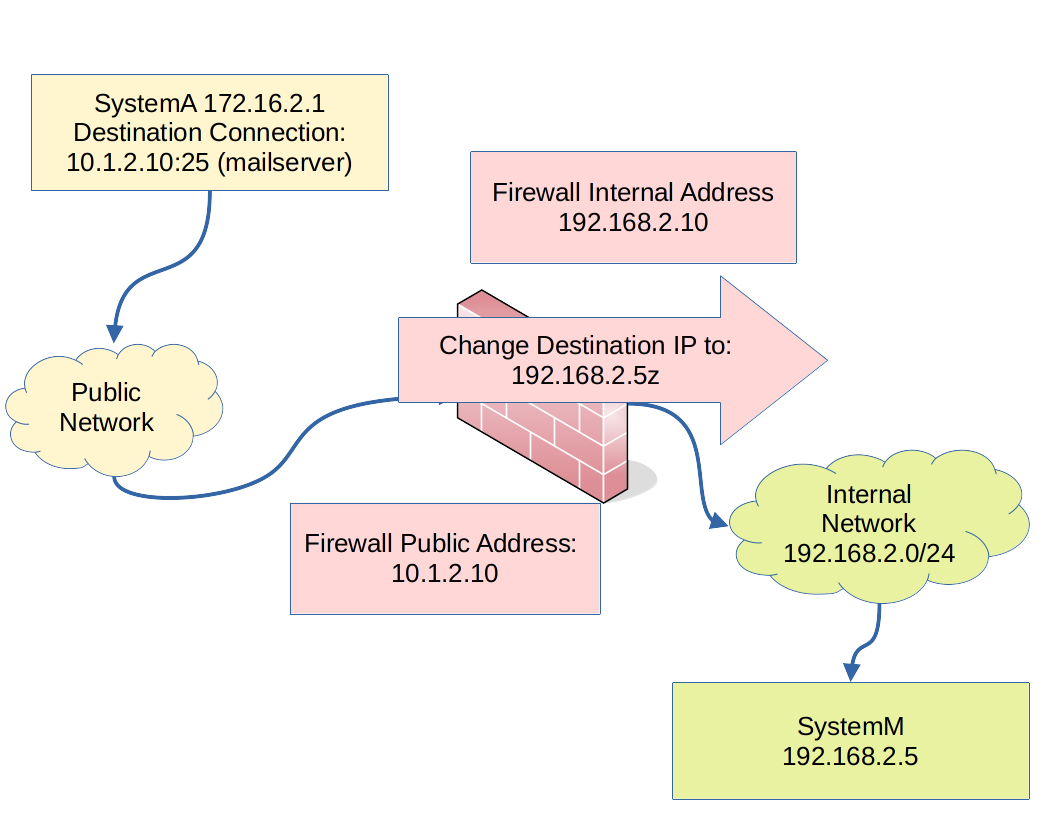
Flow example:
- SystemA sends a packet to the firewall’s public IP on port 80 (http)
- DNAT rule rewrites the destination IP → internal web server at
192.168.2.5:80 - The internal server processes and replies; the firewall translates the reply back
DNAT rules live in the PREROUTING chain (before the routing decision).
- The DNAT firewall rule inspects: destination IP (must match the firewall’s public IP) and destination port
- The rule changes the destination IP to the internal server’s address
- Return traffic is automatically translated back
SNAT and Masquerade (outbound)
Section titled “SNAT and Masquerade (outbound)”SNAT changes the source IP of outgoing packets - used when internal hosts need internet access through a single public IP.
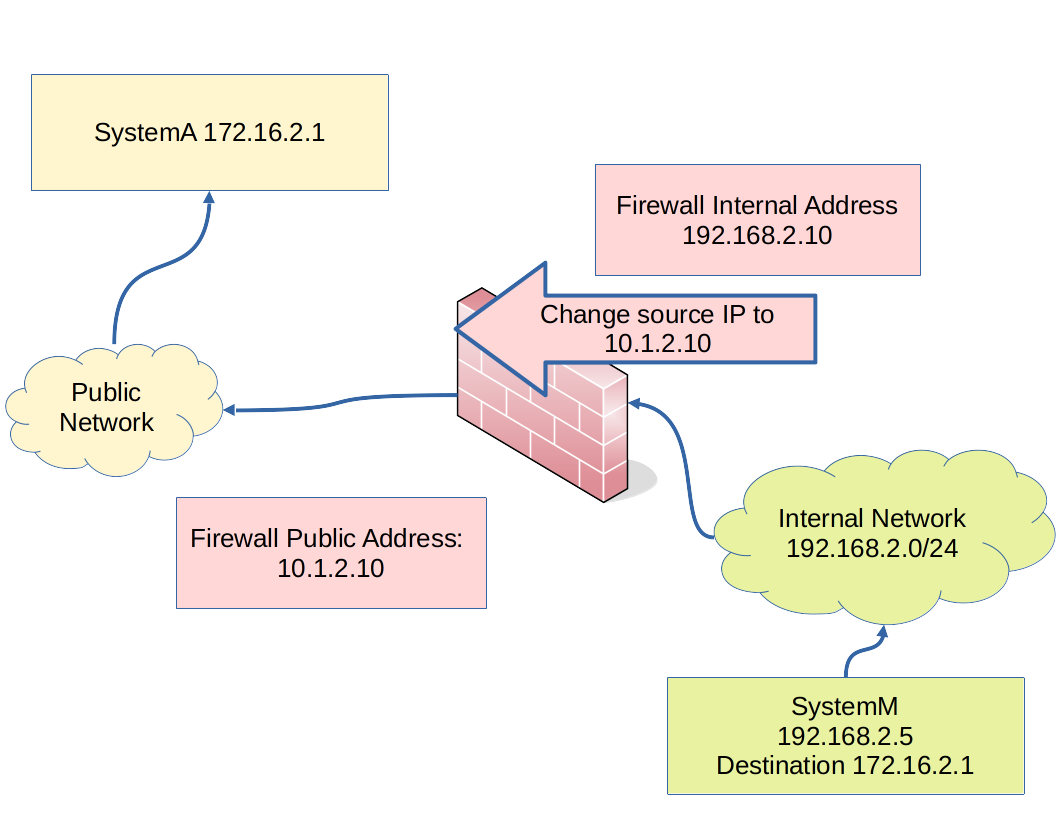
- Translation is required because internal private addresses aren’t routable on the internet
- Masquerade = dynamic SNAT (for DHCP/dynamic public IPs) - more compute overhead
- SNAT = static SNAT with a fixed public IP - more efficient
SNAT/Masquerade rules live in the POSTROUTING chain (the last point before the packet leaves).
iptables Quick Reference
Section titled “iptables Quick Reference”Still widely used in scripts and environments without firewalld.
# View rulessudo iptables -L -v -n              # list all chains with counterssudo iptables -L INPUT -v -n        # INPUT chain specificallysudo iptables -t nat -L -v -n       # NAT table
# Allow / denysudo iptables -A INPUT -p tcp --dport 22 -j ACCEPTsudo iptables -A INPUT -p tcp --dport 80 -j ACCEPTsudo iptables -A INPUT -m state --state ESTABLISHED,RELATED -j ACCEPTsudo iptables -P INPUT DROP          # set default policy to drop
# NATsudo iptables -t nat -A POSTROUTING -o eth0 -j MASQUERADEsudo iptables -t nat -A PREROUTING -p tcp --dport 80 -j DNAT \  --to-destination 192.168.1.10:80
# Persist (Debian/Ubuntu)sudo apt install iptables-persistent && sudo netfilter-persistent save
# Persist (RHEL/Fedora)sudo service iptables save