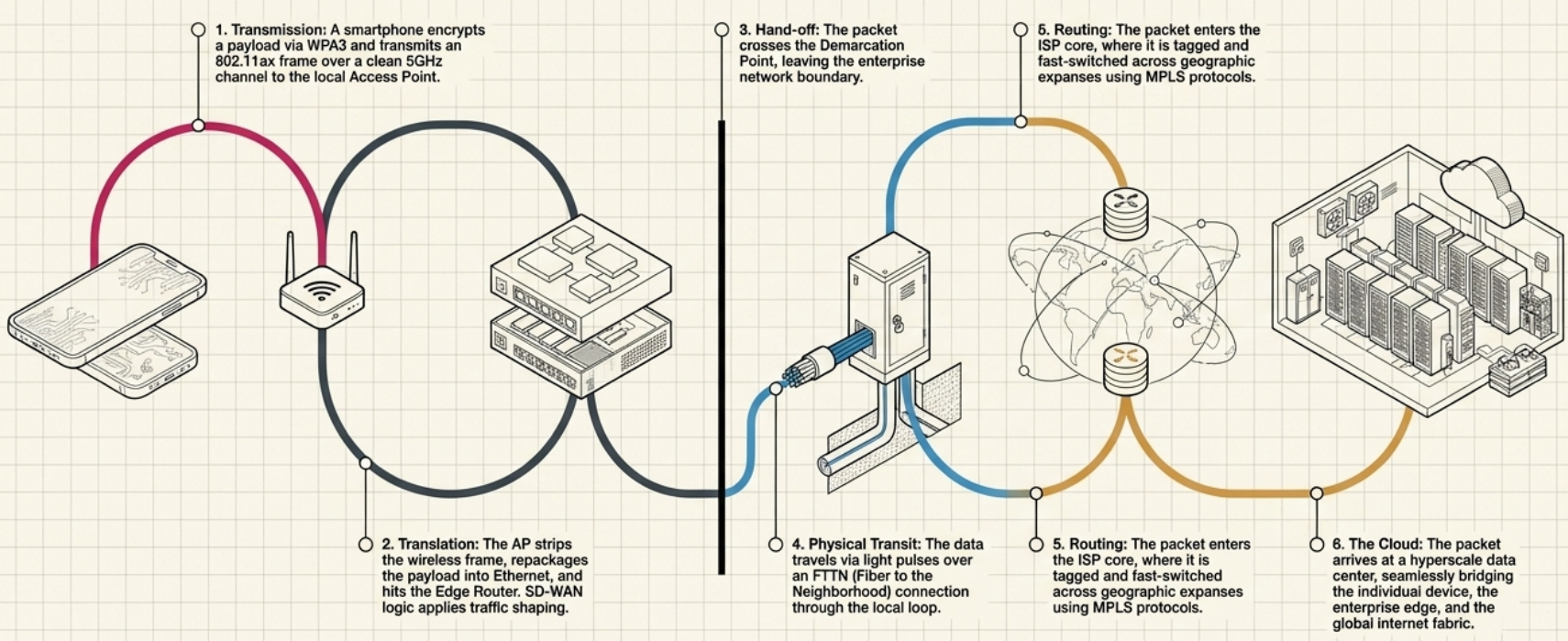
Connecting to the Internet
Internet Connection Technologies
Section titled “Internet Connection Technologies”The Evolution: Dial-up to Fiber
Section titled “The Evolution: Dial-up to Fiber”| Technology | Medium | Speed | Still Used? |
|---|---|---|---|
| Dial-up | Phone line (PSTN) | Up to 56 Kbps | Rare - only in very rural areas |
| DSL | Phone line (copper) | 1-100 Mbps | Yes, declining |
| Cable | Coaxial cable | 10-1000 Mbps | Yes, very common |
| Fiber (FTTP) | Fiber optic | 100 Mbps - 10 Gbps | Yes, growing rapidly |
| T1 / T3 | Dedicated copper | 1.5 / 45 Mbps | Legacy business lines |
| Satellite | Radio waves | 10-100 Mbps | Rural / remote areas |
| Cellular (4G/5G) | Radio waves | 10 Mbps - 1+ Gbps | Yes, everywhere |
Dial-up and Modems
Section titled “Dial-up and Modems”The first home internet connections used the Public Switched Telephone Network (PSTN) - the same lines used for phone calls. A modem (modulator/demodulator) converted digital data into audible tones for transmission over voice lines.
- Baud rate = bits per second over the phone line
- Maxed out at 56 Kbps (1990s standard)
- Tied up the phone line during use - no simultaneous calls
- Usenet (1979, Duke University) was one of the first services to use dial-up networking
DSL - Digital Subscriber Line
Section titled “DSL - Digital Subscriber Line”DSL also uses phone lines but operates at higher frequencies that don’t interfere with voice calls - so you can talk and browse simultaneously.
| Type | Upload / Download | Max Speed | Use Case |
|---|---|---|---|
| ADSL (Asymmetric) | Upload slower than download | ~24 Mbps down / 3.5 Mbps up | Home users (browsing, streaming) |
| SDSL (Symmetric) | Equal upload and download | ~1.5 Mbps each way | Businesses (hosting, VoIP) |
| VDSL (Very High Bitrate) | Asymmetric, much faster | ~52 Mbps down / 16 Mbps up | Closer to DSLAM required |
- DSLAM (Digital Subscriber Line Access Multiplexer) = the ISP-side equipment that aggregates DSL connections
- Speed degrades with distance from the DSLAM
Cable Broadband
Section titled “Cable Broadband”Cable internet piggybacks on the coaxial cable infrastructure originally built for cable TV. It uses frequency bands that don’t interfere with TV signals.
- Shared bandwidth model - you share cable bandwidth with neighbors until the signal reaches the ISP’s CMTS (Cable Modem Termination System)
- Speeds can slow during peak usage hours
- DOCSIS (Data Over Cable Service Interface Specification) is the standard that defines cable internet speeds - DOCSIS 3.1 supports up to 10 Gbps downstream
Fiber Connections
Section titled “Fiber Connections”Fiber uses light pulses through glass strands. It’s the fastest, most reliable consumer technology available.
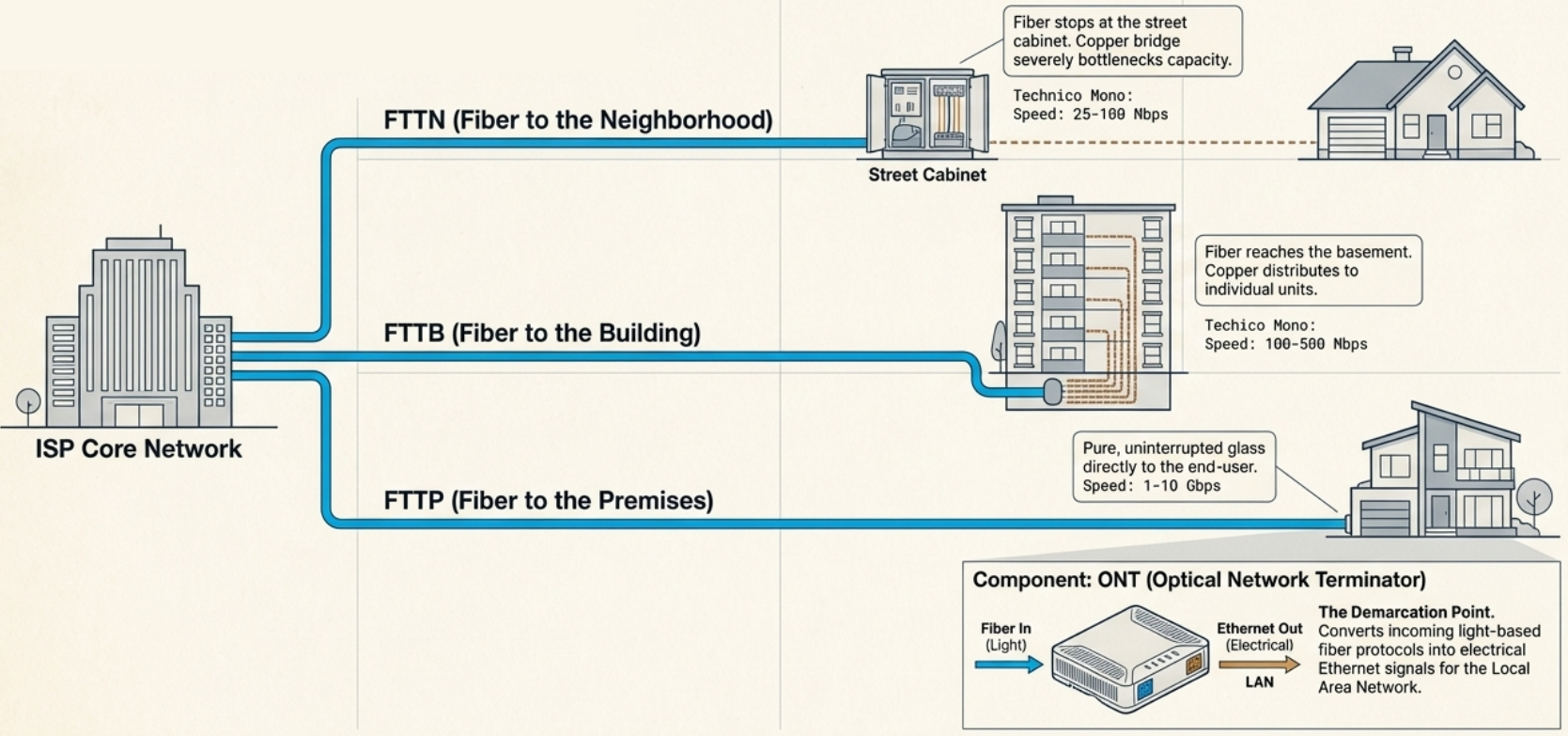
| Type | Fiber reaches… | Last mile | Speed |
|---|---|---|---|
| FTTN (Fiber to the Neighborhood) | Street cabinet | Copper to homes | 25-100 Mbps |
| FTTB (Fiber to the Building) | Building basement | Copper inside building | 100-500 Mbps |
| FTTH / FTTP (Fiber to the Home/Premises) | Your home | All fiber | 1-10 Gbps |
- ONT (Optical Network Terminator) is the demarcation point - converts fiber protocols to Ethernet for your LAN
- Fiber doesn’t degrade over distance like copper and is immune to electromagnetic interference
T-Carrier Technologies (Legacy)
Section titled “T-Carrier Technologies (Legacy)”| Line | Capacity | Speed | How |
|---|---|---|---|
| T1 | 24 channels x 64 Kbps | 1.544 Mbps | Twisted pair copper, dedicated |
| T3 (DS3) | 28 multiplexed T1s | 44.736 Mbps | Dedicated, expensive |
Originally designed by AT&T to carry multiple phone calls over a single cable. Later repurposed for data. Mostly replaced by fiber and cable, but still found in some legacy business installations.
WAN Technologies
Section titled “WAN Technologies”A WAN (Wide Area Network) connects geographically separated LANs. When a business has offices in different cities, a WAN links them together.
WAN Architecture
Section titled “WAN Architecture” Office A (LAN) Office B (LAN) │ │ [WAN Router] [WAN Router] │ │ ─── Local Loop ───┐ ┌─── Local Loop ─── │ │ ┌─────┴────┴─────┐ │ ISP Core │ │ Network │ └────────────────┘- Demarcation point = where your network ends and the ISP’s begins
- Local loop = the connection between your demarcation point and the ISP’s core network
- WAN router (also called edge/border router) = sits at the boundary, has both a WAN interface (modem) and a LAN interface (Ethernet)
WAN Protocols
Section titled “WAN Protocols”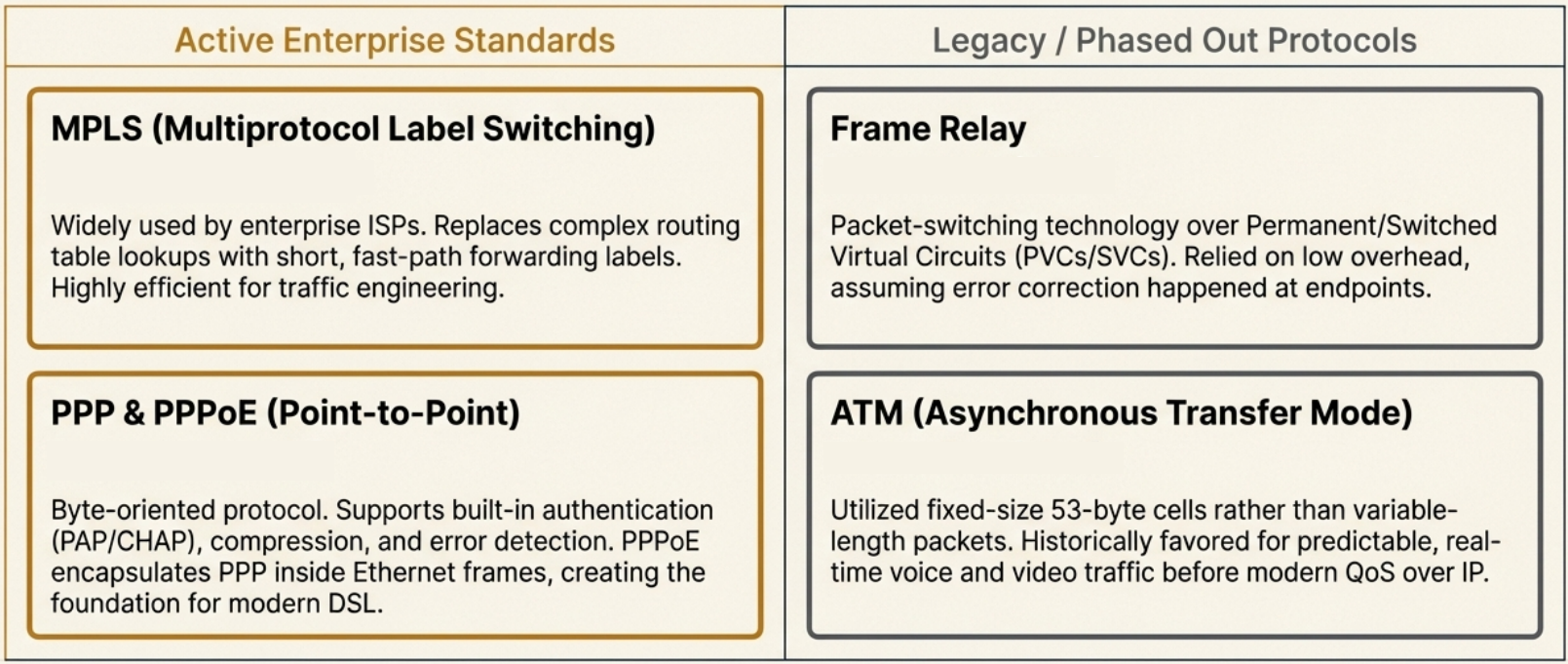
| Protocol | Layer | How it works | Status |
|---|---|---|---|
| PPP (Point-to-Point) | Data Link | Byte-oriented protocol for direct device-to-device links. Supports authentication (PAP/CHAP), compression, error detection. | Still used (DSL) |
| PPPoE (PPP over Ethernet) | Data Link | PPP frames encapsulated in Ethernet frames. Common for DSL connections. | Common |
| Frame Relay | Data Link / Physical | Packet switching over PVCs (permanent) or SVCs (temporary). Low overhead. | Legacy |
| ATM | Data Link | Fixed-size 53-byte cells. Good for real-time traffic. | Legacy |
| MPLS | Between L2/L3 | Label-based switching - short labels instead of full IP lookups. Fast path forwarding. | Widely used by ISPs |
WAN Optimization Techniques
Section titled “WAN Optimization Techniques”| Technique | What it does |
|---|---|
| Compression | Reduce data size before transmission |
| Deduplication | Store one copy of repeated files, use pointers |
| Traffic shaping | Prioritize important traffic (bandwidth throttling, rate limiting, QoS classification) |
| Local caching | Store frequently accessed files locally |
| Protocol optimization | Tune protocols for high-bandwidth, low-latency needs |
SD-WAN vs Traditional WAN
Section titled “SD-WAN vs Traditional WAN”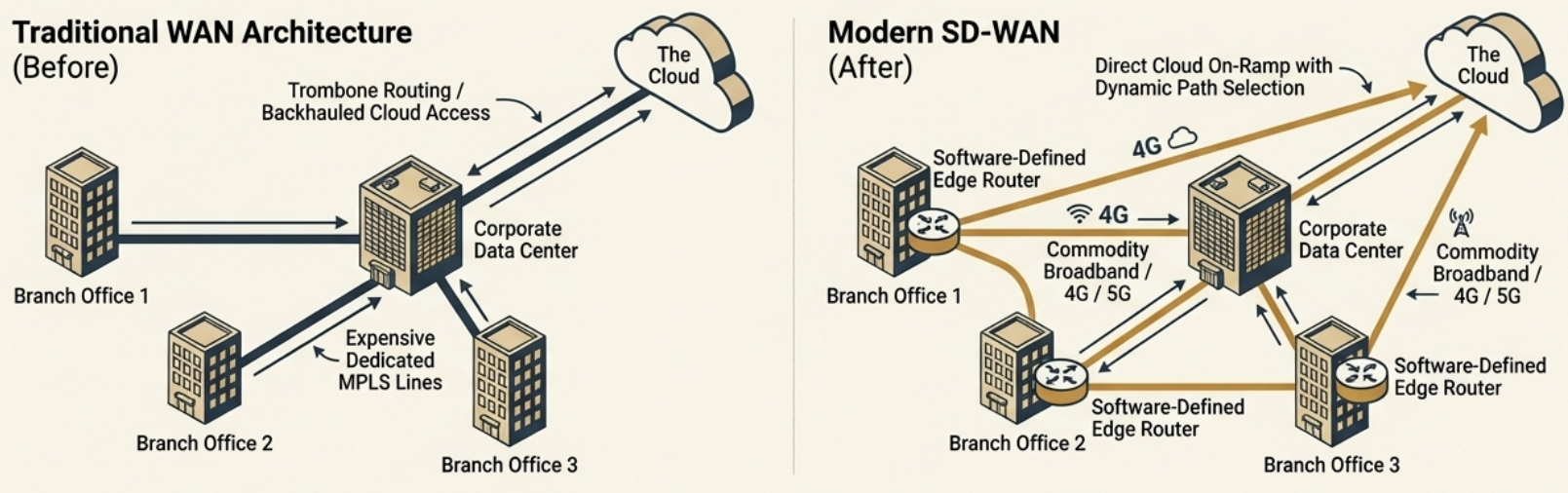
Software-Defined WAN (SD-WAN) is a software overlay that simplifies WAN management:
| Aspect | Traditional WAN | SD-WAN |
|---|---|---|
| Cost | Expensive dedicated lines | Uses cheaper internet links |
| Management | Hardware-centric, manual config | Software-defined, centralized |
| Flexibility | Rigid topology | Dynamic path selection |
| Cloud access | Backhauled through data center | Direct cloud on-ramp |
Wireless Networking
Section titled “Wireless Networking”The 802.11 (Wi-Fi) Family
Section titled “The 802.11 (Wi-Fi) Family”Wi-Fi operates on radio waves in specific frequency bands. The IEEE 802.11 standards define how devices communicate wirelessly.
| Standard | Wi-Fi Name | Year | Frequency | Max Speed | Key Feature |
|---|---|---|---|---|---|
| 802.11b | Wi-Fi 1 | 1999 | 2.4 GHz | 11 Mbps | First widely adopted |
| 802.11a | Wi-Fi 2 | 1999 | 5 GHz | 54 Mbps | Higher speed, shorter range |
| 802.11g | Wi-Fi 3 | 2003 | 2.4 GHz | 54 Mbps | Backward compatible with b |
| 802.11n | Wi-Fi 4 | 2009 | 2.4 / 5 GHz | 600 Mbps | MIMO, channel bonding |
| 802.11ac | Wi-Fi 5 | 2014 | 5 GHz | 6.9 Gbps | MU-MIMO, 160 MHz channels |
| 802.11ax | Wi-Fi 6 | 2019 | 2.4 / 5 GHz | 9.6 Gbps | OFDMA, TWT, WPA3 required |
| 802.11ax | Wi-Fi 6E | 2020 | 2.4 / 5 / 6 GHz | 9.6 Gbps | New 6 GHz band, more channels |
2.4 GHz vs 5 GHz vs 6 GHz
Section titled “2.4 GHz vs 5 GHz vs 6 GHz”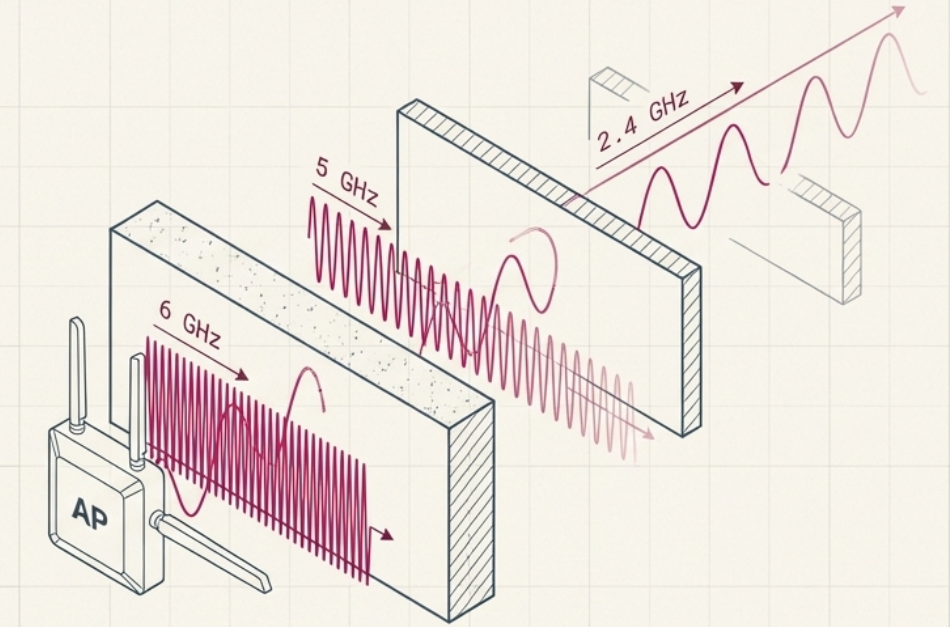
| Band | Range (indoor) | Channels | Penetration | Issues |
|---|---|---|---|---|
| 2.4 GHz | ~45m (150 ft) | 11-14 (only 3 non-overlapping: 1, 6, 11) | Best - passes through walls | Crowded, interference from Bluetooth/microwaves |
| 5 GHz | ~12m (50 ft) | 25+ non-overlapping | Moderate | Less interference, shorter range |
| 6 GHz | ~12m (50 ft) | 59 channels (14 x 80MHz, 7 x 160MHz) | Lower | Wi-Fi 6E only, very clean spectrum |
Wi-Fi 6 Key Technologies
Section titled “Wi-Fi 6 Key Technologies”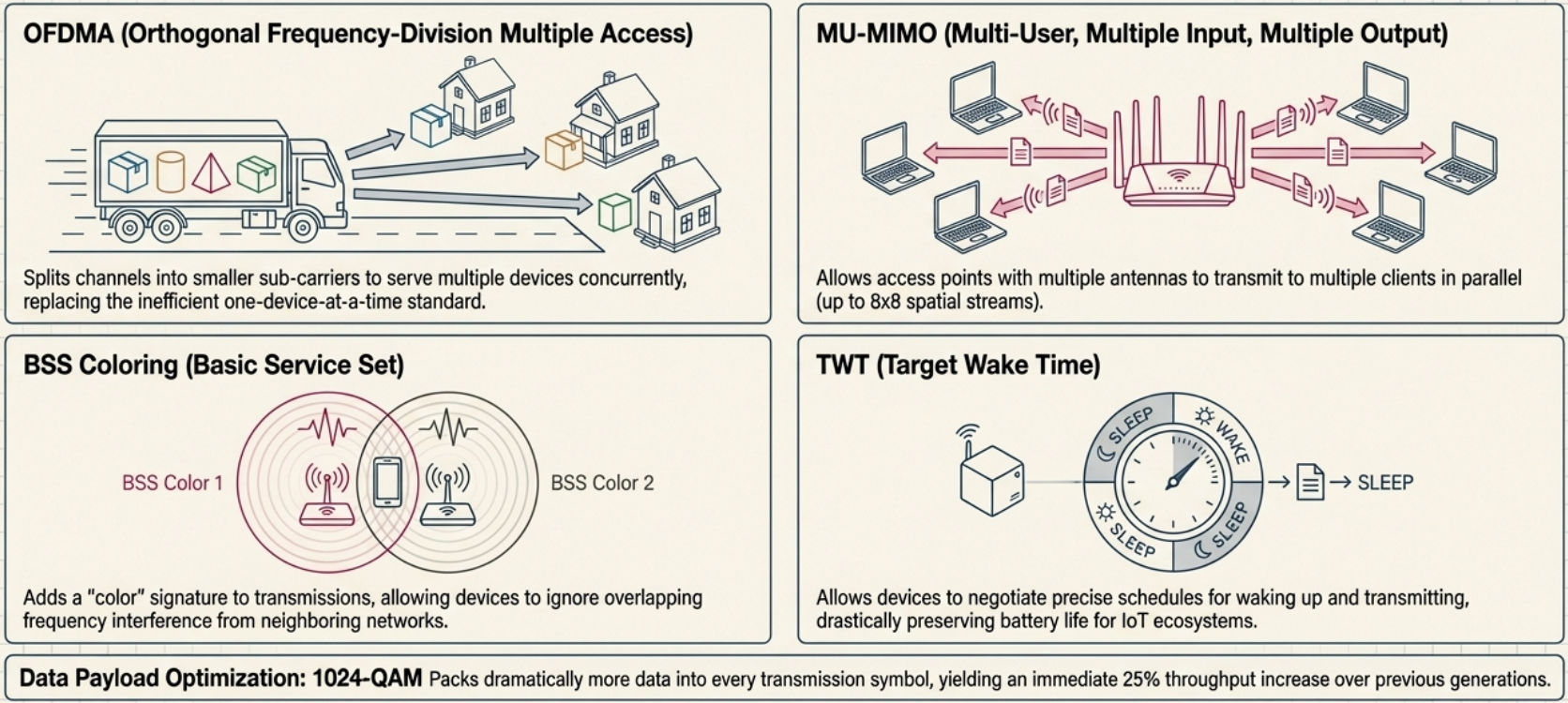
| Technology | What it does |
|---|---|
| OFDMA | Splits channels to serve multiple devices simultaneously (vs one at a time) |
| MU-MIMO | Multiple antennas serve multiple clients in parallel (8x8 streams) |
| TWT (Target Wake Time) | Devices sleep when not transmitting - saves battery for IoT |
| 1024-QAM | More data per transmission symbol (25% throughput increase) |
| BSS Coloring | Reduces interference from neighboring networks |
802.11 Frame Structure
Section titled “802.11 Frame Structure”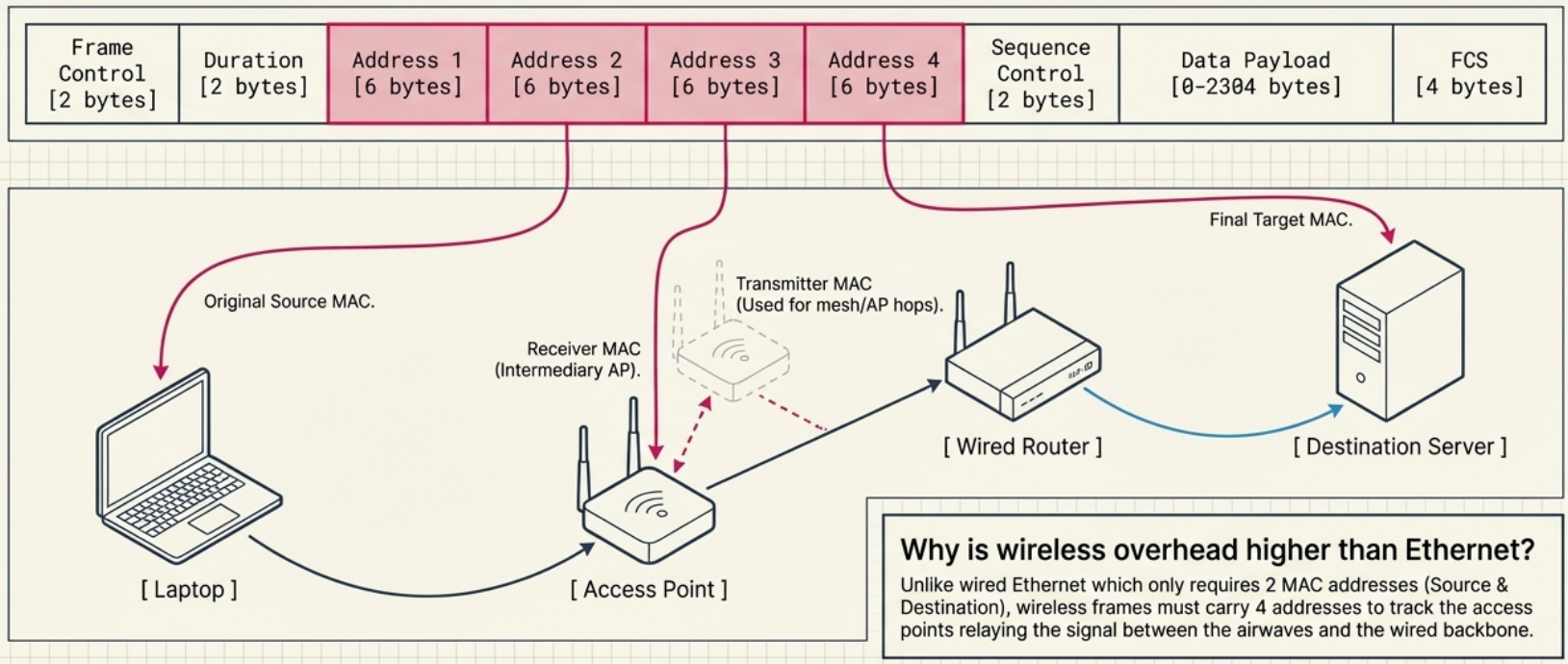
An 802.11 wireless frame has more address fields than Ethernet because wireless communication involves access points as intermediaries:
| Field | Size | Purpose |
|---|---|---|
| Frame Control | 2 bytes | Frame type, version, flags |
| Duration | 2 bytes | How long the channel will be reserved |
| Address 1 (Destination) | 6 bytes | Destination MAC |
| Address 2 (Source) | 6 bytes | Source MAC |
| Address 3 (Receiver) | 6 bytes | Access point MAC (for infrastructure mode) |
| Address 4 (Transmitter) | 6 bytes | Used in mesh/WDS mode |
| Sequence Control | 2 bytes | Fragment and sequence numbers |
| Data Payload | 0-2304 bytes | Actual data |
| FCS | 4 bytes | CRC checksum |
Wireless Network Configurations
Section titled “Wireless Network Configurations”| Type | Description | Use Case |
|---|---|---|
| Infrastructure | Devices connect through access points (most common) | Offices, homes |
| Ad-hoc | Devices connect directly peer-to-peer, no AP needed | Quick file sharing, disaster relief |
| Mesh | Devices relay for each other, self-healing if a node fails | Large coverage areas, smart home |
Wireless Channels
Section titled “Wireless Channels”Channels are specific frequency slices within a band. Overlapping channels cause interference.
2.4 GHz Band - 14 channels, only 3 non-overlapping:
 Ch 1       Ch 6       Ch 11  ├──────┤   ├──────┤   ├──────┤  2412 MHz   2437 MHz   2462 MHz
Use channels 1, 6, and 11 for multi-AP deploymentsto avoid co-channel interference# Scan available wireless networks and their channelssudo iwlist wlan0 scan | grep -E "ESSID|Channel|Signal"
# Check your Wi-Fi interface detailsiw dev wlan0 info
# See which channel you're oniwconfig wlan0
# On macOS/System/Library/PrivateFrameworks/Apple80211.framework/Versions/Current/Resources/airport -sWireless Security
Section titled “Wireless Security”Wireless signals broadcast through the air - anyone in range can potentially intercept them. Encryption is essential.
| Protocol | Year | Encryption | Key Size | Status |
|---|---|---|---|---|
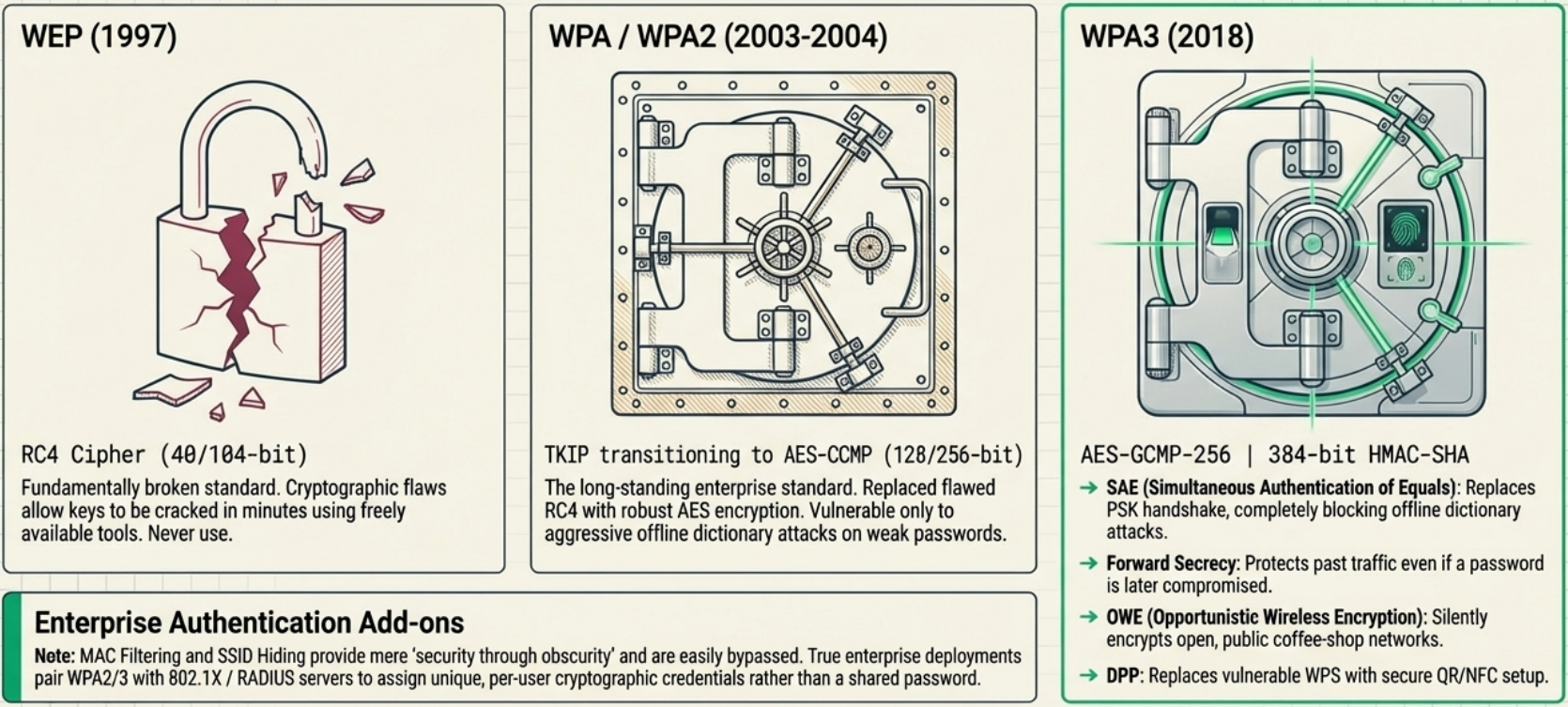
| WEP | 1997 | RC4 | 40/104 bit | Broken - crackable in minutes. Never use. |
| WPA | 2003 | TKIP (RC4-based) | 128 bit | Deprecated - vulnerabilities found |
| WPA2 | 2004 | AES-CCMP | 128/256 bit | Standard - still widely used |
| WPA3 | 2018 | AES-GCMP-256 | 192/256 bit | Latest - recommended for new deployments |
WPA3 Improvements
Section titled “WPA3 Improvements”WPA3-Personal:
- SAE (Simultaneous Authentication of Equals) replaces the PSK 4-way handshake - resistant to dictionary attacks and KRACKs
- Forward secrecy - even if your password is later compromised, previously captured traffic can’t be decrypted
- More resistant to offline brute-force attacks
WPA3-Enterprise:
- GCMP-256 encryption (stronger than WPA2’s 128-bit AES-CCMP)
- OWE (Opportunistic Wireless Encryption) - encrypts open network traffic (coffee shop Wi-Fi)
- DPP (Device Provisioning Protocol) - QR code / NFC-based setup replaces WPS
- 384-bit HMAC-SHA for message integrity
- ECDHE/ECDSA for faster, more secure key exchange
Additional Wireless Security
Section titled “Additional Wireless Security”- MAC filtering - whitelist specific MAC addresses on the access point. Adds a layer but is easily spoofed.
- SSID hiding - stops broadcasting the network name. Security through obscurity - doesn’t stop determined attackers.
- 802.1X / RADIUS - enterprise authentication where each user has unique credentials (not a shared password)
# Check your wireless security protocoliw dev wlan0 info# type: managed# channel: 36 (5180 MHz)
# See connected network security detailsnmcli device wifi show-password
# Scan for nearby networks and their securitynmcli device wifi list# SSID          SECURITY    CHAN  SIGNAL# MyNetwork     WPA2        6     85# CoffeeShop    --          1     72    <-- OPEN! Avoid or use VPN
Cellular Networking
Section titled “Cellular Networking”Cellular networks divide geographic areas into cells, each served by a cell tower that broadcasts and receives radio signals.
| Generation | Speed | Key Feature |
|---|---|---|
| 2G (GSM) | Up to 50 Kbps | First digital voice + SMS |
| 3G | Up to 2 Mbps | Mobile internet, video calls |
| 4G LTE | Up to 100 Mbps | Streaming, modern mobile apps |
| 5G | Up to 10+ Gbps | Ultra-low latency, IoT, AR/VR |
- Adjacent cells use non-overlapping frequency bands to avoid interference (same concept as Wi-Fi channels 1, 6, 11)
- Cell towers are like wireless access points but with much larger range (kilometers vs meters)
- Beyond phones: tablets, laptops, cars, IoT sensors, and industrial equipment use cellular connections
Path of a Packet
Section titled “Path of a Packet”