
Docker Engine
The Docker Engine is the server-side runtime responsible for running and managing containers. For VMware users, it plays a role similar to ESXi - it is the host-level execution environment, not the management UI.
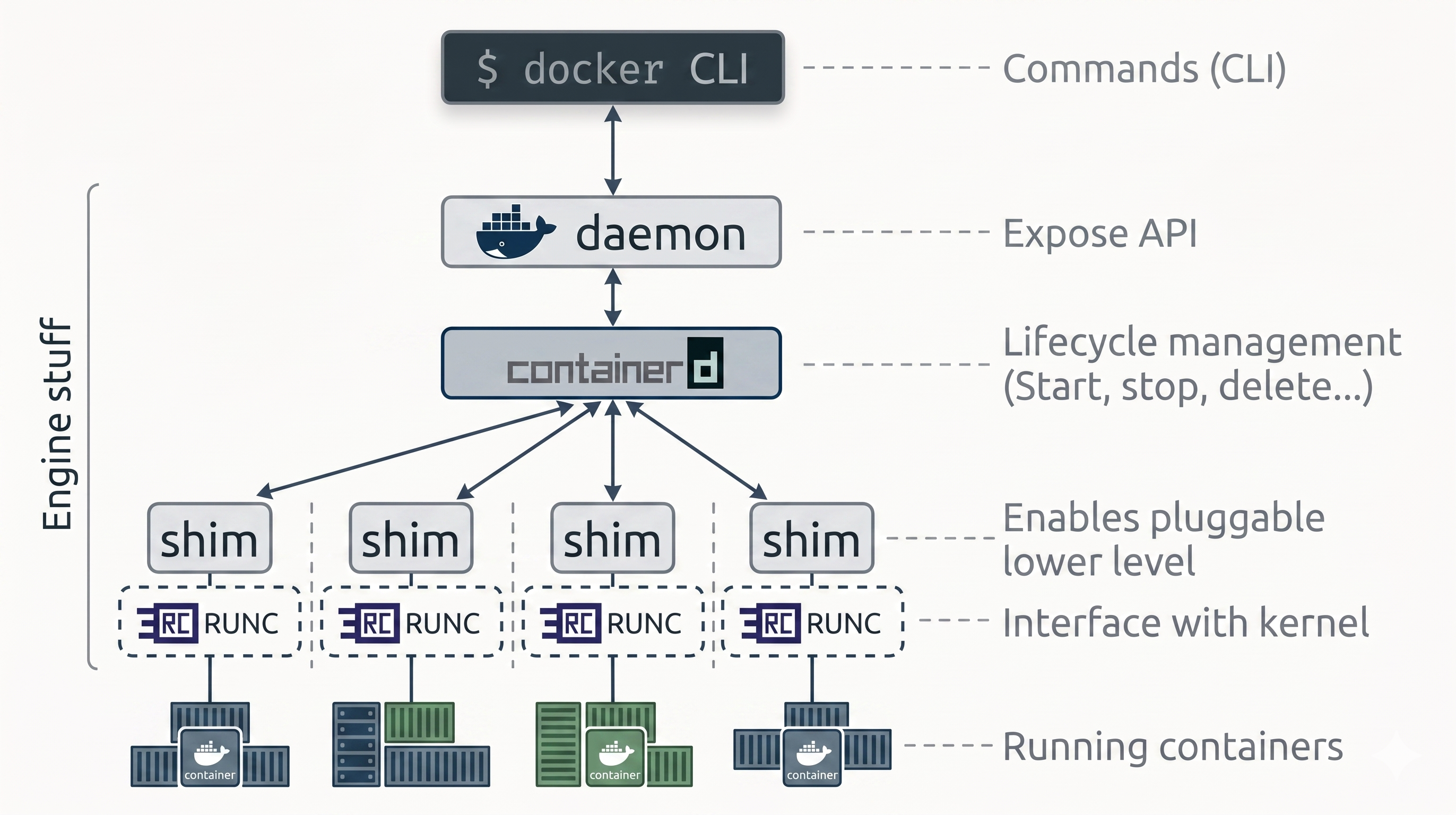
The Engine is highly modular: built from many small, specialized components drawn from the OCI, the CNCF, and the Moby project - including the API, image builder, high-level runtime, low-level runtime, and shims.
The delegation chain at a glance:
Docker CLI → dockerd → containerd → shim → runc → container processFrom Monolith to Modular
Section titled “From Monolith to Modular”When Docker launched, the Engine was two things: a monolithic daemon (handling the API, image builds, container execution, volumes, and networking all in one process) and LXC (which interfaced with the Linux kernel to build cgroups and namespaces).
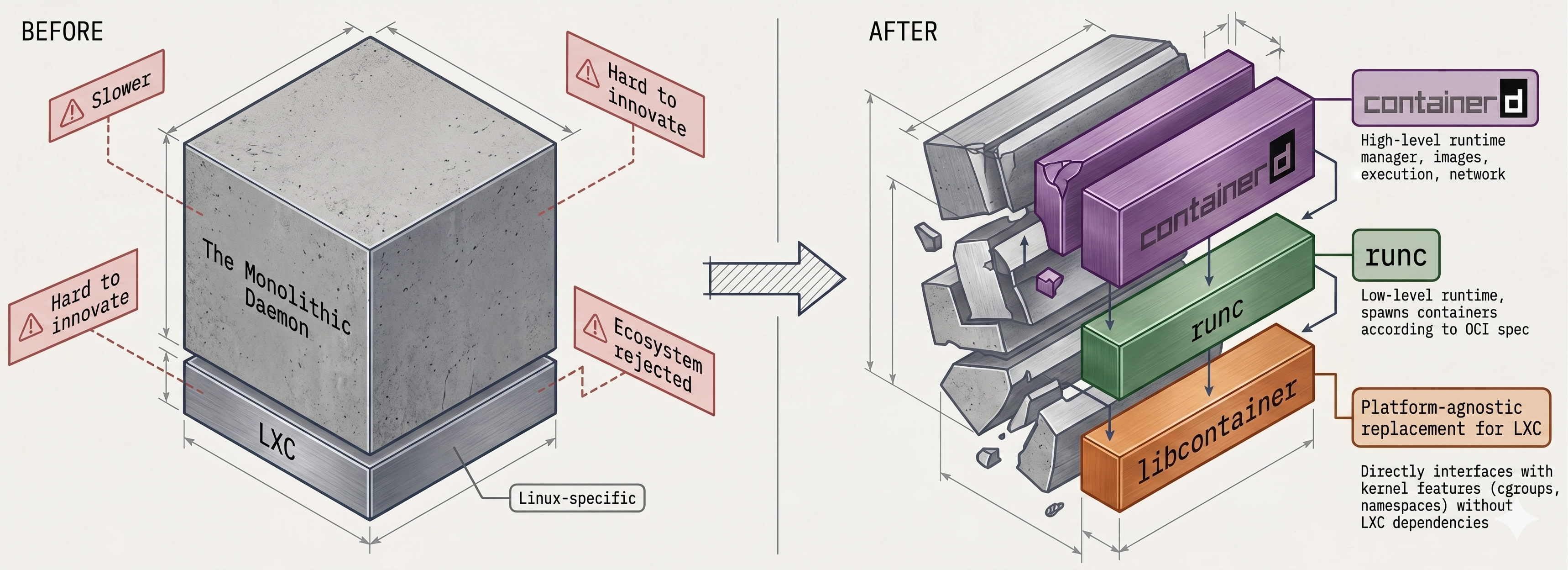
This created two compounding problems:
- LXC was Linux-only - a hard blocker for Docker’s cross-platform goals
- The monolithic daemon became slow and hard to evolve - not what the broader ecosystem wanted
Docker decomposed the Engine over several years:
| Phase | What changed |
|---|---|
| LXC → libcontainer | Docker built its own platform-agnostic kernel interface, gaining direct control over namespaces and cgroups without depending on LXC |
| Daemon split | Container execution extracted into containerd (high-level) and runc (low-level) |
| Image management | From Docker Desktop 4.27.0, image management moved out of the daemon into containerd |
| Today | The daemon is an API gateway - it coordinates specialized tools but no longer does the work itself |
The Docker Daemon (dockerd)
Section titled “The Docker Daemon (dockerd)”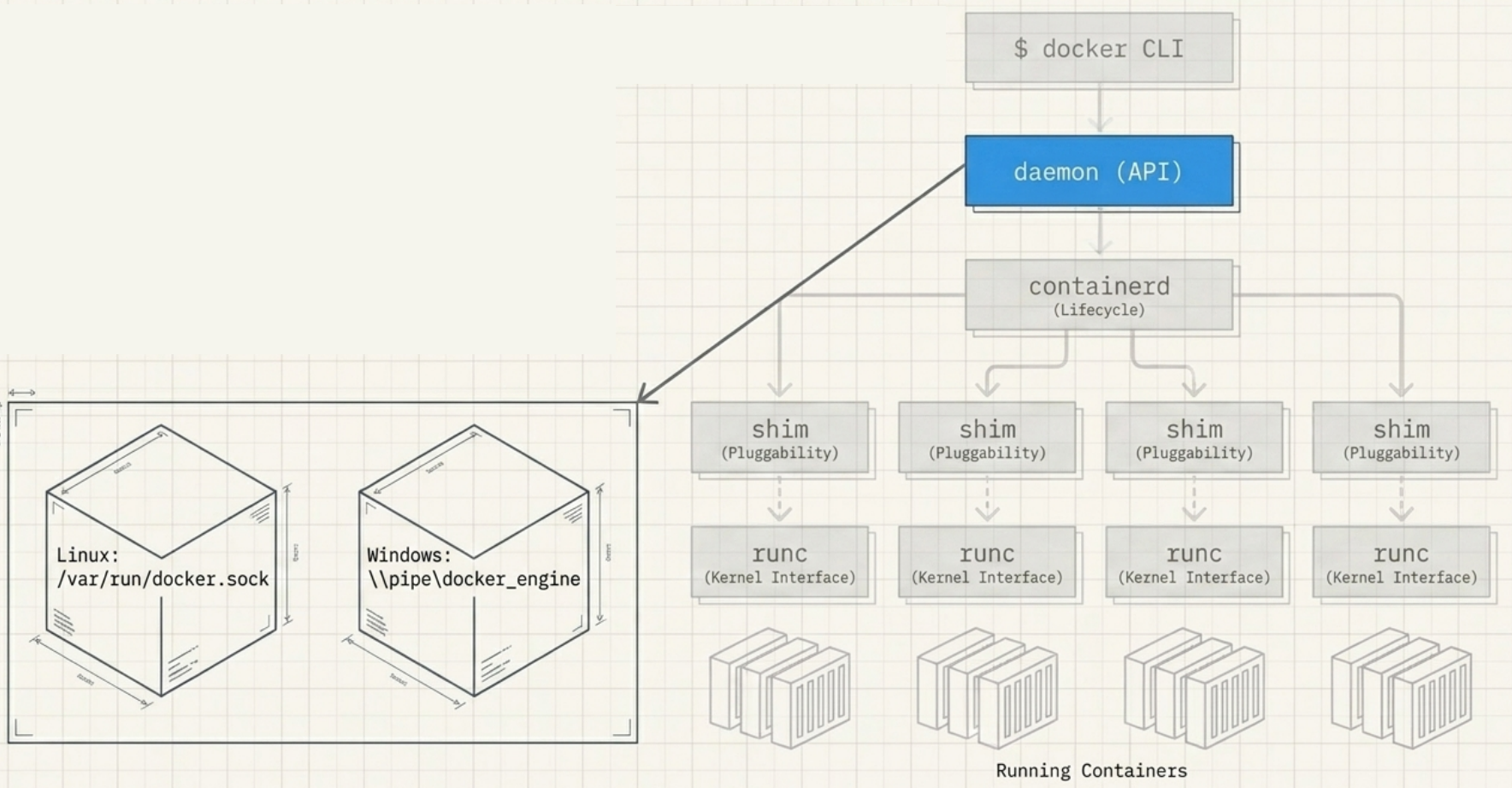
- Runs on the host and exposes the Docker REST API
- Receives API calls from the CLI or any REST client
- Interprets requests and delegates to
containerdvia gRPC - Can join a cluster of other daemons for orchestration (Docker Swarm)
- Linux binary:
/usr/bin/dockerd
# Check daemon statussystemctl status docker
# Run a container on a remote daemondocker -H 10.123.2.1:2375 run nginx
containerd - The High-Level Runtime
Section titled “containerd - The High-Level Runtime”containerd is a high-level container runtime created by Docker Inc. to pull lifecycle management out of the monolithic daemon. It was donated to the CNCF and is now a graduated CNCF project used in production at scale.
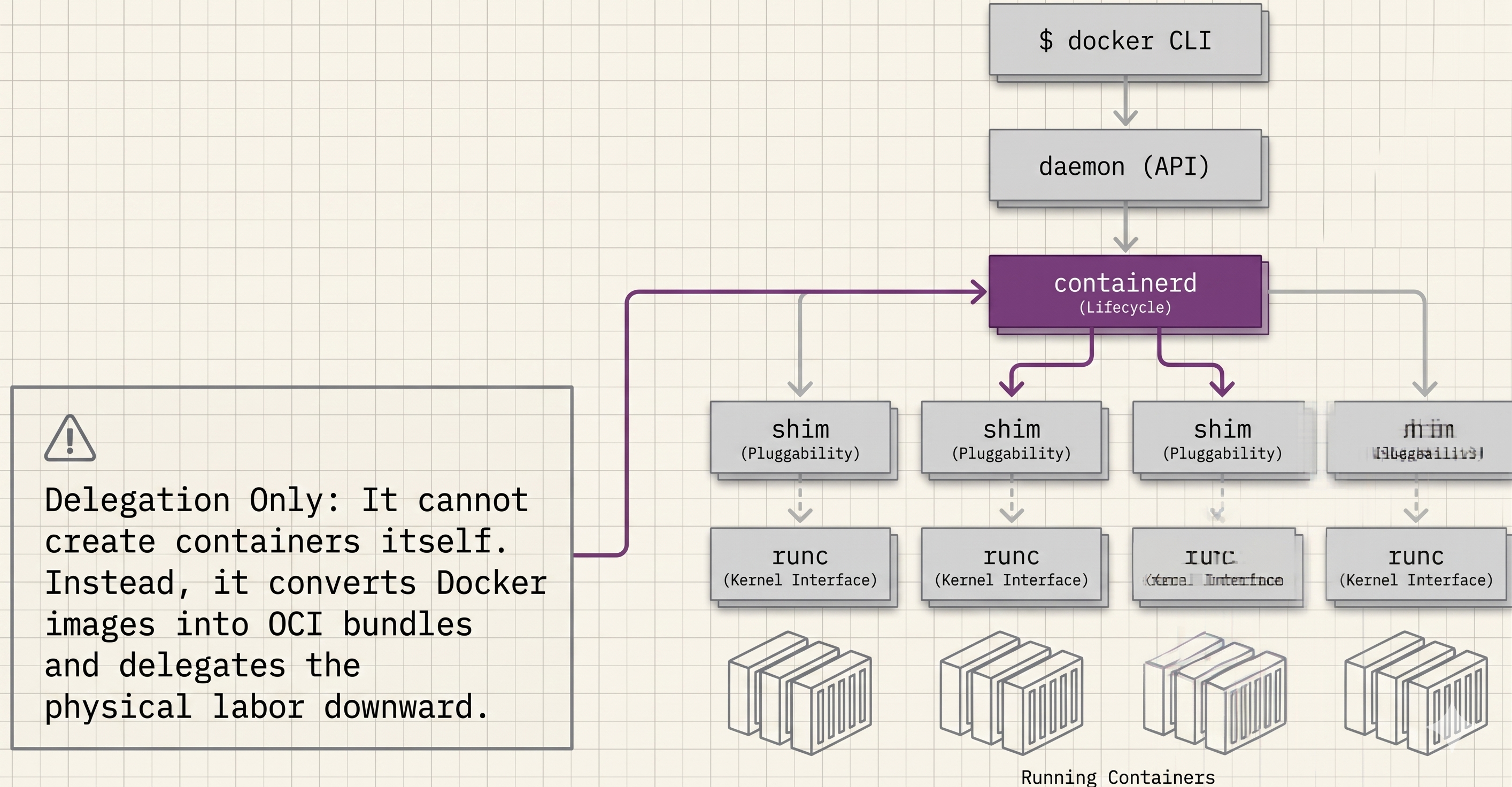
What containerd does:
- Manages container lifecycle events: start, stop, delete
- Manages images, networks, and volumes (its scope has expanded over time)
- Receives instructions from
dockerdover a gRPC API - Converts Docker images into OCI-compliant bundles for
runc - Forks and supervises shims and
runcprocesses for each container
What containerd does not do:
- It cannot create containers directly - that is
runc’s job
Modularity: Kubernetes embeds containerd directly, using only the features it needs (image push/pull, lifecycle). This is why OCI images built with Docker run on Kubernetes unchanged - the runtime is the same, just without dockerd in the chain.
Linux binary: /usr/bin/containerd
# containerd has its own CLI (ctr) for low-level inspection:ctr containers listrunc - The Low-Level Runtime
Section titled “runc - The Low-Level Runtime”runc (pronounced “run-see”, always lowercase) is the OCI runtime-spec reference implementation. Docker contributed its libcontainer codebase to the OCI as the seed for runc.
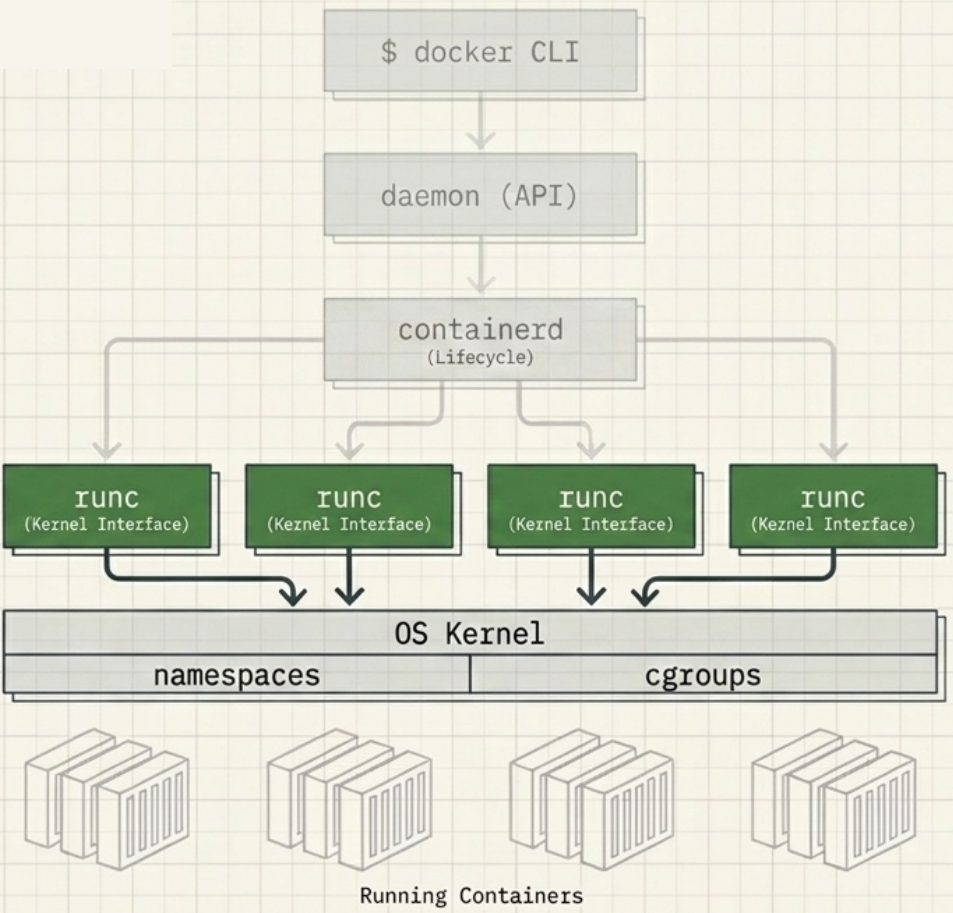
What runc does:
- Receives an OCI-compliant bundle from
containerd - Interfaces directly with the host OS kernel to construct namespaces and cgroups
- Creates the container process as a child of runc
- Exits immediately after the container starts - it is not a long-running process
What runc does not do:
- It does not manage lifecycle beyond creation
- It does not keep streams open or report status - that is the shim’s job
Pluggability: Because the OCI layer is pluggable via shims, runc can be swapped for crun, gVisor (runsc), or kata-containers when a workload needs a different isolation model (e.g., hardware-level isolation or WebAssembly).
Linux binary: /usr/bin/runc
Shims - The Glue Layer
Section titled “Shims - The Glue Layer”For every container started, containerd forks a shim alongside runc. The shim is a small, lightweight process that sits between containerd and the running container.
The three jobs of a shim:
| Benefit | How the shim delivers it |
|---|---|
| Daemonless containers | Decouples running containers from the daemon - dockerd can restart without killing any containers |
| Process management | After runc exits, the shim holds STDIN/STDOUT open and reports container status to containerd |
| Pluggable OCI layer | containerd talks to the shim interface, not runc directly - making the low-level runtime swappable |
Linux binary: /usr/bin/containerd-shim-runc-v2
Container Lifecycle: Step by Step
Section titled “Container Lifecycle: Step by Step”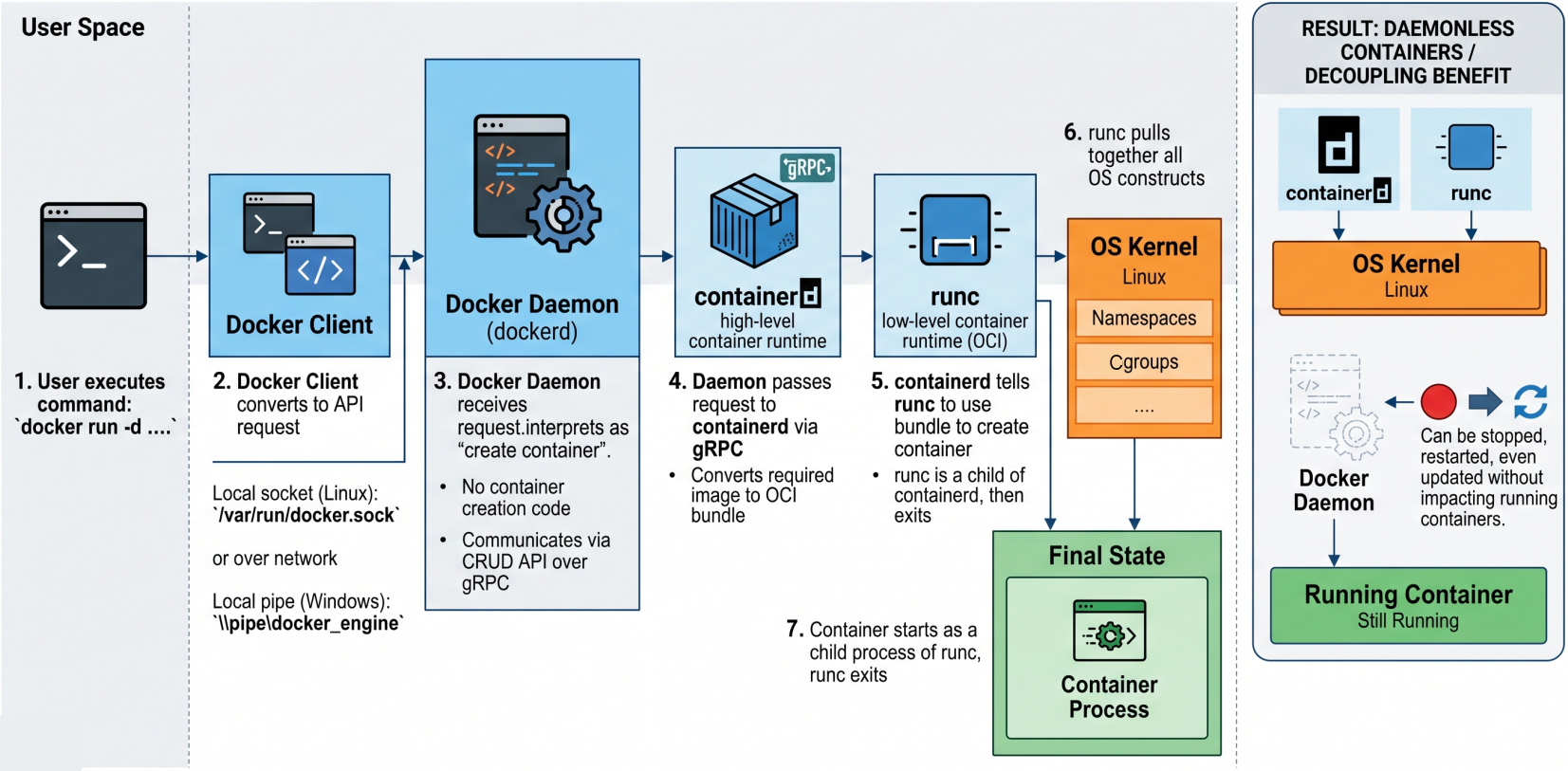
What happens internally when you run docker run -d nginx:
Step 1 - CLI to Daemon
The CLI converts the command into a REST API request and sends it to dockerd over TCP or the local socket (/var/run/docker.sock on Linux, \\.\pipe\docker_engine on Windows).
Step 2 - Daemon to containerd
dockerd receives the request, interprets it as “create a container”, and passes the instruction to containerd over gRPC. The daemon no longer contains container-creation code.
Step 3 - containerd prepares the OCI bundle
containerd cannot create the container directly. It takes the nginx image and converts it into an OCI-compliant bundle - a directory containing the root filesystem and a config.json describing the container configuration.
Step 4 - containerd forks shim + runc
containerd forks two processes: a shim and a runc instance. runc reads the OCI bundle and calls into the host kernel to construct the namespaces and cgroups.
Step 5 - Container starts, runc exits
The container process starts as a child of runc. The moment it is successfully running, runc exits. This is intentional - runc is only needed for the creation phase.
Step 6 - Shim takes over
The shim becomes the container’s new parent process. It keeps STDIN/STDOUT streams open, reports container status back to containerd, and allows dockerd to restart without disrupting the running container.
OCI Compliance
Section titled “OCI Compliance”All three OCI specs are implemented end-to-end by the Engine:
| OCI Spec | Component | What it means in practice |
|---|---|---|
| runtime-spec | runc is the official reference implementation | Any OCI-compliant runtime can replace runc |
| image-spec | Docker images are OCI images | ”Docker image”, “container image”, and “OCI image” are interchangeable |
| distribution-spec | Docker Hub and all modern registries are OCI registries | docker pull ghcr.io/org/image works identically to pulling from Docker Hub |
How Docker Containerizes Applications
Section titled “How Docker Containerizes Applications”Docker uses Linux namespaces to isolate each container’s view of the system, and cgroups to limit resource consumption. No hypervisor is involved.
Linux Binaries
Section titled “Linux Binaries”The modular architecture maps directly to separate binaries on the host. Verify them with ps or by checking the paths directly:
| Binary | Role | Present |
|---|---|---|
/usr/bin/dockerd | Docker daemon - serves the Docker API | Always (when Docker is running) |
/usr/bin/containerd | High-level runtime - lifecycle management | Always (when Docker is running) |
/usr/bin/containerd-shim-runc-v2 | Shim - parent process for running containers | Only while containers are running |
/usr/bin/runc | Low-level OCI runtime - interfaces with the host kernel | Only during container creation |