
Test Automation & Artifacts
Test automation is the engine that makes Continuous Delivery possible. It removes human bottlenecks, increases test coverage, and provides the fast feedback loop developers rely on to ship code with confidence. Without comprehensive automated testing, a pipeline cannot safely graduate code to production.
This page covers the design patterns used to structure robust test suites, and how the artifacts generated by those tests (and the build process) flow through the pipeline.
Test Automation Patterns
Section titled “Test Automation Patterns”Test suites, especially complex end-to-end and integration suites, are software projects in their own right. The following design patterns help maintain readability, reliability, and speed in test automation:
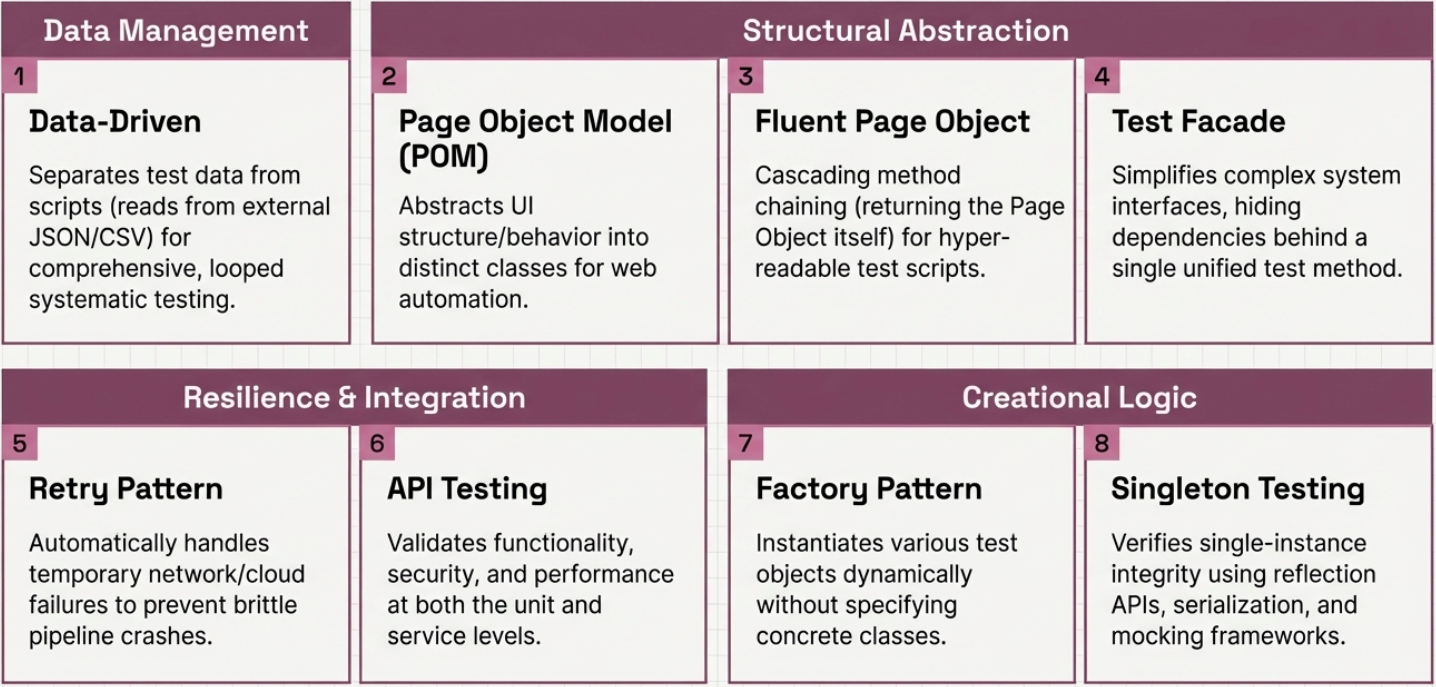
| Pattern | How it works | Primary benefit |
|---|---|---|
| Data-Driven Testing | Separates test data from test logic. A single test script reads inputs and expected outputs from an external source (CSV, JSON, DB) and loops through the rows. | Maximizes coverage without duplicating script code. |
| Retry Testing | Automatically retries a failed operation or test step before marking the overall test as failed. | Improves stability against transient network or environment failures. |
| Page Object Model (POM) | Models the structure of web pages as object-oriented classes. UI locators (XPath, CSS) and interactions are stored in the class, completely separated from the test logic. | Centralizes maintenance. If a UI button moves, you update the Page Object once, not fifty tests. |
| Fluent Page Object | Enhances the standard POM by using a “Fluent Interface” - methods return the object itself (this), allowing for cascaded method chaining (page.login().navigate().click()). | Makes test scripts highly readable and self-documenting. |
| Facade Pattern | Provides a single simplified interface class that manages complex interactions with multiple underlying components or APIs during test setup. | Reduces coupling and hides system complexity from the test writer. |
| Factory Method | Defers the instantiation of test data objects to subclasses, dynamically generating the objects needed for specific test scenarios based on runtime rules. | Flexible, reusable test data generation. |
| Singleton Testing | Ensures a class only ever has one instance (often by using reflection APIs to access private constructors) and verifying behavior via mocking (e.g., Mockito). | Validates strict architectural constraints. |
| API Testing | Tests API endpoints in isolation or within integrated service flows. Unit tests cover individual functions; service tests validate microservice interactions. Maps to the base of the Test Pyramid (unit) and the Test Diamond (integration-heavy, ideal for microservices). | Ensures APIs meet functional, performance, and security standards before integration. |
Artifacts in the CI/CD Pipeline
Section titled “Artifacts in the CI/CD Pipeline”Artifacts are the tangible byproducts generated during the software development lifecycle. These include compiled binaries, container images, test reports, and deployment manifests.
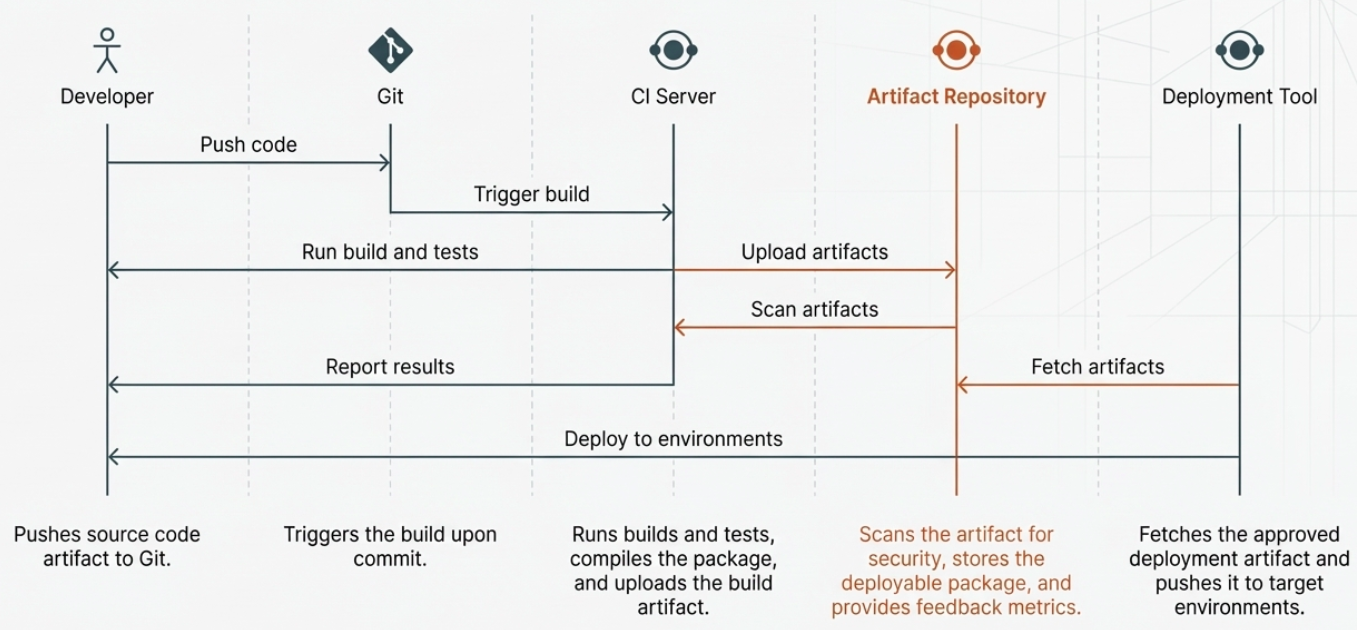
In the context of CI/CD, artifacts serve as the immutable hand-off points between pipeline stages.
| Pipeline Stage | Artifact Type | Examples | Use Case |
|---|---|---|---|
| Integration | Build Artifacts | .jar, .zip, Docker images, npm packages | The compiled code ready for validation. |
| Testing | Test Artifacts | XML test reports, code coverage metrics, generated test data | Prove the build artifact is functional and secure. |
| Delivery | Deployment Artifacts | Kubernetes manifests, Terraform state, deployment scripts | The instructions and configurations needed to install the build. |
| Feedback | Log / Metric Artifacts | Application logs, APM traces, DORA score outputs | Insights used to monitor performance and optimize future cycles. |
Artifact Repositories
Section titled “Artifact Repositories”Because artifacts are the source of truth for what is running in production, they must be stored securely. Artifact Repositories (like Nexus, Artifactory, or GitHub Packages) act as specialized databases for these files.
Once the CI server successfully builds an artifact, it uploads it to the repository. The CD tool then pulls the exact same version-controlled artifact from the repository to deploy it.
Levels of Pipeline Automation
Section titled “Levels of Pipeline Automation”The depth of a team’s test automation directly determines how far they can push deployment automation. The three levels below represent the maturity progression:
| Level | What’s automated | Human involvement |
|---|---|---|
| Basic CI/CD | Build + test stages on every commit | All deployments are manually triggered |
| Continuous Delivery | Build + test + promote to staging | One manual approval gate before production |
| Continuous Deployment | Everything, including production release | None - tests are the gate |
Achieving Continuous Deployment requires near-total confidence in the test suite. If the tests pass, the code ships. Bugs that reach production are treated as a missing test, not a failed manual QA step.