
TLS/SSL and HTTPS
Why TLS Exists
Section titled “Why TLS Exists”HTTP sends everything in plaintext. Anyone between you and the server (ISP, a coffee shop router, a MITM attacker) can read or modify it. TLS (Transport Layer Security) wraps HTTP in an encrypted tunnel - the result is HTTPS.
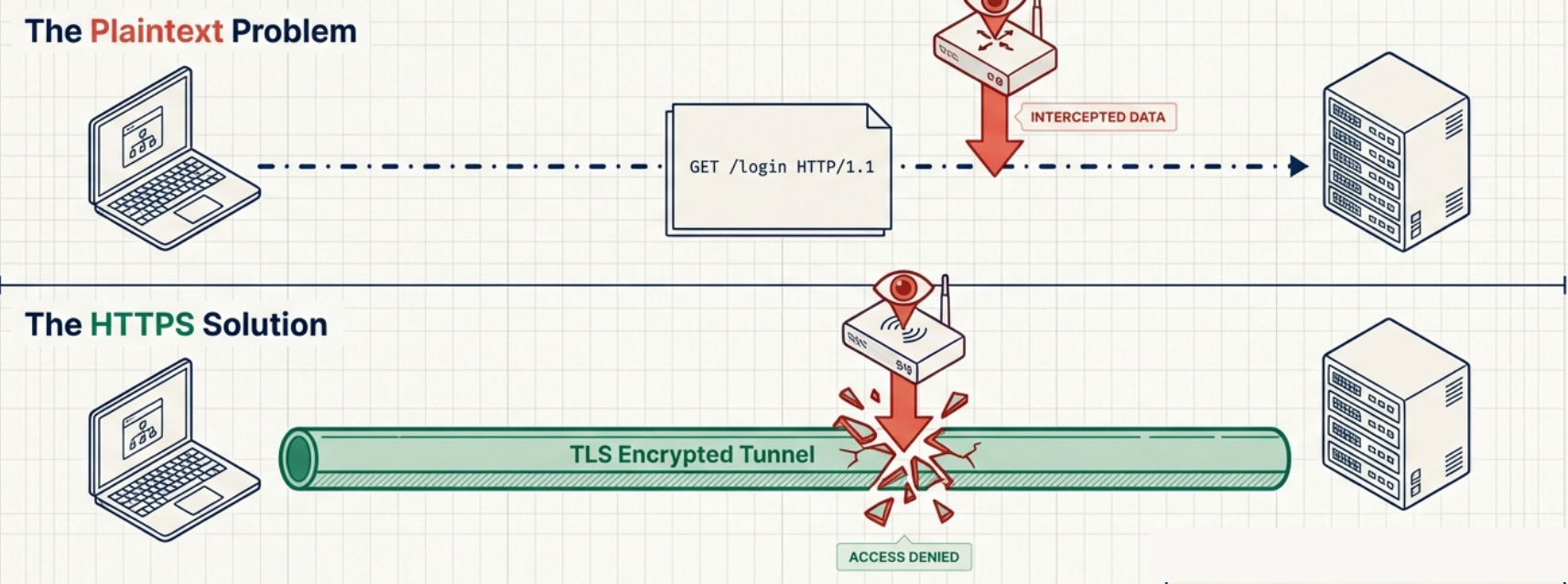
TLS operates at the session/presentation layer (between TCP and the application). It provides:
- Confidentiality - traffic is encrypted, eavesdroppers can’t read it
- Integrity - data can’t be tampered with undetected (HMAC)
- Authentication - you’re talking to the real server, not an impersonator (certificates)
The TLS Handshake (TLS 1.2)
Section titled “The TLS Handshake (TLS 1.2)”Before any encrypted data flows, the client and server negotiate which algorithms to use and exchange keys:
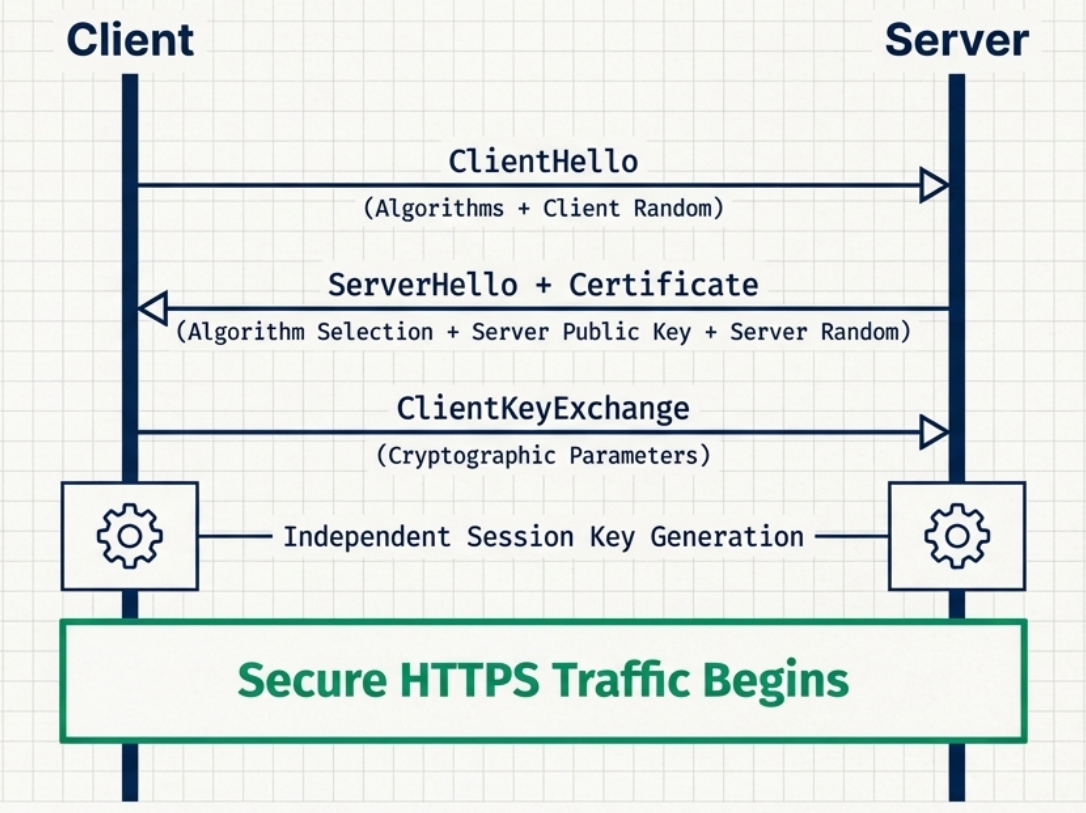
Client Server │ │ │──── ClientHello ─────────────────────────▶│ │ (TLS version, cipher suites, │ │ client random, SNI) │ │ │ │◀─── ServerHello ─────────────────────────│ │ (chosen cipher suite, │ │ server random, session ID) │ │ │ │◀─── Certificate ─────────────────────────│ │ (server's X.509 cert) │ │ │ │◀─── ServerHelloDone ─────────────────────│ │ │ │ [Client verifies certificate] │ │ │ │──── ClientKeyExchange ───────────────────▶│ │ (pre-master secret, encrypted │ │ with server's public key) │ │ │ │ [Both sides derive session keys │ │ from pre-master + both randoms] │ │ │ │──── ChangeCipherSpec ───────────────────▶│ │──── Finished (encrypted) ───────────────▶│ │◀─── ChangeCipherSpec ────────────────────│ │◀─── Finished (encrypted) ────────────────│ │ │ │═══════ Encrypted Application Data ════════│Key insight: The pre-master secret is never transmitted directly. Both sides independently derive the same session key using the same inputs (pre-master secret + both random values). This is why intercepting the encrypted key exchange doesn’t give you the session key.
TLS 1.3 - The Better Version
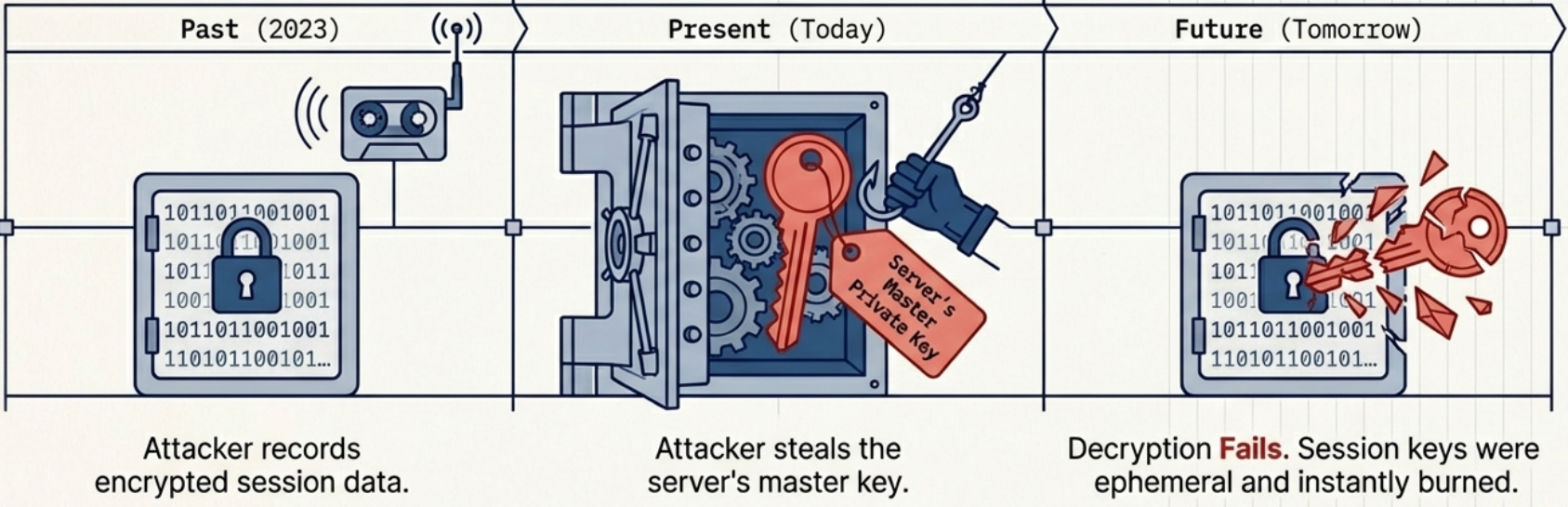
Section titled “TLS 1.3 - The Better Version”TLS 1.3 (2018) makes the handshake faster and removes weak algorithms:
| Aspect | TLS 1.2 | TLS 1.3 |
|---|---|---|
| Handshake round trips | 2 round trips | 1 round trip (0-RTT possible for repeat visits) |
| Key exchange | RSA or DHE | Only ECDHE (ephemeral, forward secrecy mandatory) |
| Cipher suites | 37 options (many weak) | 5 options (all strong) |
| Forward secrecy | Optional | Required |
| Replay attacks | Not addressed | 0-RTT has limited replay protection |
| Removed | N/A | RC4, DES, 3DES, MD5, SHA-1, RSA key exchange, static DH |
Certificates and the Chain of Trust
Section titled “Certificates and the Chain of Trust”A TLS certificate is an X.509 document that:
- Contains the server’s public key
- Is signed by a Certificate Authority (CA) that vouches for the server’s identity
- Contains the domain name(s) it’s valid for (Subject Alternative Names)
- Has an expiry date
The Chain of Trust
Section titled “The Chain of Trust”Root CA (self-signed) └── Intermediate CA (signed by Root CA) └── Server Certificate (signed by Intermediate CA) └── Your website's public keyBrowsers ship with a list of trusted Root CAs (Certificate Store). When you visit HTTPS:
- Server sends its certificate + intermediate CA’s certificate
- Browser walks the chain:
Server cert → Intermediate CA → Root CA - If the chain terminates at a trusted Root CA and the domain matches → ✅ trusted
Certificate Fields
Section titled “Certificate Fields”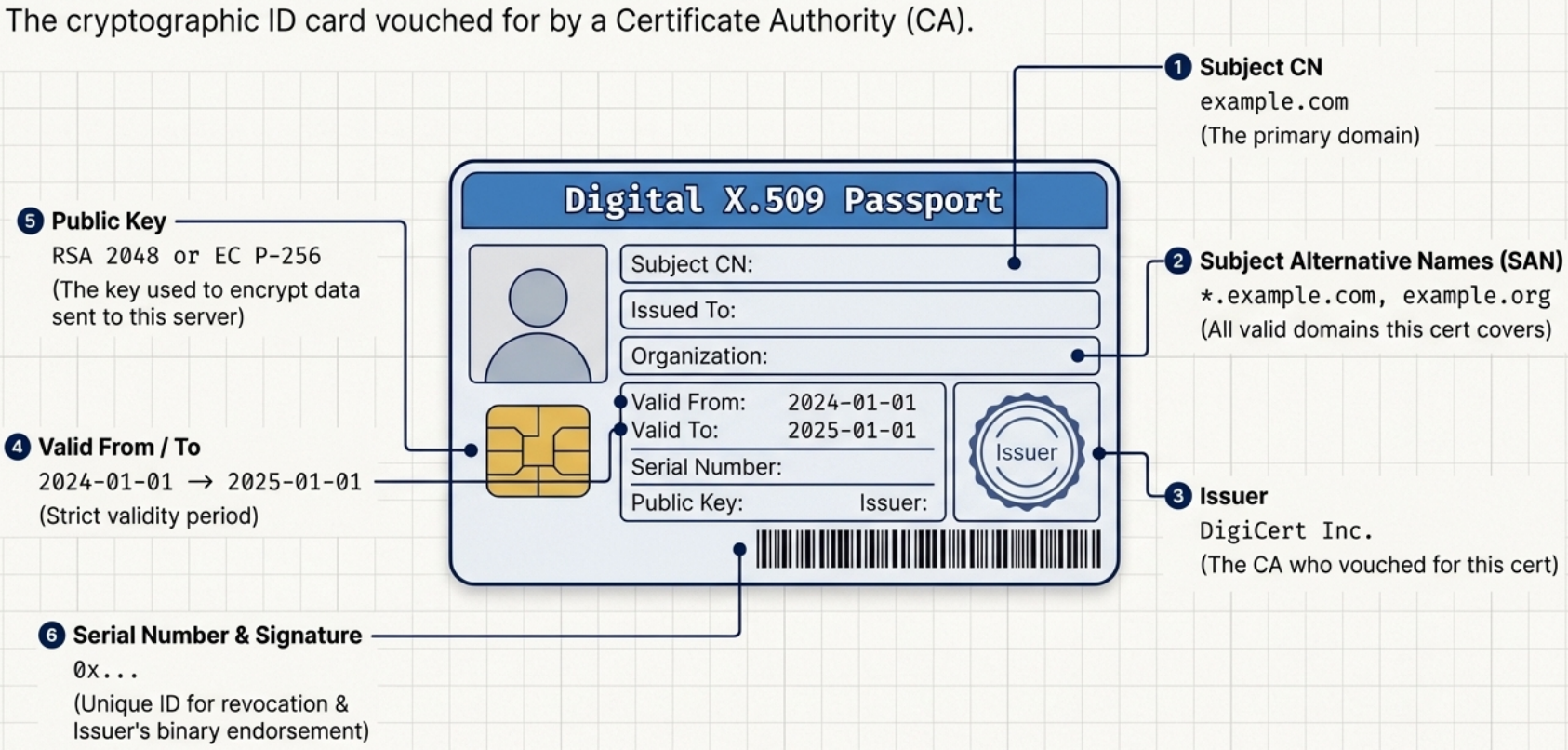
| Field | Example | Purpose |
|---|---|---|
| Subject CN | example.com | Primary domain |
| Subject Alternative Names | *.example.com, example.org | All valid domains |
| Issuer | DigiCert Inc. | Who signed this cert |
| Valid From / To | 2024-01-01 → 2025-01-01 | Validity period |
| Public Key | RSA 2048 or EC P-256 | Encrypt to this key |
| Signature | (binary) | Issuer’s endorsement |
| Serial Number | 0x... | Unique ID (used in revocation) |
Practical openssl Commands
Section titled “Practical openssl Commands”# Check a certificate directly from a serveropenssl s_client -connect example.com:443 -servername example.com
# Show just the certificate detailsopenssl s_client -connect example.com:443 -servername example.com 2>/dev/null \ | openssl x509 -noout -text
# Check expiry date onlyopenssl s_client -connect example.com:443 -servername example.com 2>/dev/null \ | openssl x509 -noout -dates# notBefore=Jan 1 00:00:00 2024 GMT# notAfter=Jan 1 00:00:00 2025 GMT
# Check which TLS version and cipher is negotiatedopenssl s_client -connect example.com:443 -servername example.com 2>/dev/null \ | grep -E "Protocol|Cipher"# Protocol : TLSv1.3# Cipher : TLS_AES_256_GCM_SHA384
# Read a local certificate fileopenssl x509 -in certificate.crt -text -noout
# Check if cert and private key match (fingerprints must match)openssl x509 -noout -modulus -in cert.pem | openssl md5openssl rsa -noout -modulus -in key.pem | openssl md5
# Test specific TLS versionsopenssl s_client -connect example.com:443 -tls1_2 # force TLS 1.2openssl s_client -connect example.com:443 -tls1_3 # force TLS 1.3
# Decode what a server returns (for debugging APIs)curl -v --cacert /etc/ssl/certs/ca-certificates.crt https://api.example.com/
# Skip certificate verification (ONLY for debugging, never production)curl -k https://example.comCommon TLS Errors
Section titled “Common TLS Errors”| Error | Meaning | Fix |
|---|---|---|
SSL_ERROR_RX_RECORD_TOO_LONG | Connecting to HTTP port with HTTPS | Check port (use 443 not 80) |
certificate verify failed | Cert not trusted (bad CA, expired, wrong domain) | Check cert chain and expiry |
SSL handshake failed | Protocol mismatch (TLS version incompatible) | Check supported TLS versions |
ERR_CERT_DATE_INVALID | Certificate expired | Renew certificate |
ERR_CERT_COMMON_NAME_INVALID | Domain doesn’t match cert SAN | Check cert’s Subject Alternative Names |
NET::ERR_CERT_AUTHORITY_INVALID | Self-signed / unknown CA | Add CA to trust store |
Cipher Suites
Section titled “Cipher Suites”A cipher suite is a combination of algorithms used for:
- Key exchange (how to establish the session key)
- Authentication (how to verify identity)
- Symmetric encryption (how to encrypt the data stream)
- Message authentication (how to verify integrity)
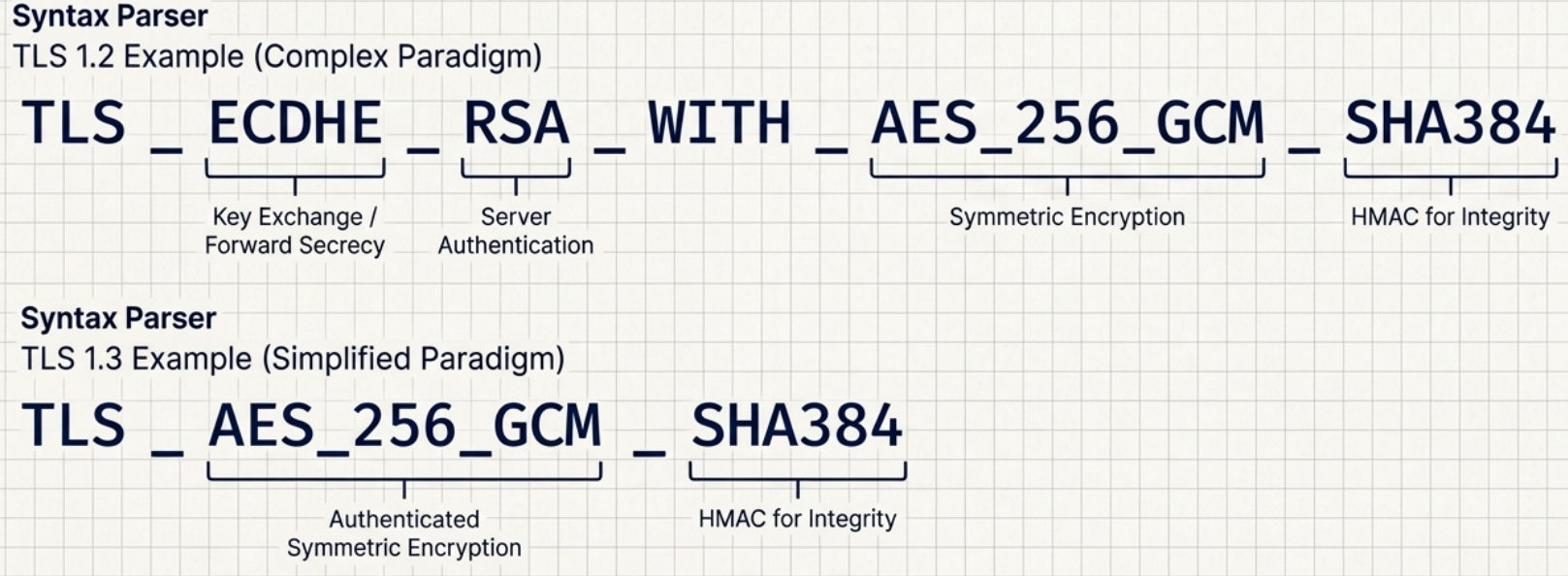
TLS 1.3 cipher suite example: TLS_AES_256_GCM_SHA384
AES_256_GCM→ AES-256 in GCM mode (authenticated encryption)SHA384→ HMAC for integrity
TLS 1.2 cipher suite example: TLS_ECDHE_RSA_WITH_AES_256_GCM_SHA384
ECDHE→ Elliptic Curve Diffie-Hellman Ephemeral (key exchange, forward secrecy)RSA→ RSA for authenticating the serverAES_256_GCM→ symmetric encryptionSHA384→ HMAC