
Docker Registry
-
A Docker Registry is a service that stores and distributes Docker images. It’s the central repository from which images are pulled and to which they are pushed.
-
Images are identified as
[registry-host/][namespace/]name[:tag] -
Default registry: Docker Hub (
docker.io). If no registry is specified in an image name, Docker Hub is assumed. -
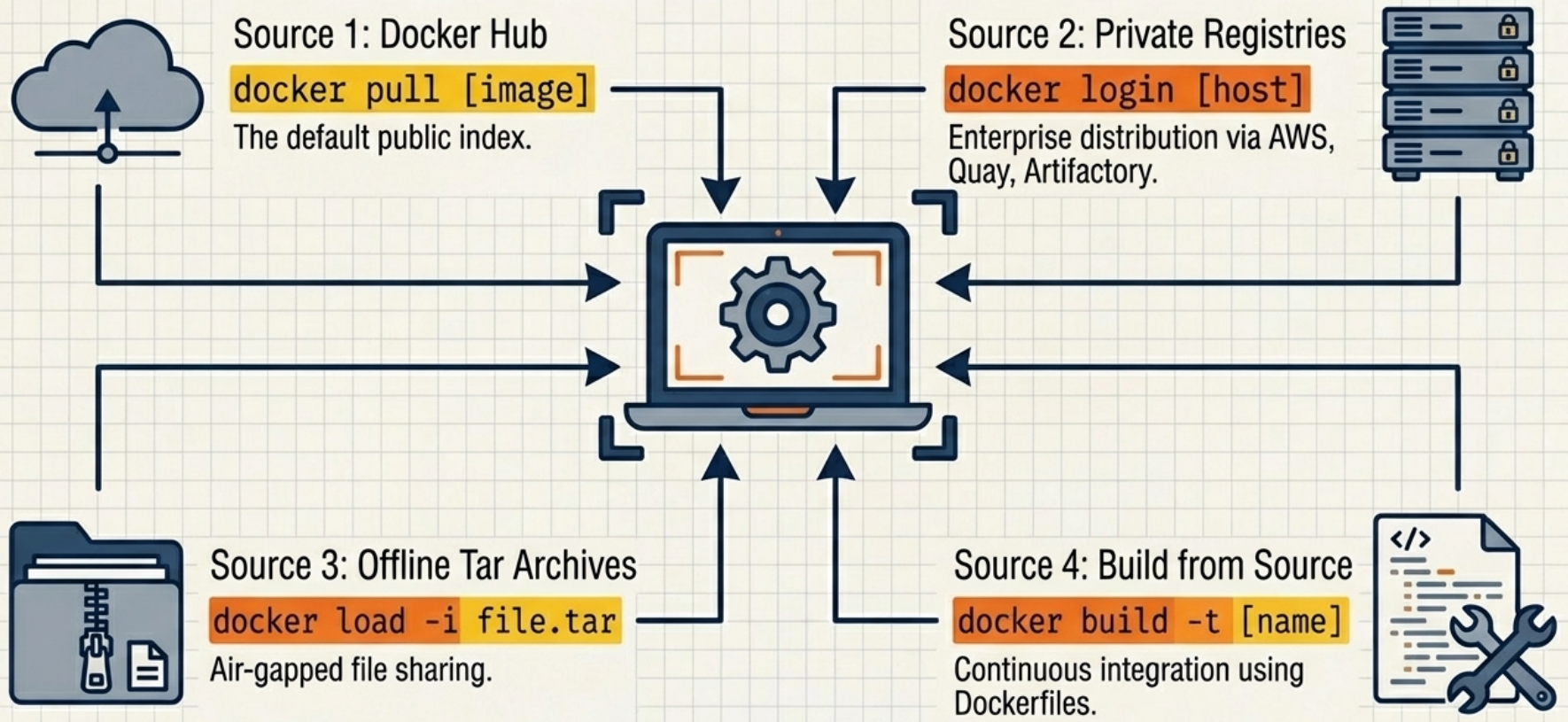
Images can reach a Docker host through four sources: pulled from Docker Hub, pulled from a private registry, loaded from an offline TAR archive, or built locally from a Dockerfile.
Choosing an Acquisition Method
Section titled “Choosing an Acquisition Method”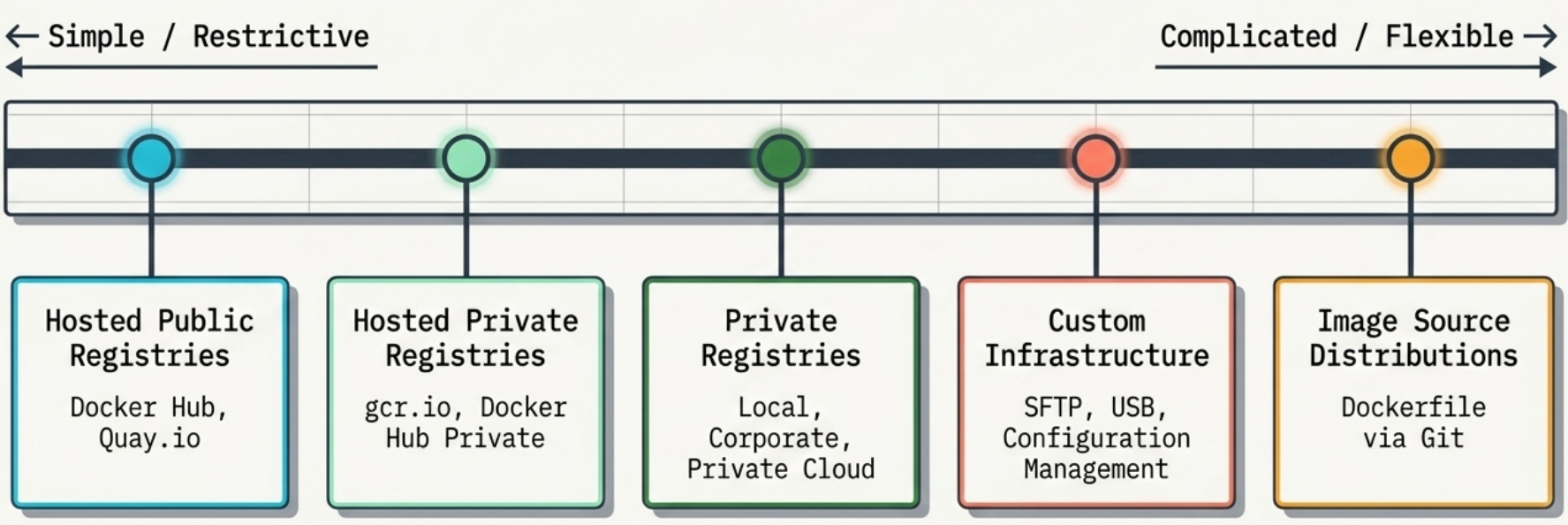
| Method | Primary Use Case | Advantage | Key Weakness |
|---|---|---|---|
| Docker Hub | Default public open-source software | Zero configuration | Third-party reliance - not suitable for proprietary code |
| Private Registries | Corporate infrastructure | Complete access control and central governance | Introduces a single point of failure |
| Tar Archives | Air-gapped or offline networks | Bypasses network requirements completely | No distribution facilities or version tracking |
| Dockerfiles | Version-controlled team projects | Extremely lightweight to share | Risk of dependency drift during delayed builds |
Decision Criteria
Section titled “Decision Criteria”When no single method is universally optimal, evaluate your requirements against these nine criteria:
| Criterion | What It Determines |
|---|---|
| Cost | Free (public hosted) to expensive (self-hosted infra). Typically the most flexible criterion - organizations trade cost for features like confidentiality. |
| Visibility | How discoverable your images are. Open-source wants maximum; internal tools and proprietary software need minimum. |
| Transport speed | Concurrent layer downloads vs. flat file shipping. Critical for just-in-time deployments; less important for local dev. |
| Access control | Protection from unauthorized access. Rigid - typically dictated by compliance or business requirements. |
| Artifact integrity | Cryptographic guarantees that what you pull is what was published. Protects against man-in-the-middle and registry compromise. |
| Artifact confidentiality | Whether image contents are protected from the provider itself. Hosted registries can never fully satisfy the most sensitive requirements. |
| Longevity control | Business risk of relying on third parties. If a hosted provider shuts down, you lose your distribution channel. |
| Availability control | Your ability to resolve outages directly. Hosted = SLA only. Self-hosted = full control and full responsibility. |
| Requisite expertise | Hosted tools need minimal knowledge. Private registries and custom pipelines require deep operational experience. |
Public vs Private Registries
Section titled “Public vs Private Registries”| Registry | Provider | Type | Notes |
|---|---|---|---|
| Docker Hub | Docker Inc | Public/Private | Default. Free tier has pull rate limits. |
| GitHub Container Registry (GHCR) | GitHub | Public/Private | Integrated with GitHub Actions. |
| Azure Container Registry (ACR) | Microsoft | Private | Native AKS/Azure integration. Geo-replication. |
| AWS ECR | Amazon | Private | Native ECS/EKS integration. IAM auth. |
| Google Artifact Registry | Private | Replaced GCR. Multi-format (Docker, npm, Maven). | |
| Harbor | CNCF | Self-hosted | Open-source. Vulnerability scanning, RBAC. |
| Nexus Repository | Sonatype | Self-hosted | Multi-format proxy and private registry. |
Working with Registries
Section titled “Working with Registries”# Login to Docker Hubdocker login# ⚠️ Credentials are stored as base64 in ~/.docker/config.json - not encrypted.# Use a credential helper (docker-credential-pass, docker-credential-osxkeychain)# to store them securely. See: docker help login
# Login to a private registrydocker login myregistry.azurecr.io
# Pull an image from Docker Hub (implicit registry)docker pull nginx:alpine
# Pull from a private registry (must be logged in)docker pull myregistry.azurecr.io/apps/my-app:v1.2
# Tag an existing local image for a registrydocker tag my-app:latest myregistry.azurecr.io/team/my-app:v1.2
# Push to registrydocker push myregistry.azurecr.io/team/my-app:v1.2
# List images in a registry (Docker Hub example via API)curl -s https://hub.docker.com/v2/repositories/library/nginx/tags | jq '.results[].name'
# Logoutdocker logout myregistry.azurecr.ioRunning a Private Registry
Section titled “Running a Private Registry”Docker distributes an official registry image you can self-host:
# Run a local registry on port 5000docker run -d \  -p 5000:5000 \  --name registry \  --restart=always \  -v registry-data:/var/lib/registry \   # persist images  registry:2
# Push an image to your local registrydocker tag my-app:latest localhost:5000/my-app:latestdocker push localhost:5000/my-app:latest
# Pull from your local registrydocker pull localhost:5000/my-app:latest
For a production private registry, add:
- TLS: Use a reverse proxy (Nginx, Caddy) with a valid certificate. Docker requires HTTPS for non-localhost registries.
- Authentication: Basic auth via htpasswd file, or proxy through an OAuth provider.
- Vulnerability scanning: Use Harbor or Trivy integration.
Infrastructure Patterns
Section titled “Infrastructure Patterns”A self-hosted registry enables distribution architectures that hosted services cannot:
- Regional caches - Deploy registry instances per geographic region to reduce pull latency for distributed teams.
- Environment-specific pools - Separate registries for dev, staging, and production enforce promotion workflows and prevent accidental cross-environment image usage.
- Corporate approval gates - Images must pass vulnerability scanning and policy checks before being promoted to a production registry.
- Team-scoped namespaces - Restrict image visibility and write access at the team level, invisible to the broader organization.
- Mirroring external dependencies - Copy images from Docker Hub into your own registry to insulate against upstream deletions, tag changes, or rate limits.
Trade-offs
Section titled “Trade-offs”| Strength | Consideration |
|---|---|
| First method truly suitable for trade secrets - you control TLS, storage encryption, and auth | Requires substantial operational expertise to run at high availability |
| No external network dependency - clients pull from internal infrastructure | Cost scales with storage volume and transaction rate, not a flat per-repo fee |
| 100% longevity and availability control | The open-source Distribution server ships with no auth - you must integrate NGINX, LDAP/Kerberos, and Redis separately |
Image Naming Deep Dive
Section titled “Image Naming Deep Dive”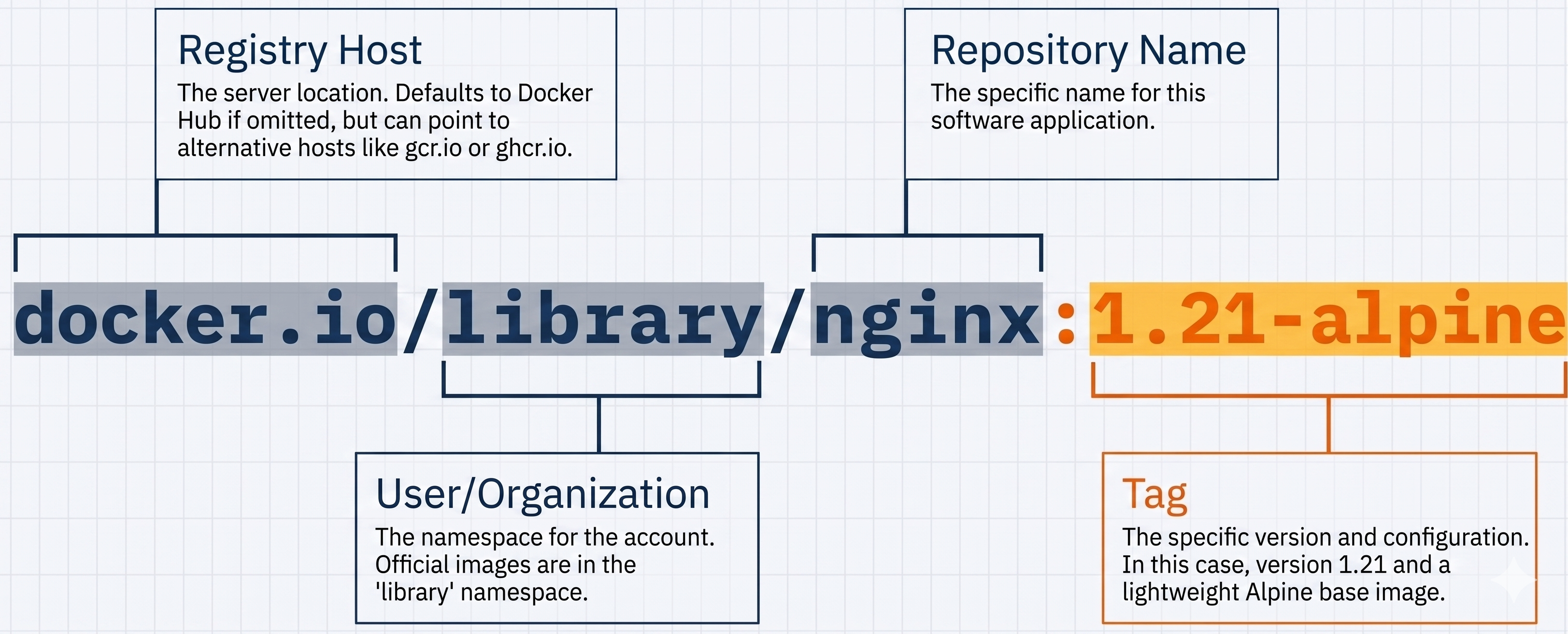
| Image Reference | Resolved To |
|---|---|
nginx | docker.io/library/nginx:latest |
nginx:alpine | docker.io/library/nginx:alpine |
myuser/myapp | docker.io/myuser/myapp:latest |
myregistry.io/myapp:v2 | myregistry.io/myapp:v2 |
myapp@sha256:abc123 | Content-addressed, exact digest |
-
Digest pinning:
sha256:...digests are immutable. Unlike tags, they cannot be overwritten. Use digests in production for reproducible deployments. -
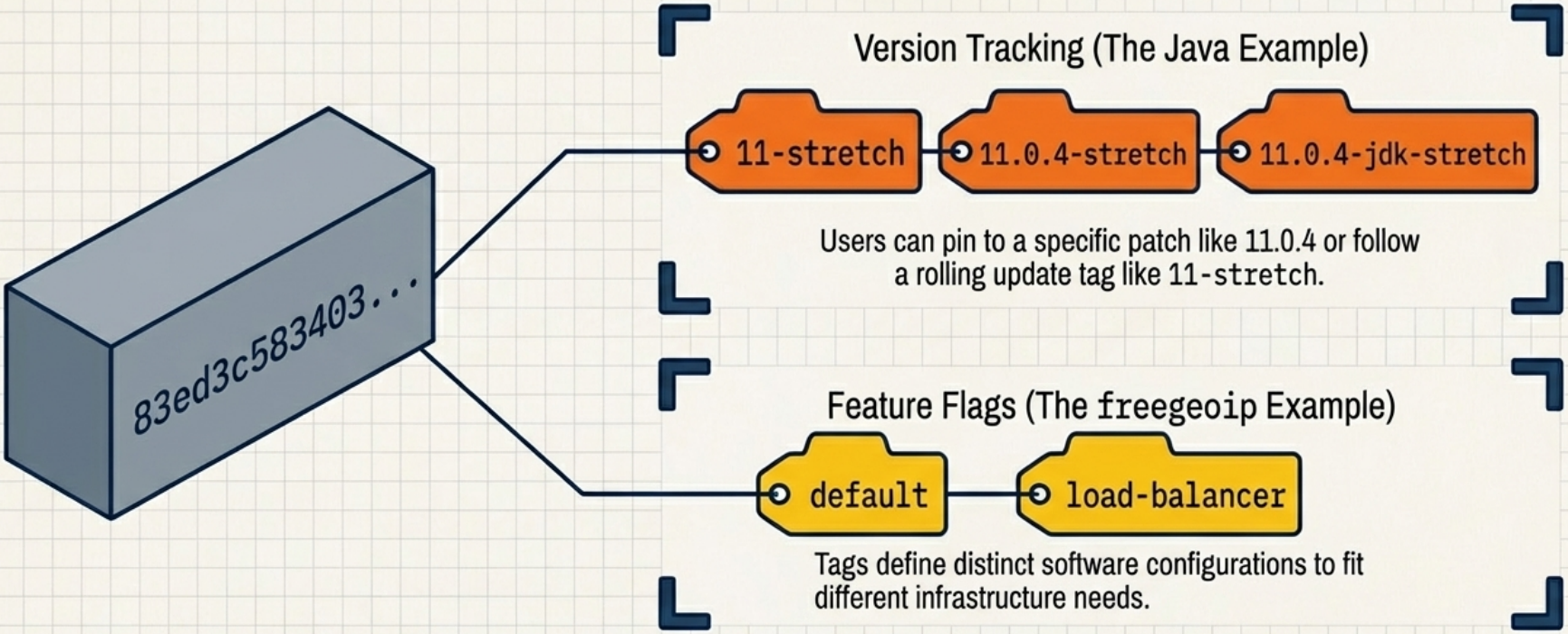
Tags are mutable. The image behind
nginx:latestchanges every time a new release is published. Never rely onlatestin CI/CD. -
Content Trust (DCT): Set
DOCKER_CONTENT_TRUST=1to enforce that only cryptographically signed images are pulled. Requires the image publisher to sign with Docker Notary (Notary v1). Useful in high-security environments, but not widely adopted outside official images.- Modern alternative (2024+): Sigstore/cosign is the CNCF-backed standard rapidly replacing DCT/Notary v1. It offers keyless signing (using OIDC identity providers like GitHub Actions), transparency logs, and better CI/CD integration. For new projects, cosign is the recommended signing approach.
Strategies for Immutable Tagging
Section titled “Strategies for Immutable Tagging”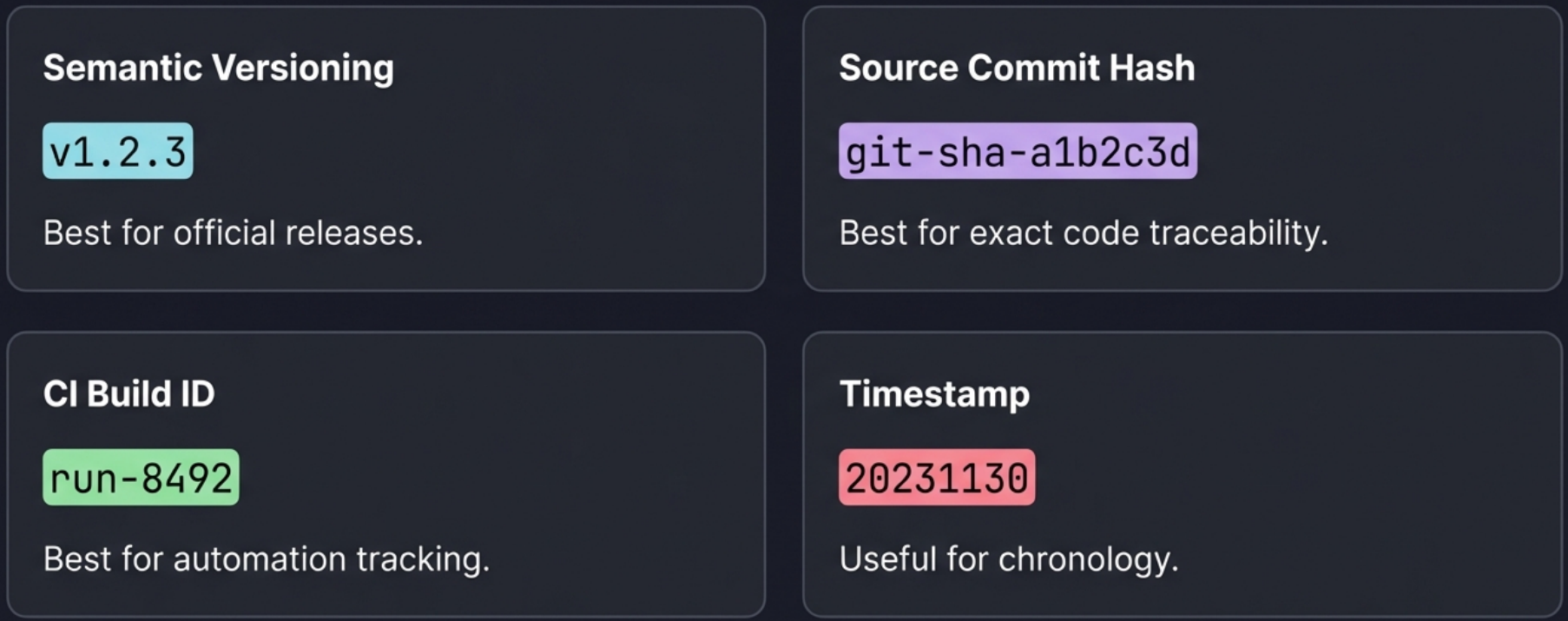
| Tag Type | Example | mutability | Use Case |
|---|---|---|---|
| Semantic | v1.2.3, v1.2, v1 | Immutable | Production releases - point to specific, pinned builds |
| Natural Sort | v1.2.3, v1.10.0, v1.20.0 | Immutable | Sort correctly lexicographically |
| Build ID | 123, 124, 125 | Immutable | Each build gets a unique ID |
| Branch/Env | master, development, staging | Mutable (dynamic) | Tracking unstable or environment-specific code |
| Latest | latest | Mutable (volatile) | Local development only - never use in production |
| SHA Digest | sha256:a1b2c3... | Immutable | Exact content address, unchangeable |
| Source commit hash | git-sha-<commit-hash> | Immutable | Each build gets a unique ID |
Docker Hub Rate Limits
Section titled “Docker Hub Rate Limits”- Unauthenticated pulls: 100 pulls per 6 hours per IP.
- Authenticated free tier: 200 pulls per 6 hours per account.
- Paid plans: unlimited.
For CI/CD pipelines that frequently pull from Docker Hub, either:
- Authenticate your CI runner with a Docker Hub account.
- Mirror Docker Hub through a private registry (pull-through cache) to avoid rate limits hitting your entire team.
# Configure a Docker Hub pull-through mirror in /etc/docker/daemon.jsoncat > /etc/docker/daemon.json <<'EOF'{  "registry-mirrors": ["https://my-dockerhub-mirror.mycompany.io"]}EOF
# Restart Docker for the change to take effectsystemctl restart docker
Offline Distribution
Section titled “Offline Distribution”When a registry is unavailable - air-gapped environments, offline CI, or transferring images between isolated networks - Docker images can be packaged into a TAR archive and loaded on another machine:
# Export one or more images to a TAR archivedocker save -o my-images.tar nginx:alpine my-app:v1.2
# Verify the archive contentstar -tf my-images.tar
# Transfer the file (scp, USB, shared volume, etc.)scp my-images.tar user@target-host:/tmp/
# Load images from the archive on the target machinedocker load -i /tmp/my-images.tar
# Confirm images are availabledocker imagesSource Distribution (Dockerfile via Git)
Section titled “Source Distribution (Dockerfile via Git)”Instead of distributing a built image, you distribute the Dockerfile and build context and let consumers build the image themselves. Standard registry commands (docker push, docker pull) are not involved - the only Docker tool used is the builder.
This is the most flexible method on the distribution spectrum since any version-control or file-sharing tool works, but it places the full build burden on the consumer.
- Producer: Packages the
Dockerfileand required source files into a repository. No registry account required. - Consumer: Clones the repository and runs
docker buildlocally. Must be familiar with Docker build tooling andDockerfilesyntax.
Example: GitHub Workflow
Section titled “Example: GitHub Workflow”# Producer - publish the sourcegit init && git add Dockerfile src/git commit -m "chore: initial Dockerfile"git remote add origin https://github.com/org/my-appgit push origin main
# Consumer - build from sourcegit clone https://github.com/org/my-appdocker build -t my-app:local ./my-appEvaluation
Section titled “Evaluation”| Criterion | Rating | Notes |
|---|---|---|
| Cost | ✅ Best | Free on public GitHub repositories |
| Visibility | ✅ Best | GitHub search and social discovery |
| Transport speed | ✅ Good | GitHub CDN + consumer pulls base layers from the nearest registry |
| Access control | ✅ Good | Private repos with collaborator management |
| Artifact integrity | ✅ Good | Git history makes tampering visible and recoverable |
| Requisite expertise | ⚠️ Good | Requires Git + Dockerfile familiarity from both parties |
| Longevity & availability | ❌ Worst | Entirely dependent on GitHub’s uptime and business continuity |
| Confidentiality | ❌ Worst | Source code is fully exposed on public repositories |