
Networking Services
DNS - Domain Name System
Section titled “DNS - Domain Name System”DNS is a globally distributed service that translates human-readable domain names (like example.com) into IP addresses (like 93.184.216.34). Without DNS, you’d need to memorize IP addresses to browse the web.
Why DNS Matters
Section titled “Why DNS Matters”- User-friendly - you type
github.cominstead of140.82.121.4 - Abstraction - an organization can move servers, change IPs, and users never notice (just update the DNS record)
- Load balancing - one domain can resolve to multiple IPs (DNS round robin), distributing traffic across servers
- Email routing - MX records tell the internet which mail server handles
@yourdomain.com - CDN delivery - DNS can return the nearest edge server based on the user’s location (GeoDNS)
- Security - DNSSEC adds cryptographic signatures to DNS responses, preventing spoofing and cache poisoning
DNS Server Types
Section titled “DNS Server Types”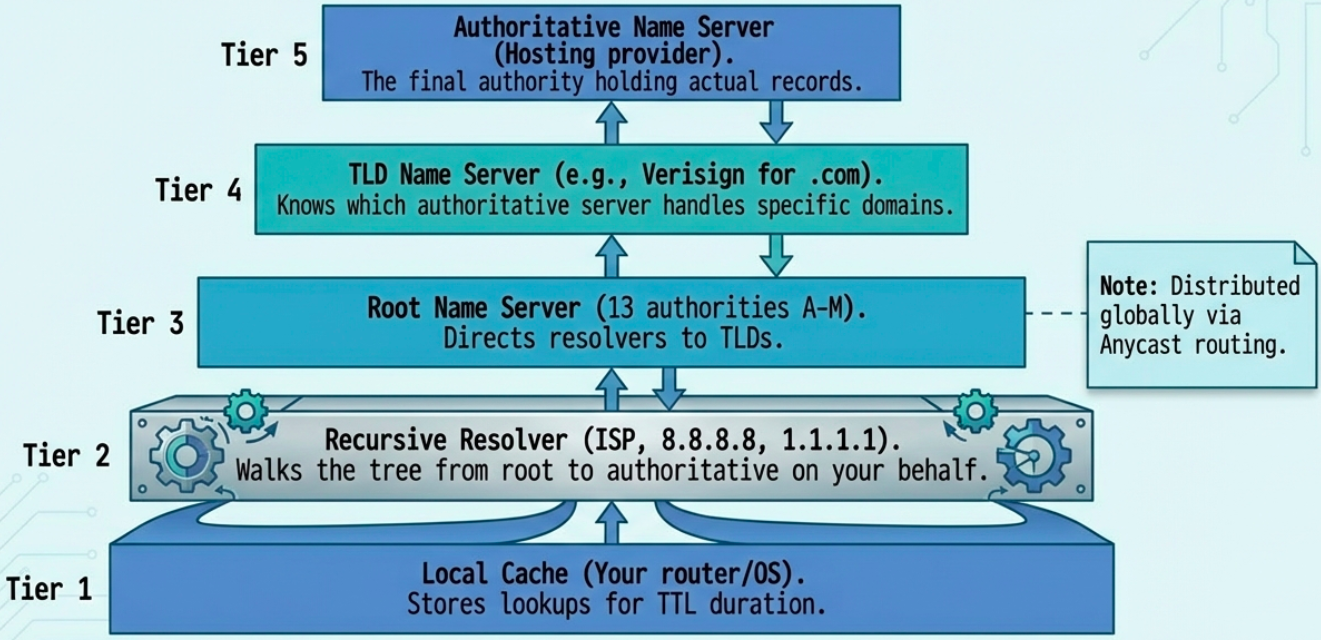
There are 5 types of DNS servers, each with a specific role in the resolution chain:
| Server Type | Role | Example |
|---|---|---|
| Caching name server | Stores previous lookups for TTL duration. Speeds up repeat queries. | Your router, local DNS cache |
| Recursive resolver | Does the full lookup on your behalf - walks the tree from root to authoritative | ISP DNS, 8.8.8.8 (Google), 1.1.1.1 (Cloudflare) |
| Root name server | First step - directs resolver to the correct TLD server. 13 root authorities (A through M), distributed globally via Anycast | a.root-servers.net through m.root-servers.net |
| TLD name server | Manages a top-level domain (.com, .org, .uk, etc.) and knows which authoritative server handles each domain in that TLD | Verisign operates .com and .net TLD servers |
| Authoritative name server | The final authority - holds the actual DNS records (A, MX, CNAME, etc.) for a specific domain | Your hosting provider’s nameservers |
The Full DNS Resolution Process
Section titled “The Full DNS Resolution Process”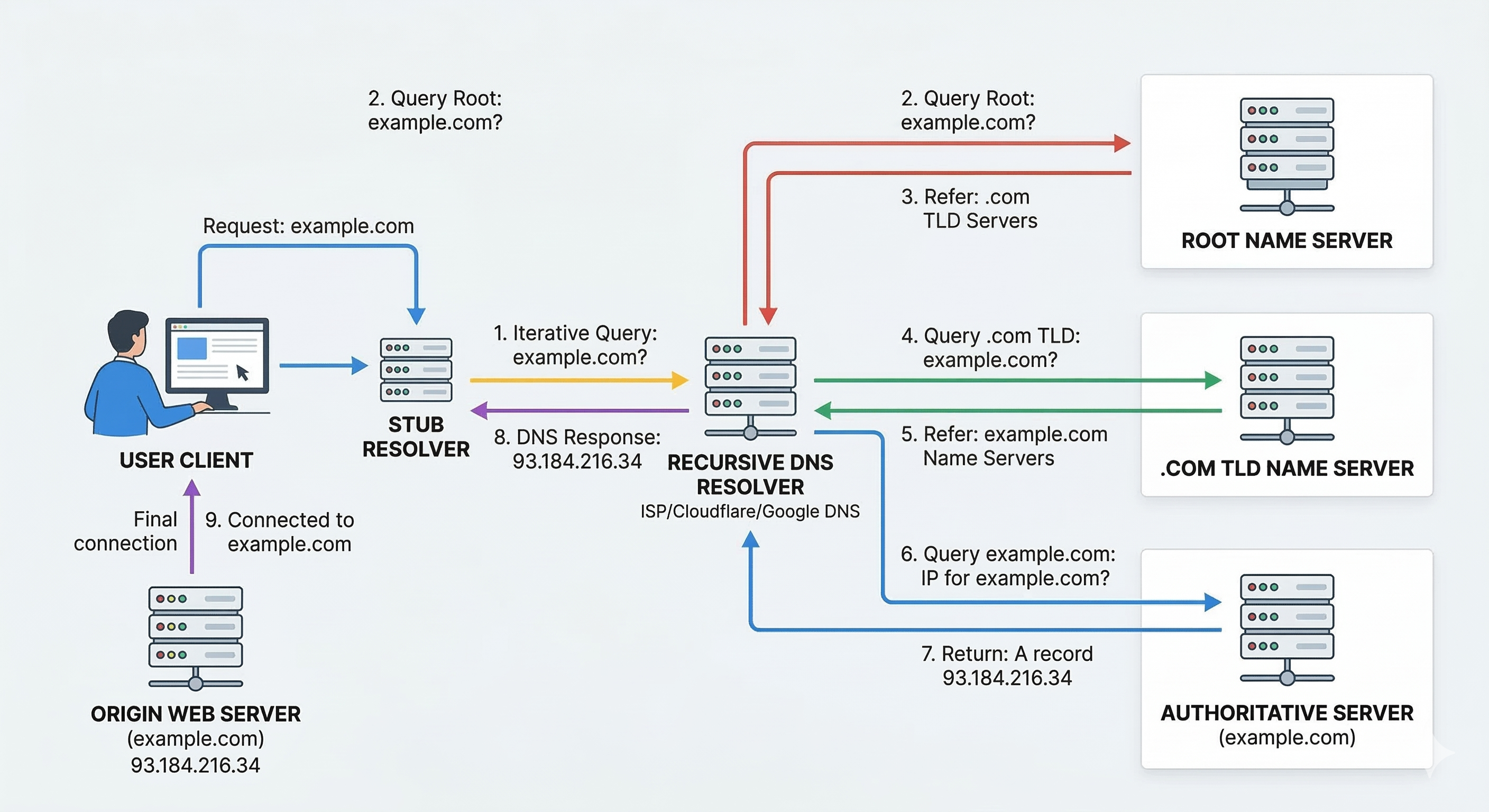
When you type www.example.com in your browser, here’s what happens:
- Local hosts file - OS checks
/etc/hosts(Linux/Mac) orC:\Windows\System32\drivers\etc\hosts(Windows) first. If there’s a match, resolution stops here. - Local DNS cache - OS checks its own cache of recent lookups
- Recursive resolver - query goes to your configured DNS resolver (usually your ISP’s, or
8.8.8.8/1.1.1.1) - Root server - resolver asks a root server “who handles
.com?” - TLD server - root directs to
.comTLD server. Resolver asks “who handlesexample.com?” - Authoritative server - TLD directs to
example.com’s authoritative nameserver. Resolver asks “what’s the IP forwww.example.com?” - IP returned - authoritative server responds with the IP address
- Caching - resolver caches the result for the record’s TTL (Time To Live) duration
- Response to client - resolver sends the IP back to your browser
TTL (Time To Live) is a value in seconds set by the domain owner. It tells resolvers how long to cache a record before re-querying. Low TTL (60-300s) = faster propagation of changes. High TTL (3600-86400s) = less DNS traffic but slower change propagation.
DNS and UDP
Section titled “DNS and UDP”DNS primarily uses UDP (port 53) instead of TCP. Why?
- A DNS query + response usually fits in a single UDP datagram - no handshake overhead needed
- No connection setup/teardown = far fewer packets. A recursive lookup via TCP requires ~44 packets minimum; via UDP, only ~8
- DNS implements its own retry logic at the application layer - if no response arrives, the resolver simply asks again. No need for TCP’s reliability guarantees
DNS Record Types
Section titled “DNS Record Types”| Record Type | Purpose | Example |
|---|---|---|
| A | Maps domain to IPv4 address | example.com -> 93.184.216.34 |
| AAAA | Maps domain to IPv6 address | example.com -> 2606:2800:220:1:... |
| CNAME | Alias - points one name to another | www.example.com -> example.com |
| MX | Mail server for the domain (with priority) | example.com -> mail.example.com (priority 10) |
| NS | Authoritative nameservers for the zone | example.com -> ns1.example.com |
| SOA | Start of Authority - zone metadata (primary NS, admin email, serial, refresh intervals) | One per zone |
| PTR | Reverse lookup - IP to domain name | 34.216.184.93.in-addr.arpa -> example.com |
| TXT | Arbitrary text - used for SPF, DKIM, domain verification | v=spf1 include:_spf.google.com ~all |
| SRV | Service location (host + port for specific services) | _sip._tcp.example.com -> sipserver.example.com:5060 |
A single domain can have multiple A records - this is DNS round robin, a basic form of load balancing where each query returns the records in a different order, distributing traffic across servers.
Anatomy of a Domain Name
Section titled “Anatomy of a Domain Name”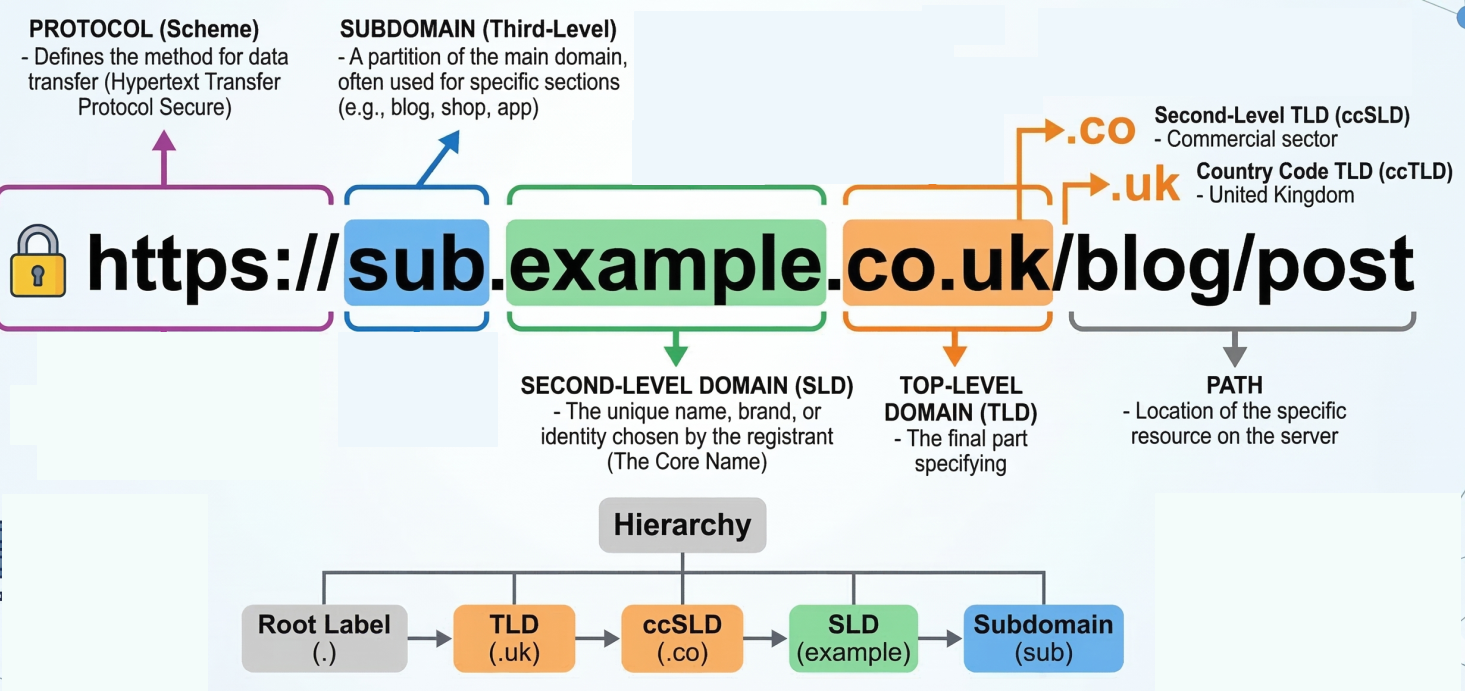
https://mail.example.com:443/inbox?sort=date&filter=unread ───┬── ──┬─ ───┬──── ─┬─ ─┬─ ──┬── ─────────┬──────────Protocol Sub Domain TLD Port Path Query Parameters domain| Component | Description |
|---|---|
| TLD (Top-Level Domain) | .com, .org, .net, country codes like .uk, .de. Managed by ICANN. |
| Domain | The registered name (example). You buy this from a registrar. |
| Subdomain | Optional prefix (mail, www, api). Free to create if you own the domain. |
| FQDN (Fully Qualified Domain Name) | The complete path: mail.example.com. (note the trailing dot - root zone) |
Technical limits: Max 127 levels deep, max 63 characters per label, max 255 characters total for an FQDN.
DNS Zones and Zone Files
Section titled “DNS Zones and Zone Files”A DNS zone is a portion of the DNS namespace managed by a specific organization. Zones let administrators split large domains into manageable chunks.
- Zone file - a plain-text file on a DNS server containing all records for that zone. Starts with an SOA record (admin contact, serial number, refresh intervals) followed by NS, A, MX, and other records.
- Zone transfer - copying zone data from a primary DNS server to secondary servers for redundancy (uses TCP, port 53)
- Reverse lookup zone - maps IPs back to domain names using PTR records (uses the special
in-addr.arpadomain for IPv4)
DHCP - Dynamic Host Configuration Protocol
Section titled “DHCP - Dynamic Host Configuration Protocol”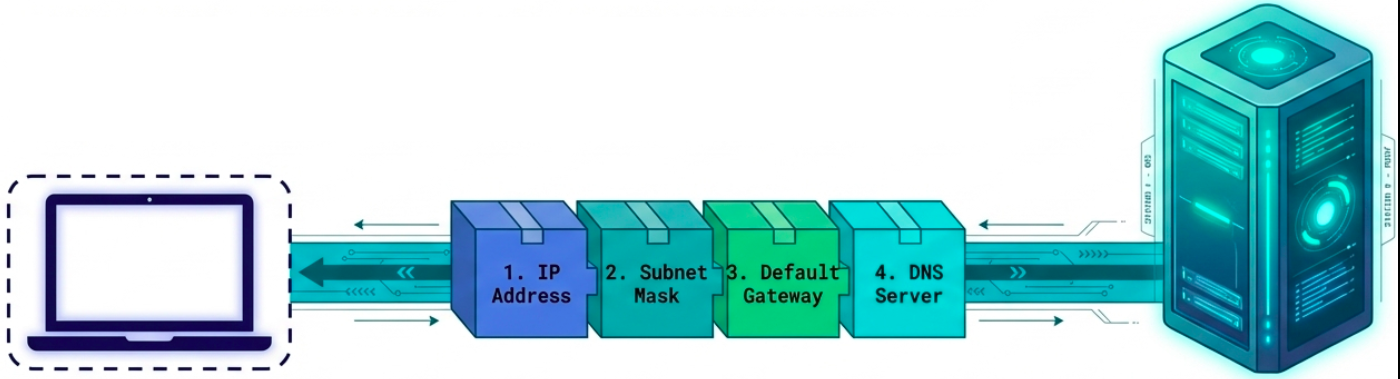
DHCP automates network configuration for client devices. Instead of manually setting IP address, subnet mask, gateway, and DNS server on every device, a DHCP server hands out configurations automatically.
Every host needs 4 things to work on a network:
- IP address
- Subnet mask
- Default gateway (router)
- DNS server
DHCP configures all four in one go. Servers and network equipment typically use static IPs (you always need to know where they are). Client devices (laptops, phones) use DHCP.
DHCP Allocation Modes
Section titled “DHCP Allocation Modes”| Mode | Behavior |
|---|---|
| Dynamic | Server assigns an IP from a pool for a limited lease period. IP returns to pool when lease expires. |
| Automatic | Server assigns a permanent IP from the pool - same IP every time if possible. |
| Fixed (reservation) | Admin maps specific MAC addresses to specific IPs in a table. Guarantees a device always gets the same IP. |
The DORA Process
Section titled “The DORA Process”DHCP uses a four-step handshake called DORA: Discover, Offer, Request, Acknowledge. All communication happens over UDP - server listens on port 67, client sends from port 68.
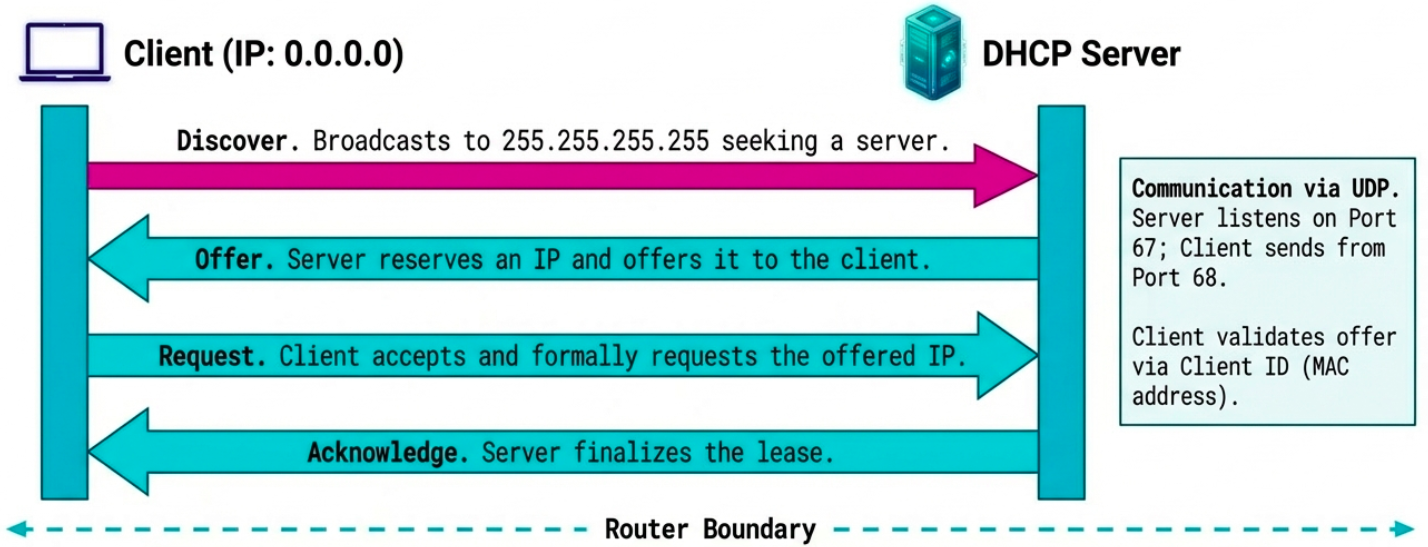
Client (no IP yet) DHCP Server | | 1. |-- DHCPDISCOVER (broadcast) -------->| "Anyone got an IP for me?" | src: 0.0.0.0:68 | (sent to 255.255.255.255:67) | dst: 255.255.255.255:67 | | | 2. |<-------- DHCPOFFER (broadcast) -----| "Here's 192.168.1.50, lease 24h" | dst: 255.255.255.255:68 | (includes subnet, gateway, DNS) | (identifies client by MAC) | | | 3. |-- DHCPREQUEST (broadcast) --------->| "I'll take that 192.168.1.50" | (also tells other DHCP servers | | to withdraw their offers) | | | 4. |<-------- DHCPACK (broadcast) -------| "Confirmed. It's yours for 24h." | | |===== Client configures interface ===|Edge cases:
- Multiple DHCP servers - client may receive multiple OFFERs; it accepts one and the others withdraw
- DHCPDECLINE - client rejects an offer if the IP conflicts with something on the network
- DHCPNACK - server withdraws the offer (client took too long to respond)
- Lease renewal - client automatically tries to renew at 50% of lease time (T1) and again at 87.5% (T2)
NAT - Network Address Translation
Section titled “NAT - Network Address Translation”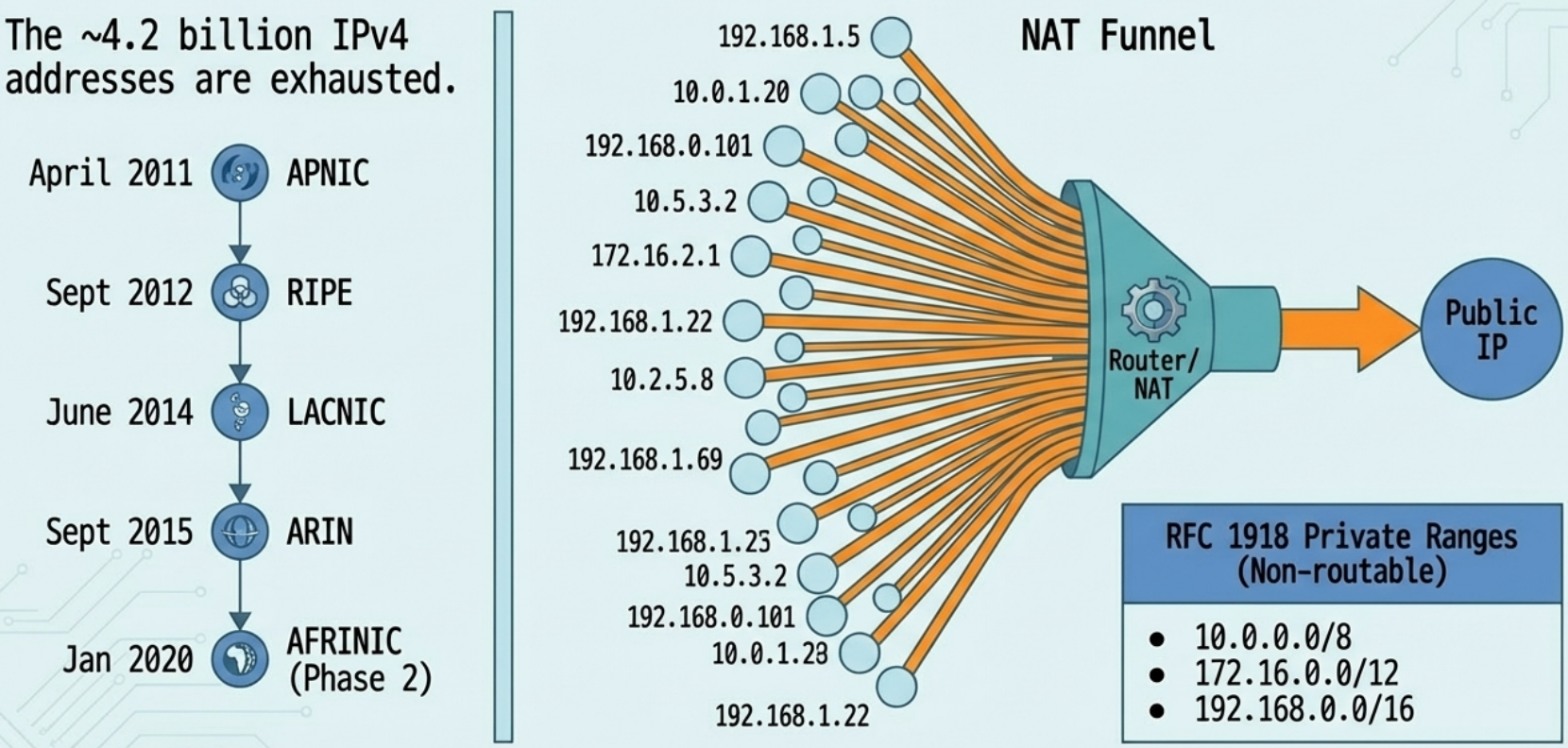
NAT allows a router/firewall to rewrite the source IP of outgoing packets so that many devices on a private network can share a single public IP address. The router remembers the mapping and rewrites return traffic back to the correct internal device.
NAT exists because of IPv4 address exhaustion - there are only ~4.2 billion IPv4 addresses, and they ran out:
| RIR | Region | Exhaustion Date |
|---|---|---|
| APNIC | Asia-Pacific | April 2011 |
| RIPE | Europe, Middle East | September 2012 |
| LACNIC | Latin America, Caribbean | June 2014 |
| ARIN | North America | September 2015 |
| AFRINIC | Africa | Phase 2: January 2020 |
RFC 1918 private address ranges (non-routable on the public internet):
10.0.0.0/8(10.0.0.0 - 10.255.255.255)172.16.0.0/12(172.16.0.0 - 172.31.255.255)192.168.0.0/16(192.168.0.0 - 192.168.255.255)
How NAT Works at the Transport Layer
Section titled “How NAT Works at the Transport Layer”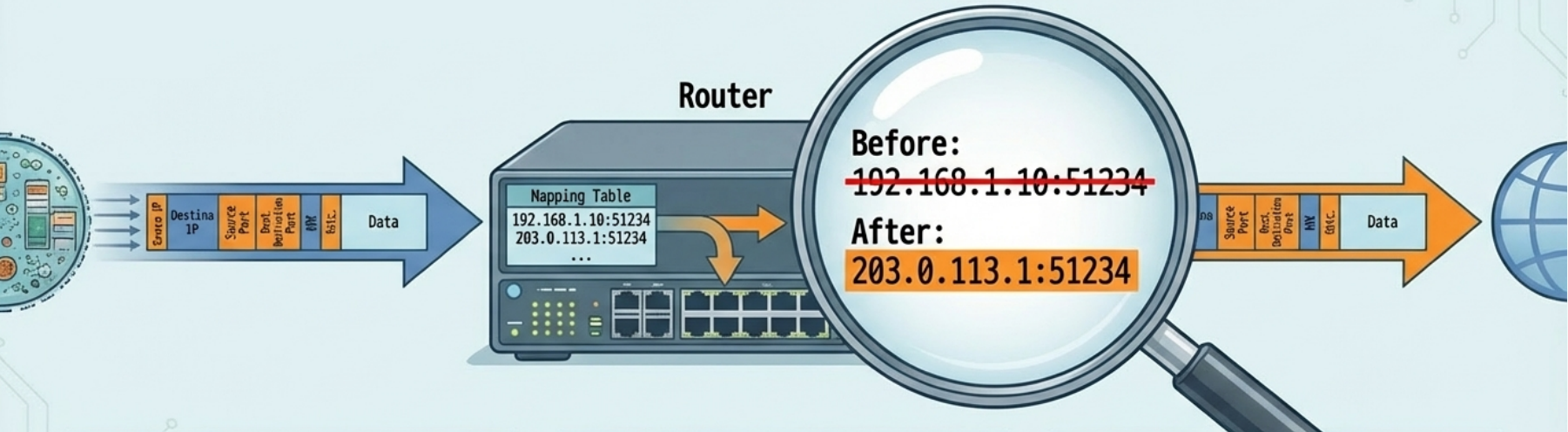
NAT doesn’t just rewrite IPs - it also tracks ports to handle many-to-one mapping:
- Port preservation - the router tries to keep the client’s original source port. If
192.168.1.10:51234sends a packet, the router maps it to203.0.113.1:51234. Return traffic to:51234gets forwarded back to the correct internal host. - Port collision - if two internal hosts pick the same ephemeral port, the router reassigns one to a random unused port
- Port forwarding - manually maps an incoming destination port to a specific internal IP:port. This is how you expose a web server behind NAT.
# Check NAT/masquerade rules on Linux (iptables)sudo iptables -t nat -L -n -v
# Set up basic NAT masqueradingsudo iptables -t nat -A POSTROUTING -o eth0 -j MASQUERADE
# Port forwarding: forward external port 8080 to internal 192.168.1.100:80sudo iptables -t nat -A PREROUTING -p tcp --dport 8080 -j DNAT --to-destination 192.168.1.100:80
# nftables equivalentsudo nft add rule nat postrouting oifname "eth0" masquerade
VPNs - Virtual Private Networks
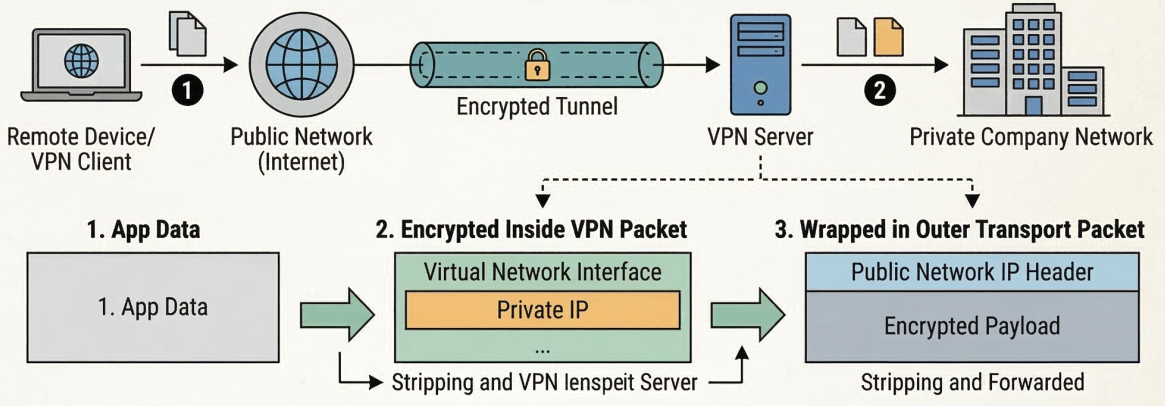
Section titled “VPNs - Virtual Private Networks”A VPN creates an encrypted tunnel over a public network (the internet), making it appear as if remote devices are on the same local network.
How VPN Tunneling Works
Section titled “How VPN Tunneling Works”- VPN client establishes an encrypted connection to the VPN server
- Client gets a virtual network interface with an IP from the company’s private address space
- Application data is encrypted and wrapped inside the transport layer payload of regular packets
- At the VPN server, the outer packet is stripped, the payload is decrypted, and the inner packet is forwarded onto the private network
Site-to-site VPN - connects two entire networks (office A to office B) so all devices on both networks can communicate as if they were local. The VPN runs between routers/firewalls, transparent to end users.
Proxy Services
Section titled “Proxy Services”A proxy is an intermediary that sits between a client and a server. The client talks to the proxy, and the proxy talks to the server on the client’s behalf.
Proxy Types
Section titled “Proxy Types”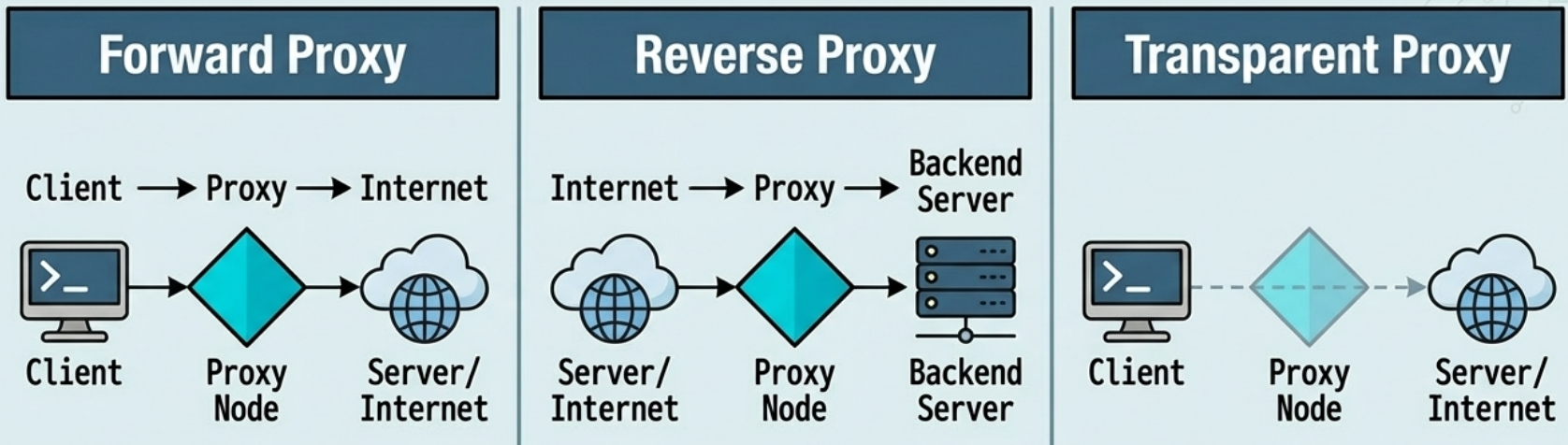
| Type | Direction | Use Case |
|---|---|---|
| Forward proxy | Client -> Proxy -> Internet | Anonymity, content filtering, corporate access control, caching |
| Reverse proxy | Internet -> Proxy -> Backend servers | Load balancing, SSL termination, caching, DDoS protection |
| Transparent proxy | Invisible to client (network-level intercept) | ISP content filtering, corporate monitoring |
Forward proxy - historically used for caching (save bandwidth by serving cached copies of frequently accessed pages). Today mostly used for content filtering and access control in corporate networks.
Reverse proxy - the client thinks it’s talking to one server, but the proxy distributes requests across multiple backend servers. Also handles TLS termination (offloading encryption from backend servers). Examples: Nginx, HAProxy, Cloudflare, AWS ALB.