
Containers
-
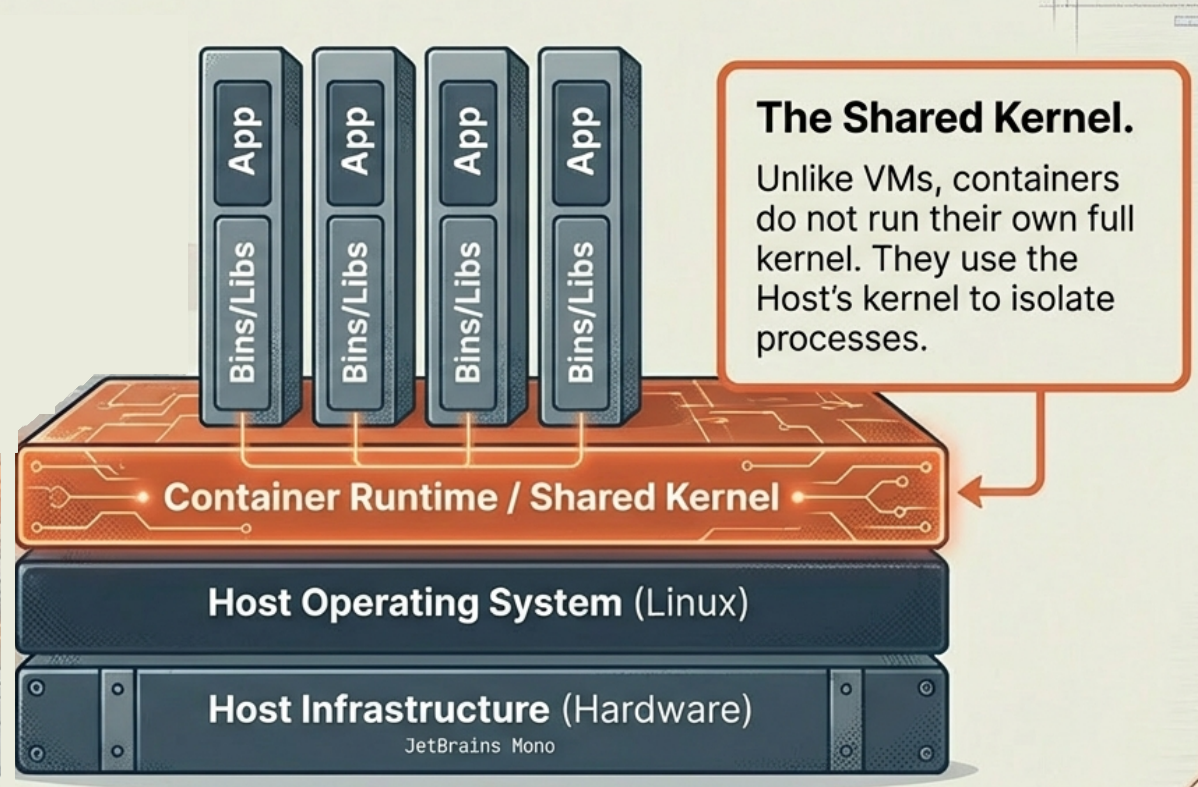
Containerization is a lightweight alternative to traditional virtualization. Instead of simulating a full hardware stack, it leverages the host’s operating system to run isolated applications, ensuring efficiency and speed.
-
It encapsulates an application into a single, isolated environment packed with all the files, libraries, and dependencies it needs - ensuring the application runs consistently across different platforms and environments.
-
Shared OS Kernel: Unlike VMs that require a full guest OS, containers share the host system’s OS kernel as a read-only resource. This is what makes them lightweight.
-
Origins: Containerization evolved from Linux cgroups (control groups) and LXC (Linux Containers). Docker, introduced in 2013, brought it to the mainstream.
For a full technical breakdown of how containers use namespaces, cgroups, union filesystems, and copy-on-write, see The Mechanics of Containerization.
Key Advantages
Section titled “Key Advantages”- Low Resource Overhead: Containers share the host OS and skip running an entire guest OS - significantly more lightweight than VMs in CPU, RAM, and storage.
- Rapid Startup: Containers start in milliseconds. No OS to boot.
- High Portability: A container packages the app and all its dependencies into a single unit that behaves identically in development, staging, and production.
- Immutability: A container never changes after deployment. Updates mean replacing it with a newly built image.
Limitations
Section titled “Limitations”- Weaker Security Isolation: Containers share the host OS kernel. A kernel vulnerability could potentially affect all containers on the same host.
- Strict OS Compatibility: Containers must run on a compatible host OS. A Linux container requires a Linux host.
- Storage Complexity: Containers are ephemeral - internal data is lost when they stop. Persistent storage requires external volumes, which adds configuration complexity.
Primary Use Cases
Section titled “Primary Use Cases”- Microservices Architectures: The standard approach for applications built as independent, loosely coupled services - each service in its own container.
- CI/CD Pipelines: Containers provide consistent, repeatable environments for automated testing and deployment.
- PaaS Scenarios: Containerization allows cloud providers to efficiently host multiple developer environments on the same infrastructure.
Popular Container Runtimes
Section titled “Popular Container Runtimes”| Runtime | Notes |
|---|---|
| Docker | The most widely used container runtime. Docker Hub provides a massive public repository of pre-built images. The default choice for local development and most CI/CD systems. |
| containerd | The industry-standard container runtime underneath Docker and Kubernetes. Manages container lifecycle directly without the Docker daemon overhead. |
| CRI-O | A lightweight implementation of the Kubernetes Container Runtime Interface (CRI). An OCI-compatible alternative to containerd for Kubernetes environments. |
| LXC (Linux Containers) | The original Linux container runtime. Focuses on OS-level isolation (running full Linux distributions in containers) rather than application containers. |