
TCP Congestion Control
The Problem
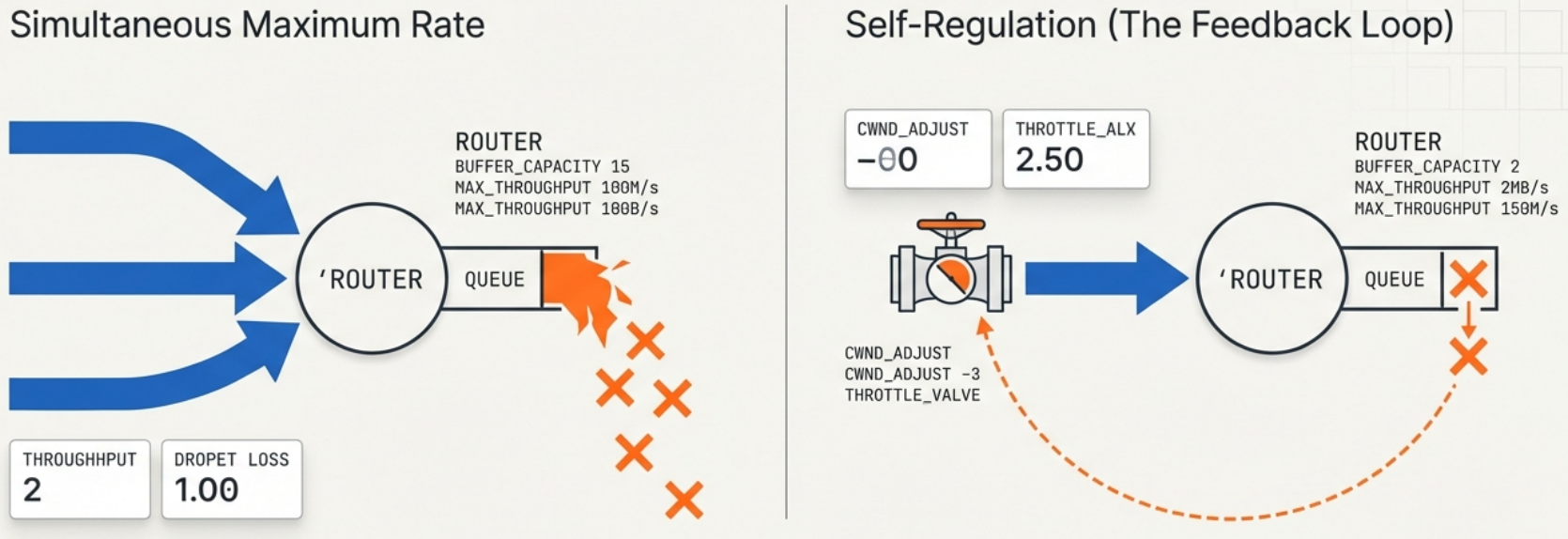
Section titled “The Problem”TCP’s job is to fill the pipe without breaking the network. If every TCP sender pushed data at maximum rate simultaneously, routers would drop packets as queues overflow. TCP congestion control is the set of algorithms that make TCP self-regulate to avoid this.
The key insight: packet loss is TCP’s signal that the network is overloaded. TCP uses loss (and latency in newer algorithms) as feedback to slow down.
Key Variables
Section titled “Key Variables”| Variable | Meaning |
|---|---|
| CWND (Congestion Window) | How many unacknowledged segments TCP is allowed to have in flight at once |
| SSTHRESH (Slow Start Threshold) | The CWND size where TCP switches from exponential growth to linear growth |
| RTT (Round Trip Time) | How long it takes for a packet + ACK round trip. Informs timing algorithms. |
| MSS (Maximum Segment Size) | The largest data payload per TCP segment (typically 1460 bytes on Ethernet) |
The Algorithms
Section titled “The Algorithms”1. Slow Start
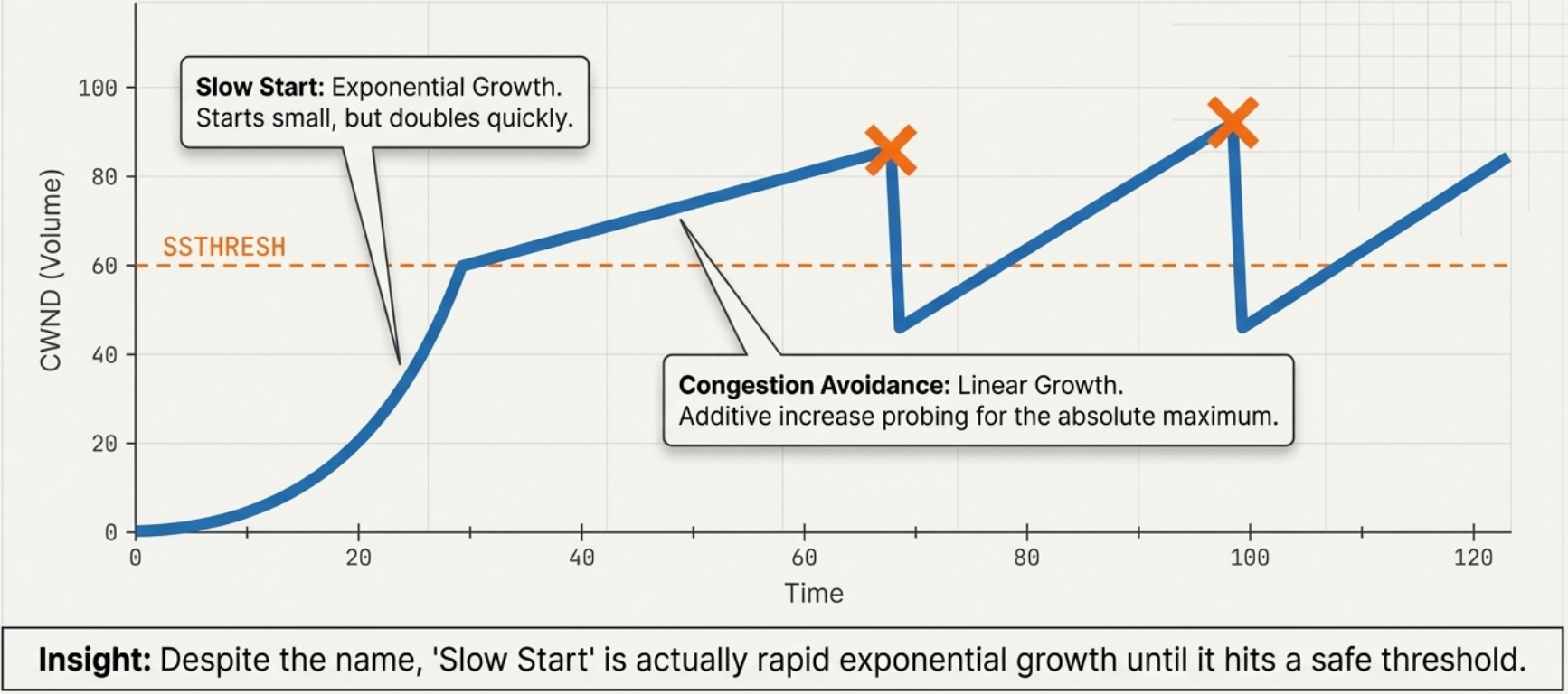
Section titled “1. Slow Start”Despite the name, slow start is actually exponential growth - it just starts small:
CWND starts at 1 MSS (or 10 MSS in modern Linux, RFC 6928)
Each ACK received → CWND += 1 MSSAfter 1 RTT → CWND doubles
RTT 0: CWND = 1 MSS  (send 1 segment)RTT 1: CWND = 2 MSS  (send 2 segments)RTT 2: CWND = 4 MSS  (4)RTT 3: CWND = 8 MSS  (8)...continues until CWND >= SSTHRESH
2. Congestion Avoidance
Section titled “2. Congestion Avoidance”Once CWND hits SSTHRESH, TCP switches to linear growth (additive increase):
Each ACK received → CWND += 1/CWND (effectively +1 MSS per RTT)
This is "Additive Increase Multiplicative Decrease" (AIMD)
3. Reacting to Congestion
Section titled “3. Reacting to Congestion”| Event | What TCP does | Why |
|---|---|---|
| Packet loss (timeout) | SSTHRESH = CWND/2, CWND = 1 MSS, restart slow start | Timeout = severe congestion signal |
| 3 duplicate ACKs (fast retransmit) | SSTHRESH = CWND/2, CWND = SSTHRESH (TCP Reno) | 3 dupACKs = mild congestion, don’t restart from scratch |
| ECN signal (explicit congestion notification) | Same as 3 dupACKs but without packet loss | Router flags packets before dropping them |
Modern Algorithms
Section titled “Modern Algorithms”The classic algorithm (TCP Reno/Cubic) reacts to loss. When links are fast, you need many seconds of data in flight before seeing loss - and then you slam the brakes. Faster links = worse efficiency with loss-based CC.
| Algorithm | Signal Used | Best For | Default On |
|---|---|---|---|
| TCP Reno | Packet loss | Low-bandwidth links | Legacy |
| TCP Cubic | Packet loss (cubic growth curve) | High-bandwidth long-delay links | Linux default until ~2016 |
| TCP BBR (Bottleneck Bandwidth and RTT) | Bandwidth + RTT (not loss) | High-speed links, long distances, lossy links | Google uses it; opt-in on Linux |
| QUIC (HTTP/3) | Custom (UDP-based, per-stream CC) | Web, mobile, high packet loss scenarios | Chrome, Cloudflare, YouTube |
Practical Observations
Section titled “Practical Observations”Checking TCP Congestion State
Section titled “Checking TCP Congestion State”# See CWND and other TCP state per connectionss -tin
# Output includes:# cwnd:10 ssthresh:7 bytes_acked:1448 rcv_rtt:11.563# rto:324 rtt:123.456/12.345 ato:40 mss:1448 pmtu:1500
# Watch live CWND changes (requires ss with -e)watch -n 1 'ss -tin | grep cwnd'Diagnosing Performance Issues
Section titled “Diagnosing Performance Issues”| Symptom | Likely cause |
|---|---|
| Slow file transfer on a fast link | Congestion window not opened fully; check RTT and SSTHRESH |
| Speed is good initially then drops | Buffer overflow causing loss; congestion kicks in |
| Some paths fast, others slow | Different congestion levels per path |
| High CPU during transfers | Interrupt coalescing / GRO settings; not CC |
| YouTube buffers but download is fine | Different CC behavior for streaming vs. bulk |
Why This Matters for Application Developers
Section titled “Why This Matters for Application Developers”- Small messages (RPC, API calls) often never leave slow start - size matters
- HTTP/1.1 keep-alive reuses connections to preserve CWND state (vs. new connection = slow start again)
- HTTP/2 multiplexing sends multiple streams on one connection - shares CWND efficiently
- TCP_NODELAY disables Nagle’s algorithm (which buffers small packets) - use for interactive apps (SSH, gaming), not bulk transfers
# Check if TCP_NODELAY is set on a socketss -tino | grep nodelay