
Deployment Strategies
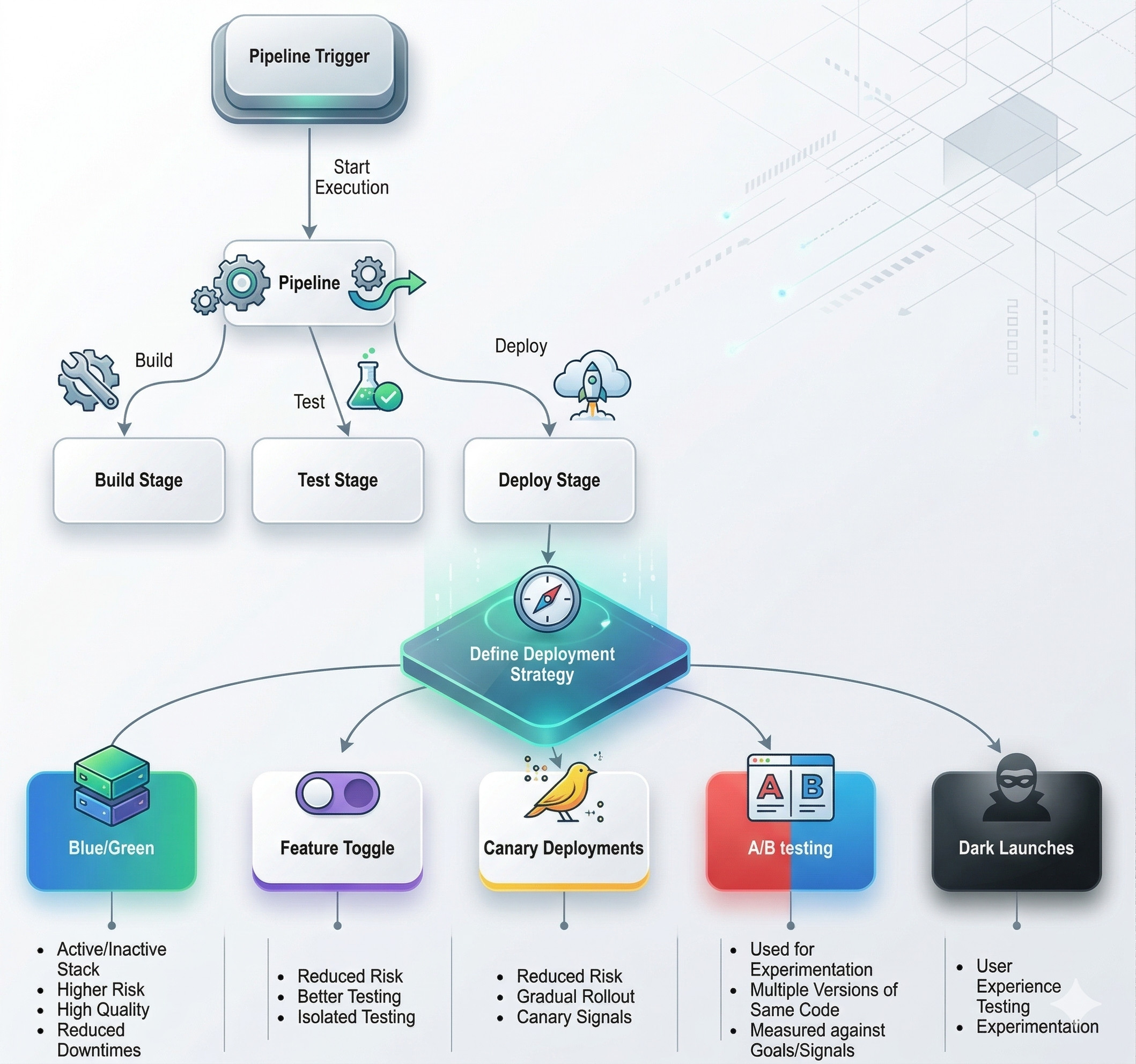
Deployment strategies control how a new version of software is promoted from the build pipeline to live production. Choosing the right strategy depends on your tolerance for downtime, infrastructure cost, rollback speed requirements, and the need to experiment with real users.
Architectural Deployment Types
Section titled “Architectural Deployment Types”Before choosing a release strategy, teams must understand the architectural type they are deploying into. The architecture sets the constraints - it dictates which release strategies are even available:
| Architecture | What it is | CI/CD implication |
|---|---|---|
| Monolithic | The entire application is a single deployable unit with one codebase and one database | Simple pipelines; any deploy touches the entire system, so rollback is coarser |
| Microservices | Independent services communicating via APIs, each with its own deployment lifecycle | Each service needs its own pipeline; enables granular canary/rolling per service |
| Containerized | Applications packaged into containers (Docker/Podman) orchestrated by Kubernetes or Compose | Enables rolling, canary, and blue-green natively through the orchestration layer |
| Serverless (FaaS) | Stateless code executed in response to events; platform manages all infrastructure | Event-driven; pipelines deploy functions, not servers - much simpler infra footprint |
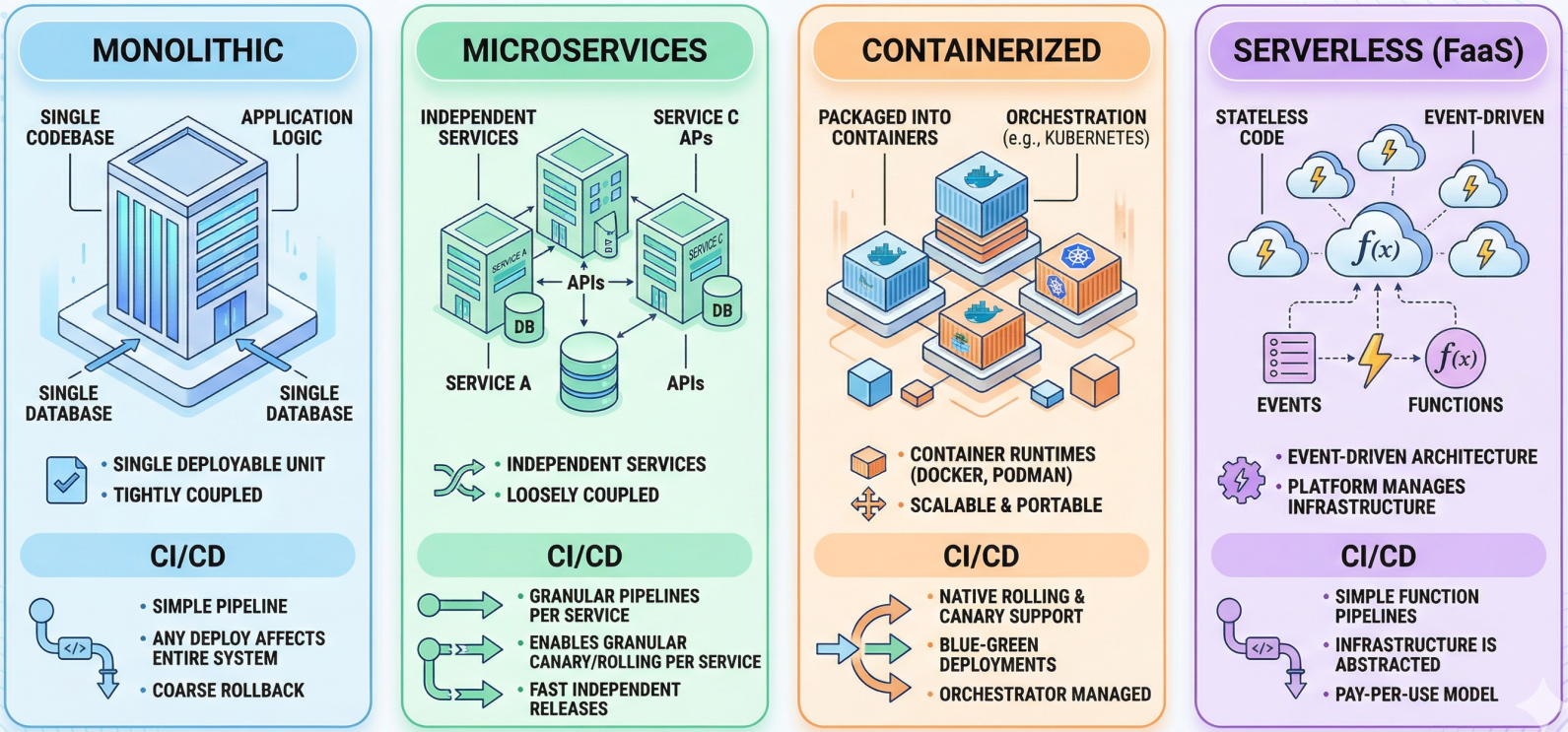
Once the architectural context is clear, the release strategy determines exactly how new versions are swapped in:
Quick Comparison
Section titled “Quick Comparison”| Strategy | Downtime | Infrastructure cost | Rollback speed | Best for |
|---|---|---|---|---|
| Recreate | Yes | Low | Slow | Dev/test environments only |
| Rolling | No | Low | Medium | General-purpose, cost-conscious teams |
| Blue-Green | No | High (2x infra) | Instant | Critical systems, zero-tolerance downtime |
| Canary | No | Low-medium | Very fast | Gradual rollouts, high-traffic systems |
| Feature Flags | No | Minimal overhead | Instant (toggle off) | Decoupling deploy from release |
| A/B Testing | No | Medium | Fast | Experimentation, UX optimization |
| Dark Launch | No | Medium | Fast | Pre-release load testing, blind feedback |
Rolling Deployments
Section titled “Rolling Deployments”A rolling deployment incrementally replaces the old version across the infrastructure - one instance, node, or pod at a time. Once a node is updated and passes its health checks, it begins serving traffic and the pipeline moves to the next.
How it works:
- Take one node out of the load balancer rotation.
- Deploy the new version to that node.
- Run health checks / readiness probes. If they pass, return the node to rotation.
- Repeat until all instances are updated.
Pros: No duplicated infrastructure. Continuous availability throughout. Default behavior in Kubernetes (RollingUpdate deployment strategy).
Cons: Old and new versions run concurrently during the rollout - APIs and database schemas must be backward compatible for the duration. Rollback requires rolling forward again (or a full redeploy).
Blue-Green Deployments
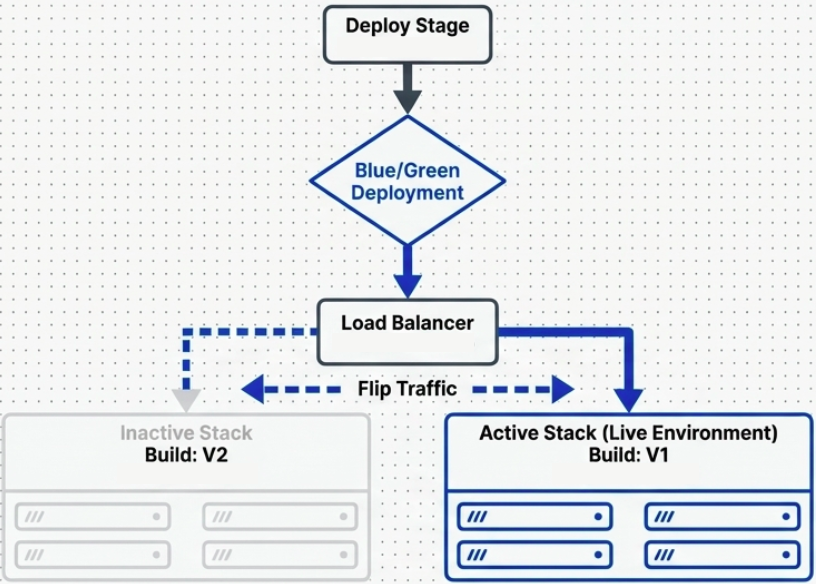
Section titled “Blue-Green Deployments”Also called Red-Black deployments. This strategy maintains two identical, parallel production environments. Only one is live at any time; the other is idle.
How it works:
- Blue is live, serving all traffic. Green is idle.
- Deploy the new version to Green. Test it in isolation - real infrastructure, zero real user impact.
- Once confident, flip the load balancer (or DNS) to route all traffic from Blue to Green.
- Green is now live. Blue becomes the idle standby (and your instant rollback target).
Pros: True zero-downtime deployments. Rollback is instantaneous - flip traffic back to Blue. Full production environment for pre-release smoke testing.
Cons: Requires double the infrastructure cost. Database schema changes are the hardest problem - both environments may need to connect to the same database, requiring forward and backward compatible migrations.
Canary Deployments
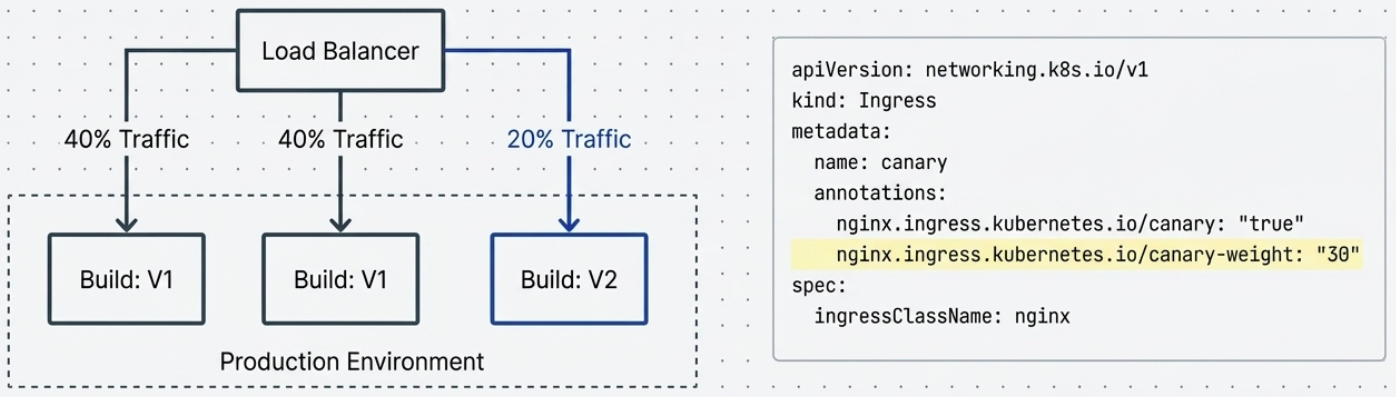
Section titled “Canary Deployments”Named after the “canary in a coal mine” practice. A small slice of real traffic is routed to the new version. If the canary survives (metrics are healthy), traffic is gradually increased to 100%.
How it works:
- Deploy the new version alongside the old. Route 5-10% of traffic to it.
- Monitor canary signals - error rates, latency, business metrics.
- If signals are healthy: incrementally increase traffic (5% → 25% → 50% → 100%).
- If signals degrade: immediately route all traffic back to the old version.
In Kubernetes, canary deployments are commonly implemented using NGINX ingress controllers with weight-based annotations, or with service meshes like Istio.
Pros: Limited blast radius - bugs affect only the canary cohort. Uses real users and real production conditions. No duplicate full-stack infrastructure.
Cons: Requires sophisticated observability - you need to know which metrics indicate the canary is healthy. Both versions run simultaneously, so versioning discipline and backward-compatible schemas are required.
Feature Flags (Feature Toggles)
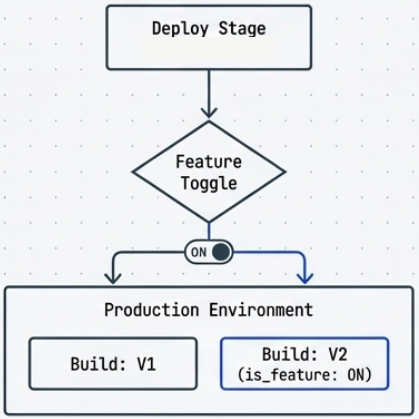
Section titled “Feature Flags (Feature Toggles)”Feature flags are configuration switches that control whether specific features inside a deployed application are active or visible. The code is in production - the feature is just turned off.
How it works:
- Feature code is merged and deployed behind a flag (a config value, environment variable, or remote config entry).
- The flag is off by default. The application behaves identically to the previous version.
- When ready to release, the flag is toggled - no redeployment needed.
- If something goes wrong, the flag is toggled back. Instant rollback.
This decouples deployment from release. Engineers ship when the code is ready; product decides when users see the feature.
Types of flags:
- Release flags: Gate incomplete features during development.
- Experiment flags: Route different cohorts to different variations (overlaps with A/B testing).
- Ops flags: Emergency kill switches for features under load or exhibiting errors.
Tools: LaunchDarkly, Flagsmith, Unleash, environment variables (for simple cases).
A/B Testing
Section titled “A/B Testing”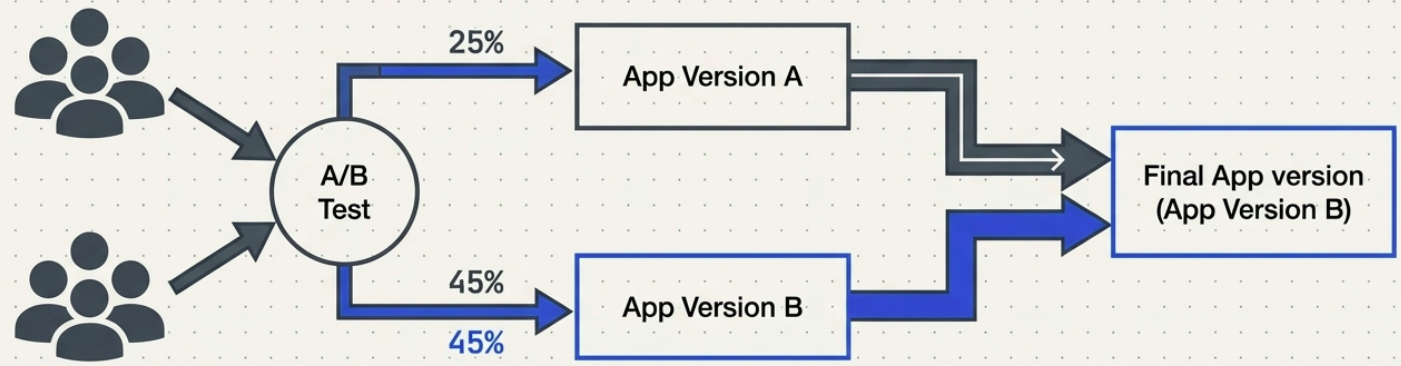
A/B Testing is an experimentation strategy. Two or more variants of the application are served to different user cohorts simultaneously. Behavior is measured against predefined metrics to determine which variant performs better.
How it differs from Canary: A Canary is about deployment safety - does the new version work? A/B Testing is about product optimization - does the new version perform better for users?
Example: 25% of users see Checkout Flow A, 75% see Checkout Flow B. Conversion rate, time-on-page, and drop-off are tracked. The winning variant becomes the production default.
Requirements: A robust telemetry stack (analytics, event tracking), statistical significance thresholds, and long enough run times to produce reliable results.
Dark Launches
Section titled “Dark Launches”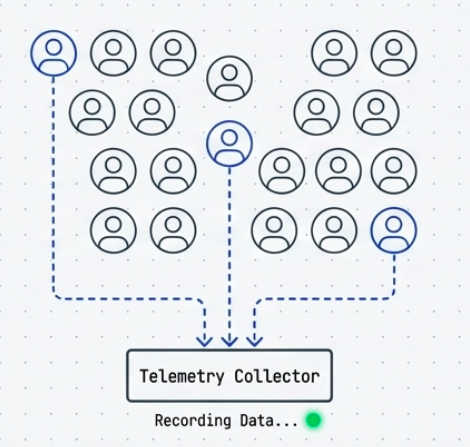
A dark launch deploys a new feature or version to a subset of users invisibly - the user is unaware they’re being used as a test cohort. Unlike A/B Testing (which exposes different UIs), a dark launch typically exercises backend functionality silently.
Common use case: Mirror a percentage of production traffic to a new service’s backend to observe how it performs under real load, without surfacing any results to the user. This is also called Shadow Deployment or Traffic Mirroring.
Pros: Real-world load and edge cases reveal issues that synthetic tests miss. Zero user-facing risk.
Cons: Requires careful isolation - the shadow service must not produce observable side effects (emails sent, payments processed, database writes). Service meshes like Istio support traffic mirroring natively.
Recreate (Not for Production)
Section titled “Recreate (Not for Production)”The simplest possible strategy: shut down the old version entirely, then bring up the new version. Results in a full downtime window during the transition.
Diagnostic Matrix
Section titled “Diagnostic Matrix”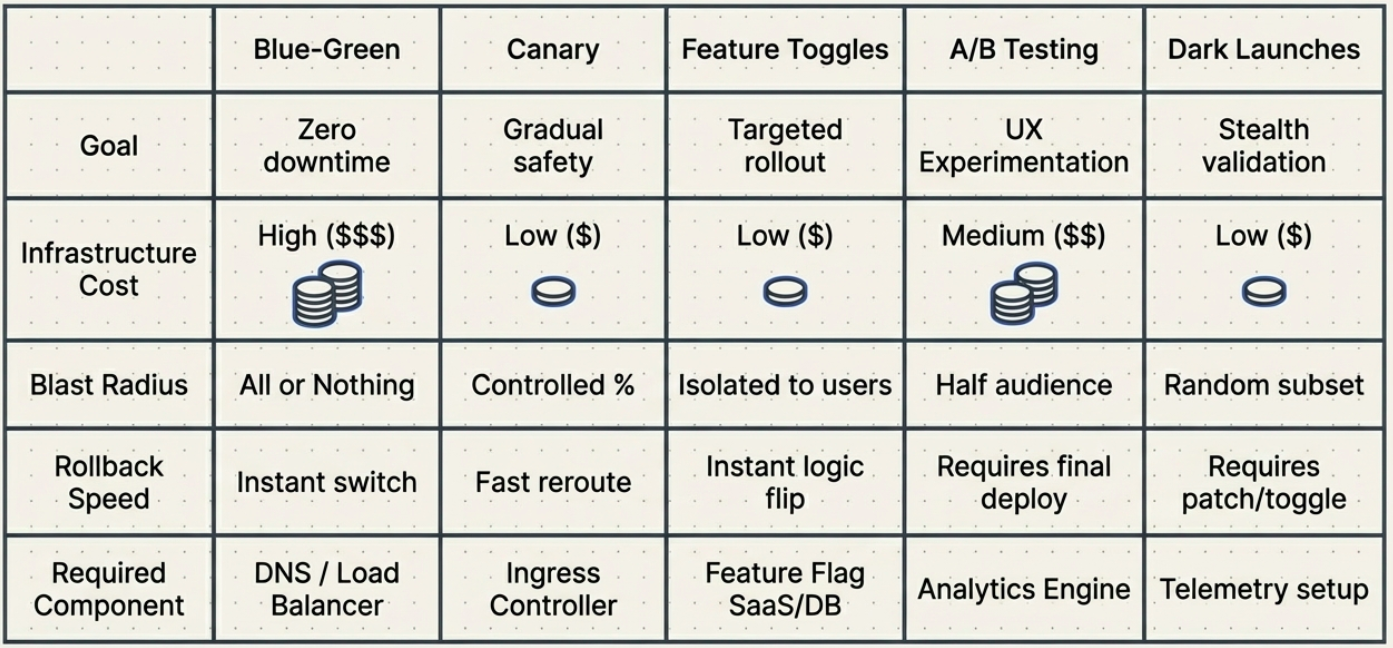
Database Migrations: The Hard Part
Section titled “Database Migrations: The Hard Part”Every deployment strategy must account for database schema changes - and this is where most real-world complexity lives.
The key constraint: you cannot change a schema in a way that breaks the currently running version, because both versions may be running simultaneously (rolling, canary, blue-green) or you may need to roll back.
The Expand/Contract pattern (also called Parallel Change) is the standard approach:
- Expand: Add the new column/table alongside the old. Both versions work with both schemas.
- Migrate: Run a background job to backfill data into the new column/table.
- Contract: Once all instances run the new version and migration is complete, drop the old column/table.
Choosing a Strategy
Section titled “Choosing a Strategy”Use the quick comparison table at the top as a starting point, then answer these questions:
- Can you afford downtime? No → rule out Recreate. Yes only in maintenance windows → Blue-Green with planned cutover.
- Can you afford 2x infrastructure? No → Rolling or Canary.
- Do you need instant rollback? Yes → Blue-Green or Feature Flags.
- Do you need real user feedback before full rollout? Yes → Canary or A/B Testing.
- Do you want to decouple deploy from release? Yes → Feature Flags.
In mature CI/CD systems, these strategies are combined: a Canary rollout wrapped inside Feature Flags, nested within a Blue-Green environment switch. Each layer adds a different type of safety.
For the security and governance controls that make these strategies auditable and compliant - SLSA, SoD, RBAC, approval flows, and OPA - see Security & Compliance in CI/CD.