
Advanced Shell Scripting
Safer Scripts - Recommended Preamble
Section titled “Safer Scripts - Recommended Preamble”Always start production scripts with:
#!/bin/bashset -euo pipefailIFS=$'\n\t'| Option | Effect |
|---|---|
-e | Exit immediately on error (non-zero exit code) |
-u | Treat unset variables as errors |
-o pipefail | A pipeline fails if any command in it fails (not just the last) |
IFS=$'\n\t' | Prevent word-splitting on spaces - safer for filenames with spaces |
Without set -euo pipefail, a script can silently continue after a failed command, leading to unpredictable state.
String Manipulation
Section titled “String Manipulation”A string variable contains a sequence of text characters - letters, numbers, symbols, punctuation.
str="Hello, World"
# Compare strings[[ "$str1" > "$str2" ]]       # sorting order comparison[[ "$str1" == "$str2" ]]      # equality check
# String lengthmyLen=${#str}                 # length of $str
# Extract substringecho "${str:0:5}"             # first 5 chars → "Hello"echo "${str:7}"               # from char 7 onward → "World"echo "${str#*.}"              # strip everything up to and including first dotecho "${str##*.}"             # strip up to last dot (get extension)
# Substitutionecho "${str/World/Linux}"     # replace first matchecho "${str//o/0}"            # replace all matches
The case Statement
Section titled “The case Statement”case compares a variable against multiple patterns. It’s cleaner than deeply nested if-elif-elif-fi blocks and is often used for handling command-line options or user menus.
Advantages:
- Easier to read and write
- Compares a value against multiple patterns at once
- Reduces complexity compared to nested
if
case expression in pattern1) commands ;; pattern2) commands ;; pattern3|pattern4) commands ;; # match either pattern *) default commands ;; # catch-allesac#!/bin/bashread -p "Enter day (1-7): " daycase $day in 1) echo "Monday" ;; 2) echo "Tuesday" ;; 3) echo "Wednesday" ;; 4) echo "Thursday" ;; 5) echo "Friday" ;; 6|7) echo "Weekend" ;; *) echo "Invalid input" ;;esac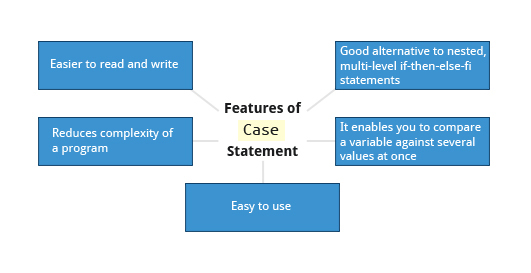
CLI Option Handling with case
Section titled “CLI Option Handling with case”#!/bin/bashwhile [[ $# -gt 0 ]]; do case "$1" in -v|--verbose) VERBOSE=true; shift ;; -o|--output) OUTPUT="$2"; shift 2 ;; -h|--help) usage; exit 0 ;; *) echo "Unknown option: $1"; exit 1 ;; esacdoneLooping Constructs
Section titled “Looping Constructs”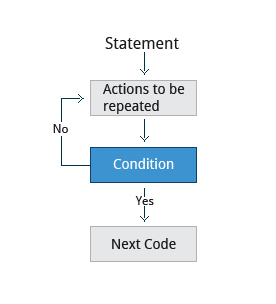
Loops execute a block of code repeatedly - either over a list of items (for) or until a condition changes (while, until).
for Loop
Section titled “for Loop”for variable in list; do commandsdone
# Sum 1 to 10sum=0for i in {1..10}; do sum=$((sum + i))doneecho "Sum: $sum" # Sum: 55
# Process filesfor f in /etc/*.conf; do echo "Config: $f"done
# C-style for loopfor (( i=0; i<5; i++ )); do echo "$i"donewhile Loop
Section titled “while Loop”Repeats as long as the condition is true:
while condition; do    commandsdone
# Read file line by line:while IFS= read -r line; do    echo "Line: $line"done < /etc/hosts
# Retry until success:attempts=0while ! ping -c1 google.com &>/dev/null; do    echo "Attempt $((++attempts)): waiting for network..."    sleep 2done
until Loop
Section titled “until Loop”Repeats as long as the condition is false (opposite of while):
until condition; do    commandsdone
# Wait for a service to start:until systemctl is-active --quiet nginx; do    echo "Waiting for nginx..."    sleep 1doneecho "nginx is up"
Script Debugging
Section titled “Script Debugging”Debugging finds and fixes errors in scripts - one of the most important sysadmin skills.
Debug Mode
Section titled “Debug Mode”bash -x ./script.sh # trace every command before executionbash -vx ./script.sh # also print input lines as read
# Toggle debug within a script:set -x # enable tracing from here...set +x # disable tracingIn debug mode, each command is printed prefixed with + before execution - and again with its expanded values. This makes it clear exactly what the shell is doing at each step.
Redirecting Errors
Section titled “Redirecting Errors”In UNIX/Linux, every process starts with three open file streams:
| Stream | Name | File Descriptor |
|---|---|---|
stdin | Standard input (keyboard by default) | 0 |
stdout | Standard output (terminal by default) | 1 |
stderr | Standard error (terminal by default) | 2 |
Separate stdout and stderr for better debugging:
./script.sh > output.log 2> error.log     # separate files./script.sh > all.log 2>&1                # both in one file./script.sh 2>&1 | tee all.log           # both to file AND terminal
# Suppress errors:./noisy-command 2>/dev/null
/dev/null - The Bit Bucket
Section titled “/dev/null - The Bit Bucket”/dev/null is a special device node that silently discards all data written to it. Write operations always succeed; reads return EOF immediately. Often called the black hole or bit bucket.
command > /dev/null           # discard stdoutcommand 2> /dev/null          # discard stderr onlycommand > /dev/null 2>&1      # discard stdout and stderrcommand &> /dev/null          # bash shorthand for the above
# Use case: run silently, but capture errorswget -q https://example.com/file > /dev/null 2>&1; echo $?
Temporary Files and Directories
Section titled “Temporary Files and Directories”Temporary files store data for a short time and should disappear when the program exits.
Why not just use touch /tmp/tmpfile?
Using a predictable filename is a security risk. An attacker can pre-create a symbolic link from /tmp/tmpfile to a critical file (like /etc/passwd). If a privileged script writes to that path, the target file is overwritten.
Use mktemp which generates random, unpredictable names:
TMPFILE=$(mktemp /tmp/tempfile.XXXXXXXX)     # create temp fileTMPDIR=$(mktemp -d /tmp/tempdir.XXXXXXXX)    # create temp directory
echo $TMPFILE     # /tmp/tempfile.K7xM2pQr  (actual name varies)
The XXXXXXXX placeholder is replaced with random characters, making the filename impossible to predict from outside the process.
Cleanup Pattern
Section titled “Cleanup Pattern”#!/bin/bashTMPFILE=$(mktemp /tmp/myapp.XXXXXXXX)trap 'rm -f "$TMPFILE"' EXIT # cleanup on any exit (success, error, signal)
# ... use TMPFILE ...echo "working data" > "$TMPFILE"trap ... EXIT guarantees cleanup happens even if the script exits early due to an error or signal.
Random Numbers
Section titled “Random Numbers”Random data is useful for security tasks, test data generation, and reinitializing storage.
$RANDOM - Shell Variable
Section titled “$RANDOM - Shell Variable”$RANDOM generates a pseudo-random integer between 0 and 32767 each time it’s referenced:
echo $RANDOM # e.g., 17382echo $((RANDOM % 100)) # random 0–99echo $((RANDOM % 6 + 1)) # simulate dice: 1–6This is fast but not cryptographically secure - do not use for keys, tokens, or anything security-critical.
How the Kernel Generates Randomness
Section titled “How the Kernel Generates Randomness”Linux maintains an entropy pool - a collection of random bits gathered from unpredictable hardware events (interrupt timing, disk I/O, network packets, mouse movement). Two kernel device nodes expose this:
| Device | Behavior | Use for |
|---|---|---|
/dev/random | Blocks until sufficient entropy available | High-quality keys, one-time pads |
/dev/urandom | Never blocks; reuses internal pool | General cryptographic use (passwords, tokens, session keys) |
# Generate random byteshead -c 16 /dev/urandom | base64             # 16 random bytes as base64openssl rand -hex 32                         # 32 random bytes as hexod -An -N4 -tu4 /dev/urandom | tr -d ' '   # random unsigned 32-bit integer
# Generate random passwordtr -dc 'A-Za-z0-9!@#$%^&*' < /dev/urandom | head -c 20; echo
On servers with hardware random number generators (TPM, RDRAND instruction), entropy is collected from thermal noise and photoelectric effects via a transducer converting physical signals to digital values - providing much higher quality randomness without blocking.
Practical Script Patterns
Section titled “Practical Script Patterns”Error Handling Function
Section titled “Error Handling Function”#!/bin/bashset -euo pipefail
die() { echo "[ERROR] $*" >&2 exit 1}
warn() { echo "[WARN] $*" >&2}
[[ $# -eq 0 ]] && die "Usage: $0 <filename>"[[ -f "$1" ]] || die "File not found: $1"Logging
Section titled “Logging”LOG=/var/log/myscript.log
log() { echo "$(date '+%Y-%m-%d %H:%M:%S') $*" | tee -a "$LOG"}
log "Script started"log "Processing $1"Checking for Root
Section titled “Checking for Root”if [[ $EUID -ne 0 ]]; then echo "This script must be run as root" >&2 exit 1fi