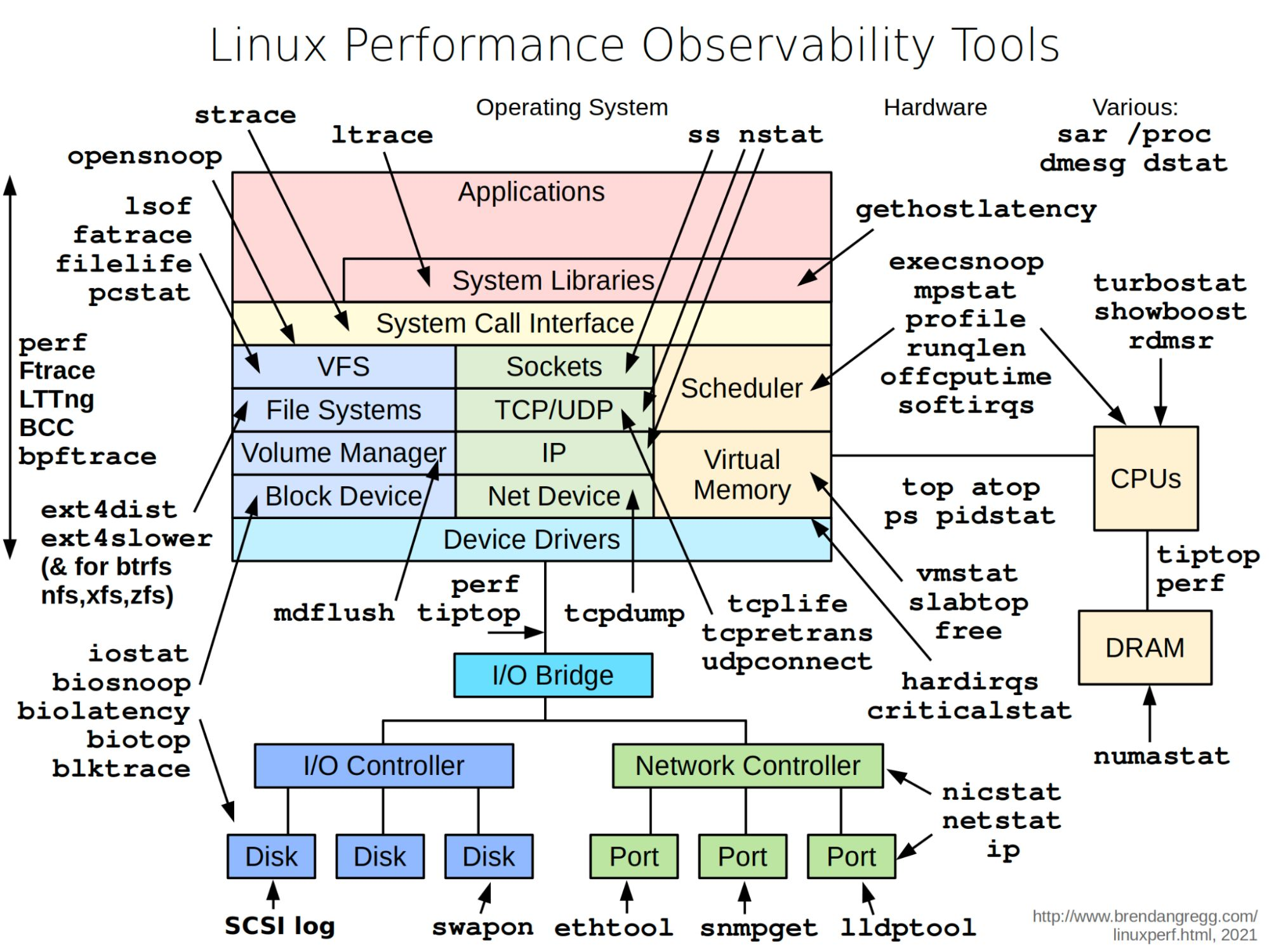
When a process or service is consuming too much CPU, memory, disk I/O, or network bandwidth - or when the system is just behaving unexpectedly - Linux provides a rich set of observability tools to diagnose what’s happening.
The general approach: work from symptoms to data . Start with high-level overview tools (top, vmstat), narrow down to the subsystem (iostat, ss), then drill into specific processes or kernel events (strace, perf).
Tool Purpose topDynamic real-time view of running processes + CPU/memory htopBetter top - color, mouse, per-core bars (install separately) atopFull-featured: CPU, memory, disk, net; logs history ps auxSnapshot of all processes with CPU/memory usage pidstatPer-process CPU, memory, I/O, thread stats vmstatSystem-wide: processes, memory, paging, block I/O, CPU mpstatPer-CPU statistics (helpful on multi-core systems) sarSystem Activity Reporter - collect, report, save system data free -hMemory and swap usage summary slabtopKernel slab allocator statistics numastatNUMA memory allocation statistics
vmstat 1 10 # 1-second intervals, 10 samples
mpstat -P ALL 1 # per-CPU stats every second
sar -u 1 5 # CPU utilization, 5 samples
free -h # human-readable memory summary
ps aux --sort=-%mem | head -10 # top 10 memory consumers
ps aux --sort=-%cpu | head -10 # top 10 CPU consumers
Tool Purpose iostatBlock device I/O statistics and CPU utilization iotopReal-time I/O usage per process (like top for disk) blktraceLow-level block layer tracing biolatencyDisk I/O latency histogram (BCC/eBPF) biotopTop disk I/O by process (BCC/eBPF) swapon -sShow active swap devices and usage lsofList open files (includes sockets, pipes)
iostat -xz 1 # extended stats, skip idle, 1-second intervals
iostat -d sda 1 5 # disk stats for sda only
iotop -o # show only processes doing I/O
lsof | grep deleted # find deleted-but-still-open files consuming space
Tool Purpose df -hDisk space usage by filesystem du -sh /pathDisk usage of a directory lsofFiles open by processes (fd leaks, locked files) perfCPU, tracepoints, kernel profiling FtraceLinux kernel function tracer bcc / bpftraceeBPF-based dynamic tracing tools
df -h # filesystem usage overview
du -sh /var/ * | sort -rh | head # find largest directories under /var
lsof +D /path # find all open files under a path
Tool Purpose ss -tulpnOpen sockets, listening ports, processes netstat -rnRouting table (deprecated; use ip route) ip -s linkInterface statistics (errors, drops) tcpdumpPacket capture tcpretransTrace TCP retransmits (BCC) tcplifeLog TCP connection lifetimes (BCC) nicstatNetwork interface throughput and utilization nstatNetwork statistics (faster than netstat)
ss -tulpn # all listening sockets
ss -tp state established # established TCP connections
tcpdump -i eth0 -n port 443 # capture HTTPS traffic
ip -s link show eth0 # interface error counters
Tool Purpose straceTrace system calls made by a process ltraceTrace library calls opensnoopTrace file opens system-wide (BCC) execsnoopTrace new process executions (BCC) profileCPU sampling profiler (BCC)
strace -p PID # attach to running process
strace -e trace=open,read ./binary # filter to specific syscalls
strace -c ./binary # count syscalls and report summary
Tool Purpose dmesgKernel ring buffer - hardware errors, driver messages journalctlsystemd journal - aggregated system logs /procKernel-exposed process and system info as virtual files uptimeLoad averages + time since last boot lscpuCPU topology and features lspciPCI devices lsusbUSB devices lsblkBlock devices and mount points
dmesg -T | tail -50 # last 50 kernel messages with timestamps
dmesg -T | grep -i error # kernel errors
journalctl -u nginx --since " 1h ago " # service logs from last hour
journalctl -p err -n 50 # last 50 error-level log entries
cat /proc/meminfo # detailed memory breakdown
cat /proc/cpuinfo # per-CPU info
When asked to investigate a slow or misbehaving system, work through this order:
Starting point - uptime (load averages) + dmesg -T | tail (recent kernel events)CPU/memory - top or htop → identify top consumersDisk I/O - iostat -xz 1 → look for 100% %util or high awaitNetwork - ss -tulpn + ip -s link → check for drops/errorsApplication - strace -p PID or perf → syscall/CPU profileLogs - journalctl -u servicename --since "10 min ago" → check service output