
Pipeline as Code
Pipeline as Code (PaC) means defining your CI/CD pipeline configuration in a file that lives alongside your application code in version control. Every change to the pipeline is tracked, reviewed, and auditable - just like a code change.
This is the foundation of modern CI/CD. Without it, pipelines are configured through UIs, are hard to replicate, and drift silently over time.
Why Pipeline as Code
Section titled “Why Pipeline as Code”| Benefit | What it means in practice |
|---|---|
| Auditability | Every pipeline change is a commit. You know who changed what, when, and why. |
| Reproducibility | Check out the repo in a new environment and get an identical pipeline. |
| Collaboration | Pipeline changes go through pull requests, code review, and approval gates - same as application changes. |
| Drift prevention | The file is the source of truth. If it’s not in version control, it doesn’t exist. |
| Testability | Pipeline logic can be analysed, validated, and debugged using testing frameworks before being pushed to production. |
| Dynamic flexibility | PaC handles conditional branching, loops, parallelism, and automated error handling that GUI-based pipeline tools cannot express. |
Implementing PaC
Section titled “Implementing PaC”The entry point for most teams is YAML-defined pipelines stored in the VCS alongside application code:
| Tool | Pipeline file | Syntax |
|---|---|---|
| GitHub Actions | .github/workflows/*.yml | YAML - event triggers, jobs, steps, matrix builds |
| GitLab CI/CD | .gitlab-ci.yml + config.toml for runners | YAML - native DAG, include templates, GitLab Runners |
| Jenkins | Jenkinsfile | Groovy DSL - declarative or scripted pipeline |
| Azure DevOps | azure-pipelines.yml | YAML - stages, jobs, tasks; tight Azure CLI integration |
| Travis CI | .travis.yml | YAML - simple configuration, popular with open source |
| Bamboo | Bamboo Specs | YAML or Java - build plans, deployment projects, branches |
For Kubernetes-native teams, Tekton Pipelines defines pipeline resources as Kubernetes custom resources (Task, Pipeline, PipelineRun), keeping the pipeline definition consistent with the cluster’s control plane.
See the GitHub Actions and Jenkins sections for tool-specific implementation patterns.
PaC Implementation Examples
Section titled “PaC Implementation Examples”Different orchestrators implement PaC using distinct languages, file structures, and CLIs. Here is how the most common tools structure their pipelines:
GitHub Actions defines workflows in YAML files stored in the
.github/workflows/ directory. - Structure: Defined by events
(triggers), jobs (which run in parallel by default), and steps
(individual shell commands or pre-built Actions). - Setup: Create a
workflow file (e.g., ci.yml). - Best Practices: - Use descriptive
names for workflows and jobs. - Use self-contained actions to minimize
external dependencies. - Store sensitive data in Secrets and avoid
exposing them in logs. - Use Environments for protection rules and
approvals before deploying to production.
GitLab uses a .gitlab-ci.yml file placed in the repository root, executed
by GitLab Runners. - GitLab Runners: Agents that execute jobs. You
configure them via config.toml (setting concurrency, limits, execution
environments like shell or docker). - Runner Tags: Assign tags (e.g.,
linux, gpu) to runners to match specific jobs to the hardware that can
run them. - Setup: Commit the .gitlab-ci.yml file; jobs are
automatically assigned to available runners based on environment and tags.
Jenkins implements PaC using a Jenkinsfile written in Groovy (using
either Declarative or Scripted syntax). - Structure: Defined by
pipeline, stages, steps, and actions. - Setup Methods: 1.
Template-based: Create a baseline Jenkinsfile with placeholders
replaced at runtime. 2. Pipeline DSL: Programmatically define jobs and
behaviors using the Pipeline plugin. - Process: Commit the Jenkinsfile
to the root directory for Jenkins to automatically scan and execute upon
triggers.
Azure Pipelines uses YAML configuration (azure-pipelines.yml) alongside a
powerful CLI ecosystem. - Structure: Uses stages, jobs, steps, and
tasks, heavily driven by parameters and variables for reusability. -
Setup: Commit the YAML file, configure triggers, and use templates for
common tasks. - Power Platform CLI: A unique aspect of the Azure
ecosystem is the CLI (pac). You can use pac solution check or pac solution pack to validate and upload configurations programmatically.
Travis CI uses a .travis.yml file in the project root, popular in the
open-source community. - Dynamic Configuration: Supports YAML anchors,
aliases, and references to avoid repetition (e.g., defining common
environment variables across multiple jobs). - Matrix Expansion:
Automatically creates multiple parallel job executions for different
parameters (e.g., testing against 5 different Node.js versions
simultaneously).
Atlassian Bamboo uses Bamboo Specs (written in YAML or Java) to define
build and deployment plans programmatically. - Setup: Enable “Pipelines
as Code” in Bamboo administration, then add a .bamboo.yml file to the
root. - Integration: Deep integration with Jira and Bitbucket allows for
full traceability from Jira ticket → code commit → Bamboo build without
manual linking.
Sequential vs Parallel Execution
Section titled “Sequential vs Parallel Execution”How pipeline stages are ordered is one of the first structural decisions in Pipeline as Code.
| Model | How it works | When to use |
|---|---|---|
| Sequential | Each stage runs after the previous one completes. Simple and predictable. | Linear workflows, when stage order matters strictly. |
| Parallel | Independent stages run simultaneously. Faster overall pipeline time. | When stages don’t depend on each other (e.g., unit tests + linting). |
| DAG (Directed Acyclic Graph) | Stages run based on declared dependencies. Maximum flexibility. | Complex pipelines where some stages are independent and others have prerequisites. |
Most modern platforms (GitHub Actions, GitLab CI, Tekton) support all three. The goal is to minimize total pipeline time while preserving correctness - run everything in parallel that you can, gate on results before proceeding.
The Chain of Responsibility Pattern
Section titled “The Chain of Responsibility Pattern”Sequential execution maps directly to the Chain of Responsibility design pattern - a linear chain of handlers where each one processes a request and passes it to the next.
This is ideal for pipeline stages where order and processing integrity matter:
authentication → validation → logging → deploymentEach handler handles its concern and passes control onward. If any handler fails, the chain stops - no partial execution downstream.
In CI/CD terms: lint must pass before build, build must pass before tests, tests must pass before deploy. The Chain of Responsibility is why you can trust the state of an artifact by the time it reaches the last stage.
The Executor Pattern
Section titled “The Executor Pattern”Parallel execution maps to the Executor pattern - a concurrency model that separates the initiation of tasks from their execution. A pool of threads or workers handles tasks concurrently without the caller needing to manage scheduling.
In CI/CD terms: running security scans, unit tests, and linting simultaneously; fetching build artifacts from multiple services in parallel; or load-balancing test suites across multiple runners. The executor ensures that independent work doesn’t queue unnecessarily behind unrelated work.
IaC in the CI/CD Pipeline
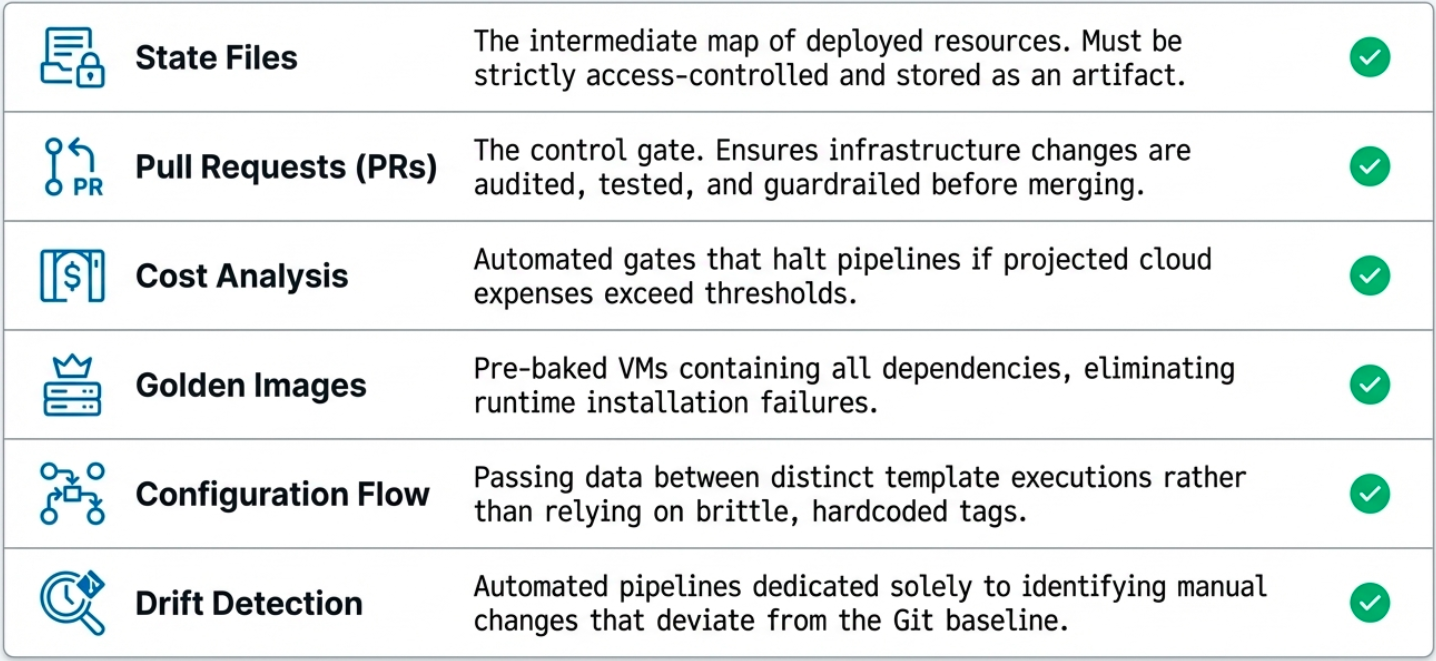
Section titled “IaC in the CI/CD Pipeline”The scope of CI/CD has expanded beyond application source code to include cloud infrastructure. Infrastructure changes carry significant security and stability risks - they require specialized patterns inside the pipeline.
State File Management
Section titled “State File Management”IaC tools like Terraform and OpenTofu maintain a state file that tracks current real-world infrastructure. Running tofu plan generates an inspectable artifact showing exactly what will change before anything is executed.
In a pipeline, the plan output is stored as an artifact and reviewed (or automatically validated) before tofu apply is allowed to run. This creates a mandatory inspection checkpoint.
Pull Requests as Audit Gates
Section titled “Pull Requests as Audit Gates”For sensitive infrastructure changes, the pull request becomes a control mechanism:
- The pipeline runs
planon every PR and posts the diff as a comment - Required reviewers must approve before merge
- The apply only runs after merge to the protected branch - never directly
This enforces Separation of Duties (SoD): the person who proposes the change is not the same person approving it.
Cost Analysis
Section titled “Cost Analysis”Infrastructure changes can silently balloon cloud bills. Integrating tools like Infracost into the pipeline adds a cost estimate as a pipeline gate:
- The pipeline calculates the monthly cost delta of the proposed change
- The estimate is posted to the PR alongside the plan diff
- Teams can set thresholds - changes above a cost ceiling require explicit approval
Golden Images
Section titled “Golden Images”Rather than installing dependencies at boot time, Golden Images are pre-tested VM images built by a dedicated image pipeline (using Packer).
Benefits: every instance is identical (repeatability), no installation delay at boot (speed), and OS patches are validated in the image pipeline before rollout (risk reduction).
Configuration Flow
Section titled “Configuration Flow”Complex infrastructure pipelines often run in stages - a networking pipeline produces a VPC ID that an application pipeline needs. Tools like Spacelift provide state sharing between pipeline runs so downstream pipelines can consume outputs from upstream ones safely.
Drift Detection
Section titled “Drift Detection”A specialized pipeline that runs on a schedule to detect configuration drift - differences between the desired template state and actual live infrastructure.
- Runs
planon a schedule (hourly or daily) - If drift is detected, alerts the team and optionally opens a PR to document it
- Can automatically remediate (run
apply) for low-risk drift, or escalate for review
Design Patterns Applied to Infrastructure
Section titled “Design Patterns Applied to Infrastructure”Software design patterns don’t just apply to application code - they also govern how IaC tools create and manage cloud resources. There are four classical patterns to infrastructure provisioning:
Factory Method
Section titled “Factory Method”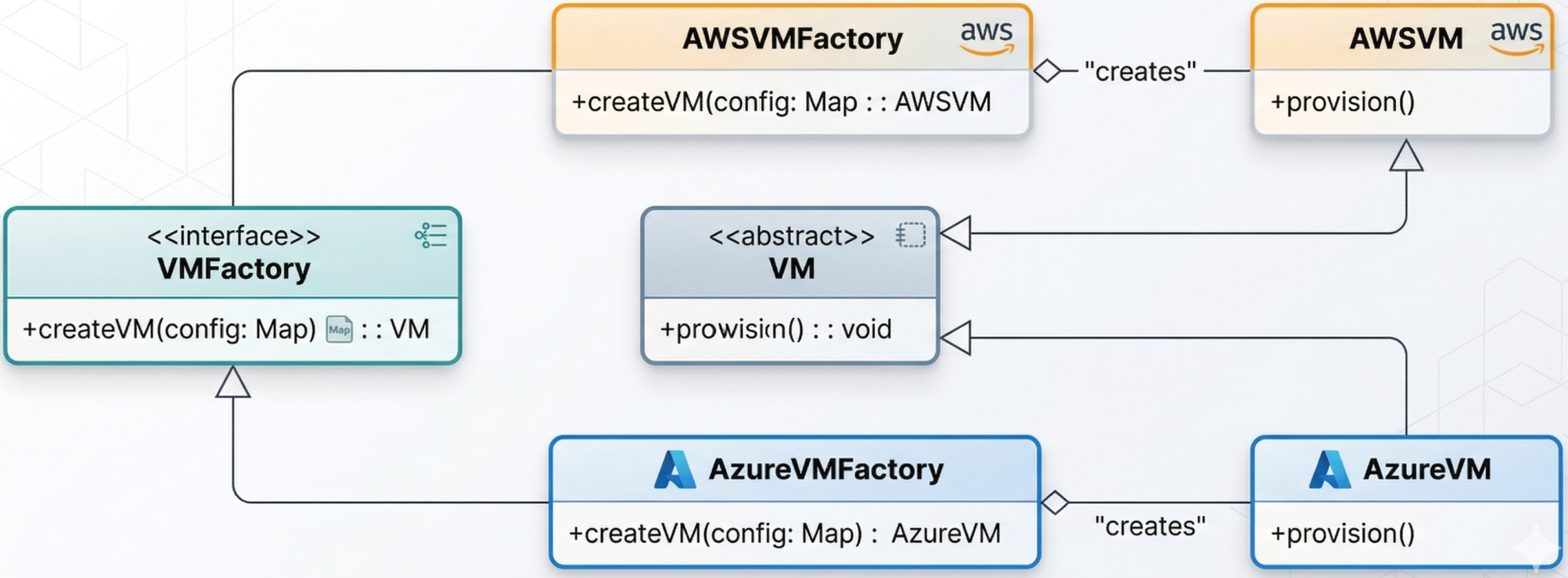
Allows the system to decide which infrastructure resource to create based on parameters at runtime. A Terraform module can act as a factory: given a cost or availability signal, it dynamically provisions a virtual machine on AWS or Azure - without changing the calling pipeline logic.
The pattern: define an abstract interface (create_resource()), let the module implementation choose the concrete provider.
Builder Pattern
Section titled “Builder Pattern”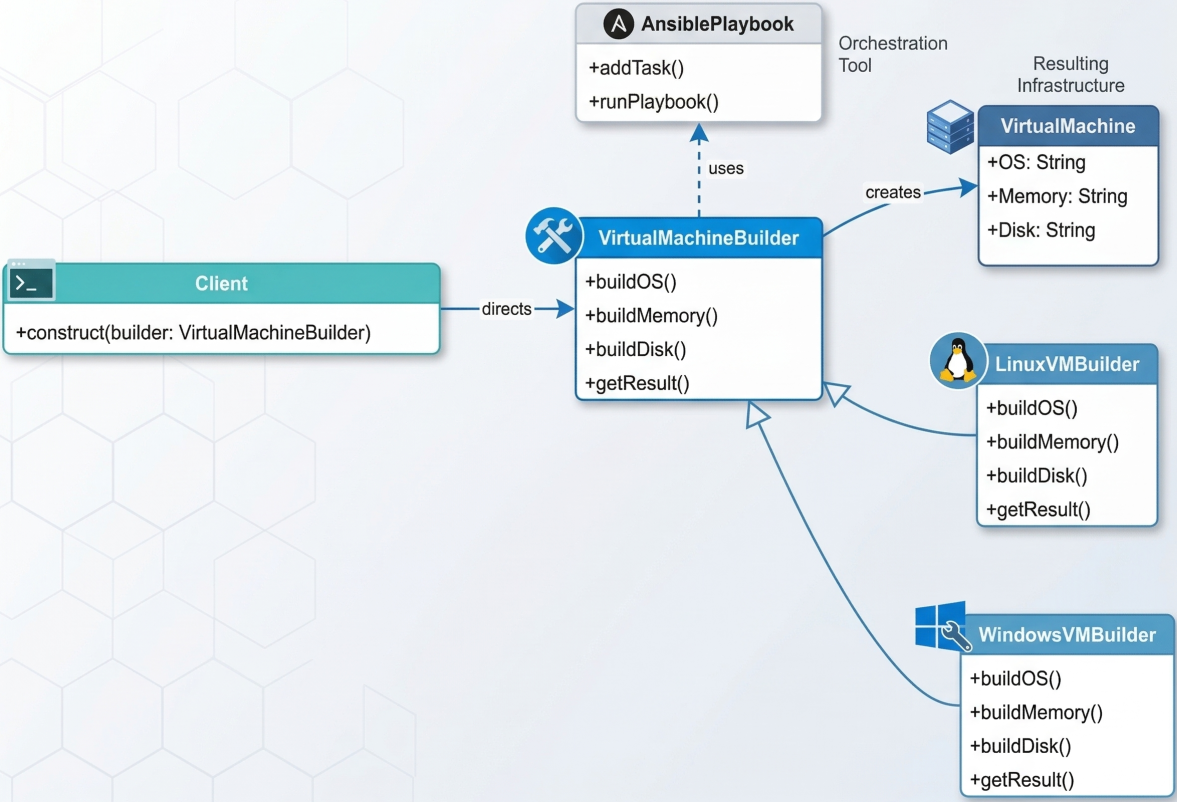
Used to construct complex infrastructure step-by-step without exposing the creation logic to the caller. An Ansible playbook acts as a builder: it layers the operating system, memory allocation, disk type, and application dependencies onto a VM in a defined sequence, producing a ready-to-run instance.
Useful when the infrastructure resource requires many optional, ordered configuration steps. The caller simply says “build me a staging environment” - the builder handles all the detail.
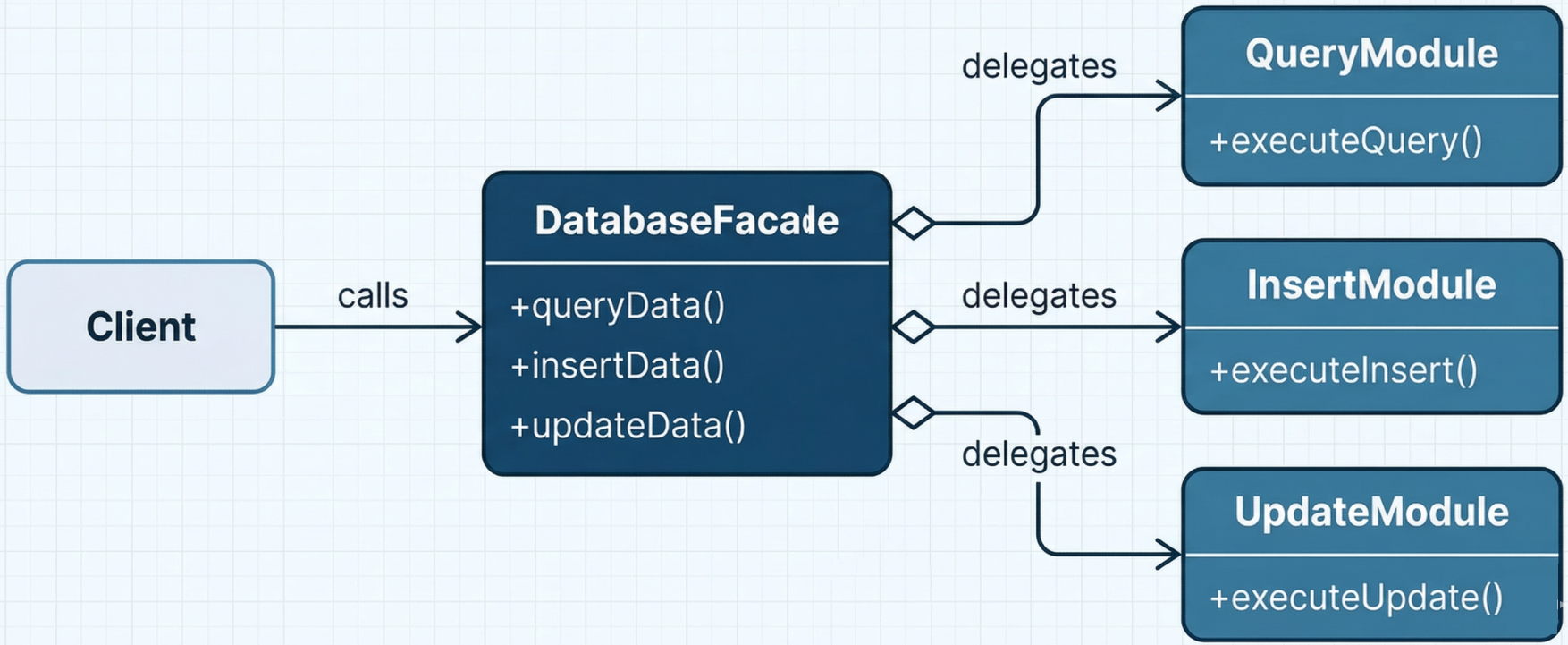
Adapter and Facade Patterns
Section titled “Adapter and Facade Patterns”Used to simplify integration with complex or incompatible infrastructure APIs:
-
Adapter (Chef): Wraps an external system (e.g., Amazon S3) behind a consistent interface so the pipeline interacts with it uniformly regardless of the underlying API details.

-
Facade (Puppet): Provides a single simplified interface for executing complex sequences of database queries or infrastructure operations - hiding the underlying complexity behind a clean API surface.
Observer Pattern (GitOps)
Section titled “Observer Pattern (GitOps)”Establishes a relationship where dependent resources automatically update when a core configuration changes. This is the architectural model behind GitOps and tools like Argo CD.
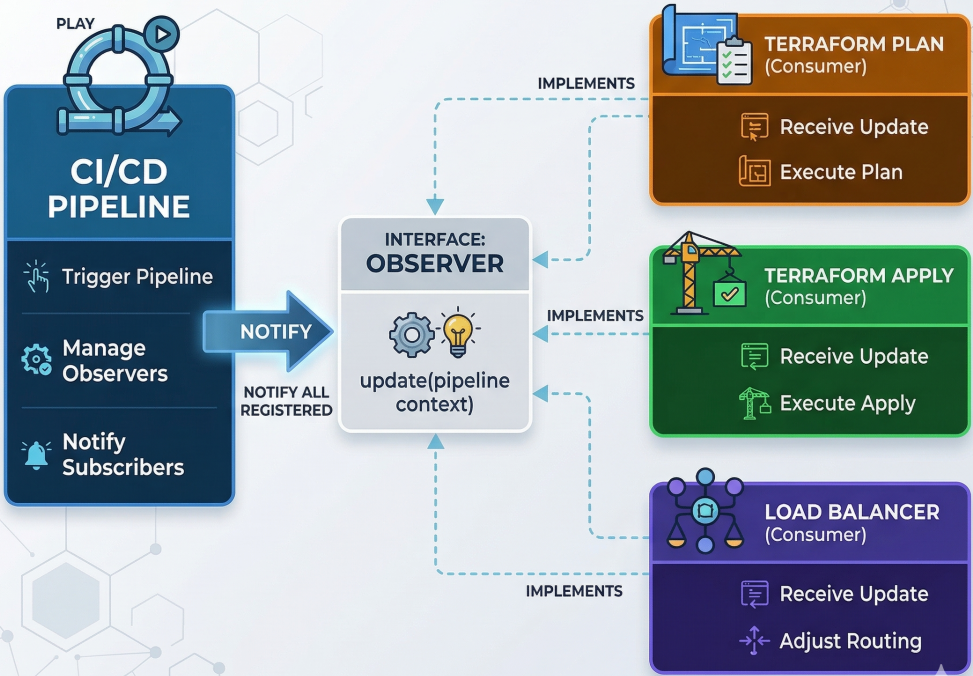
In practice: Argo CD applications act as observers continuously monitoring a Git repository. When a new Terraform configuration or Kubernetes manifest is committed, Argo CD is notified and automatically runs plan/apply to reconcile the live cluster with the desired state in Git - without any human trigger.
To see the Observer pattern in action, we can map distinct pipeline stages (Terraform Plan, Terraform Apply, Load Balancer Configuration) to individual Argo CD Application resources. Each application acts as an observer watching a specific path in a Git repository (the subject).
Watches the terraform/plan path and runs terraform plan when changes are detected.
apiVersion: argoproj.io/v1alpha1kind: Applicationmetadata: name: terraform-planspec: project: default source: repoURL: 'https://github.com/your-org/your-repo' targetRevision: HEAD path: terraform/plan destination: server: 'https://kubernetes.default.svc' namespace: terraform syncPolicy: automated: prune: true selfHeal: trueWatches the terraform/apply path to execute the infrastructure changes.
apiVersion: argoproj.io/v1alpha1kind: Applicationmetadata: name: terraform-applyspec: project: default source: repoURL: 'https://github.com/your-org/your-repo' targetRevision: HEAD path: terraform/apply destination: server: 'https://kubernetes.default.svc' namespace: terraform syncPolicy: automated: prune: true selfHeal: trueWatches the infrastructure/load-balancer path and applies necessary cluster adjustments.
apiVersion: argoproj.io/v1alpha1kind: Applicationmetadata: name: load-balancer-adjustmentspec: project: default source: repoURL: 'https://github.com/your-org/your-repo' targetRevision: HEAD path: infrastructure/load-balancer destination: server: 'https://kubernetes.default.svc' namespace: loadbalancer syncPolicy: automated: prune: true selfHeal: trueBy breaking stages into dedicated observers, Argo CD ensures that the live state of the corresponding infrastructure part always matches the desired state in Git - effectively implementing the Observer pattern natively within Kubernetes.