
The Transport and Application Layers
The Transport Layer
Section titled “The Transport Layer”The transport layer is layer 4 in the TCP/IP model. Its job is to take data from the application layer above and deliver it to the right application on the right host - reliably (TCP) or as-fast-as-possible (UDP).
Two core responsibilities:
- Multiplexing - combining data streams from multiple sockets into one transmission channel, tagging each with a port number so the receiver knows where to send it.
- Demultiplexing - at the receiving end, reading that port number and routing each segment to the correct application socket.
Transport sits on top of IP, which delivers datagrams host to host on a best-effort basis. IP can drop, duplicate, delay, or reorder packets and promises nothing about it. The transport layer extends delivery from host to host to process to process. UDP adds only ports and an optional error check. TCP builds ordering, reliability, flow control, and congestion control on top of IP’s unreliable service. Neither can promise bandwidth or delay, because IP does not.
A port is a 16-bit number (0-65535) that identifies which application on a host should receive incoming traffic. IP addresses get you to the right machine; ports get you to the right program.
| Port Range | Category | Description |
|---|---|---|
| 1 - 1023 | System / Well-known | Reserved for standard services (HTTP, SSH, DNS). Binding requires root/admin. |
| 1024 - 49151 | User / Registered | Vendor-registered ports. Not as strict. |
| 49152 - 65535 | Ephemeral / Dynamic | OS-assigned temporary ports for outgoing client connections. |
Common Ports Quick Reference
Section titled “Common Ports Quick Reference”| Port | Protocol | Service |
|---|---|---|
| 20 / 21 | TCP | FTP (data / control) |
| 22 | TCP | SSH |
| 23 | TCP | Telnet (unencrypted - avoid) |
| 25 | TCP | SMTP (email sending) |
| 53 | TCP/UDP | DNS |
| 67 / 68 | UDP | DHCP (server / client) |
| 80 | TCP | HTTP |
| 110 | TCP | POP3 |
| 143 | TCP | IMAP |
| 443 | TCP | HTTPS (TLS) |
| 3306 | TCP | MySQL |
| 3389 | TCP | RDP (Remote Desktop) |
| 5432 | TCP | PostgreSQL |
| 6443 | TCP | Kubernetes API server |
| 8080 | TCP | HTTP alternate / dev servers |
How the receiver picks a socket
Section titled “How the receiver picks a socket”One host runs many sockets, so each arriving segment needs a rule that selects its socket. UDP and TCP use different keys.
| UDP | TCP | |
|---|---|---|
| Socket identified by | Destination IP, destination port | Source IP, source port, destination IP, destination port |
| Two clients, same server port | Both land in the same socket | Each gets its own connected socket |
| State | None | Per-connection state |
With UDP, the source port is only a return address. The server reads it from each datagram and uses it as the destination of the reply.
With TCP, a server listens on one port and accept() produces a new connected socket for every client. Thousands of connections can share port 443 because each has a different four-tuple.
ss -tn state established '( sport = :443 )'
# Recv-Q Send-Q Local Address:Port   Peer Address:Port# 0      0      10.0.1.20:443        198.51.100.7:51514# 0      0      10.0.1.20:443        198.51.100.7:51520# 0      0      10.0.1.20:443        203.0.113.41:40122
The four-tuple also sets a ceiling. A client that connects to one server IP and port can use only as many source ports as its ephemeral range allows, about 28,000 on Linux by default. A proxy or NAT gateway funnelling many clients to a single upstream address can run out of source ports long before it runs out of CPU. Widen the range with net.ipv4.ip_local_port_range or spread connections over more source or destination addresses. See Kubernetes Services for the same effect behind a cluster NAT.
TCP - The Reliable Protocol
Section titled “TCP - The Reliable Protocol”Transmission Control Protocol (TCP) is a connection-oriented, reliable transport protocol. Before any data moves, the two sides agree to communicate. Along the way, every segment is acknowledged. Lost segments are retransmitted.
TCP Segment Structure
Section titled “TCP Segment Structure”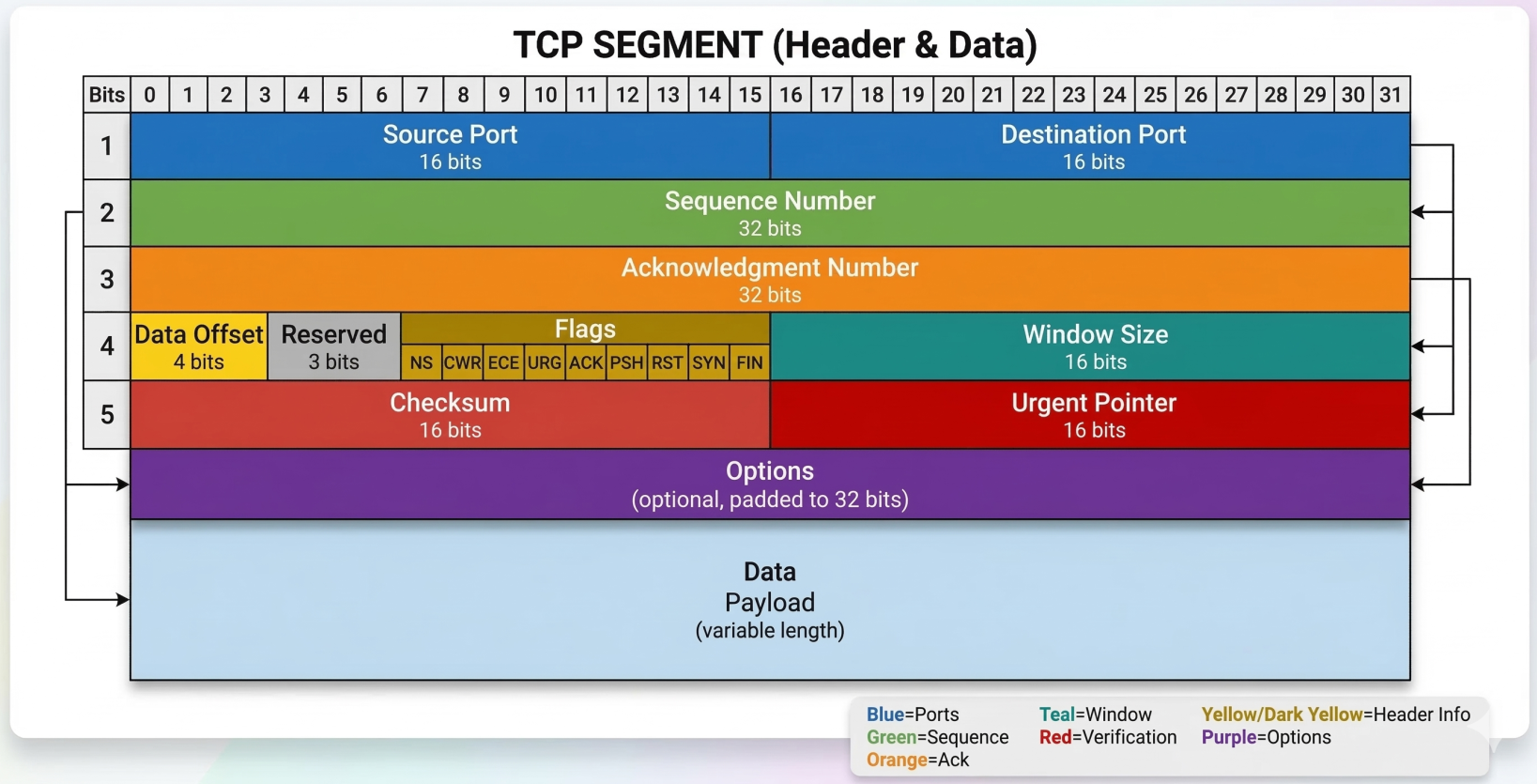
A TCP segment has a mandatory header followed by the data payload. The header contains 10 mandatory fields:
| Field | Size | Purpose |
|---|---|---|
| Source Port | 16 bits | Sending application’s port |
| Destination Port | 16 bits | Receiving application’s port |
| Sequence Number | 32 bits | Byte offset in the data stream - used for ordering |
| Acknowledgment Number | 32 bits | Next expected byte from the other side |
| Header Length (Data Offset) | 4 bits | Header size in 32-bit words (tells OS where data starts) |
| Control Flags | 6-8 bits | URG, ACK, PSH, RST, SYN, FIN (+ ECE, CWR for ECN) |
| Window Size | 16 bits | How many bytes the receiver can accept before needing an ACK (flow control) |
| Checksum | 16 bits | Integrity check over header + data + IP pseudoheader |
| Urgent Pointer | 16 bits | Only relevant when URG flag is set. Rarely used in practice. |
| Options | 0-40 bytes | Extensions: MSS, Window Scaling, SACK, Timestamps |
Key TCP Options:
- MSS (Maximum Segment Size) - negotiated at connection setup; the largest chunk of data TCP will send in one segment
- Window Scaling - allows the 16-bit window field to be multiplied (necessary for high-bandwidth long-distance links)
- SACK (Selective Acknowledgement) - receiver tells sender exactly which out-of-order segments were received, avoiding retransmitting already-delivered data
- Timestamps - used for RTT measurement and PAWS (Protection Against Wrapped Sequence numbers)
TCP Control Flags
Section titled “TCP Control Flags”Six flags you’ll see constantly:
| Flag | What it does |
|---|---|
| SYN | Initiates a connection. Synchronizes sequence numbers. |
| ACK | Acknowledges received data. Set on almost every segment after the first SYN. |
| FIN | Begins graceful connection teardown. “I’m done sending.” |
| RST | Abruptly terminates a connection. No graceful close. |
| PSH | Tell the receiver: flush this to the application now, don’t buffer. |
| URG | Urgent data present (pointer field valid). Almost never used in practice. |
The Three-Way Handshake
Section titled “The Three-Way Handshake”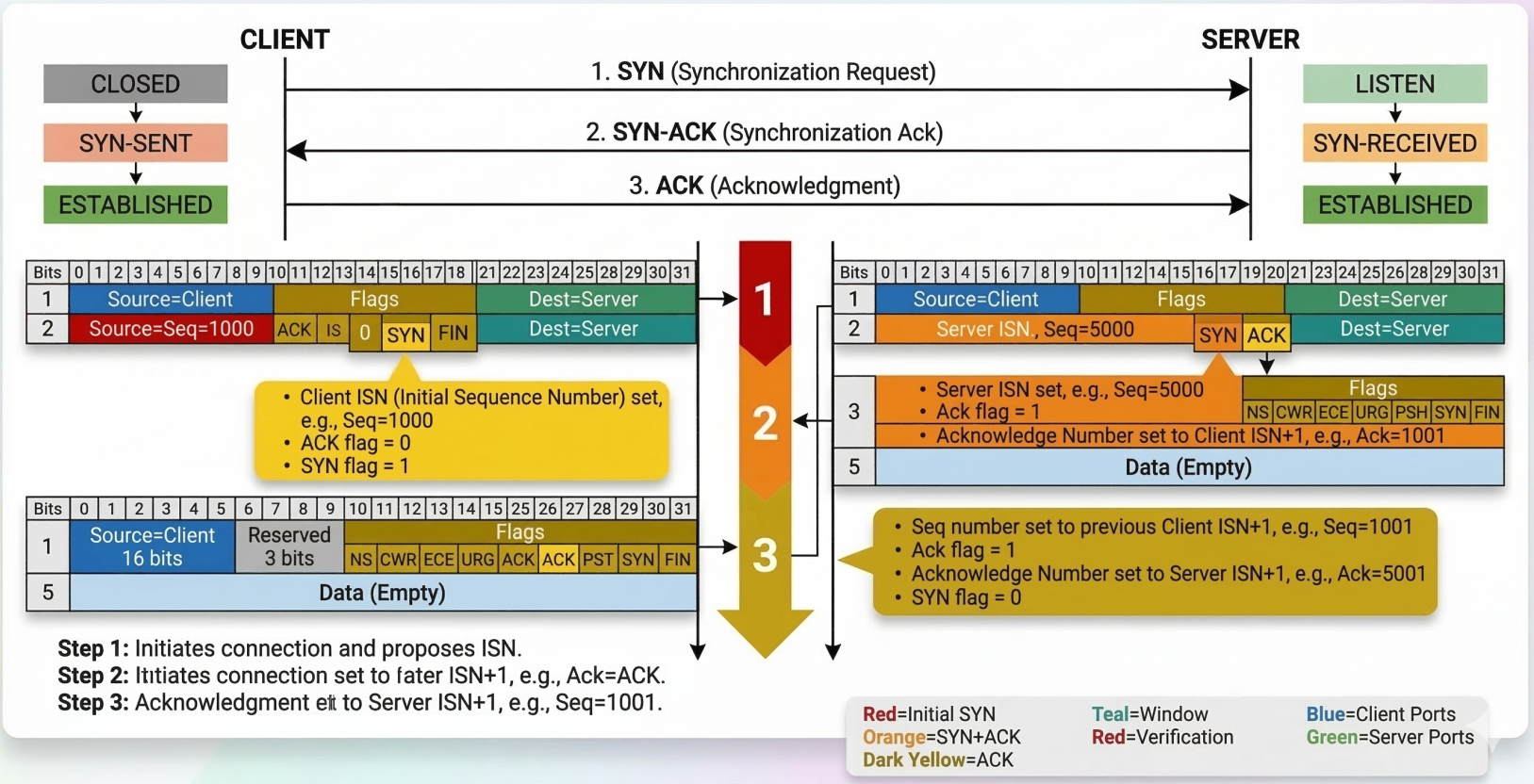
TCP requires a handshake before any application data flows. The goal: both sides synchronize sequence numbers and confirm they can reach each other.
Client Server | | |------ SYN (seq=1000) -------->| Client picks ISN (Initial Sequence Number) | | |<-- SYN-ACK (seq=5000, | Server picks its own ISN, ACKs client's SYN | ack=1001) --------| | | |------ ACK (ack=5001) -------->| Client ACKs server's SYN | | |====== Data flows now =========|After the handshake, the connection is full-duplex - both sides can send simultaneously, and every segment gets an ACK.
Four-Way Teardown
Section titled “Four-Way Teardown”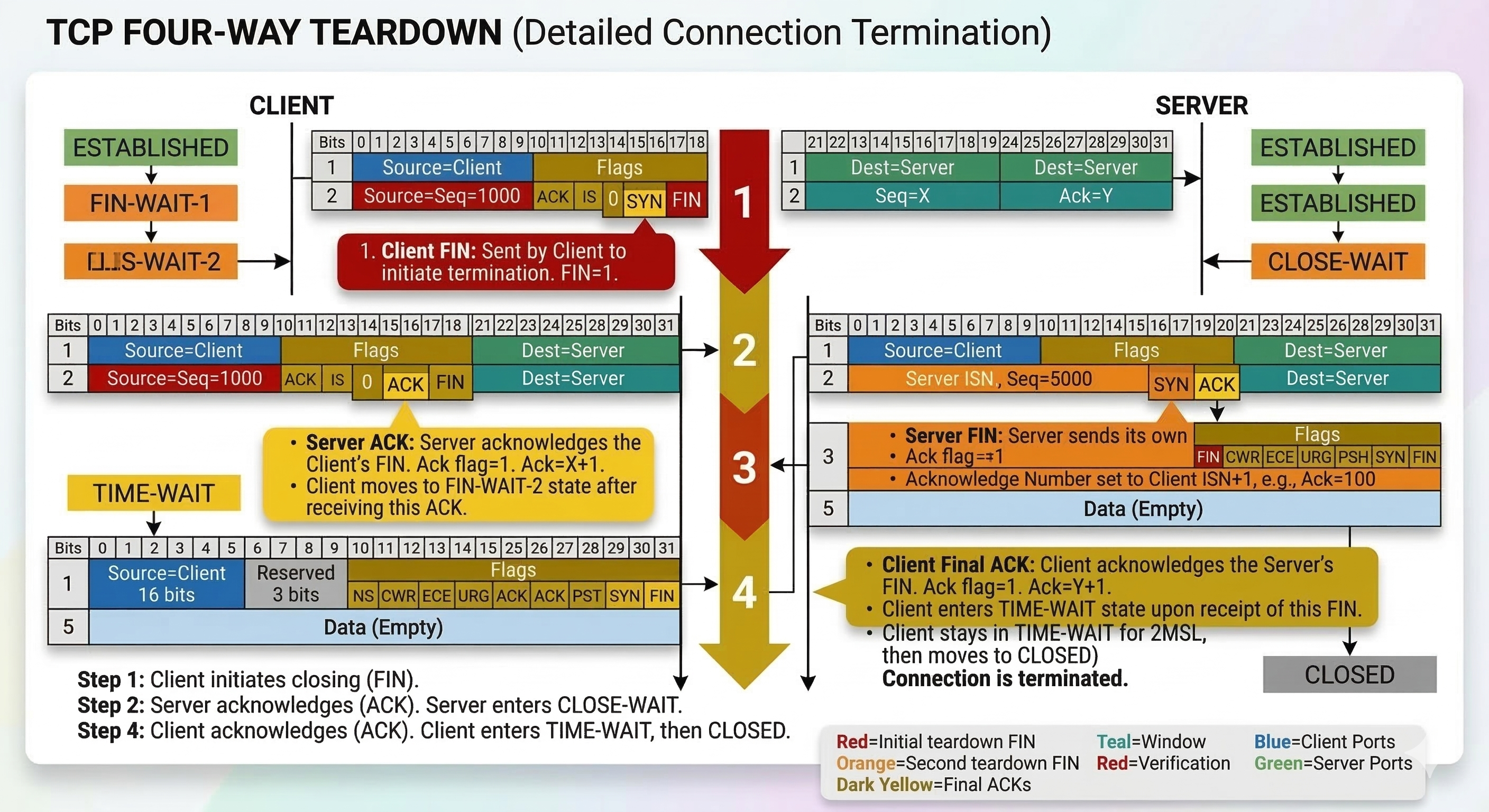
Closing is also graceful - each side independently signals it’s done sending:
Client Server | | |-------- FIN ----------------->| "I'm done sending" |<-------- ACK -----------------| "Got it" | | (Server may still send data here) |<-------- FIN -----------------| "I'm also done sending" |--------- ACK ---------------->| "Got it" | | |===== Connection closed =======|TCP Socket States
Section titled “TCP Socket States”A socket is an instantiated endpoint - a port that a program has actually opened and is listening on. You can send to any port, but only get a response if a socket is open there.
TCP connections move through a state machine:
Connection Establishment States
Section titled “Connection Establishment States”| State | Who | Meaning |
|---|---|---|
CLOSED | Both | No connection exists |
LISTEN | Server only | Waiting for incoming SYN |
SYN-SENT | Client only | Sent SYN, waiting for SYN-ACK |
SYN-RECEIVED | Server only | Got SYN, sent SYN-ACK, waiting for ACK |
ESTABLISHED | Both | Connection open, data flows |
Connection Termination States
Section titled “Connection Termination States”| State | Meaning |
|---|---|
FIN-WAIT-1 | Sent FIN, waiting for ACK |
FIN-WAIT-2 | Got ACK for our FIN, waiting for remote FIN |
CLOSE-WAIT | Received FIN, notified application to close |
LAST-ACK | Sent our FIN, waiting for final ACK |
TIME-WAIT | Both sides closed; lingering to catch any late packets (lasts 2x MSL) |
How reliable delivery works
Section titled “How reliable delivery works”IP can lose packets, corrupt them, duplicate them, and deliver them out of order. A reliable transport hides all of that with five tools:
- Checksum - detects corrupted data
- Acknowledgments (ACKs) - the receiver confirms what it got
- Sequence numbers - let the receiver spot duplicates and gaps
- Timer - the sender waits a bounded time for an ACK, then assumes loss
- Retransmission - the sender resends unacknowledged data
The simplest design is stop-and-wait: send one packet, wait for its ACK, send the next. It is correct but wasteful. The sender is busy for only a tiny fraction of each round trip:
utilization = (L / R) / (RTT + L / R)
Example: 10 Gbit/s link, 40 ms round trip, 1500-byte (12,000-bit) packets  L / R = 1.2 microseconds  utilization = 0.0012 ms / 40.0012 ms = about 0.003%  throughput  = 12,000 bits per 40 ms = about 300 kbit/s on a 10 Gbit/s link
The fix is pipelining: keep many packets in flight before the first ACK returns. That needs a larger sequence number space, a sender buffer for unacknowledged data, and sometimes a receiver buffer. How much data must be in flight to keep the link full is the bandwidth-delay product:
BDP = link rate x round-trip time = 10 Gbit/s x 40 ms = 400 Mbit = 50 MB in flightTwo designs for recovering from loss in a pipelined protocol:
| Go-Back-N | Selective Repeat | |
|---|---|---|
| Acknowledgments | Cumulative: “everything up to N arrived” | Individual: one per packet |
| Timers | One, for the oldest unacknowledged packet | One per packet |
| On a loss | Resend the lost packet and everything after it | Resend only the lost packet |
| Receiver | Discards out-of-order packets, so needs no buffer | Buffers out-of-order packets until the gap fills |
| Cost | Wasted retransmissions when loss is frequent | More state at both ends |
TCP is a hybrid of the two. Like Go-Back-N it uses cumulative ACKs and one timer. Like Selective Repeat it buffers out-of-order data and retransmits only the missing segment. The SACK option moves it closer to Selective Repeat by reporting exactly which ranges arrived.
Going deeper: Reliable delivery protocols rebuilds the mechanism step by step, with Go-Back-N and Selective Repeat traces and the window vs sequence space rule.
TCP sequence numbers, timers, and windows
Section titled “TCP sequence numbers, timers, and windows”Sequence and acknowledgment numbers
Section titled “Sequence and acknowledgment numbers”TCP numbers bytes, not packets. The sequence number in a segment is the stream position of its first byte. Sending a 10,000-byte response with a 1,460-byte MSS produces segments at offsets 0, 1460, 2920, and so on. The acknowledgment number is the next byte the receiver expects, and it is cumulative: ACK 4380 means every byte before 4380 has arrived.
Received bytes 0 to 2919, then 4380 to 5839 (2920 to 4379 missing)
Receiver replies ACK 2920 to every new segment until the gap is filled
Each side picks a random initial sequence number during the handshake, so delayed segments from an old connection are unlikely to be accepted by a new one with the same addresses and ports. Tools show relative numbers by default (starting at 0); use tcpdump -S to see the real ones. In an interactive session, ACKs ride along on data going the other way, which is called piggybacking.
Round-trip time and the retransmission timeout
Section titled “Round-trip time and the retransmission timeout”The sender needs a timeout that is longer than a typical round trip but short enough to recover quickly. A fixed value fails on any path whose delay changes, so TCP measures the RTT continuously and smooths it:
EstimatedRTT = 0.875 x EstimatedRTT + 0.125 x SampleRTTDevRTT = 0.75 x DevRTT + 0.25 x |SampleRTT - EstimatedRTT|RTO = EstimatedRTT + 4 x DevRTTDevRTT measures how much the samples vary, so the timeout widens on jittery paths. Segments that were retransmitted are not used as samples, because the sender cannot tell which transmission an ACK belongs to (the timestamp option removes that ambiguity). After a timeout, TCP doubles the RTO on each further failure (exponential backoff), which also reduces load on a congested path. Linux starts with a 1 second RTO and never lets it fall below 200 ms.
ss -ti dst 203.0.113.41
# cubic wscale:7,7 rto:204 rtt:23.5/4.2 mss:1448 cwnd:10 retrans:0/3#                  ^^^^^^^ RTO   ^^^^^^^^^ average RTT / variation
Retransmission
Section titled “Retransmission”A lost segment is detected in one of two ways.
- Timeout - no ACK arrives before the RTO fires. This is slow and is treated as severe congestion.
- Fast retransmit - the receiver sends a duplicate ACK for every out-of-order segment. Three duplicate ACKs tell the sender that the next segment was lost and not merely delayed, so it resends immediately without waiting for the timer.
Wireshark labels both cases for you, and the kernel counts them:
# Wireshark display filters#   tcp.analysis.retransmission#   tcp.analysis.fast_retransmission#   tcp.analysis.duplicate_ack
nstat -az TcpRetransSegs TcpExtTCPFastRetrans
Flow control
Section titled “Flow control”Flow control protects the receiver. Each side has a receive buffer, and every ACK advertises how much free space remains, called the receive window (rwnd). The sender keeps its unacknowledged data below that figure.
rwnd = RcvBuffer - (LastByteReceived - LastByteRead)bytes in flight <= min(rwnd, cwnd)When an application reads slowly, the buffer fills and rwnd drops to 0. The sender stops and sends tiny probe segments until the window reopens. In Wireshark this shows up as TCP ZeroWindow and TCP Window Full, and it points at the receiving application, not the network.
The 16-bit window field caps rwnd at 64 KiB, which is far below the BDP of a fast long-distance path. The window scaling option multiplies it, and Linux tunes buffer sizes automatically within the limits in net.ipv4.tcp_rmem and net.ipv4.tcp_wmem.
| Flow control | Congestion control | |
|---|---|---|
| Protects | The receiving host | The network between the hosts |
| Limit | rwnd, advertised by the receiver | cwnd, calculated by the sender |
| Signal | Free buffer space in each ACK | Loss, delay, or ECN marks |
See TCP congestion control for the second row.
Resets and SYN floods
Section titled “Resets and SYN floods”A host that receives a segment for a port with no listening socket answers with a segment that has the RST flag set. The client sees this as “connection refused” immediately, which makes a refused connection different from a firewall that silently drops packets and leaves the client timing out. (UDP has no connection to reset. A closed UDP port produces an ICMP port unreachable message instead.)
The handshake is also an attack surface. The server allocates state when it receives a SYN, before the client proves it exists. In a SYN flood, an attacker sends many SYNs and never completes the handshake, filling the table of half-open connections until real clients are refused. SYN cookies defend against it: the server encodes the connection details into its initial sequence number, keeps no state, and creates the socket only if the final ACK returns a matching value.
sysctl net.ipv4.tcp_syncookies# net.ipv4.tcp_syncookies = 1
# Half-open connections piling up on a listenerss -tn state syn-recv | wc -l
TCP Fast Open (net.ipv4.tcp_fastopen) lets a returning client put data in its SYN, saving a round trip, at the cost of the same replay caveats as TLS 0-RTT.
Troubleshooting TCP behavior
Section titled “Troubleshooting TCP behavior”| Symptom | Likely cause | Fix |
|---|---|---|
| Throughput far below link speed on a long path | Window smaller than the BDP (scaling off or small buffers) | Confirm wscale in ss -ti, raise the tcp_rmem and tcp_wmem maximums |
| Many retransmissions on one path | Loss from congestion or a faulty link | Run mtr, check interface errors with ethtool -S |
| Connection refused at once | RST: nothing is listening, or a firewall rejects | ss -tlnp on the server, then the firewall rules |
| Connection hangs, then times out | SYN silently dropped | tcpdump shows SYNs leaving with no reply, so check firewalls and security groups |
| Transfer stalls in bursts | Receiver advertising a zero window | Fix the slow reader, then check receive buffer size |
Many connections in SYN-RECV | SYN flood, or accept backlog full | Keep tcp_syncookies on, raise the listen backlog |
UDP segments and checksum
Section titled “UDP segments and checksum”UDP adds almost nothing to IP. The header is four 16-bit fields, 8 bytes in total.
| Field | Purpose |
|---|---|
| Source port | Return address for replies |
| Destination port | Selects the receiving socket |
| Length | Header plus data, in bytes |
| Checksum | Detects corruption |
The checksum is the 16-bit one’s complement sum of the data and a pseudo-header containing the IP addresses. The receiver sums everything including the checksum field and expects all ones, otherwise the datagram is discarded. UDP detects errors but never recovers from them. It is optional in IPv4 (a value of 0 means unused) and mandatory in IPv6.
A transport checksum looks redundant when links already run a CRC, but not every link checks, and a router can corrupt a packet in memory after the link check passes. Only the endpoints can verify the data end to end.
TCP vs UDP
Section titled “TCP vs UDP”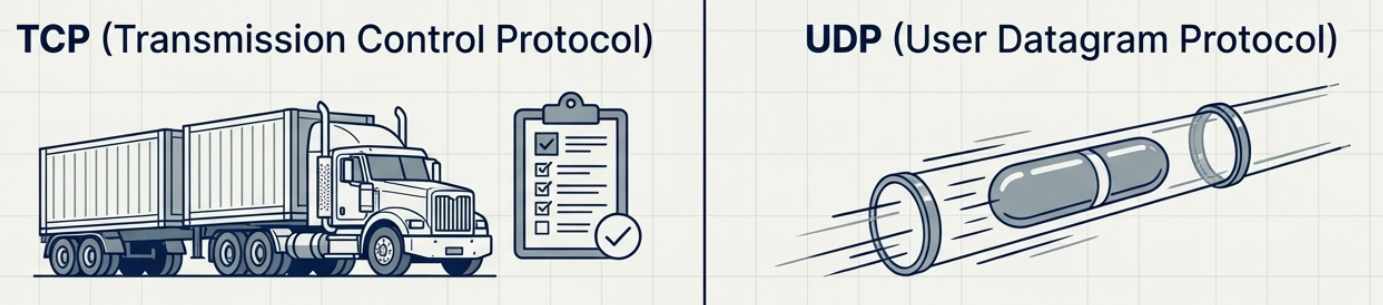
| Property | TCP | UDP |
|---|---|---|
| Connection | Yes (3-way handshake) | No |
| Reliability | Guaranteed delivery + ordering | Best-effort |
| Overhead | Higher (headers, ACKs, retransmits) | Lower |
| Speed | Slower (wait for ACKs) | Faster |
| Flow control | Yes (window size) | No |
| Use cases | HTTP, SSH, FTP, databases | DNS, video streaming, VoIP, gaming |
Firewalls
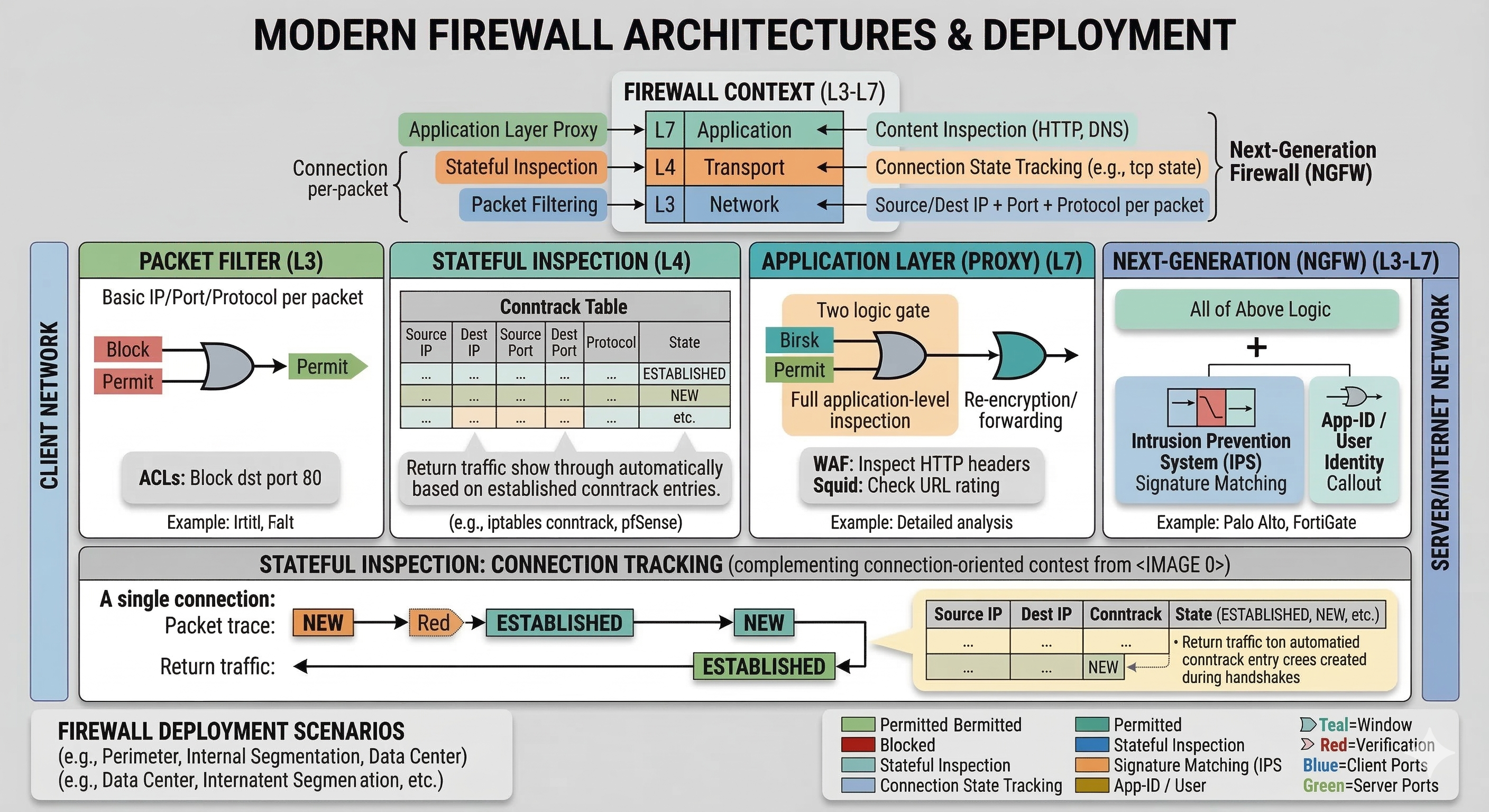
Section titled “Firewalls”A firewall blocks or permits network traffic based on rules. Most commonly deployed at the transport layer, making decisions based on ports and connection state.
Firewall Types
Section titled “Firewall Types”| Type | Works at | How it decides | Example |
|---|---|---|---|
| Packet filter | Network layer (L3) | Source/dest IP + port + protocol per-packet | Router ACLs |
| Stateful inspection | Transport layer (L4) | Tracks connection state; allows return traffic automatically | iptables conntrack, pfSense |
| Application layer (proxy) | Application layer (L7) | Inspects content - HTTP headers, DNS payloads | WAF, squid proxy |
| Next-generation (NGFW) | L3-L7 | All of above + IPS, app identification, user identity | Palo Alto, FortiGate |
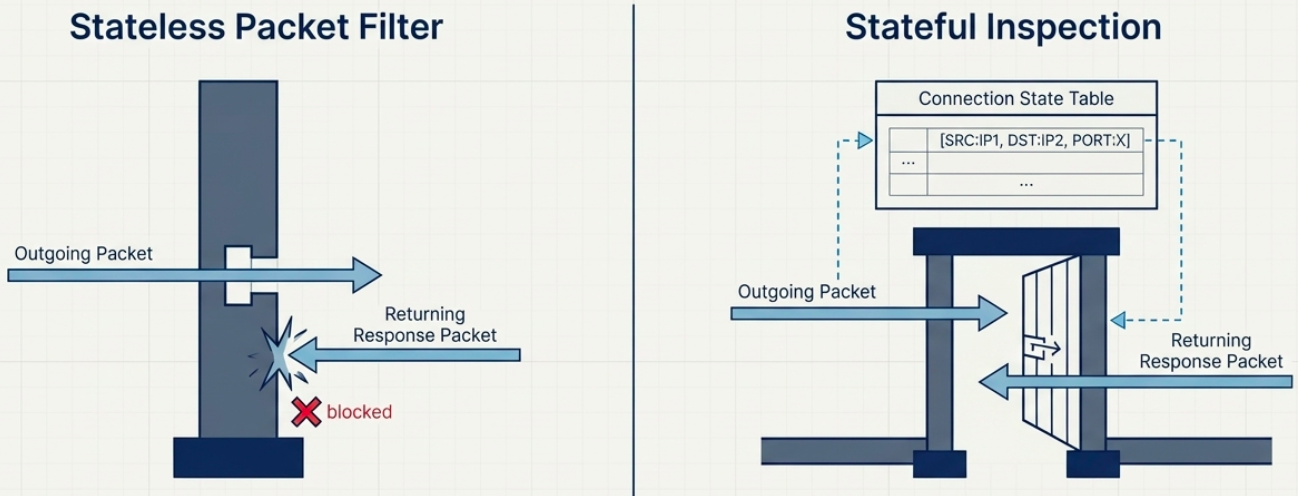
Common Linux firewall tools:
# iptables - classic stateful firewall (older but ubiquitous)# Allow established/related return trafficsudo iptables -A INPUT -m state --state ESTABLISHED,RELATED -j ACCEPT
# Allow SSH inboundsudo iptables -A INPUT -p tcp --dport 22 -j ACCEPT
# nftables - modern replacement for iptables# List all rulessudo nft list ruleset
# ufw - user-friendly frontend for iptables (Ubuntu/Debian)sudo ufw allow 22/tcpsudo ufw allow 443/tcpsudo ufw status verbose
# firewalld - zone-based firewall (RHEL/CentOS/Fedora)sudo firewall-cmd --list-allsudo firewall-cmd --add-service=https --permanentsudo firewall-cmd --reload
Firewalls also appear at other layers now: cloud security groups (AWS/GCP/Azure), Kubernetes NetworkPolicies, and container-level rules - same concept, different control plane.
IDS and IPS
Section titled “IDS and IPS”A firewall decides on headers and connection state. An intrusion detection system (IDS) and an intrusion prevention system (IPS) go further and inspect the payload, a technique called deep packet inspection.
| Firewall | IDS | IPS | |
|---|---|---|---|
| Looks at | Headers and connection state | Headers and payload | Headers and payload |
| Position | Inline | Out of band, on a mirror port or tap | Inline |
| On a match | Allow or deny by rule | Raise an alert only | Drop the packet and alert |
| Failure impact | Traffic stops if it fails closed | None, traffic keeps flowing | Traffic stops or bypasses inspection, depending on fail mode |
Detection works in two ways. Signature-based engines compare traffic against a database of known attack patterns, which is precise but blind to new attacks until a signature ships. Anomaly-based engines learn a baseline and flag deviations, which can catch new attacks but produce more false positives.
Two limits matter in practice. Encrypted traffic hides the payload, so inspection needs TLS termination at the device, or it falls back to headers and metadata. An inline IPS also adds latency and becomes a failure point, so decide whether it fails open or closed. Suricata, Snort, and Zeek are the common open-source engines. These devices are middleboxes in the end-to-end sense. They sit in the path and read layers above the one they are meant to work at. See Firewall rules and iptables and Network hardening for the defensive side.
The Application Layer
Section titled “The Application Layer”The application layer (Layer 5 in TCP/IP) is where actual applications exchange data. It sits on top of transport - it doesn’t care how the data got there, just whether it arrived.
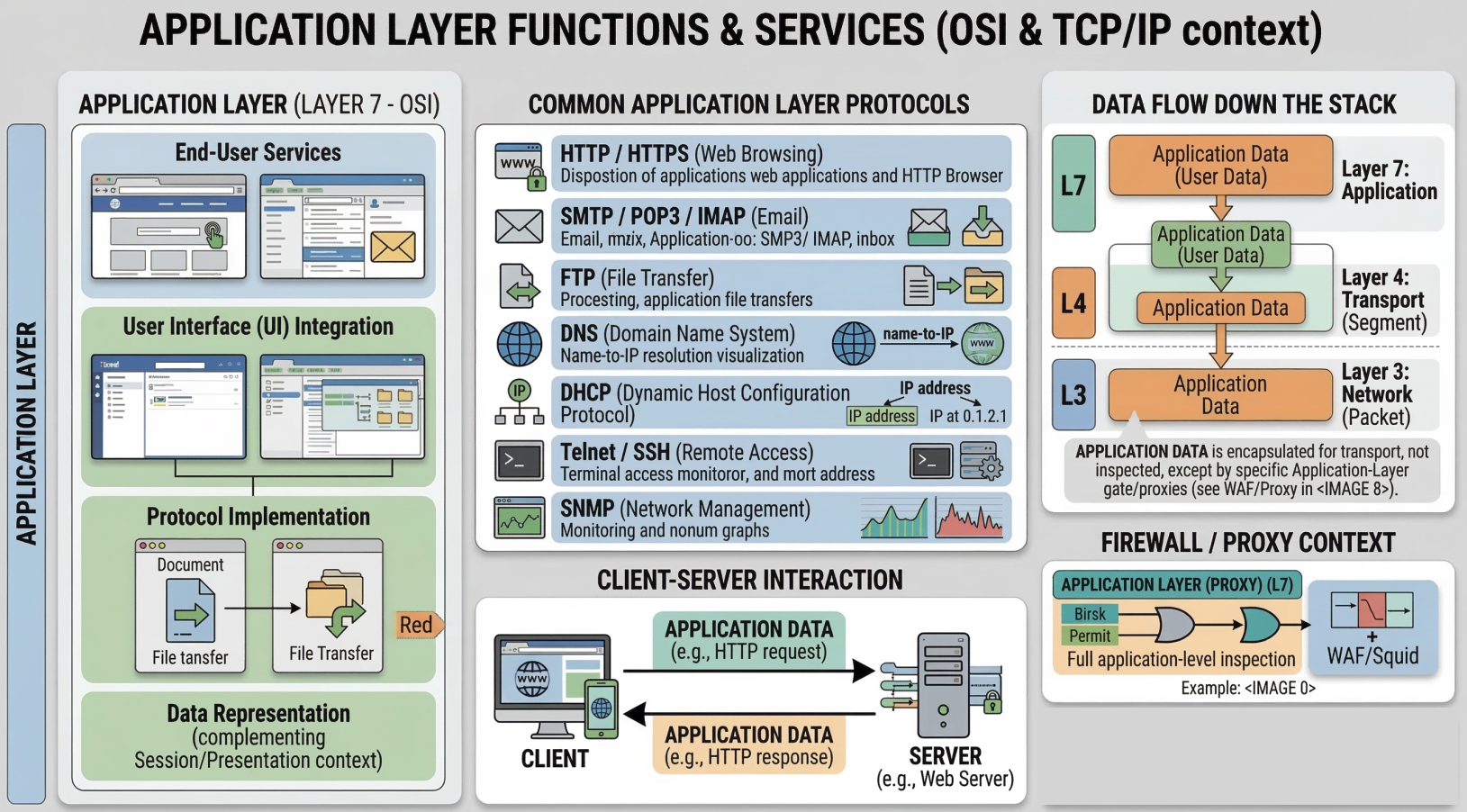
Key principle: interoperability through protocol standardization. Chrome and Firefox both speak HTTP. Apache and Nginx both speak HTTP. Any browser can talk to any web server because they all implement the same HTTP spec. The same logic applies to FTP clients, SMTP mail servers, SSH clients vs servers.
TCP segments carry the full application-layer payload in their data section.
Application architectures
Section titled “Application architectures”An application’s architecture decides which hosts talk to which. Routers and switches don’t run application code, so everything here happens on end systems.
| Client-server | Peer-to-peer | |
|---|---|---|
| Structure | An always-on server with a well-known address. Clients start every exchange and never talk to each other | Hosts exchange data directly with each other |
| Scaling | Add servers behind a load balancer or in a cluster | Every peer that downloads also uploads, so capacity grows with the number of peers |
| Cost | Server capacity and bandwidth | Mostly borne by the participants |
| Weakness | Servers are a cost and a single point of attack | Harder to secure, monitor, and keep reliable |
| Typical use | Web, APIs, email, databases | File and image distribution |
Almost all production services are client-server. Peer-to-peer appears where one large artifact must reach many hosts at once, as in some container image distribution tools.
Either way, communication happens between processes, not hosts. The process that opens the conversation is the client and the one that waits is the server, and a process is addressed by the host’s IP address plus a port number.
What applications need from the transport layer
Section titled “What applications need from the transport layer”Applications choose a transport protocol by what they need along four dimensions:
- Reliability - file transfers, web pages, email, and payments need every byte intact. Voice and video calls tolerate some loss.
- Throughput - some applications need a minimum rate to work at all. Bulk transfers are elastic and use whatever is available.
- Timing - interactive applications such as calls and games need low and steady delay.
- Security - confidentiality, integrity, and authentication of the endpoints.
| Service | TCP | UDP | QUIC |
|---|---|---|---|
| Connection | Yes | No | Yes |
| Delivery | Reliable, ordered byte stream | Unreliable datagrams | Reliable, independent streams |
| Congestion control | Yes | No | Yes |
| Encryption | None by default, added with TLS | None | Built in (TLS 1.3) |
| Throughput guarantee | No | No | No |
| Delay guarantee | No | No | No |
None of the three offers a throughput or delay guarantee on the public internet. Applications that need steady timing, such as streaming and calls, work around it with buffering and by adapting their bitrate. See CDNs and video streaming.
Application Layer and the OSI Model
Section titled “Application Layer and the OSI Model”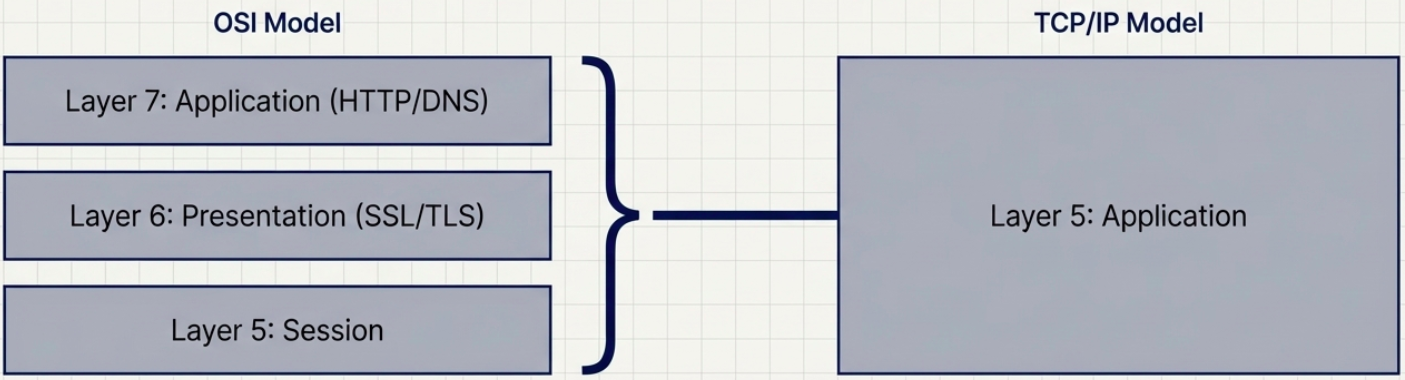
The TCP/IP model’s application layer (layer 5) maps to three layers in the 7-layer OSI model:
| OSI Layer | Name | What it does | TCP/IP equivalent |
|---|---|---|---|
| 7 | Application | User-facing protocols: HTTP, FTP, SMTP, DNS | Application layer |
| 6 | Presentation | Encryption, encoding, compression (SSL/TLS lives here conceptually) | Application layer |
| 5 | Session | Managing sessions, checkpoints, reconnects | Application layer / TCP |
Sockets in practice
Section titled “Sockets in practice”A socket is the operating system handle an application uses to send and receive on the network. It is the boundary between the application layer and the transport layer, and it is identified by an IP address and a port.
| Step | TCP server | TCP client | UDP (either side) |
|---|---|---|---|
| 1 | socket() create | socket() create | socket() create |
| 2 | bind() to a port | bind() to a port (server side) | |
| 3 | listen() | connect() (three-way handshake) | |
| 4 | accept() returns a new socket for each client | send() / recv() | sendto() / recvfrom() |
| 5 | send() / recv() on the new socket | close() | close() |
The accept() step explains how one port serves many clients. The listening socket stays open on the port and each completed handshake produces a separate connected socket, distinguished by the client’s address and port.
# server.py: echo one message per connection (a real server would use threads or async I/O)import socket
with socket.socket(socket.AF_INET, socket.SOCK_STREAM) as srv: srv.setsockopt(socket.SOL_SOCKET, socket.SO_REUSEADDR, 1) srv.bind(("0.0.0.0", 9000)) srv.listen(5) # queue of connections that finished the handshake while True: conn, addr = srv.accept() # blocks until a client connects with conn: conn.sendall(conn.recv(1024))import socket
with socket.create_connection(("127.0.0.1", 9000)) as s: s.sendall(b"ping") print(s.recv(1024)) # b'ping'UDP skips the connection steps. Each datagram carries the destination address, and the receiver learns the sender from recvfrom().
import socket
s = socket.socket(socket.AF_INET, socket.SOCK_DGRAM)s.bind(("0.0.0.0", 9000))data, addr = s.recvfrom(2048)s.sendto(data, addr)                   # reply to whoever sent it
nc gives the same behavior from the shell, and ss shows the sockets.
nc -l 9000                             # listen on TCP 9000nc 127.0.0.1 9000                      # connect to itnc -u -l 9000                          # UDP listener
ss -tlnp | grep 9000 # listening socket and owning processss -tn dst 127.0.0.1:9000 # established connectionsFor a listening socket, ss -ltn shows the current accept queue in Recv-Q and its maximum in Send-Q. A server that falls behind lets that queue fill, and new connection attempts are then dropped or time out on the client.
Troubleshooting Transport Layer Issues
Section titled “Troubleshooting Transport Layer Issues”# Test TCP connectivity to a specific port (the "is this port open?" check)nc -zv example.com 443 # Linux/Mac - verbose, zero i/o mode# -z = scan only, don't send data# -v = verbose output# Exit code 0 = success, non-zero = failed
# Windows equivalentTest-NetConnection -ComputerName example.com -Port 443
# Quick port scan of common ports on a host (use only on hosts you own)nc -zv 192.168.1.1 20-25 80 443 8080
# Test UDP connectivity (harder - nc sends a probe, may or may not get response)nc -zuv 8.8.8.8 53
# Trace a TCP connection - see where it dropstraceroute -T -p 443 example.com # TCP traceroute (bypasses ICMP blocks)sudo tcptraceroute example.com 443 # alternative tool
# Watch live TCP connectionswatch -n1 'ss -tan | grep ESTABLISHED'