
Docker Model Runner
- Docker Model Runner (DMR) is a Docker toolchain component that executes AI models directly on the host machine - not inside containers.
- It exposes OpenAI-compatible inference endpoints, making it a drop-in local replacement for cloud AI APIs.
- Because it runs locally, DMR addresses privacy concerns, eliminates cloud costs, reduces latency, and gives you full control over which models run.
Why Models Run Outside Containers
Section titled “Why Models Run Outside Containers”Containers cannot easily access most AI acceleration hardware:
- Only CUDA-capable NVIDIA GPUs are accessible from containers, and doing so requires the complex NVIDIA Container Toolkit installation.
- NPUs, TPUs, and non-NVIDIA GPUs (including Apple Silicon) are entirely inaccessible from inside containers.
DMR bypasses this by running as a host process with direct hardware access - NVIDIA GPUs on Windows, Apple Silicon via Metal on Mac. CPU fallback is available but significantly slower.
DMR vs. Alternatives
Section titled “DMR vs. Alternatives”| Tool | Inference Engine | Hardware | Docker Integration |
|---|---|---|---|
| DMR | llama.cpp (pluggable) | NVIDIA + Apple Silicon | Native - docker model CLI, OCI registry |
| Ollama | llama.cpp | NVIDIA only (in containers) | Manual - separate tool |
| LM Studio | llama.cpp | NVIDIA + Apple Silicon | None - GUI only |
Architecture
Section titled “Architecture”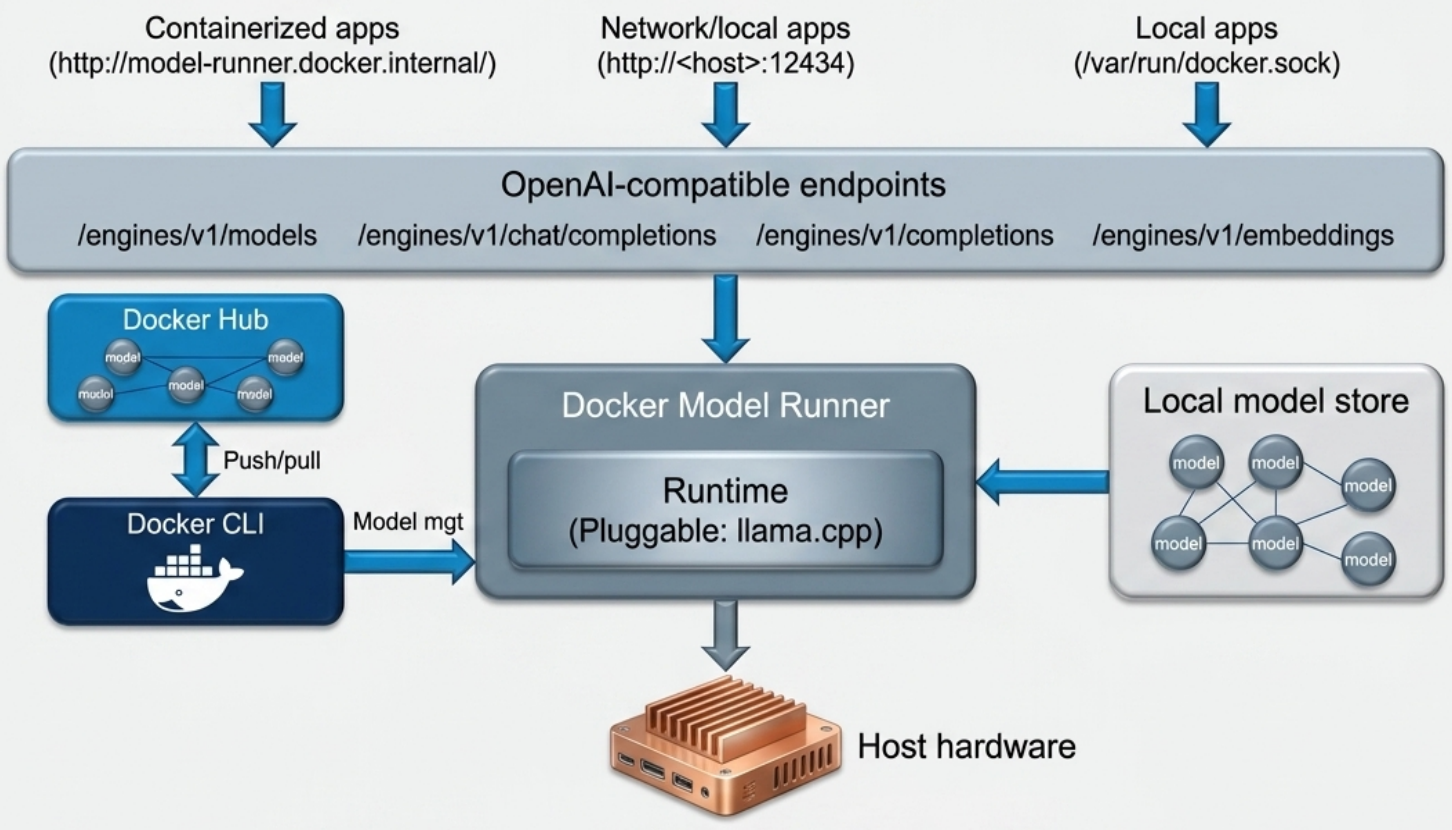
- DMR is a host process, entirely separate from the Docker Engine.
- On Mac, it runs outside the Docker Desktop VM - direct hardware access with no virtualization overhead.
- The runtime layer is pluggable: DMR wraps one or more inference engines. Default is llama.cpp; the active runtime and hardware backend are visible in
docker model status. - Models are dynamically loaded and unloaded based on demand.
API Endpoints
Section titled “API Endpoints”DMR exposes two endpoint families:
| Family | Path prefix | Purpose |
|---|---|---|
| Native model management | /models | List, pull, inspect models |
| OpenAI-compatible inference | /engines/v1/... | Chat completions, embeddings |
Accessible from three contexts:
| Context | Address |
|---|---|
| Containerized apps on the same host | http://model-runner.docker.internal/ |
| Local non-containerized apps | localhost:12434 (host-side TCP must be enabled) |
| Remote apps on another host | http://<dmr-host>:12434 |
Model Storage
Section titled “Model Storage”- Models are stored as OCI artifacts (
amodeltype) in~/.docker/models/blobs/sha256/. - This means your existing private OCI registries (ACR, ECR, GHCR, Harbor) can store and distribute AI models - no separate model registry required, no “registry sprawl”.
Requirements
Section titled “Requirements”- Docker Desktop v4.41 or newer (bundles Compose v2.35)
- Mac (Apple Silicon preferred) or Windows host
- NVIDIA GPU (Windows) or Apple Silicon GPU for hardware-accelerated inference; CPU fallback available but slow
Enabling DMR
Section titled “Enabling DMR”- Open Docker Desktop Settings → Features in development
- Check Enable Docker Model Runner
- Check Enable host-side TCP support - maps DMR to port
12434on the host’s network interface, making it reachable from both local and remote clients - Leave the port at
12434and click Apply & restart
Verifying
Section titled “Verifying”docker model statusA successful output confirms the runner is active and reports the inference backend - e.g., llama.cpp using Apple Metal or NVIDIA CUDA.
Working with Models
Section titled “Working with Models”Pulling Models
Section titled “Pulling Models”Docker maintains a catalog of verified models under the ai namespace on Docker Hub:
# Pull a model by name and quantization tagdocker model pull ai/gemma3:4B-Q4_K_M
# Pull a smaller model for quick testingdocker model pull ai/qwen3:0.6B-Q4_K_MListing and Inspecting
Section titled “Listing and Inspecting”# List all locally downloaded modelsdocker model ls
# Inspect a local model (architecture, size, format)docker model inspect ai/gemma3:4B-Q4_K_M
# Query model manifest directly from Docker Hub (no local copy needed)docker manifest inspect ai/gemma3:4B-Q4_K_MLocal model files (GGUF weights, config, license) are stored in ~/.docker/models/blobs/sha256/.
Testing Models
Section titled “Testing Models”CLI - quick tests, stateless:
# Start an interactive chat REPLdocker model run ai/gemma3:4B-Q4_K_M
# Exit/bye
The CLI does not maintain conversational context - every prompt is treated independently.
Docker Desktop UI - context-aware:
Open the Models tab in Docker Desktop. Clicking a model opens a chat window that retains history across prompts, like a commercial chatbot.
API Usage
Section titled “API Usage”DMR’s OpenAI-compatible API allows any script or tool that speaks the OpenAI REST API to use your local models without code changes.
# List available local modelscurl http://localhost:12434/engines/v1/models
# Chat completioncurl http://localhost:12434/engines/v1/chat/completions \ -H "Content-Type: application/json" \ -d '{ "model": "ai/gemma3:4B-Q4_K_M", "messages": [ {"role": "system", "content": "Keep your responses to one sentence."}, {"role": "user", "content": "What is a Docker container?"} ], "temperature": 0.7, "max_tokens": 200 }'| Parameter | Effect |
|---|---|
model | Which local model to use |
messages | Conversation turns - system sets behavior rules, user is the prompt |
temperature | 0 = deterministic, 1 = most creative |
max_tokens | Maximum response length in tokens |
Compose Integration
Section titled “Compose Integration”DMR integrates with Docker Compose via the provider extension (requires Compose v2.35+), allowing you to declare it as a typed service dependency.
Standard Architecture
Section titled “Standard Architecture”Frontend (UI) → Backend (API) → DMR (inference) → ModelCompose File
Section titled “Compose File”services: frontend: build: ./frontend ports: - "3000:3000" depends_on: - backend
backend: build: ./backend environment: - MODEL_HOST=http://model-runner.docker.internal/engines/v1 - LLM_MODEL_NAME=${LLM_MODEL_NAME} depends_on: - dmr
dmr: provider: type: model options: model: ${LLM_MODEL_NAME} # auto-pulled if not already localLLM_MODEL_NAME=ai/gemma3:4B-Q4_K_Mdocker compose up --build --detachCompose starts services in dependency order: DMR → backend → frontend. DMR auto-downloads the specified model if it is not already in the local store.
Third-Party Apps: Open WebUI
Section titled “Third-Party Apps: Open WebUI”Because DMR exposes standard OpenAI-compatible endpoints, any OpenAI-compatible frontend works against it without modification. Open WebUI is the most common choice - a self-hosted ChatGPT-like interface backed by your local models.
services:  open-webui:    image: ghcr.io/open-webui/open-webui:main    ports:      - "3001:8080"    environment:      - OPENAI_API_BASE_URL=http://model-runner.docker.internal/engines/v1      - OPENAI_API_KEY=na # DMR does not require authentication    volumes:      - open-webui-data:/app/backend/data # persist chats + settings
volumes: open-webui-data:- Access at
http://localhost:3001after startup - First-time setup creates a local admin account - all data stays on your machine
- Customize behavior via Settings → General → System Prompt
(e.g., “Give simple answers. Limit responses to two sentences.”) - The model selector dropdown lets you switch between any models in your local store without restarting
Running Models in Containers (Discouraged)
Section titled “Running Models in Containers (Discouraged)”The core problem is hardware access: containers can only reach CUDA-capable NVIDIA GPUs via the NVIDIA Container Toolkit. NPUs, TPUs, and all non-NVIDIA GPUs (including Apple Silicon) are invisible from inside containers - models fall back to CPU, which is significantly slower.
If you need a containerized model server (e.g., on a CI server without DMR), Ollama is the standard choice:
# CPU-only compose.yamlservices:  ollama:    image: ollama/ollama    ports:      - "11434:11434"    volumes:      - ollama-data:/root/.ollama
volumes:  ollama-data:
For NVIDIA GPU access, add the deploy.resources.reservations.devices block and ensure the NVIDIA Container Toolkit is installed on the host.