
Terraform
Terraform is an open-source IaC provisioning tool that provides a single, unified interface for managing infrastructure across thousands of different vendors. You write infrastructure in HCL (HashiCorp Configuration Language), declare the desired end state, and Terraform figures out what needs to change - and in what order.
Its primary appeal over scripting is that it replaces imperative “do this, then this, then this” automation with a declarative model: describe what you want, not how to build it.
Core Components
Section titled “Core Components”Terraform’s architecture is made up of four distinct layers:
HCL - The Language
Section titled “HCL - The Language”HashiCorp Configuration Language (HCL) is a declarative language designed to be readable even to those unfamiliar with it. It is Terraform’s own flavor of HCL - distinct from what Packer, Consul, or Nomad use - with its own functions and resource types.
- Declarative: You define the desired end state of your infrastructure. Terraform determines the actions required to reach it.
- Noun/adjective model: Declarative languages describe outcomes (nouns and adjectives), where imperative languages describe actions (verbs). You write
resource "google_compute_instance" "web" { ... }, not “create a VM, then wait for it, then configure it.” - No migration paths needed: Because you declare what should exist rather than how to get there, moving between infrastructure versions doesn’t require writing explicit rollback logic.
| Imperative Programming | Declarative Paradigm (Terraform) | |
|---|---|---|
| Core Action | Instructs “what to do” (e.g., check if machine exists, if no, create it) | Describes “what it should look like” (e.g., I need exactly one machine) |
| Primary Grammar | Relies on verbs (Create, Update, Delete) | Relies on nouns & adjectives (a web server, size medium) |
| Handling Changes | Requires writing complex step-by-step state migrations to alter infrastructure | Developer updates the desired end-state; the internal engine calculates the diff automatically |
| Mental Model | Following strict step-by-step recipe instructions | Plotting a route to specific destination coordinates using GPS navigation |
CLI and Core
Section titled “CLI and Core”The Terraform CLI is the primary interface. It handles creating, updating, and destroying infrastructure, code formatting, and generating visual dependency graphs.
Inside the CLI sits the Terraform Core - the translation engine. Core reads HCL, builds the dependency graph, and communicates with providers via gRPC. It is deeply integrated into the CLI and cannot be used separately.
Providers
Section titled “Providers”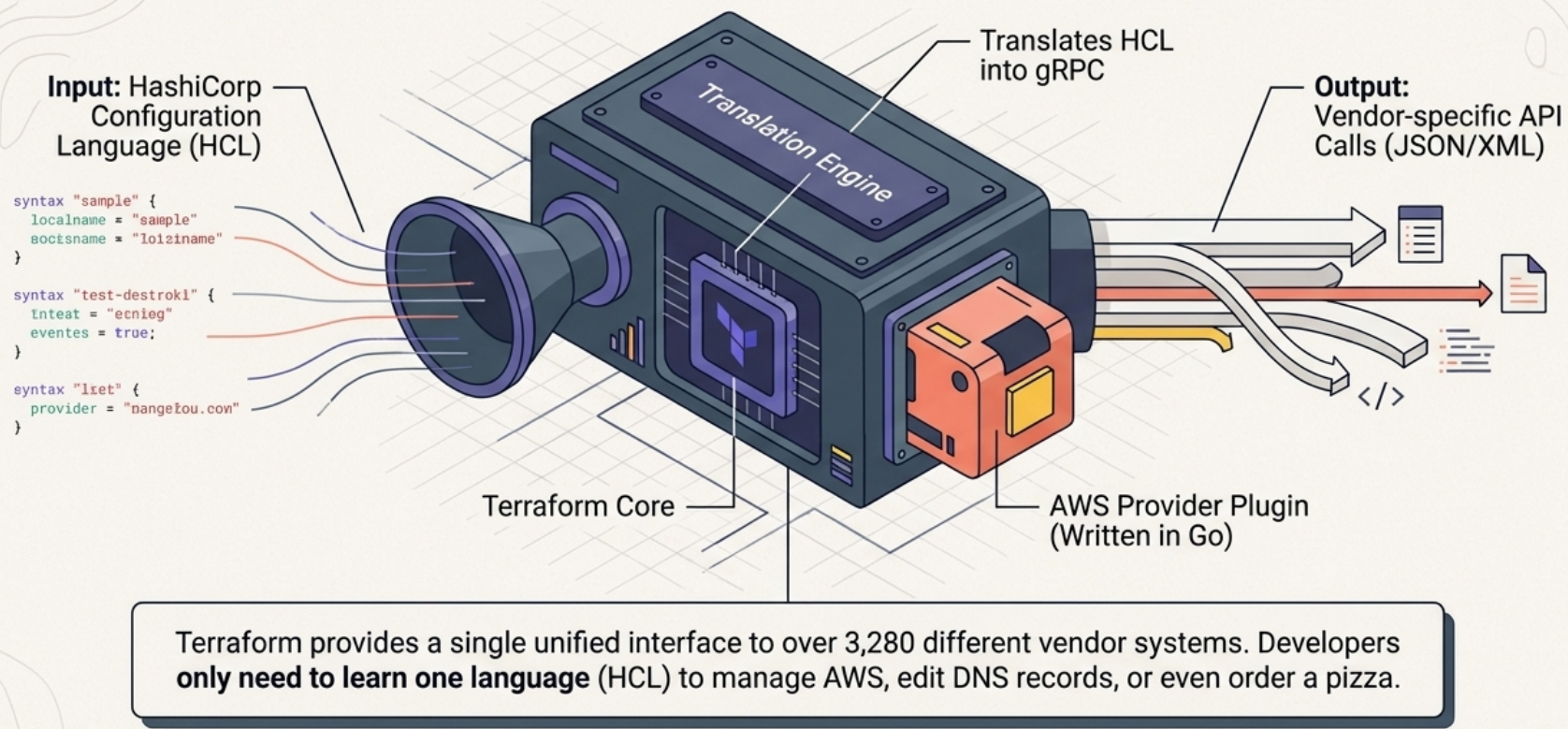
Providers are plugins that wrap a vendor’s API, acting as the bridge between Terraform Core and real infrastructure. Each provider supplies the resources, data sources, and functions needed to manage that vendor’s systems.
- Written in Go, communicating with Core via gRPC
- Maintained by vendors or the community, versioned independently of Terraform
- Over 3,280 providers in the public Terraform Registry: major clouds (AWS, GCP, Azure), DNS, Git, authentication systems, databases, and more
- Terraform is vendor-agnostic - it manages anything with a provider, from cloud infrastructure to Okta SSO groups to GitHub repositories
State, Backends, and Workspaces
Section titled “State, Backends, and Workspaces”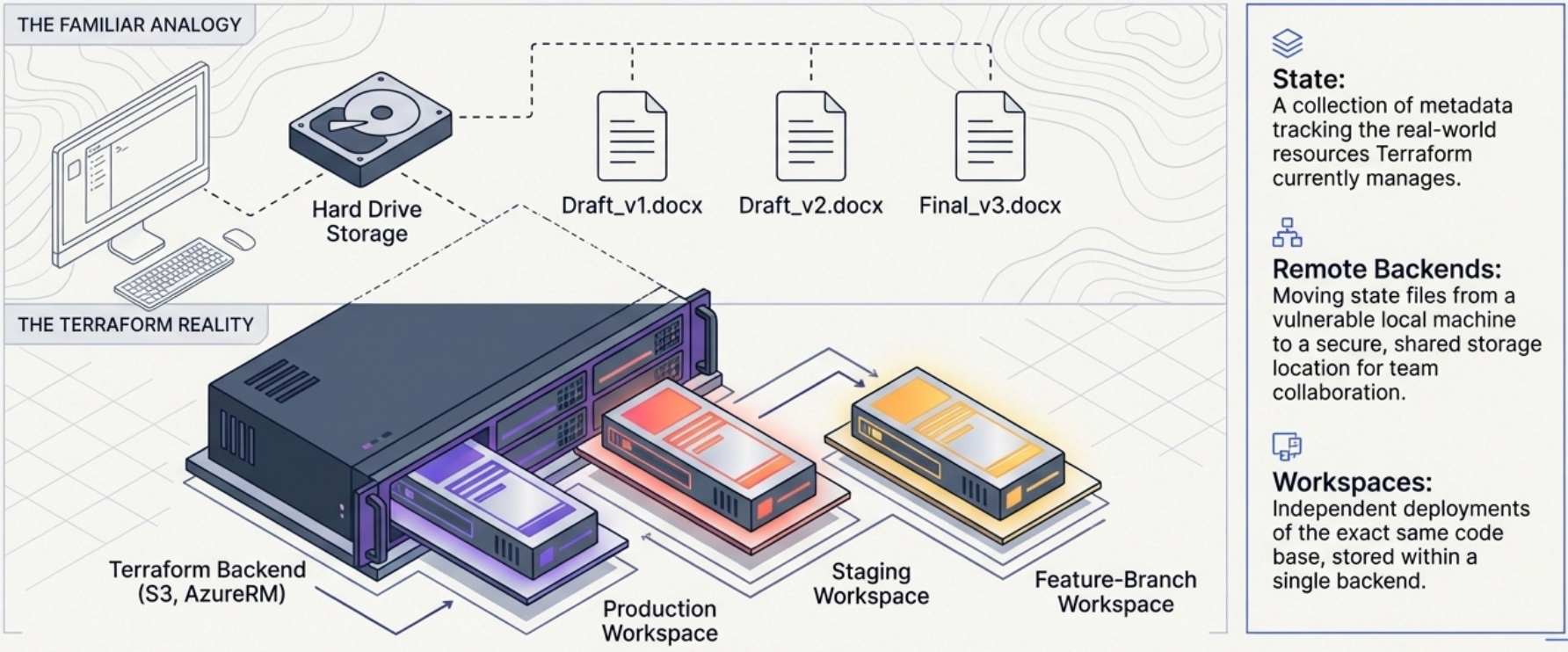
State is how Terraform tracks what it manages - a collection of metadata and the full list of currently provisioned resources. Without state, Terraform would have no way to know what already exists.
Backends determine where state is stored:
- Local backend (default): State is saved to disk on the developer’s machine - suitable for solo work only
- Remote backends: Teams store state in GCS, S3, or a TACOS platform so all members share the same source of truth
Workspaces represent a specific deployment of a Terraform codebase - analogous to a specific installation of a software program:
- Each workspace is fully independent: its own backend, input variables, and state file
- A single codebase can have unlimited workspaces - production, staging, temporary feature environments, per-customer deployments
Declarative Dependency Resolution
Section titled “Declarative Dependency Resolution”Modern infrastructure is interconnected. A web app needs database credentials. A DNS record needs an IP address from a freshly launched VM. Terraform handles these relationships automatically.
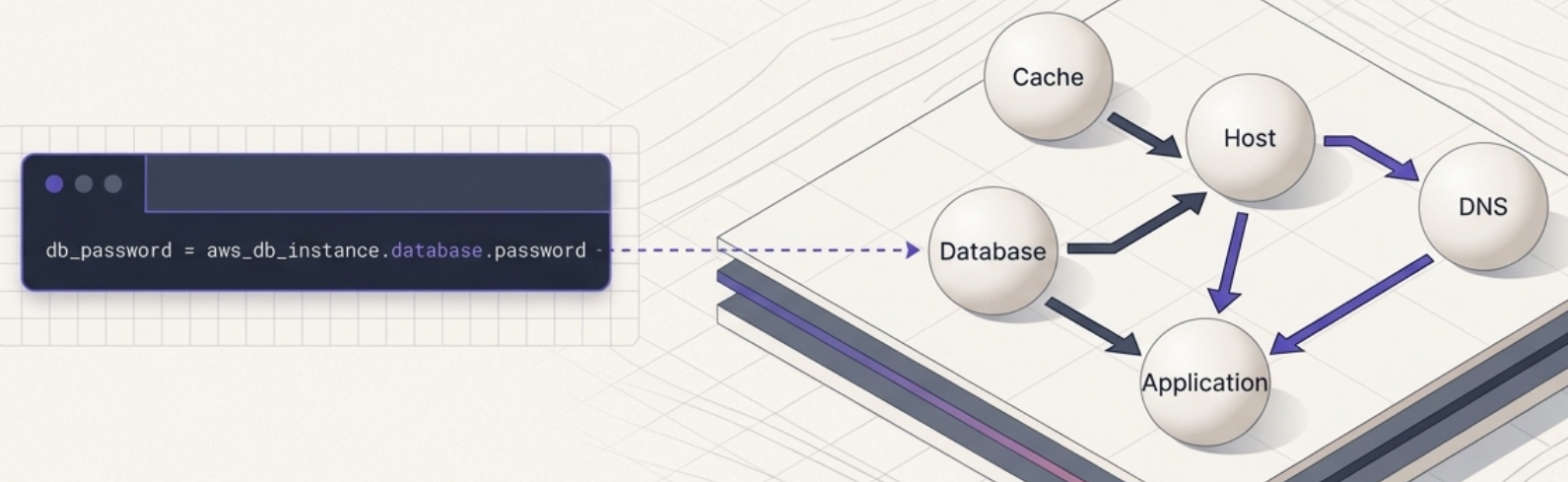
When resources reference each other in HCL, Terraform infers the dependency order from the references themselves - you do not write explicit ordering. If an app resource reads an output from a database resource, Terraform knows the database must be provisioned first.
Directed Acyclic Graphs (DAGs)
Section titled “Directed Acyclic Graphs (DAGs)”To safely schedule operations, Terraform translates declared resources into a Directed Acyclic Graph (DAG) - a dependency-aware execution plan:
- Independent resources are provisioned concurrently to minimize wait time
- Dependent resources are queued until their dependencies are ready
- Terraform can output a visual
.dotgraph file for debugging complex dependency structures
# Visualize the dependency graphterraform graph | dot -Tsvg > graph.svgCircular Dependencies
Section titled “Circular Dependencies”The primary failure mode of declarative dependency resolution is circular dependencies - when resource A needs B, B needs C, and C needs A. All three end up waiting on each other indefinitely. Terraform will error during plan with a cycle detection message.
Fixing circular dependencies requires breaking the cycle by restructuring resources, using depends_on to override implicit inference, or splitting resources across separate apply phases.
The Deployment Workflow
Section titled “The Deployment Workflow”Terraform changes move through a fixed sequence: write → init → plan → apply.
terraform init
Section titled “terraform init”Prepares the workspace for use. Run this before any other command and whenever dependencies change:
terraform init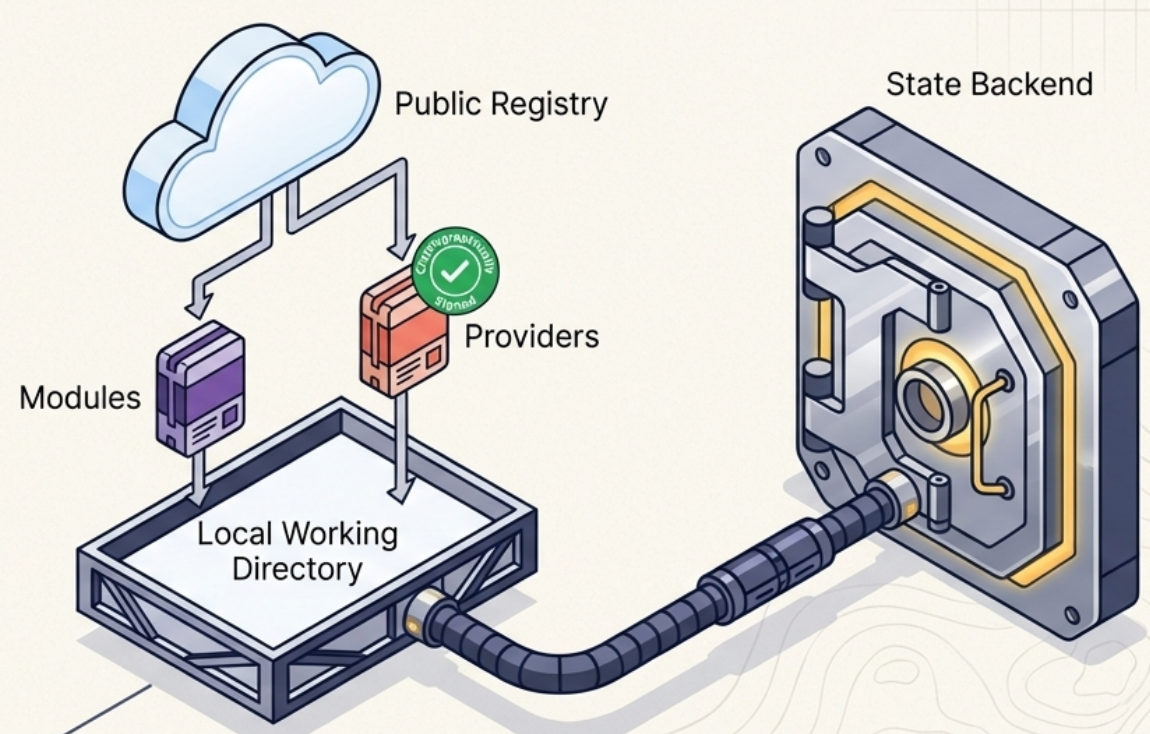
During init, Terraform:
- Initialize and connects to the configured backend and verifies access to remote state
- Downloads required provider plugins from the Terraform Registry (or a private registry)
- Creates
.terraform.lock.hcl- a lock file pinning exact provider versions for reproducible runs
terraform plan
Section titled “terraform plan”Calculates the exact changes Terraform intends to make without executing them:
terraform planterraform plan -out=tfplan # Save the plan for later apply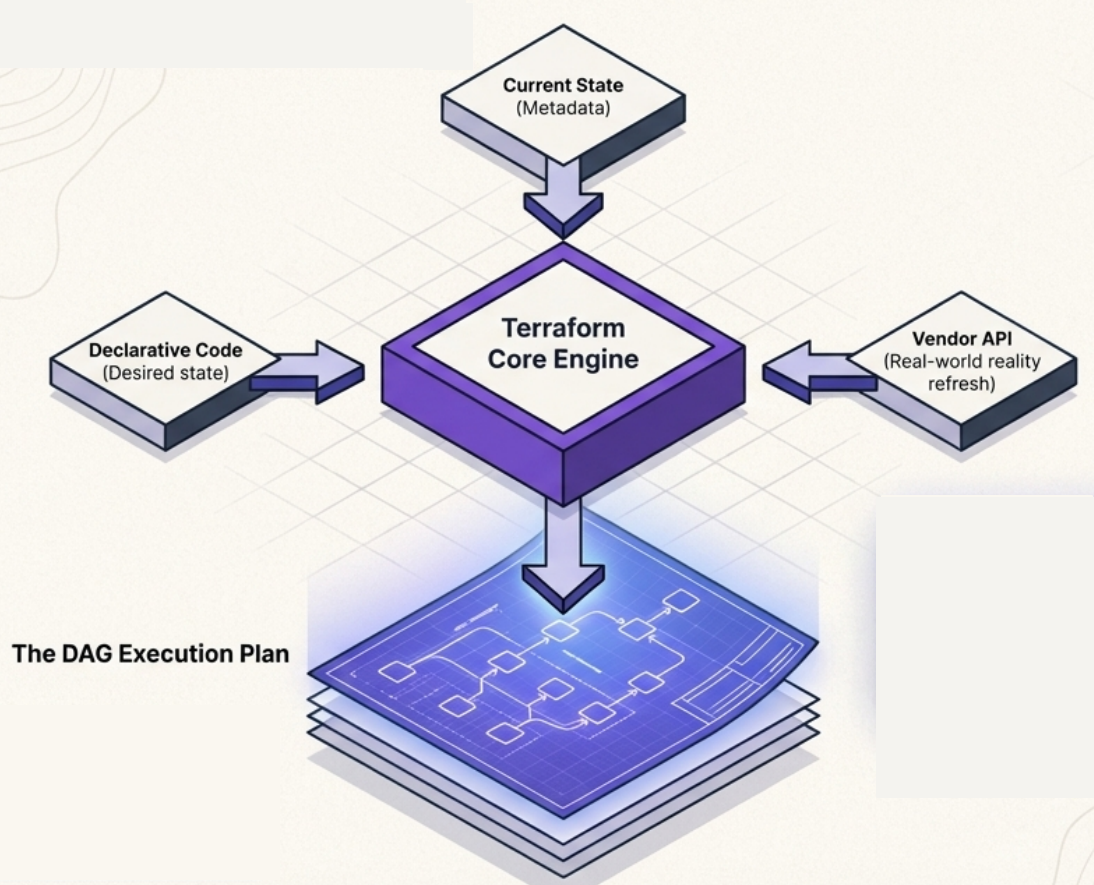
Plan runs three internal phases:
- Refresh - Terraform queries the vendor API for the real, current state of every tracked resource
- Compare - Diffs the refreshed real state against the declared desired state in your HCL
- Plan - Builds the DAG of proposed actions and outputs a human-readable summary: what will be created, updated, or destroyed
Always review the plan output before applying. Terraform marks each resource change with + (create), ~ (update in-place), or -/+ (destroy and recreate).
terraform apply
Section titled “terraform apply”Executes the proposed changes:
terraform apply # Generates a fresh plan and prompts for confirmationterraform apply tfplan # Applies a previously saved plan (no confirmation prompt)During apply:
- Terraform executes the DAG in dependency order
- Independent resources run concurrently - significantly faster than sequential provisioning
- On completion, outputs a summary: resources added, changed, destroyed, plus any declared output values
Common Use Cases
Section titled “Common Use Cases”Terraform is most valuable for infrastructure that is complex, repeatable, or shared across teams.
Machine Learning Training Clusters
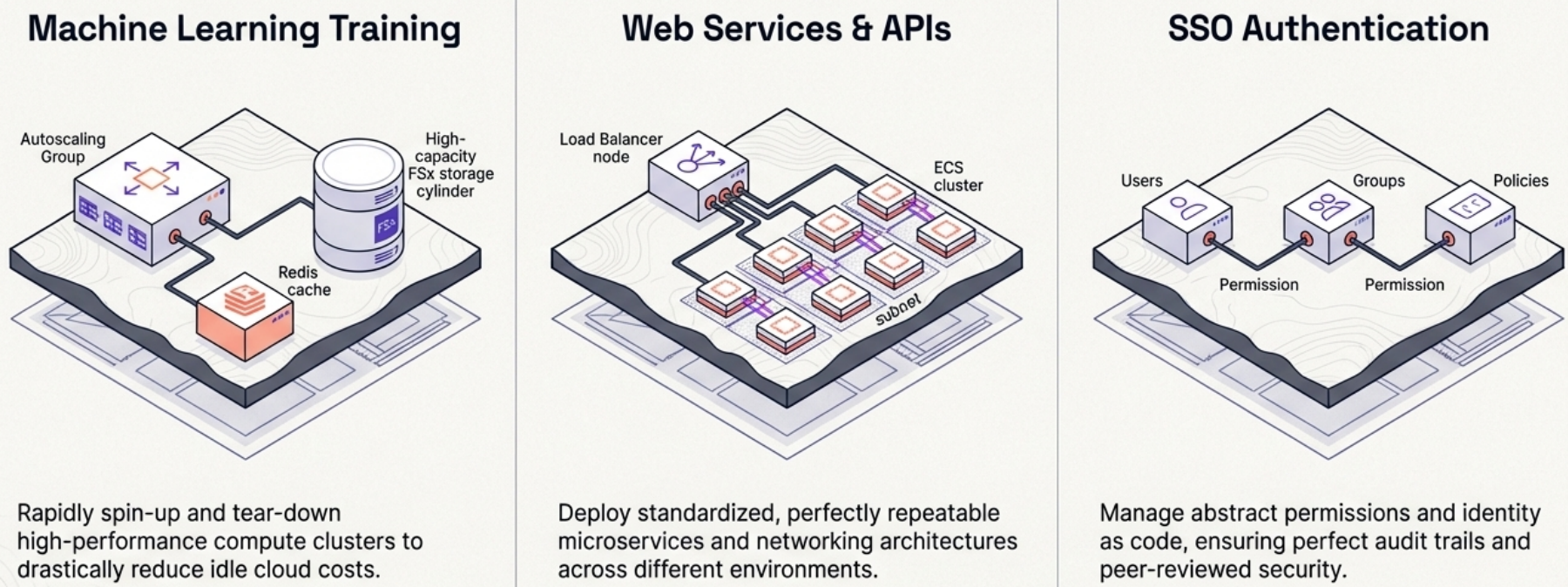
Section titled “Machine Learning Training Clusters”ML clusters require interconnected components - networking, machine templates, high-performance filesystems, storage, IAM permissions, and autoscaling triggers. Setting this up manually takes weeks; Terraform codifies it once and provisions it in minutes.
Teams can launch multiple large clusters for a training run and tear them down immediately after, paying only for active compute time.
API and Web Services
Section titled “API and Web Services”A production web service typically requires load balancers, compute instances, SSL certificates, DNS records, caching, databases, and a secure network with public and private subnets. Encapsulating all of this in a shared Terraform module means developers can launch a new service by calling the module - without needing to understand the underlying infrastructure.
Security improvements or compliance changes to the module propagate automatically to every service using it.
Single Sign-On (SSO) and IAM
Section titled “Single Sign-On (SSO) and IAM”SSO environments (Okta, Google Workspace, Azure AD) involve complex webs of groups, users, applications, policies, and roles that are difficult to audit manually. Terraform codifies the permission structure, enforces code review before any access change, and creates a full audit trail in Git.
Rapid Prototyping
Section titled “Rapid Prototyping”Pre-built, maintained Terraform modules allow developers to provision complete infrastructure stacks without understanding the underlying components - freeing them to focus on building the product rather than configuring queues, storage, or compute from scratch.
TACOS: IaC-Native CI/CD Platforms
Section titled “TACOS: IaC-Native CI/CD Platforms”The IaC ecosystem has produced a category of CI/CD platforms built specifically for Terraform workflows, collectively called TACOS (Terraform Automation and Collaboration Software):
| Platform | Type | Key feature |
|---|---|---|
| HCP Terraform | SaaS (HashiCorp) | Native Terraform runs, policy enforcement, state management |
| Spacelift | SaaS | Multi-tool (Terraform + Pulumi + Ansible), OPA policies |
| Scalr | SaaS | Hierarchical workspaces, cost estimation |
| Atlantis | Self-hosted | GitHub/GitLab PR automation, open source |
TACOS integrate directly with GitHub and GitLab to run speculative plans on every pull request (showing exactly what would change if the PR were merged) and execute apply automatically when code merges.
Traditional CI/CD tools (GitHub Actions, Cloud Build, Jenkins) can also orchestrate Terraform - with more flexibility for custom testing and linting but without the native Terraform UX.