
Kubernetes API & Object Model
Kubernetes is completely API-centric. Every resource - Pods, Services, Deployments, StatefulSets - is defined in the API. All configuration and all querying must pass through the API server. Understanding the API’s shape is the prerequisite for understanding everything else in Kubernetes.
The API Server
Section titled “The API Server”The API server is the front-end for the Kubernetes API and the central communication hub for the entire cluster. Every interaction with Kubernetes - kubectl commands, kubelet status reports, control plane components sharing state - is a REST call directed at the API server.
- Exposes a secure RESTful HTTPS interface, typically on port 443 or 6443
- All connections are encrypted with TLS; every request must pass authentication and authorization before it is accepted
- Runs as a set of Pods in the
kube-systemnamespace on self-managed clusters; cloud providers fully manage it on hosted services - Is stateless - it reads and writes all cluster state to etcd
CRUD over REST
Section titled “CRUD over REST”The API server manages resources using standard HTTP verbs mapped directly to CRUD operations:
| CRUD | HTTP method | kubectl equivalent |
|---|---|---|
| Create | POST | kubectl create -f / kubectl apply -f |
| Read | GET | kubectl get |
| Update | PUT / PATCH | kubectl apply -f / kubectl edit |
| Delete | DELETE | kubectl delete |
Serialisation
Section titled “Serialisation”Kubernetes supports two serialisation formats:
| Format | Used for | Why |
|---|---|---|
| JSON | External clients (kubectl, your code) | Human-readable, universally supported |
| Protobuf | Internal cluster component communication | Faster, more compact, better at scale |
Clients indicate the format they accept via the HTTP Accept header; the API server responds with Content-Type: application/json for external requests.
Everything is an Object
Section titled “Everything is an Object”The fundamental rule of Kubernetes: every entity in the cluster is an object. Pods, Nodes, Namespaces, ConfigMaps, Deployments, Services - all are objects stored in etcd, all are manipulated through the same API, and all follow the same manifest structure.
In object-oriented terms: a primitive (or resource type) is the blueprint, and an object is a running instance of that blueprint. Kubernetes assigns every object a system-generated UID to ensure it is uniquely identifiable even if objects of the same name are created and destroyed over time.
Manifest Structure
Section titled “Manifest Structure”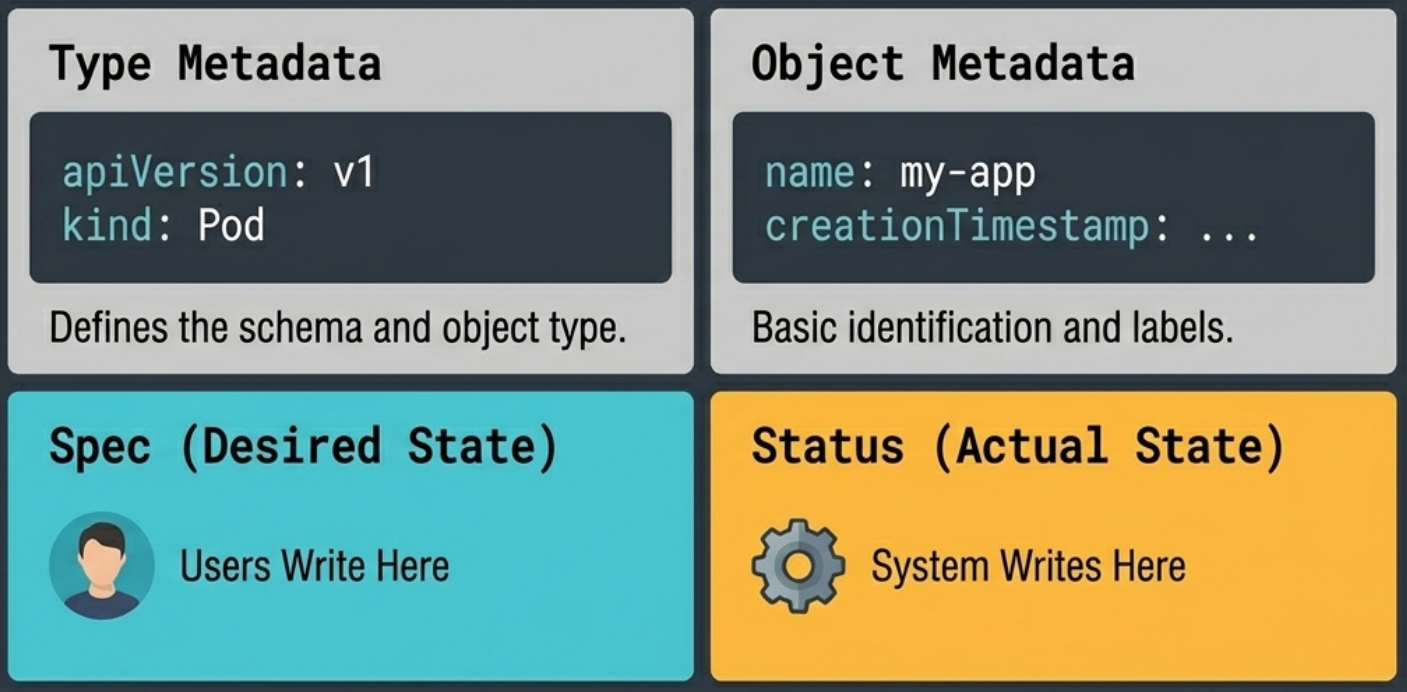
Every Kubernetes object is defined in a manifest - a structured YAML (or JSON) file. Manifests share a consistent five-section structure regardless of object type:
apiVersion: apps/v1 # API group + versionkind: Deployment # resource typemetadata: # identity fields name: my-app namespace: production labels: app: my-appspec: # desired state - you write this replicas: 3 ...status: # actual state - system writes this availableReplicas: 3 ...| Section | Purpose | Who writes it |
|---|---|---|
apiVersion | Defines the schema version and API group (e.g. apps/v1, v1) | You |
kind | Declares the resource type (Pod, Deployment, Service…) | You |
metadata | Identity: name, namespace, labels, annotations, uid, resourceVersion | You (uid/resourceVersion set by system) |
spec | Desired state - what you want the object to look like | You |
status | Actual state - what is currently running | System (controllers) |
Even though you only write to
specand read fromstatus, APIGETandPUTrequests always send and return the entire object.
API Groups and Versioning
Section titled “API Groups and Versioning”Kubernetes originally stored all resources in a single flat namespace. As the project grew, the API was reorganised into groups - modular collections of related resources.
The Two Types of API Groups
Section titled “The Two Types of API Groups”| Group type | REST path | Contains |
|---|---|---|
| Core group | /api/v1 | Original objects: Pods, Nodes, Services, Namespaces, ConfigMaps, Secrets |
| Named groups | /apis/{group}/{version}/ | All newer resources: e.g. apps/v1 for Deployments, networking.k8s.io/v1 for Ingresses |
The core group predates the concept of API groups and carries no group name in its path (represented as "" in documentation).
A useful mnemonic for the named-group REST path structure is GVR - Group, Version, Resource:
/apis/apps/v1/deployments ^^^^ ^^ ^^^^^^^^^^^ Group Version ResourceInspecting Your Cluster’s API
Section titled “Inspecting Your Cluster’s API”kubectl api-resources # list all resource types, groups, shortnames, and scopekubectl api-versions # list all enabled API versions (e.g. apps/v1, batch/v1)The Graduation Lifecycle
Section titled “The Graduation Lifecycle”All new Kubernetes resources move through three maturity stages:
| Stage | Characteristics | Default enabled |
|---|---|---|
| Alpha | Experimental; bugs expected; features may be removed without notice | ❌ Usually disabled |
| Beta | Near-final; enabled by default; sometimes used in production (with care) | ✅ Yes |
| GA (Stable) | Production-ready; long-term commitment from the project | ✅ Yes |
Deprecation Policy
Section titled “Deprecation Policy”Kubernetes has strict rules preventing API sprawl:
- Beta resources must either release a newer beta version or graduate to GA within 9 months of their last release
- GA resources are only deprecated once a newer stable version exists, then supported for 12 months or 3 releases (whichever is longer) before removal
- Deprecated resources trigger a CLI deprecation warning, a
k8s.io/deprecated:trueaudit log annotation, and a Prometheus gauge metric
The Declarative Model
Section titled “The Declarative Model”Kubernetes strongly prefers a declarative approach to managing objects: you describe the end state you want, and Kubernetes figures out how to get there.
| Model | How it works | When to use |
|---|---|---|
| Declarative | Describe desired state in a YAML manifest; kubectl apply it | Production, GitOps, anything that needs version control |
| Imperative | Issue direct commands (kubectl run, kubectl create) | Quick experiments, exam environments, one-off debugging |
The declarative model rests on three concepts that apply to every object in the cluster:
- Desired state - what you specified in the manifest (
spec) - Observed state - what is actually running right now (
status) - Reconciliation - the continuous process of closing the gap between the two
flowchart LR
    A["Desired state (spec)"] --> B["Controller compares"]
    B --> C{Gap?}
    C -- Yes --> D["Controller acts to close gap"]
    C -- No --> E["No action"]
    D --> B
Why the declarative model matters in practice:
- Self-healing: if a node kills 2 of your 10 replicas, the observed count drops to 8 - a controller immediately schedules 2 replacements
- Rollouts: update the image tag in your YAML and
applyit - the Deployment controller performs a rolling replacement without you scripting a thing - GitOps-ready: manifests are plain files that live in version control, giving you auditable history and one-command rollback
The Object Hierarchy
Section titled “The Object Hierarchy”Applications are rarely deployed as bare Pods. Kubernetes uses object nesting - wrapping objects inside higher-level controllers - where each layer adds operational value:
flowchart TD
    A["Container - app code + dependencies"] --> B["Pod - schedules container on the cluster"]
    B --> C["Deployment - self-healing, scaling, rolling updates"]
The Pod is the atomic, minimum unit of scheduling in Kubernetes. No workload - container, VM, or Wasm app - runs directly on a cluster; it must be wrapped in a Pod first.
Key characteristics:
- A Pod creates a shared execution environment (network stack, storage volumes, shared memory) for one or more containers
- All containers in a Pod share the same IP address and can reach each other via
localhost - Starting a Pod is atomic - Kubernetes only marks it ready once every container inside it is running
- Pods are mortal and immutable - when a Pod dies it is replaced, never resurrected; the replacement gets a new ID and IP. You never mutate a running Pod; you replace it
Pods are also the unit of scaling: to scale up, Kubernetes adds more Pods; to scale down, it removes Pods. You do not add containers to an existing Pod to scale.
Deployments
Section titled “Deployments”A Deployment wraps Pods and adds:
- Self-healing - replaces failed Pods to maintain the desired replica count
- Scaling - declaratively change the replica count
- Rolling updates and rollbacks - replace Pods progressively with zero downtime; revert if something goes wrong
Deployments run as a background watch loop: the Deployment controller continuously compares the observed Pod count against the desired count in the spec and takes corrective action.
Services
Section titled “Services”Because Pods are mortal, their IP addresses change whenever they are replaced. This IP churn problem makes it impossible to hard-code Pod IPs into client configuration.
A Service solves this by providing a stable network front-end for a dynamic set of Pods:
- Front-end: a stable DNS name, ClusterIP, and port that never changes
- Back-end: a continuously updated list of healthy Pods, selected by labels; traffic is load-balanced across them
As Pods come and go (scaling, rollouts, node failures), the Service tracks the changes automatically - clients always reach a live Pod without any reconfiguration.
Controllers and the Reconciliation Loop
Section titled “Controllers and the Reconciliation Loop”Controllers are the engines that bring objects to life. For each object type there is usually a dedicated controller (Deployment controller, ReplicaSet controller, StatefulSet controller, etc.).
Every controller runs the same loop:
- Read the desired state from the object’s
spec - Observe the actual state of the cluster
- Act to close any gap - this may mean creating/deleting objects, talking to cloud APIs, updating node configuration
- Report the result by updating the object’s
status
Controllers never act on infrastructure directly - they write objects to the API server and let downstream components (kubelets, the cloud controller manager) react.
Controllers also generate events. As they work, they emit Event objects that record what they did or warn about failures. Events are:
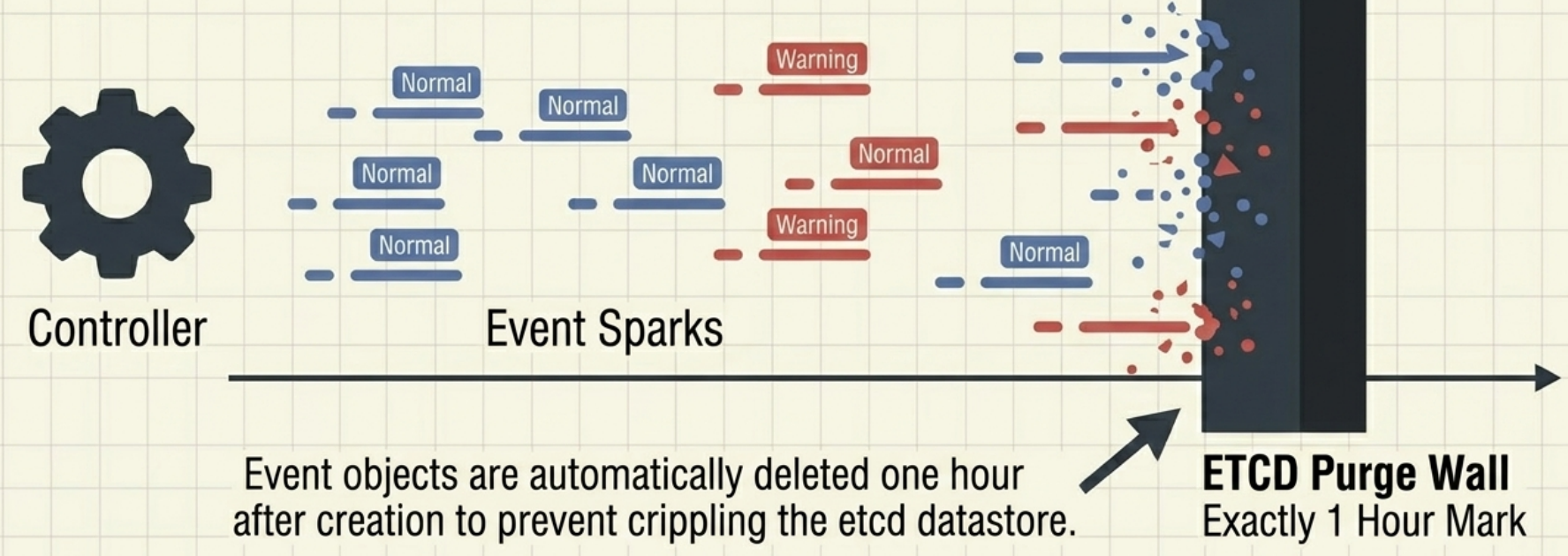
- Categorised as
Normal(informational) orWarning(something prevented reconciliation) - Short-lived - automatically purged ~1 hour after creation to avoid flooding etcd
- The first place to look when diagnosing cluster problems
Example: Viewing Controller Events
kubectl get eventsLAST SEEN TYPE REASON OBJECT MESSAGE3m45s Normal Scheduled pod/nginx-deployment-7fb96c846b-8q2zm Successfully assigned default/nginx-deployment-7fb96c846b-8q2zm to node-13m44s Normal Pulling pod/nginx-deployment-7fb96c846b-8q2zm Pulling image "nginx:1.14.2"3m42s Normal Pulled pod/nginx-deployment-7fb96c846b-8q2zm Successfully pulled image "nginx:1.14.2"3m41s Normal Created pod/nginx-deployment-7fb96c846b-8q2zm Created container nginx3m41s Normal Started pod/nginx-deployment-7fb96c846b-8q2zm Started container nginx3m45s Normal SuccessfulCreate replicaset/nginx-deployment-7fb96c846b Created pod: nginx-deployment-7fb96c846b-8q2zm3m45s Normal ScalingReplicaSet deployment/nginx-deployment Scaled up replica set nginx-deployment-7fb96c846b to 1Inspecting Objects
Section titled “Inspecting Objects”kubectl explain - built-in API reference
Section titled “kubectl explain - built-in API reference”kubectl explain is an inline documentation tool that lets you explore any object’s fields without leaving the terminal:
kubectl explain pods # top-level fields for Podkubectl explain pods.spec.containers # drill into containers listkubectl explain deployment.spec.strategy.rollingUpdatekubectl explain nodes --recursive # full field tree (no descriptions)kubectl explain nodes --api-version=v1 # pin to a specific schema versionUse it liberally when writing manifests - it prevents typos and tells you whether a field expects a string, a list, or a nested object.
kubectl describe - human-readable summaries
Section titled “kubectl describe - human-readable summaries”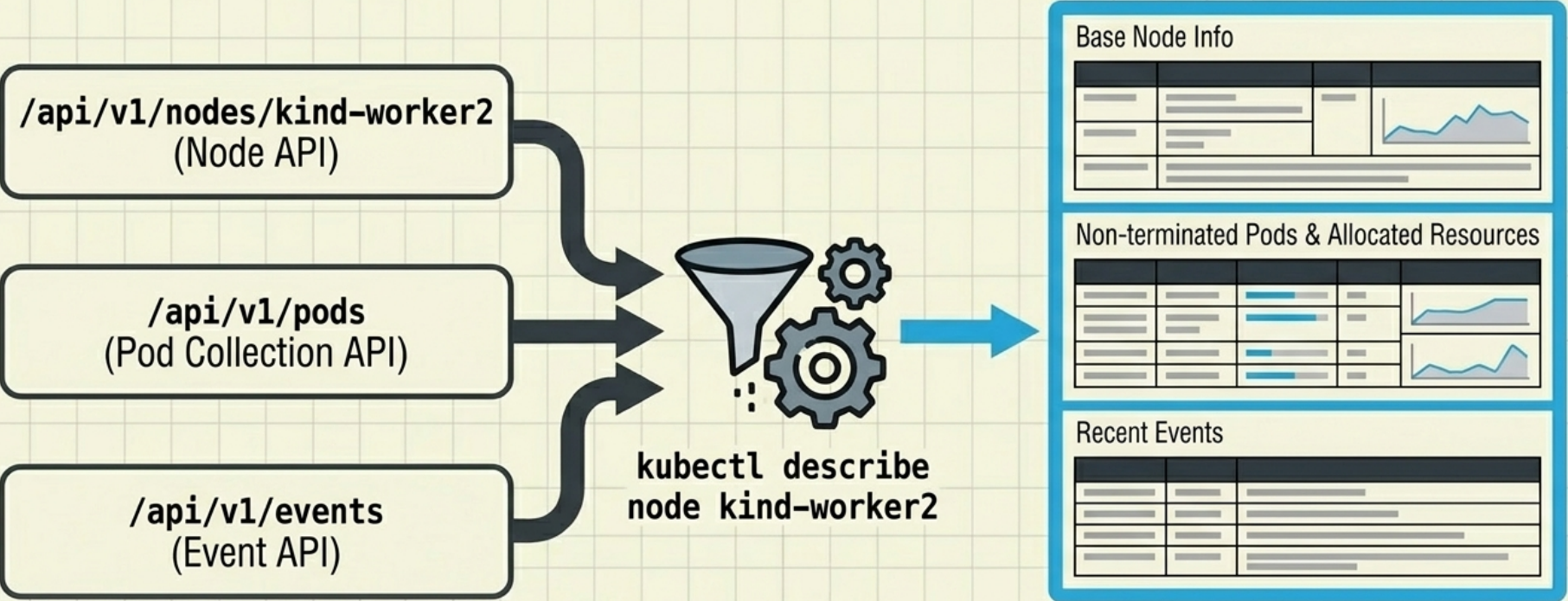
kubectl describe aggregates data from multiple API endpoints into one readable view. For a Node it shows properties, running Pods, and recent events in a single output.
kubectl describe node <name>kubectl describe pod <name>kubectl describe deployment <name>Example: kubectl describe command on a Node object
kubectl describe node controlplaneName: controlplaneRoles: control-planeLabels: beta.kubernetes.io/arch=amd64 beta.kubernetes.io/os=linux kubernetes.io/arch=amd64 kubernetes.io/hostname=controlplane kubernetes.io/os=linux node-role.kubernetes.io/control-plane= node.kubernetes.io/exclude-from-external-load-balancers=Annotations: node.alpha.kubernetes.io/ttl: 0 volumes.kubernetes.io/controller-managed-attach-detach: trueCreationTimestamp: Mon, 20 Jul 2026 19:13:35 +0000Taints: <none>Unschedulable: falseLease: HolderIdentity: controlplane AcquireTime: <unset> RenewTime: Thu, 23 Jul 2026 16:13:57 +0000Conditions: Type Status LastHeartbeatTime LastTransitionTime Reason Message ---- ------ ----------------- ------------------ ------ ------- NetworkUnavailable False Mon, 20 Jul 2026 19:14:16 +0000 Mon, 20 Jul 2026 19:14:16 +0000 CiliumIsUp Cilium is running on this node MemoryPressure False Thu, 23 Jul 2026 16:11:45 +0000 Mon, 20 Jul 2026 19:13:34 +0000 KubeletHasSufficientMemory kubelet has sufficient memory available DiskPressure False Thu, 23 Jul 2026 16:11:45 +0000 Mon, 20 Jul 2026 19:13:34 +0000 KubeletHasNoDiskPressure kubelet has no disk pressure PIDPressure False Thu, 23 Jul 2026 16:11:45 +0000 Mon, 20 Jul 2026 19:13:34 +0000 KubeletHasSufficientPID kubelet has sufficient PID available Ready True Thu, 23 Jul 2026 16:11:45 +0000 Mon, 20 Jul 2026 19:13:35 +0000 KubeletReady kubelet is posting ready statusAddresses: InternalIP: 172.30.1.2 Hostname: controlplaneCapacity: cpu: 1 ephemeral-storage: 19221248Ki hugepages-2Mi: 0 memory: 2300144Ki pods: 110Allocatable: cpu: 1 ephemeral-storage: 18698430040 hugepages-2Mi: 0 memory: 2197744Ki pods: 110System Info: Machine ID: b4f277f01b6649c285b0f3d7f640d633 System UUID: 232503de-96e1-46b1-9460-6b9e6c84006d Boot ID: 0f48326f-48eb-4636-82e1-c7917fba2d61 Kernel Version: 6.8.0-136-generic OS Image: Ubuntu 24.04.4 LTS Operating System: linux Architecture: amd64 Container Runtime Version: containerd://2.2.1 Kubelet Version: v1.35.1 Kube-Proxy Version:PodCIDR: 192.168.0.0/24PodCIDRs: 192.168.0.0/24Non-terminated Pods: (10 in total) Namespace Name CPU Requests CPU Limits Memory Requests Memory Limits Age --------- ---- ------------ ---------- --------------- ------------- --- kube-system cilium-7l688 100m (10%) 1 (100%) 10Mi (0%) 1Gi (47%) 2d21h kube-system cilium-envoy-tc5rr 0 (0%) 0 (0%) 0 (0%) 0 (0%) 2d21h kube-system cilium-operator-768c98966f-9n259 0 (0%) 0 (0%) 0 (0%) 0 (0%) 2d21h kube-system coredns-5f68d5bd7f-cl5xn 50m (5%) 0 (0%) 50Mi (2%) 170Mi (7%) 2d20h kube-system coredns-5f68d5bd7f-qrs4d 50m (5%) 0 (0%) 50Mi (2%) 170Mi (7%) 2d20h kube-system etcd-controlplane 25m (2%) 0 (0%) 100Mi (4%) 0 (0%) 2d20h kube-system kube-apiserver-controlplane 50m (5%) 0 (0%) 0 (0%) 0 (0%) 2d20h kube-system kube-controller-manager-controlplane 25m (2%) 0 (0%) 0 (0%) 0 (0%) 2d20h kube-system kube-scheduler-controlplane 25m (2%) 0 (0%) 0 (0%) 0 (0%) 2d20h local-path-storage local-path-provisioner-644f8b49d7-f2rts 0 (0%) 0 (0%) 0 (0%) 0 (0%) 2d20hAllocated resources: (Total limits may be over 100 percent, i.e., overcommitted.) Resource Requests Limits -------- -------- ------ cpu 325m (32%) 1 (100%) memory 210Mi (9%) 1364Mi (63%) ephemeral-storage 0 (0%) 0 (0%) hugepages-2Mi 0 (0%) 0 (0%)Events: <none>kubectl get events - cluster event log
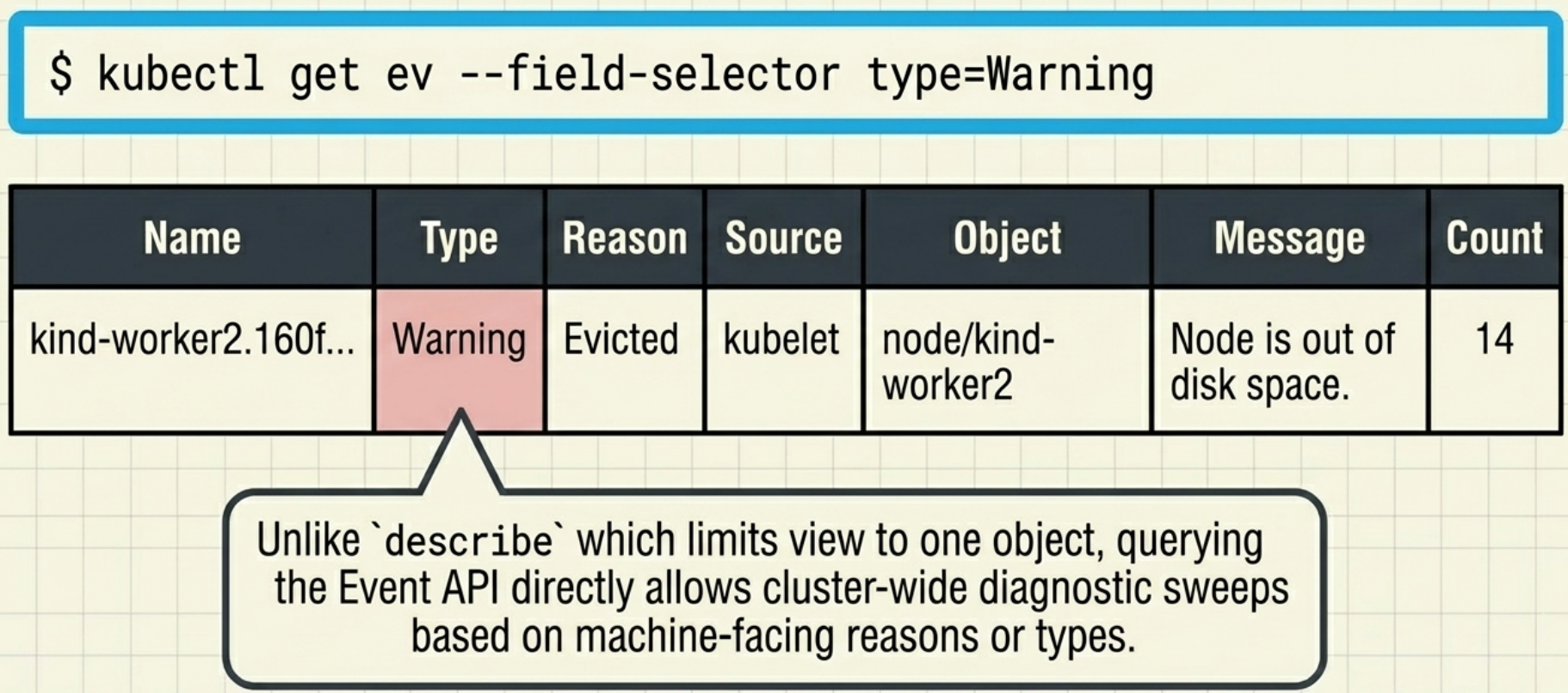
Section titled “kubectl get events - cluster event log”Because Event objects are standalone (not embedded in the object they describe), you query them separately:
kubectl get events # all recent eventskubectl get events -o wide # extra columns (source, count, timestamps)kubectl get events --field-selector type=Warning # warnings onlykubectl get node <name> -o json | jq .status.conditions # isolate Node conditionsProperties of an Event Object:
| Property | Description |
|---|---|
| Name | The name of this Event object instance. Useful only if you want to retrieve the given object directly from the API. |
| Type | The type of the event. Typically Normal or Warning. |
| Reason | A machine-facing description of why the event occurred. |
| Source | The component that reported this event, usually a controller. |
| Object | The object instance to which the event refers (e.g., pod/nginx). |
| Sub-object | The specific sub-object to which the event refers (e.g., a specific container within a pod). |
| Message | The human-facing description of the event. |
| First seen | The first time this event occurred. Since Event objects are purged over time, this may not be the absolute first time the event actually occurred in the cluster’s history. |
| Last seen | Events often occur repeatedly. This field indicates when this specific event last occurred. |
| Count | The number of times the event has occurred. |
Status Conditions
Section titled “Status Conditions”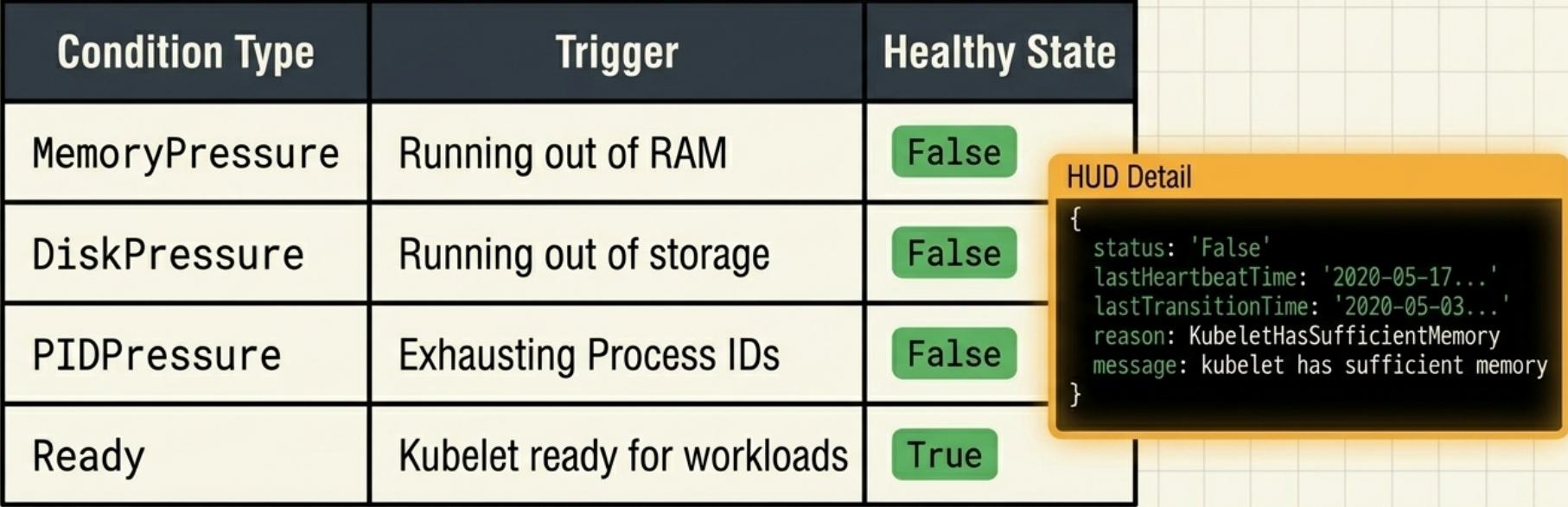
Many objects express their health as an array of conditions rather than a single state field. Each condition is independent:
| Condition field | Values | Meaning |
|---|---|---|
type | e.g. Ready, MemoryPressure | What aspect is being measured |
status | True / False / Unknown | Current evaluation |
reason | short machine string | Why it last changed |
message | human-readable string | Detailed context |
Using an array of orthogonal conditions - rather than a single state - makes the API extensible: new conditions can be added without breaking existing clients that only watch for specific ones.
Example:
kubectl get node controlplane -o json | jq .status.conditions[ { "lastHeartbeatTime": "2026-03-20T19:14:16Z", "lastTransitionTime": "2026-03-20T19:14:16Z", "message": "Cilium is running on this node", "reason": "CiliumIsUp", "status": "False", "type": "NetworkUnavailable" }, { "lastHeartbeatTime": "2026-03-23T15:56:26Z", "lastTransitionTime": "2026-03-20T19:13:34Z", "message": "kubelet has sufficient memory available", "reason": "KubeletHasSufficientMemory", "status": "False", "type": "MemoryPressure" }, { "lastHeartbeatTime": "2026-03-23T15:56:26Z", "lastTransitionTime": "2026-03-20T19:13:34Z", "message": "kubelet has no disk pressure", "reason": "KubeletHasNoDiskPressure", "status": "False", "type": "DiskPressure" }, { "lastHeartbeatTime": "2026-03-23T15:56:26Z", "lastTransitionTime": "2026-03-20T19:13:34Z", "message": "kubelet has sufficient PID available", "reason": "KubeletHasSufficientPID", "status": "False", "type": "PIDPressure" }, { "lastHeartbeatTime": "2026-03-23T15:56:26Z", "lastTransitionTime": "2026-03-20T19:13:35Z", "message": "kubelet is posting ready status", "reason": "KubeletReady", "status": "True", "type": "Ready" }]Extending the API
Section titled “Extending the API”The Kubernetes API is designed to be extended. The primary extension mechanism is CustomResourceDefinitions (CRDs):
- A CRD registers a new resource type in the API - it gets its own REST path, works with
kubectl, and is stored in etcd like any native object - CRDs alone are inert - to make a custom resource do something you must deploy a custom controller that watches for objects of that type and reconciles them
- This controller + CRD pairing is the foundation of the Operator pattern - the standard way to encode operational knowledge about stateful applications into Kubernetes itself