Stacks & Components
IaC organizes resources into a hierarchy of component types - from individual cloud primitives up to full multi-stack compositions. Understanding this hierarchy clarifies what a Terraform project, a module, and a “stack” actually are, and how they relate to each other.
The Component Hierarchy
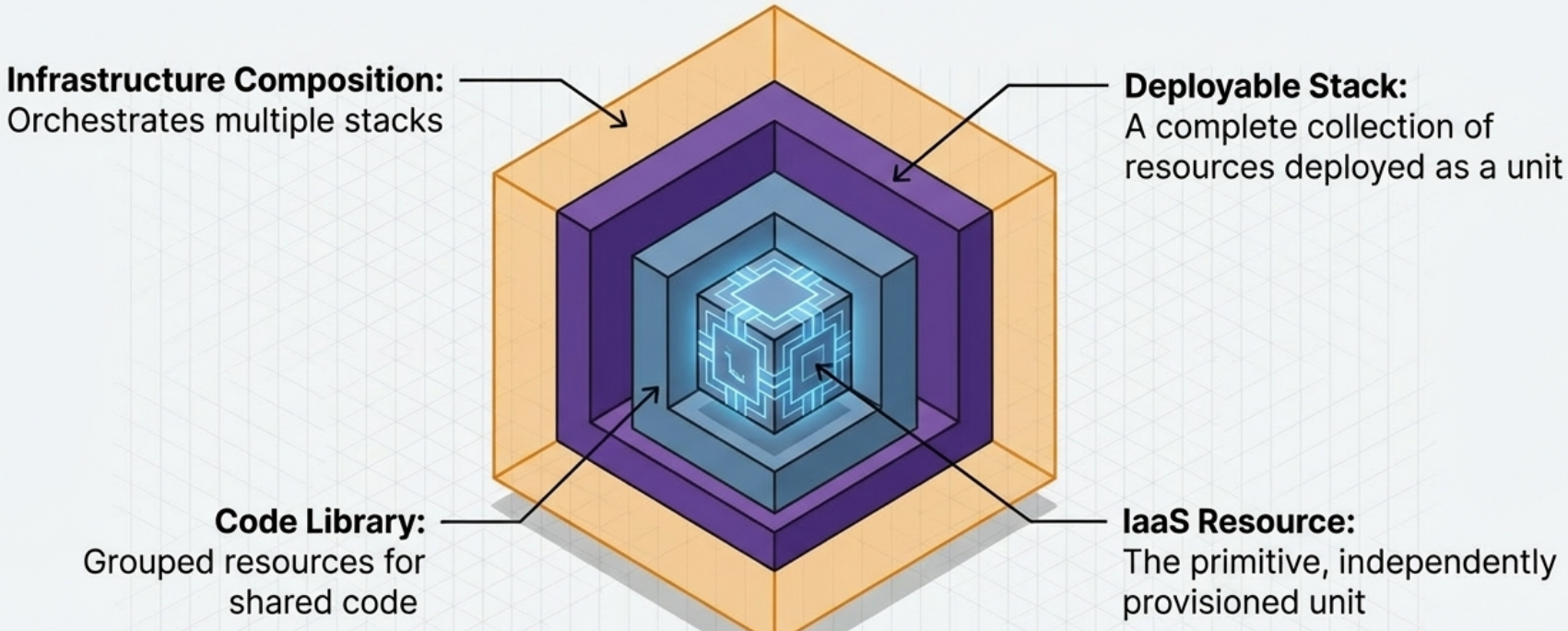
Section titled “The Component Hierarchy”IaC components are organized into four levels of scope, each aggregating the level below it:
| Level | Component | What it is | Tool examples |
|---|---|---|---|
| 4 - Highest | Composition | A collection of stacks organized around a workload concern; defines inter-stack dependencies and config | Pulumi projects, Terraform stacks, Terragrunt services, Atmos stacks |
| 3 | Deployment Stack | A complete, independently deployable unit of infrastructure resources | CloudFormation stacks, CDK stacks, Pulumi stacks, Terraform projects/workspaces |
| 2 | Code Library | Reusable code patterns projects | Terraform modules, Bicep modules, CDK L3 constructs, CloudFormation modules |
| 1 - Lowest | Primitive Resource | The smallest independently provisionable unit | aws_instance, google_compute_instance, CDK L1/L2 constructs |
Infrastructure Compositions
Section titled “Infrastructure Compositions”A composition is a collection of deployment stacks organized around a workload-relevant concern. It defines:
- Configuration values for the stacks it contains
- Integration points and dependencies between those stacks
- Lifecycle orchestration - how stacks are deployed in relation to each other
Compositions should be structured to make sense to the teams configuring and managing the applications - not to the infrastructure engineers who built the underlying primitives.
Deployment Stacks
Section titled “Deployment Stacks”A stack is the architectural quantum of infrastructure - a highly cohesive, independently deployable collection of resources. How resources are grouped and sized within a stack directly determines how easily the system can be delivered, updated, and operated.
The Stack Lifecycle
Section titled “The Stack Lifecycle”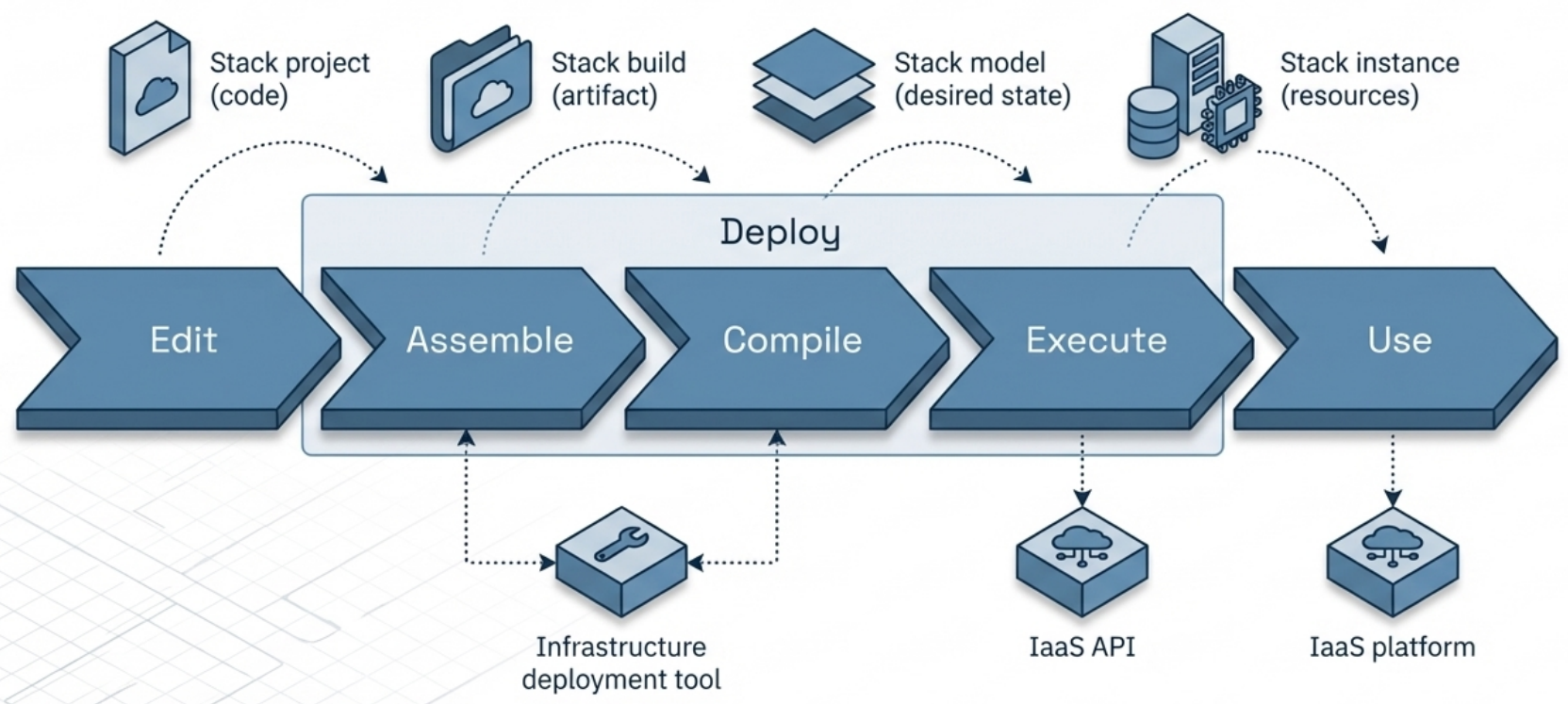
Every stack progresses through four stages from code to live infrastructure:
| Stage | What happens | Artifact |
|---|---|---|
| Stack Project | Engineers write the raw IaC code | Source files in a repo |
| Assemble (Build) | Tool imports libraries, plugins, and dependencies | Build artifact - directory, branch, or archive |
| Compile (Model) | Build is compiled with instance-specific config into a desired state | In-memory state model |
| Execute (Instance) | Tool calls IaaS API to provision or modify real resources | Live infrastructure used by workloads |
This maps directly to the terraform init → terraform plan → terraform apply flow:
- init = Assemble
- plan = Compile (generates desired state, compares to current)
- apply = Execute
Code Libraries
Section titled “Code Libraries”Code libraries group infrastructure resources so they can be shared and reused across multiple stack projects. In Terraform, these are modules.
Libraries are resolved during the Assemble step - they can live alongside the stack project or be imported from an external registry (Terraform Registry, Git, S3, GCS).
The Stack Module Pattern
Section titled “The Stack Module Pattern”In tools like Terraform and OpenTofu - which have strong library support but no native composition or deployment-unit abstraction - teams often implement an entire deployable stack as a code library. This is the Stack Module pattern:
- A stack module contains all the resource definitions for a complete deployable unit
- A wrapper stack project imports the module and provides instance-specific configuration
- The wrapper’s only job is to call the module and pass variables - it contains no resources of its own
This pattern separates reusable infrastructure logic from environment-specific deployment config.
Sharing and Reuse
Section titled “Sharing and Reuse”Sharing infrastructure code reduces maintenance surface area but creates coupling. Every reuse decision is a trade-off.
Code Libraries (DRY)
Section titled “Code Libraries (DRY)”The primary mechanism for code sharing is the Don’t Repeat Yourself (DRY) principle, implemented through libraries (Terraform modules).
| Benefit | Trade-off |
|---|---|
| Single source of truth for shared logic | Changes to a library impact every stack that uses it |
| Less code to maintain | Breaking changes cascade across all consumers |
| Enforces consistent patterns | Requires versioning discipline and retesting |
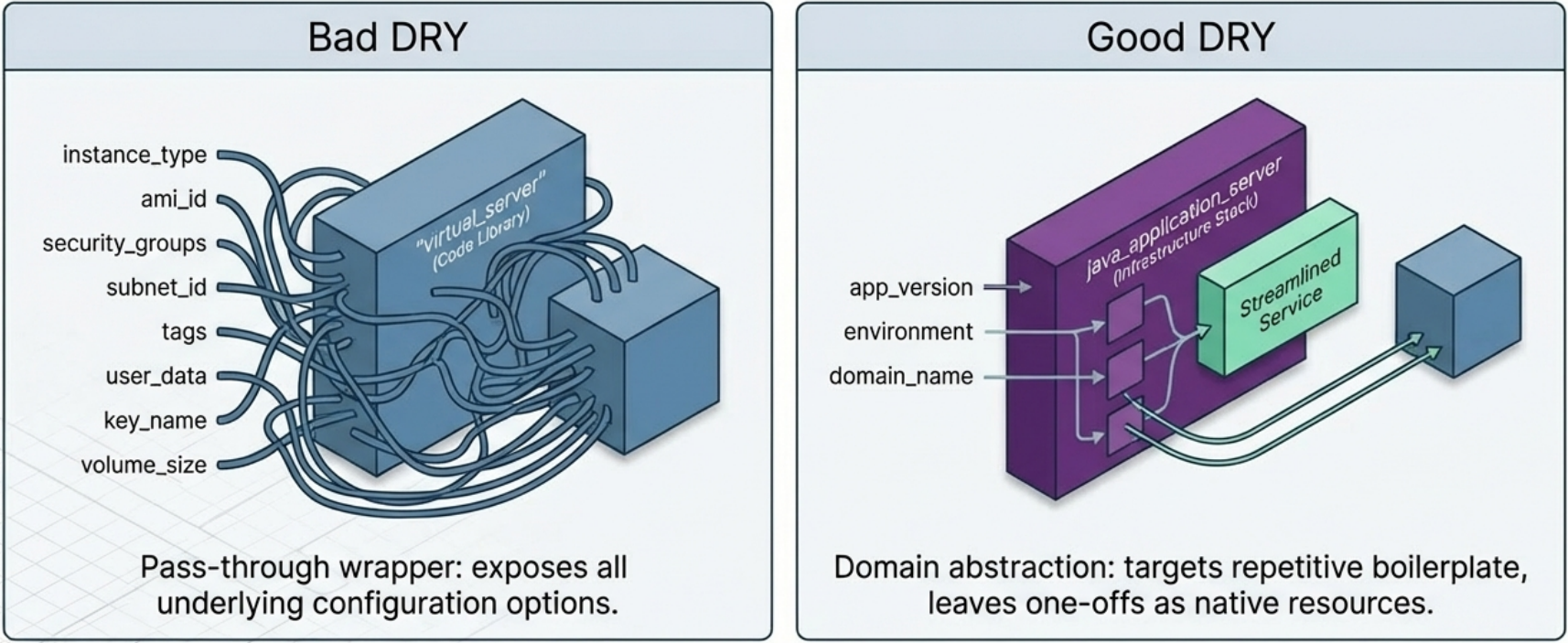
Avoid “hasty abstractions.” The DRY principle applies to higher-level knowledge, not just raw code. Wrapping an aws_instance in a generic virtual_server module that still requires all the original configuration options adds complexity without value. Instead:
- Create purpose-built modules (like
java_application_server) only where configurations are genuinely identical across consumers - Use raw resources for unique or highly varied infrastructure
Reusable Stack Projects
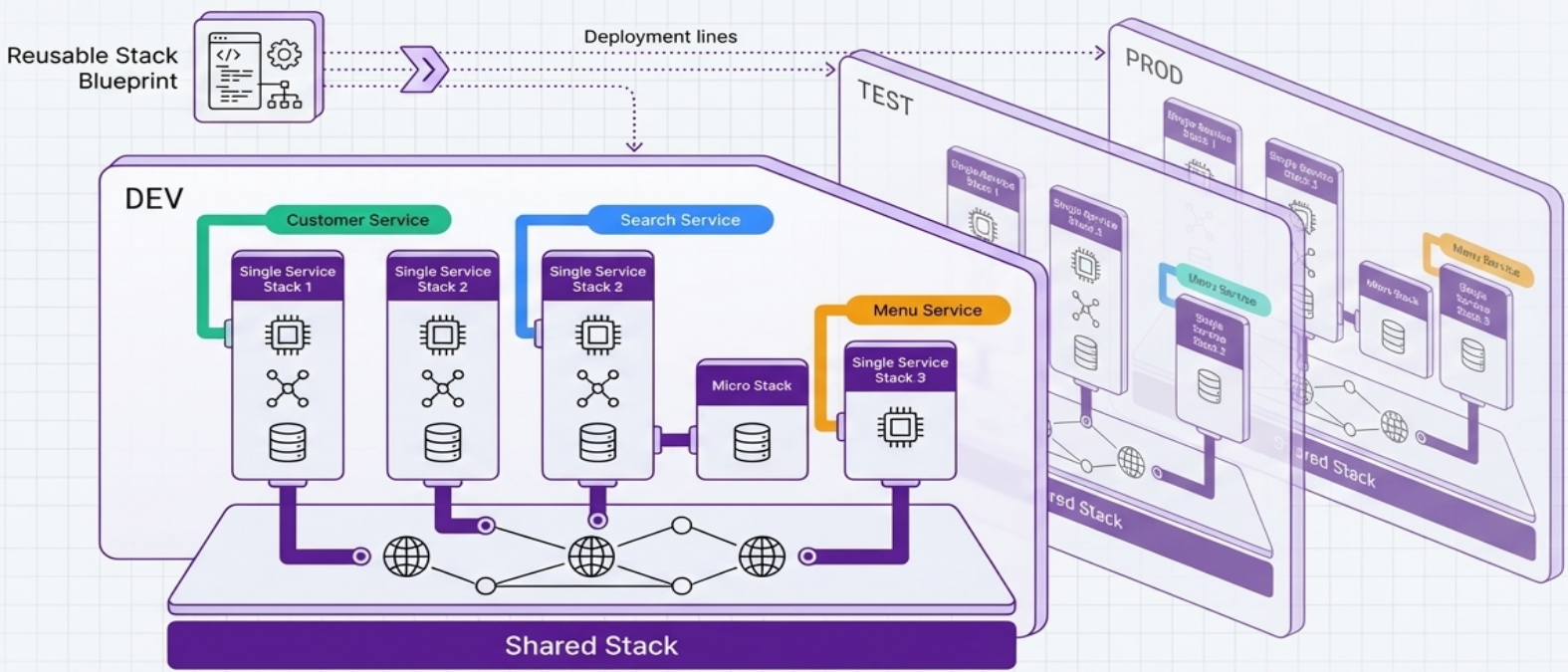
Section titled “Reusable Stack Projects”Beyond sharing libraries, teams can share entire stack projects - a single codebase deployed multiple times to create separate live instances:
- Write one stack project for a Cloud SQL database
- Deploy it once for the menu service, once for the ordering service
- Inject different configuration (size, tuning, region) per instance via variables
This is also how multi-environment deployments work: the same stack project produces dev, staging, and production instances with different config.
Sharing Instances vs. Shared-Nothing
Section titled “Sharing Instances vs. Shared-Nothing”Beyond sharing code, teams must decide whether to share live infrastructure instances across workloads (e.g., multiple services using one shared VPC).
| Approach | When to use |
|---|---|
| Shared instance | Only when sharing actively enables services to interact (e.g., a common network for service-to-service communication) |
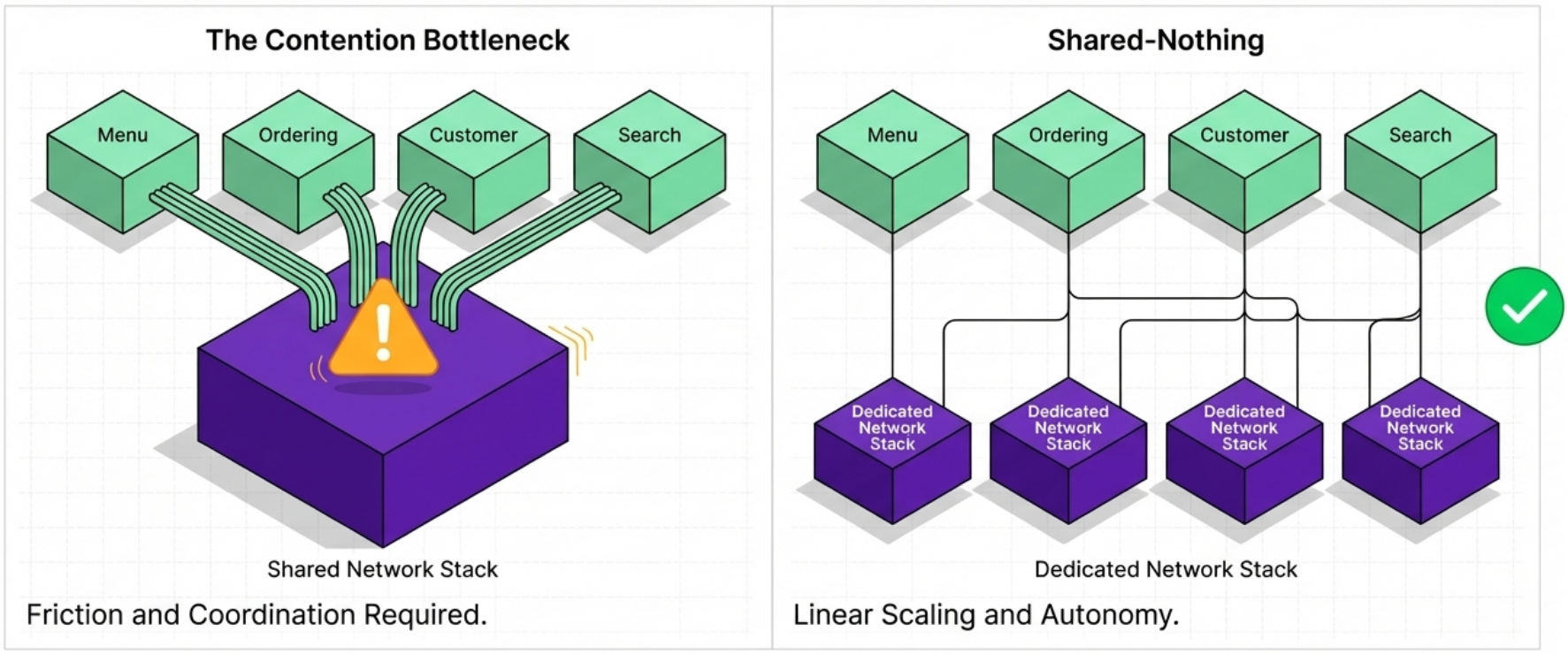
| Dedicated instances (shared-nothing) | Default choice - avoids coordination friction, scaling contention, and deployment coupling |
Rule of thumb: Reuse stack projects freely to stamp out independent instances. Only share a live instance if it enables the consumers to communicate with each other.
Shared-Nothing Architecture
Section titled “Shared-Nothing Architecture”Borrowed from distributed computing, shared-nothing is a design strategy where new nodes can be added without creating contention for shared resources. Applied to IaC, it means provisioning dedicated infrastructure instances for each service rather than routing everything through shared components.
Why Shared-Nothing Works in the Cloud
Section titled “Why Shared-Nothing Works in the Cloud”Traditional “Iron Age” infrastructure made sharing necessary - duplicating physical hardware was expensive and led to waste. Cloud IaaS eliminates this constraint:
- Virtual infrastructure is cheap and fast to duplicate
- Auto-scaling resizes resources to match actual usage
- No physical waste from provisioning dedicated instances
The result: systems of all sizes benefit from removing shared infrastructure. This is especially critical at scale - a telecommunications provider adding dozens of service instances per minute cannot afford contention on shared resources.
Workload-Centric Design
Section titled “Workload-Centric Design”The primary purpose of infrastructure is to run workloads. This makes the workload - not the technology tier - the starting point for design.
Horizontal vs. Vertical Architecture
Section titled “Horizontal vs. Vertical Architecture”| Approach | How it’s structured | The problem |
|---|---|---|
| Horizontal (antipattern) | One stack for all compute, one for all databases, one for all networking | A single team’s DB config change requires modifying a stack shared with every other team → central bottleneck |
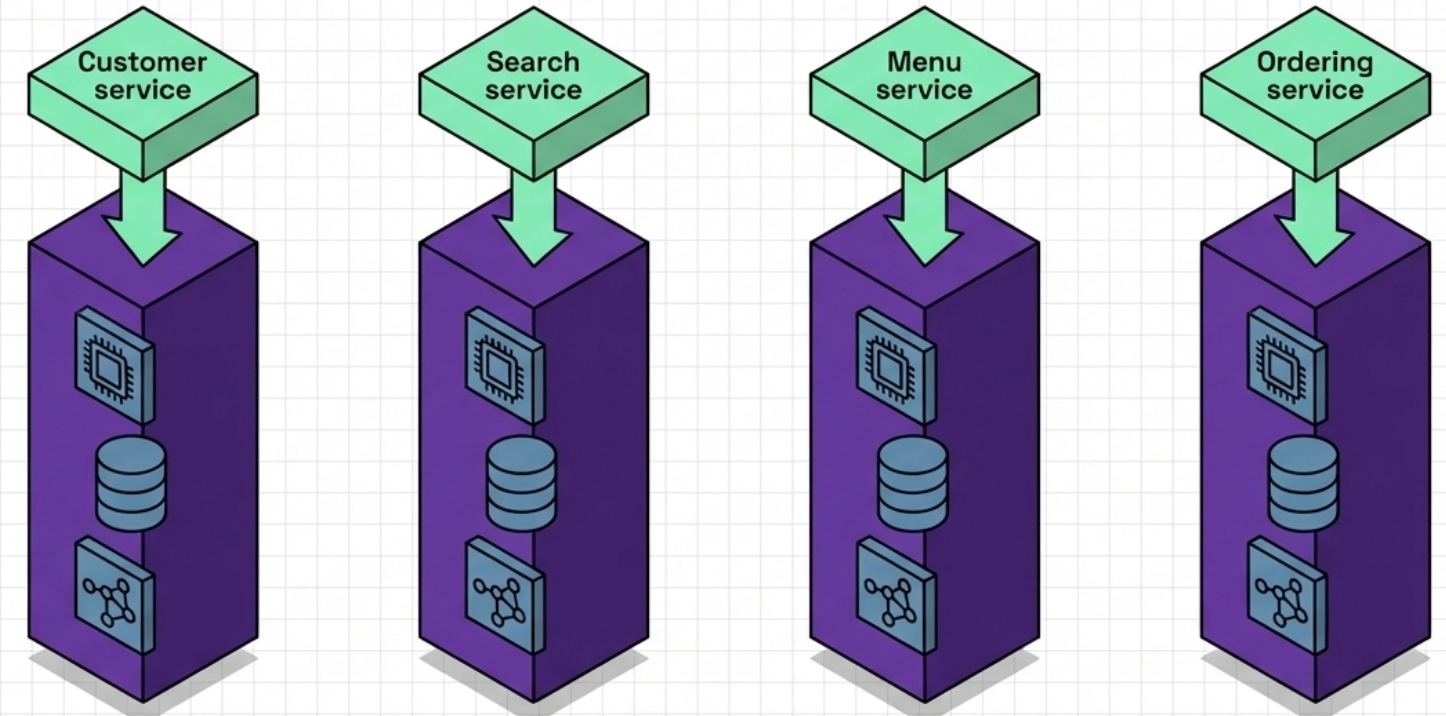
| Vertical (recommended) | Each service’s compute, database, and networking provisioned together in a dedicated stack | Teams change, test, and deploy their infrastructure independently - no cross-team coordination required |
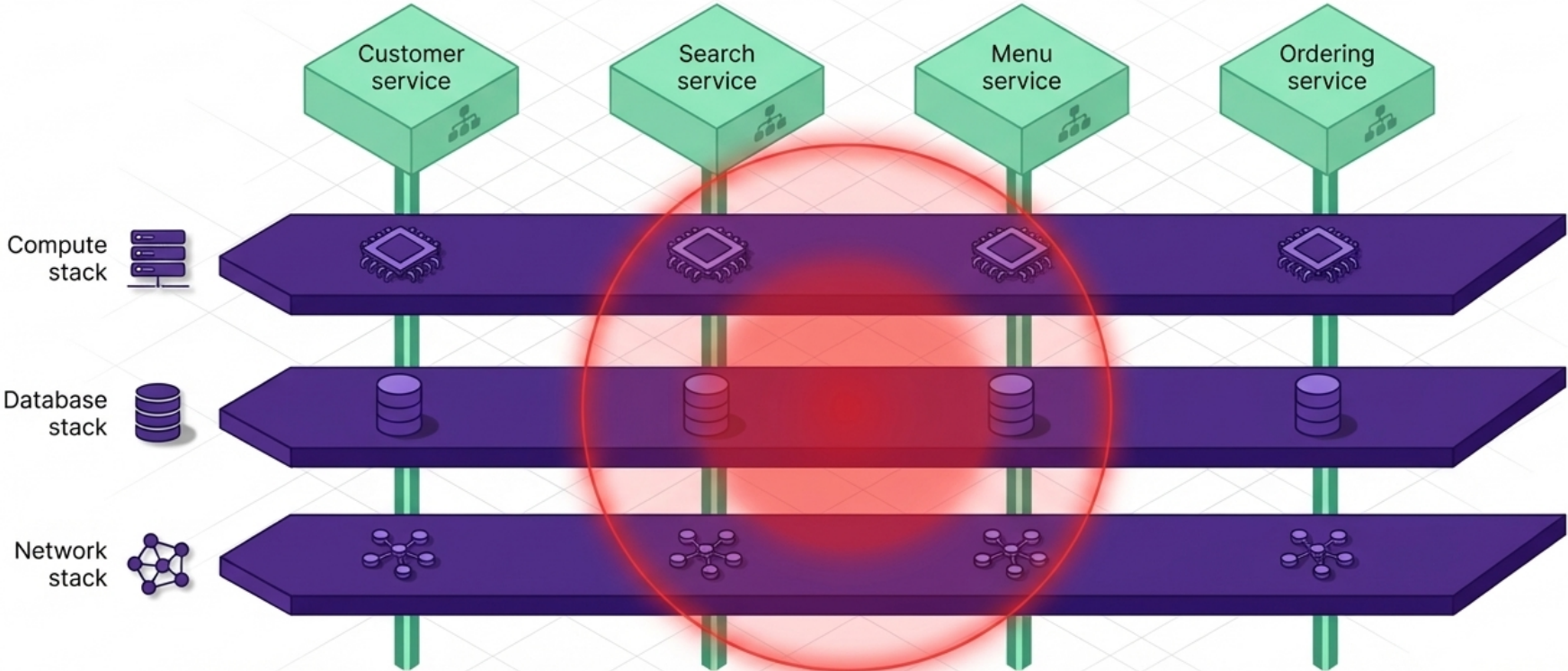
Horizontal design doesn’t just create code duplication - it creates scope-of-risk and ownership problems. When a shared database stack breaks during one team’s deployment, every team’s service is affected.
Reference Architecture Layers
Section titled “Reference Architecture Layers”When applying workload-centric design across multiple environments, infrastructure naturally organizes into layers:
| Layer | What it contains | Example |
|---|---|---|
| Dedicated workload | Infrastructure for a single specific service | App-specific Cloud SQL, GKE deployment, service account |
| Shared infrastructure | Components used by multiple workloads | Shared GKE cluster, shared VPC |
| Environment | Overarching environment-wide resources | Environment-wide network routing, DNS zones |
| Global | Cross-environment resources | Organization-wide IAM policies, governance controls |
Two design principles govern where resources belong:
- Implement at the most specific level - a workload’s load-balancer rules belong in its dedicated stack, not in the environment stack
- Lower levels must not know about higher levels - an environment stack should never contain configuration that references specific workloads (this would create circular provider→consumer dependencies)
The 6-Step Design Workflow
Section titled “The 6-Step Design Workflow”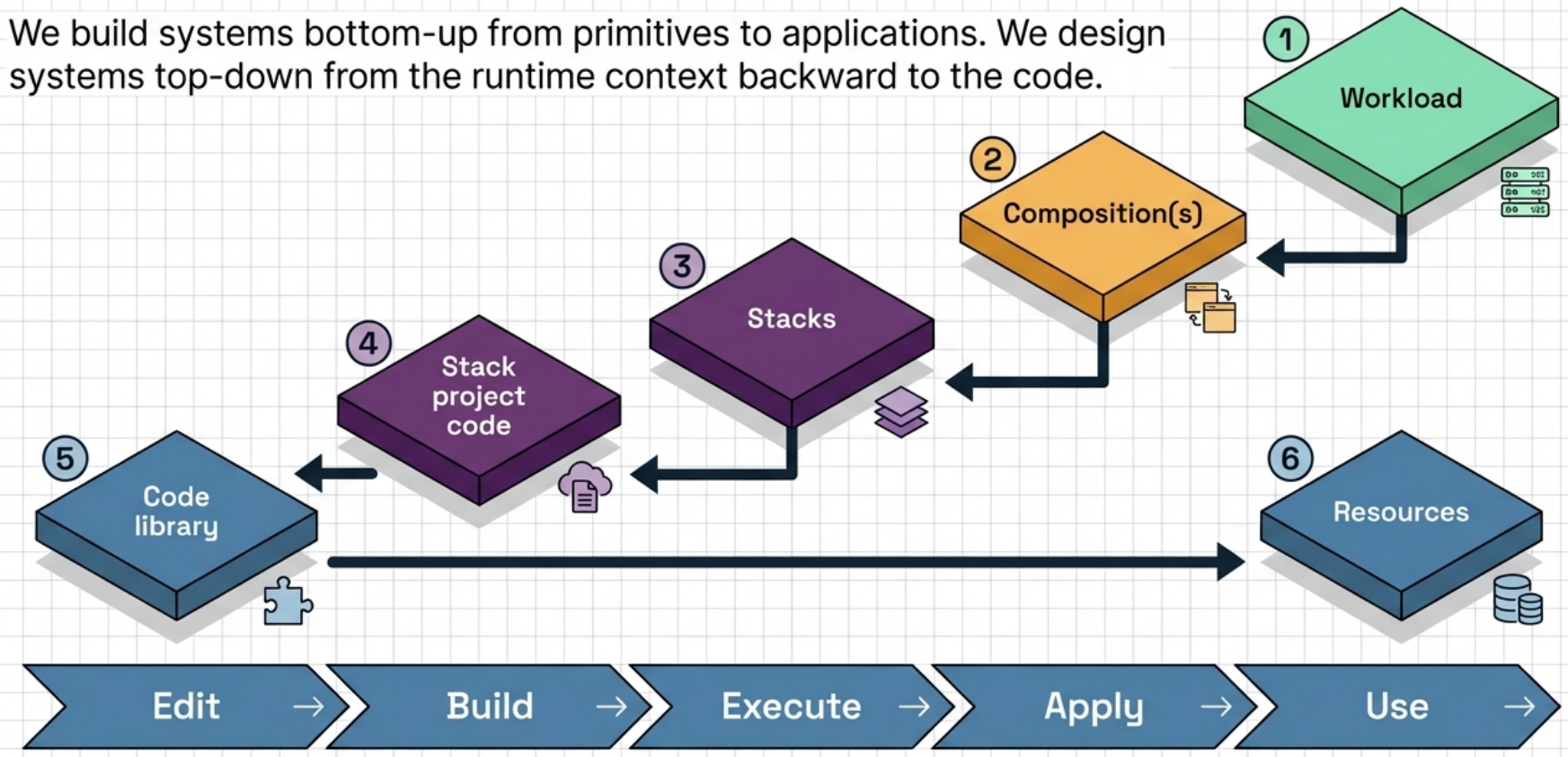
Start at the runtime context and work backward to the code:
- Workload - understand the software that will run on this infrastructure
- Compositions - design how stacks integrate to support the workload
- Stacks - organize resources into independently deployable units
- Stack project code - define the code projects to build and deploy the stacks
- Code libraries - identify reusable modules to share across projects
- Resources - write the underlying IaaS resource definitions
Stack Sizing Patterns
Section titled “Stack Sizing Patterns”The goal of sizing stacks is not to make them as small as possible - it is to balance design forces like cohesion and coupling so that each stack aligns cleanly with the workloads it supports.
Pattern Overview
Section titled “Pattern Overview”| Pattern | Scope | Type | Best for |
|---|---|---|---|
| Full System Stack | All infrastructure in one stack | Pattern | Simple systems, tightly coupled resources |
| Monolithic Stack | Too many loosely related resources in one stack | Antipattern | Nothing - split it |
| Application Group Stack | All infrastructure for a team’s service group | Pattern | Small teams owning related services |
| Single Service Stack | One stack per deployable service | Pattern | Microservice architectures |
| Micro Stacks | One service split across multiple stacks | Pattern | Isolating compute from stateful resources |
| Shared Stack | Infrastructure used by multiple workloads | Pattern | Networking, clusters, platform services |
Full System Stack
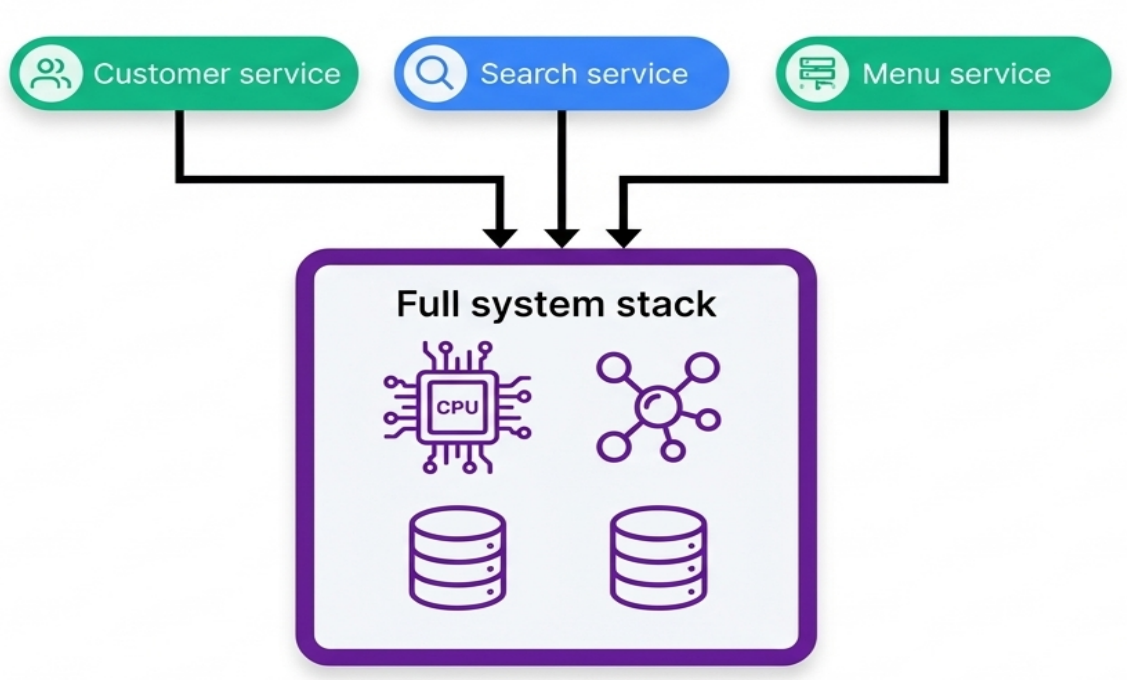
Section titled “Full System Stack”All infrastructure for a complete system lives in a single deployment stack. This avoids the overhead of orchestrating multi-stack deployments and works well when:
-
The infrastructure estate is simple (single application, straightforward resources)
-
The entire stack deploys fast
-
Resources within it change together frequently
-
Infrastructure is entirely shared by all workloads (e.g., one network topology serving everything)
Monolithic Stack (Antipattern)
Section titled “Monolithic Stack (Antipattern)”A full system stack that has grown beyond its useful scope - containing an unmanageably large number of loosely related resources with low cohesion.
Symptoms:
-
Codebase is hard to understand or debug
-
Fixes cause new, unrelated problems
-
Frequent deployment conflicts from multiple people or teams working simultaneously
-
CI builds take too long to run
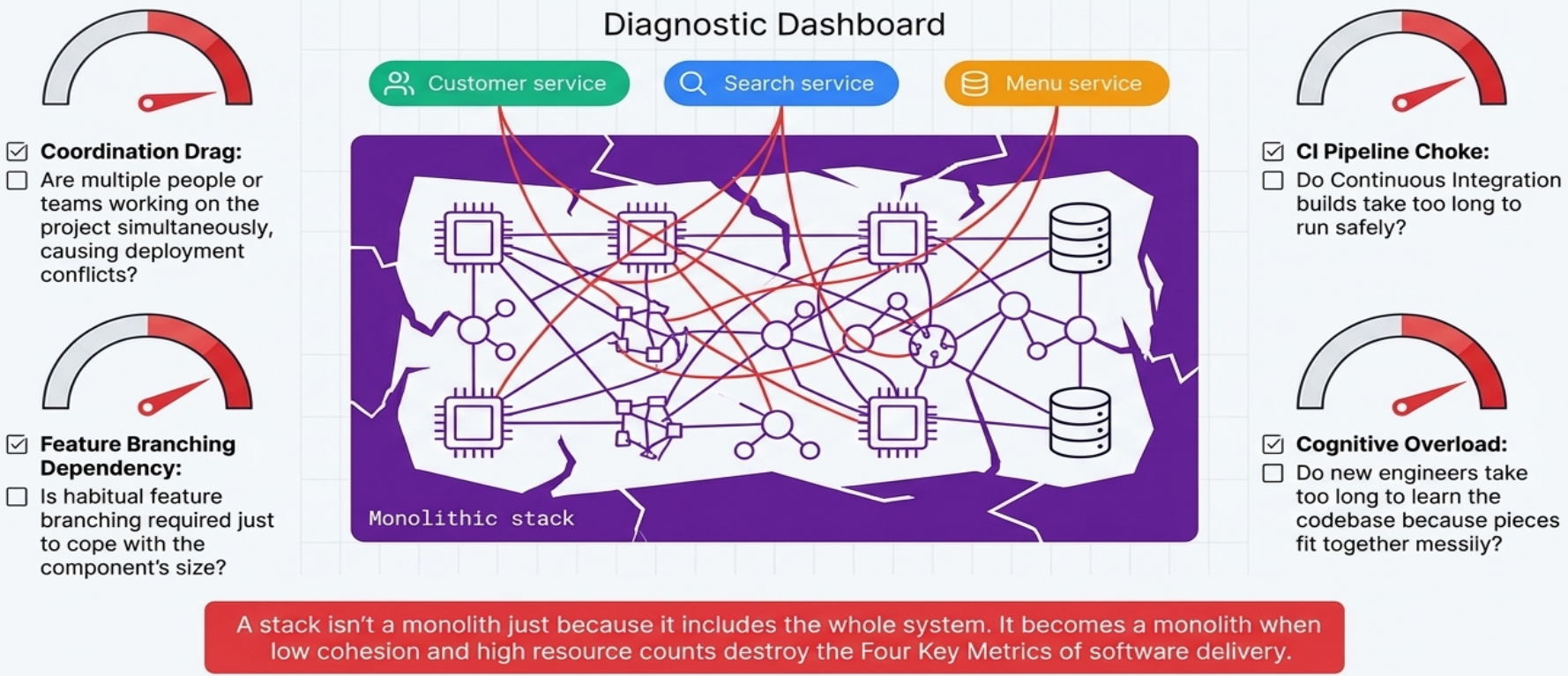
Why it’s dangerous: combining resources for different workloads creates high coupling. A change for one workload risks breaking another. Slow test-fix-test cycles lead to poorer code quality and less frequent, riskier deployments.
Resolution: look for natural “seams” - boundaries between workloads, ownership domains, or change frequencies - and split the monolith into multiple smaller stacks or an infrastructure composition.
Application Group Stack
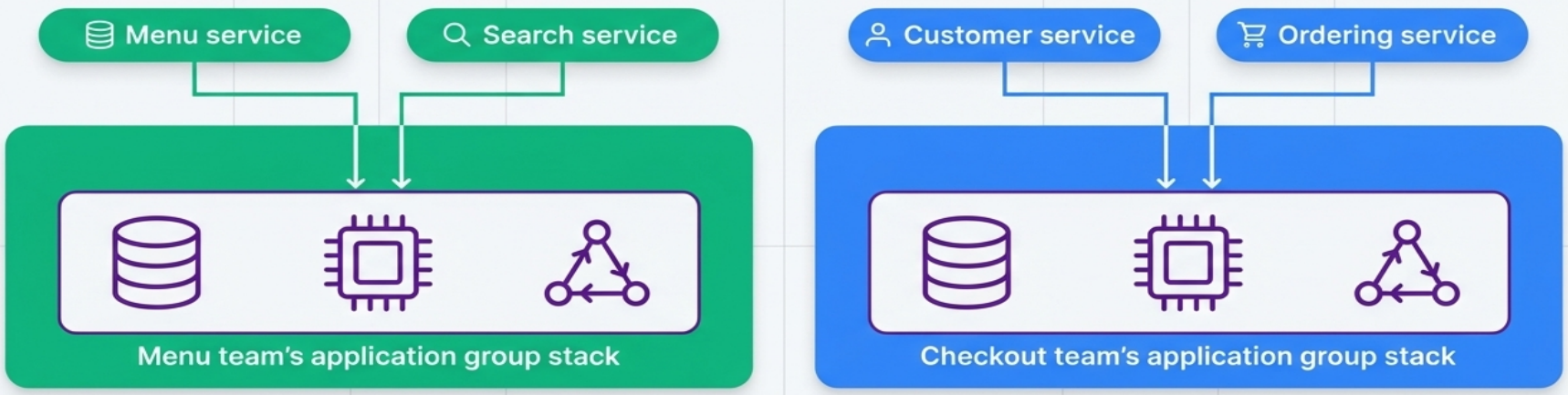
Section titled “Application Group Stack”All infrastructure for a group of related applications managed by a single team lives in one stack. This pattern aligns infrastructure ownership with organizational structure.
| Advantage | Risk |
|---|---|
| Simplifies tooling (fewer stacks to manage) | Designing around team ownership makes reorganization difficult |
| Single team can deploy and iterate quickly | If a service transfers to another team, the stack must be split |
| Useful stepping stone away from a monolith | Can organically grow into a monolithic stack |
Single Service Stack
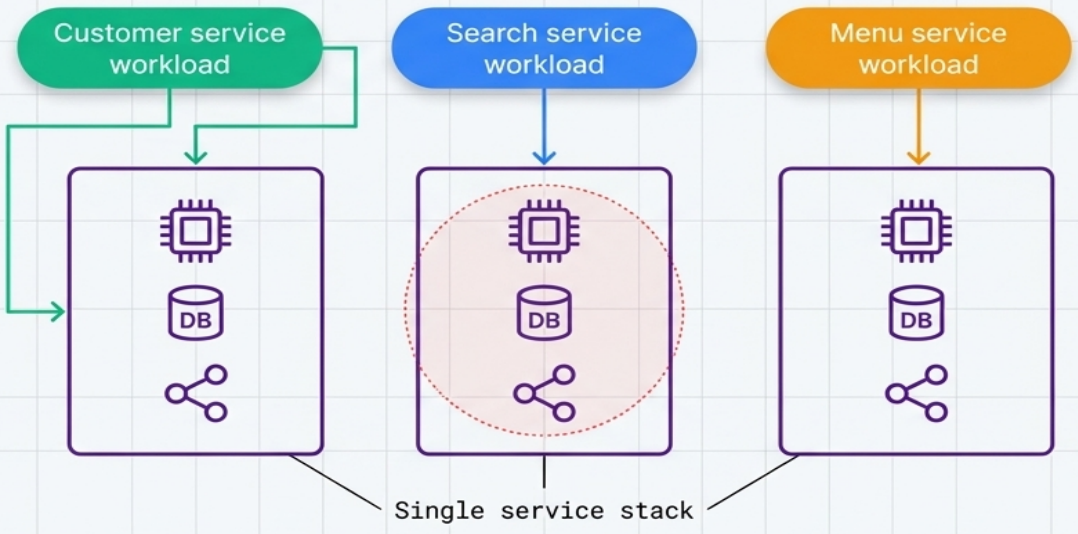
Section titled “Single Service Stack”Each deployable application component gets its own dedicated stack - the strictest workload-aligned boundary.
-
Blast radius: limited to exactly one service
-
Autonomy: teams fully own the infrastructure for their software
-
Best for: microservice architectures
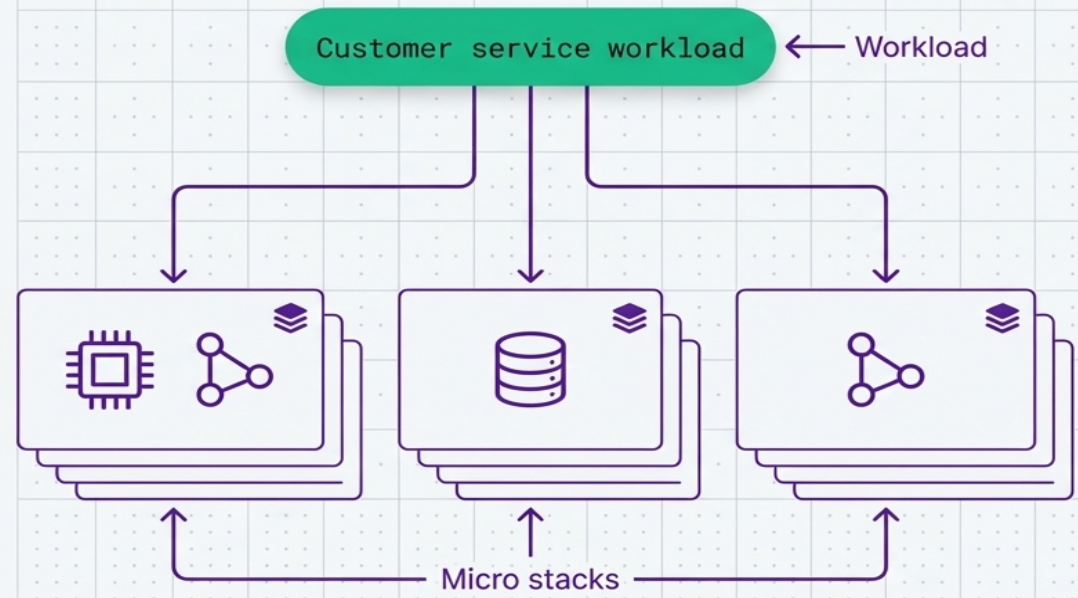
Micro Stacks
Section titled “Micro Stacks”The infrastructure for a single service is split across multiple deployment stacks - for example, separate compute, storage, and networking stacks for one application.
When to use: deployment and runtime concerns demand different change frequencies or risk profiles. A team might want to frequently patch application servers (compute) without risking accidental data loss (storage).
| Benefit | Trade-off |
|---|---|
| Individual stacks are smaller and simpler | More moving parts to test, deliver, and integrate |
| Change isolation between tiers | Requires cross-stack integration and orchestration |
| Stateful resources protected from compute churn | Higher total operational complexity |
If multiple workloads use similar micro stacks (e.g., standard databases), a single reusable project can provision all of them.
Shared Stack
Section titled “Shared Stack”A stack that provisions infrastructure exclusively for use by multiple workloads - containing no resources specific to any single workload.
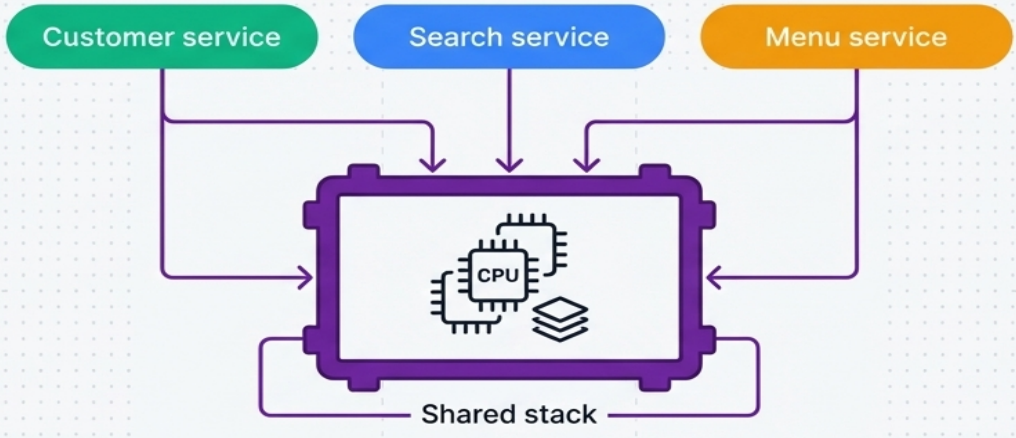
Ideal for:
- Connectivity: networking, VPCs, messaging infrastructure
- Platform services: monitoring, logging, observability
- Multi-tenant hosting: container clusters, serverless platforms
Multi-Instance Deployment Strategies
Section titled “Multi-Instance Deployment Strategies”Organizations frequently need to deploy multiple instances of the same infrastructure - separate environments (dev, test, prod), geographic replicas, or per-customer instances. Three strategies exist; two are antipatterns.
| Strategy | Type | Key characteristic |
|---|---|---|
| Multi-Environment Stack | Antipattern | All environments in one stack |
| Snowflakes as Code | Antipattern | Separate codebase per environment |
| Reusable Stack | Pattern | One codebase, many instances |
Multi-Environment Stack (Antipattern)
Section titled “Multi-Environment Stack (Antipattern)”All environments (dev, test, production) are defined and managed within a single deployment stack.
Why teams do it: for teams starting with IaC, putting everything in one project feels like the most natural first step.
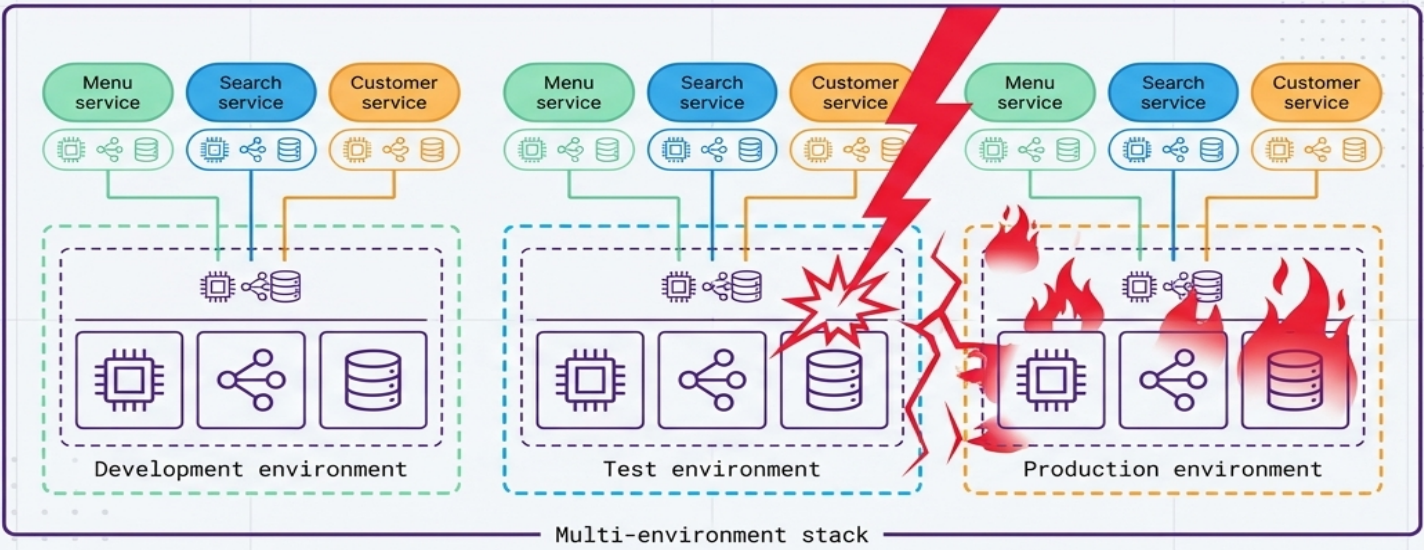
Why it’s dangerous: deployment tools operate at the stack level - the scope of any change encompasses everything within the stack. A coding error, an unexpected dependency, or a tool bug intended only for test can bring down production.
Snowflakes as Code (Antipattern)
Section titled “Snowflakes as Code (Antipattern)”A completely separate stack source code project is created for every instance, even when those instances are meant to be identical replicas.
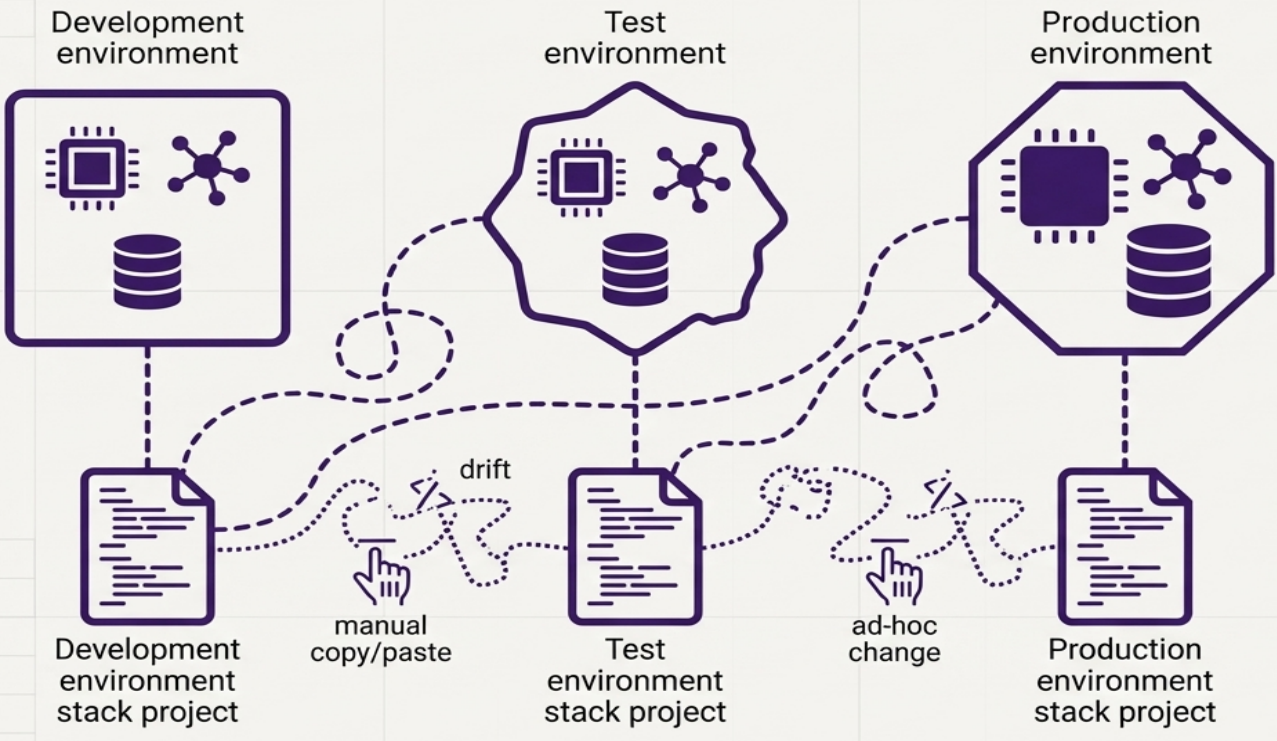
Why teams do it: it successfully isolates environments - changes to one project can’t break another. Copying and customizing an existing codebase is also the fastest way to spin up a new environment initially.
Why it fails at scale: the per-environment cost of ownership escalates rapidly. Applying a bug fix across all environments is time-consuming. Because of the manual effort, organizations fail to update all environments simultaneously, leading to configuration drift - dangerous inconsistencies that multiply between environments over time.
Reusable Stack (Recommended Pattern)
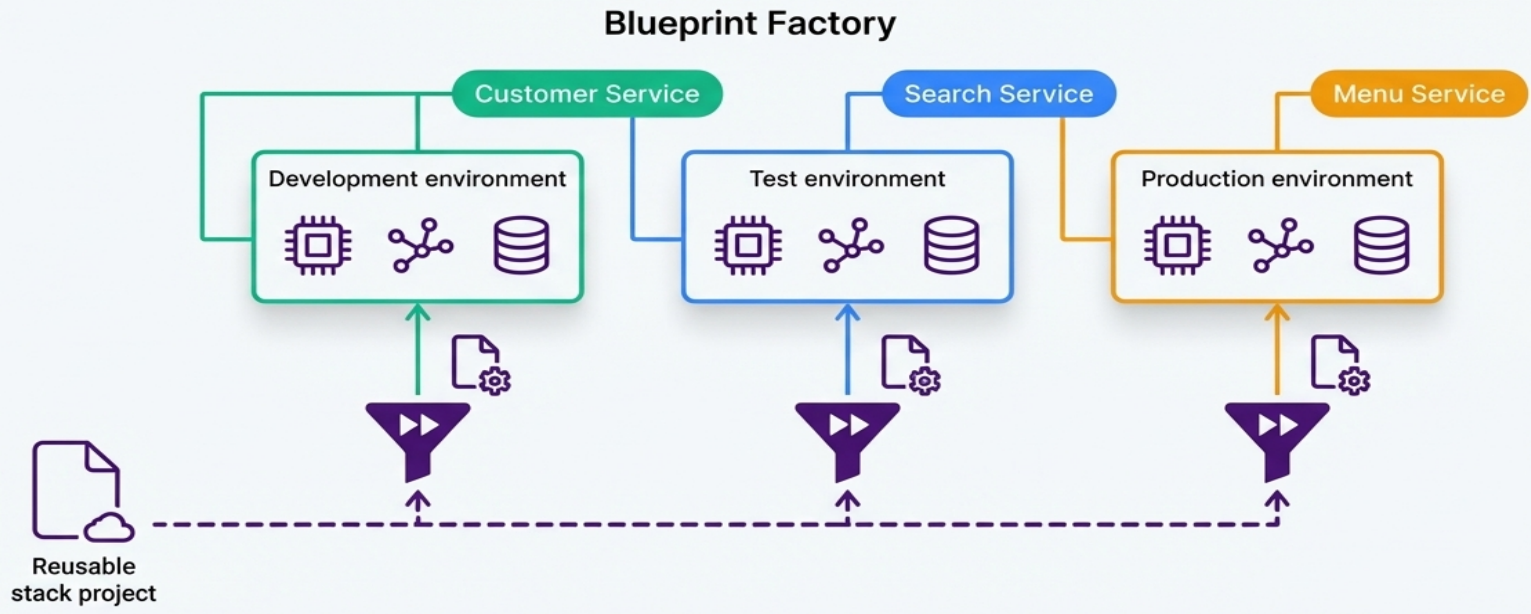
Section titled “Reusable Stack (Recommended Pattern)”A single stack project codebase is used to create and update multiple distinct stack instances.
| Aspect | How it works |
|---|---|
| Configuration | Variations (resource sizes, tuning, region) are injected via parameters - not by changing core code |
| Tooling | Terraform workspaces, separate state files, or CloudFormation stack IDs |
| Consistency | Updating the core project rolls fixes and improvements to all instances |
| Pipelines | Automated infrastructure pipelines test and deploy changes to all instances within a short time frame, preventing drift |