
Kubernetes security and workload hardening
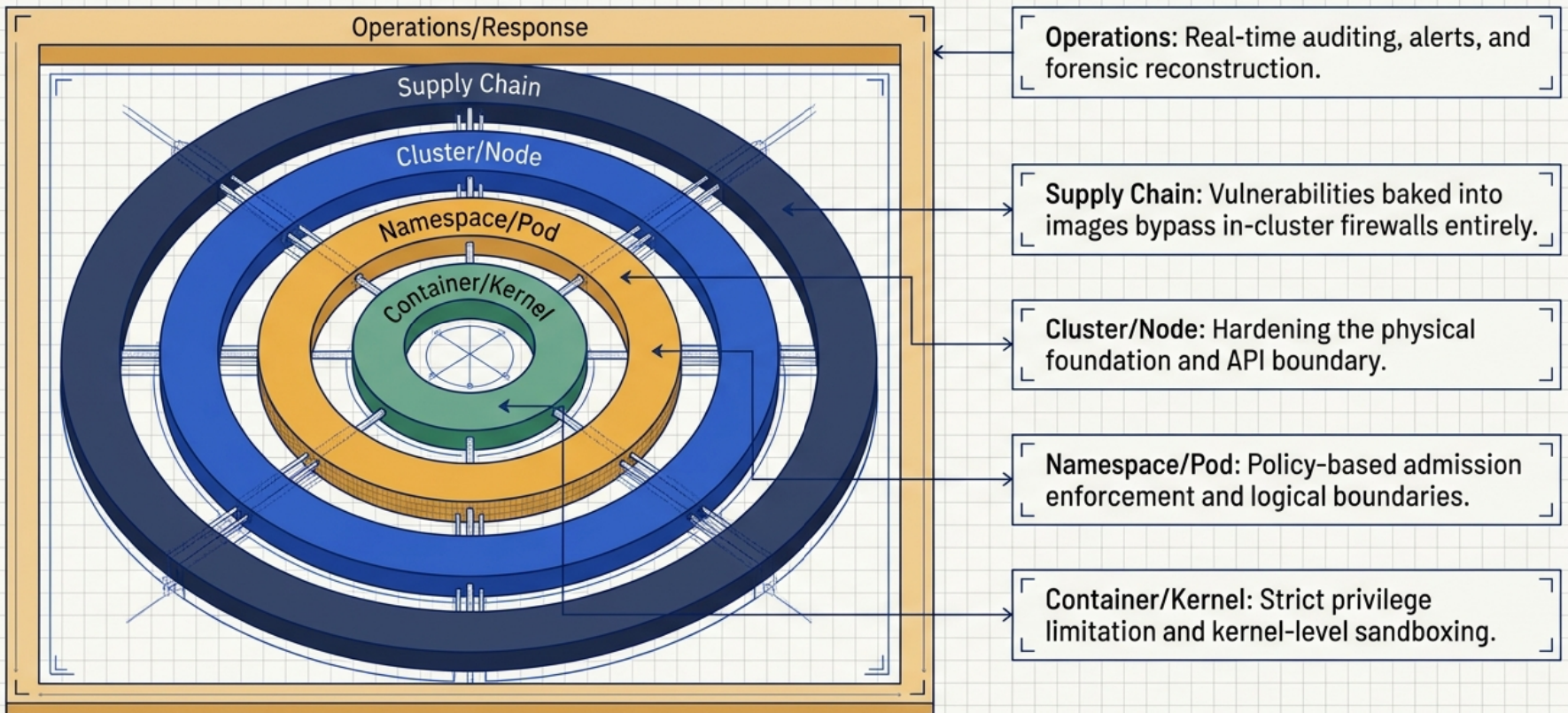
Securing a Kubernetes cluster requires defense-in-depth across the entire software delivery and execution lifecycle. A secure platform combines pipeline-level supply chain controls, strict multi-tenancy boundaries, kernel-level container sandboxing, policy-based admission enforcement, and real-time security auditing. Relying on any single layer creates a single point of failure.
Supply chain and image hygiene
Section titled “Supply chain and image hygiene”Container security begins before workloads reach the cluster. Vulnerabilities introduced during image build or pulled from unvetted external sources bypass in-cluster firewalls and RBAC rules entirely.
Approved base images and layering
Section titled “Approved base images and layering”Container images are structured as stacked filesystem layers: a base operating system layer, a middle dependency and runtime layer, and a top application code layer.
flowchart TD
    App["📦 Top Layer: Application Code<br/><i>Compiled binaries, templates, business logic</i>"]
    Mid["📚 Middle Layer: Runtimes & Libraries<br/><i>Node, Python, Go runtime, shared system libraries</i>"]
    Base["🧱 Base Layer: Hardened Operating System<br/><i>Minimal rootfs (Alpine, distroless), verified CA certs</i>"]

    App --> Mid
    Mid --> Base
Organizations should mandate a minimal catalog of company-approved, hardened base images (such as Alpine Linux or Google distroless) rather than allowing teams to pull arbitrary community images:
- Reduced attack surface - stripping package managers (
apt,apk), shells (/bin/sh,/bin/bash), and debugging utilities eliminates the tools attackers rely on during post-exploitation. - Consistent vulnerability patching - central security teams maintain and patch base images, propagating updates down to all downstream application images on rebuild.
- Audit consistency - standardized system configurations, CA certificates, and time zones across all running containers simplify compliance audits.
When workloads require specialized dependencies (such as GPU drivers), teams should adapt an approved base image through formal governance rather than introducing an entirely new, unvetted distribution.
Registry access and repository RBAC
Section titled “Registry access and repository RBAC”Container registries must enforce role-based access control (RBAC) to segregate development experimentation from production delivery:
- Developer access - developers have push and pull permissions only for non-production (
dev,test) repositories. - Production guardrails - production repositories reject direct pushes from developer workstations. Only automated CI/CD runners and verified build nodes possess push credentials.
- Egress lockdown - cluster worker nodes should be firewalled at the network layer to permit image pull traffic only from approved registry domain names and IP addresses.
Automated CI/CD quality gates
Section titled “Automated CI/CD quality gates”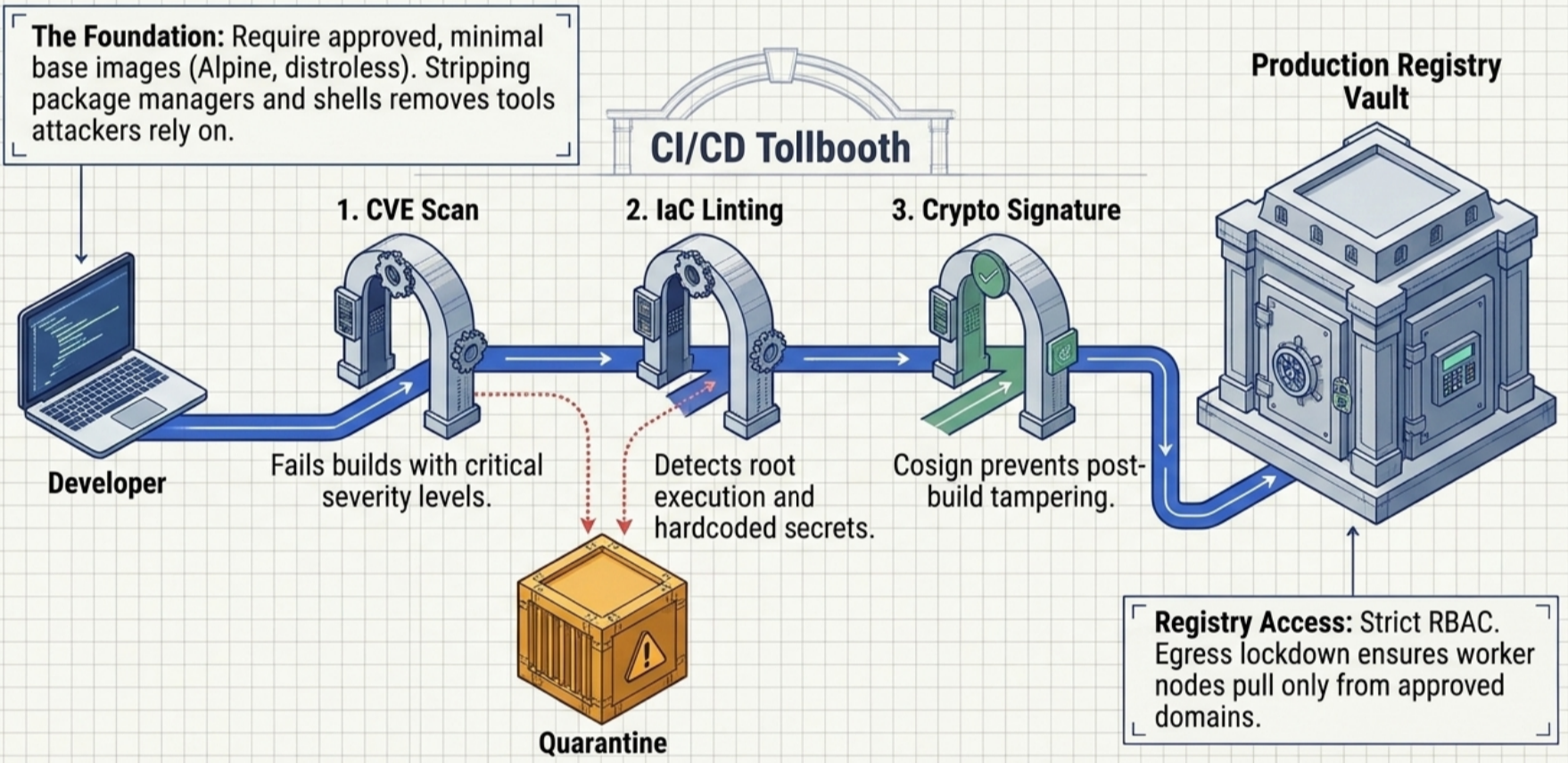
Before an image moves from development repositories into production, automated build pipelines must enforce three verification gates:
flowchart LR
    Build["🔨 Build Image"] --> Gate1["🔍 1. CVE Binary Scan"]
    Gate1 -->|"Pass"| Gate2["📄 2. IaC & Manifest Scan"]
    Gate2 -->|"Pass"| Gate3["🔏 3. Cryptographic Sign"]
    Gate3 -->|"Promote"| ProdRepo["🚀 Production Registry"]

    Gate1 -.->|"Critical CVE"| Quarantine["⛔ Quarantine"]
    Gate2 -.->|"Policy violation"| Quarantine
- Binary vulnerability scanning - scans container image layers against known Common Vulnerabilities and Exposures (CVE) databases. Pipelines automatically fail builds and quarantine images exceeding configured severity thresholds (such as any unpatched critical CVE). Scanners must support context-aware suppression rules to handle false positives when vulnerable functions are demonstrably never invoked.
- Infrastructure-as-Code (IaC) linting - scans Dockerfiles, Kubernetes manifests, and Helm charts for policy violations. Automated rules detect anti-patterns such as running as
root, mounting the host Docker socket, or hardcoding sensitive credentials and TLS private keys into image layers. - Cryptographic image signing - CI/CD pipelines cryptographically sign container image digests (using tools such as Sigstore Cosign) upon passing all scanning gates. Cluster admission controllers verify signatures before permitting container execution, ensuring images were not tampered with after publication.
Workload isolation and multi-tenancy
Section titled “Workload isolation and multi-tenancy”Multi-tenancy boundaries
Section titled “Multi-tenancy boundaries”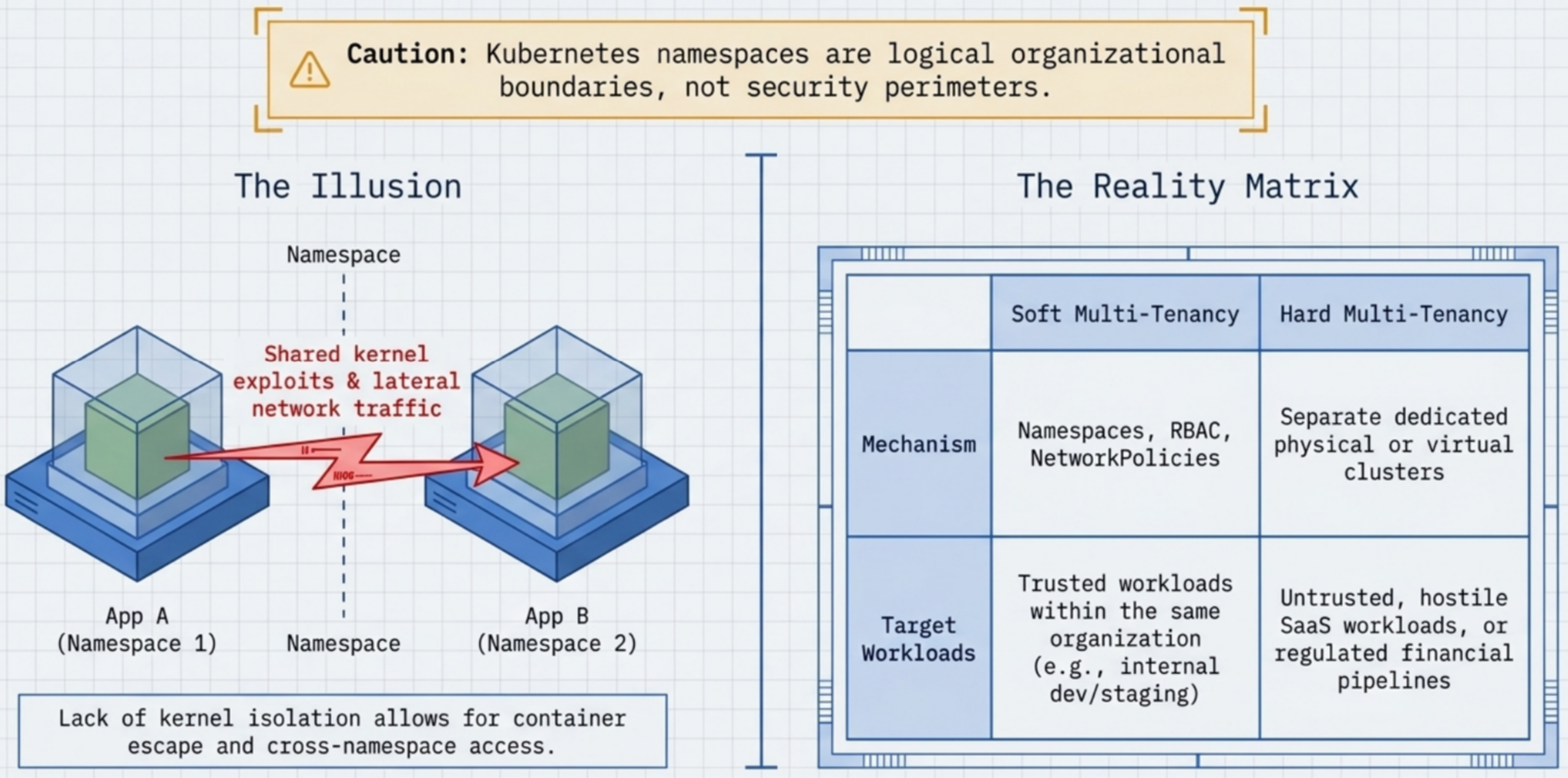
A foundational rule of Kubernetes architecture is that standard clusters do not provide hard multi-tenant isolation out of the box:
Kubernetes distinguishes between two operational multi-tenancy models:
| Model | Workload relationship | Isolation mechanism | Typical use case |
|---|---|---|---|
| Soft multi-tenancy | Trusted workloads within the same organization | Namespaces, RBAC, NetworkPolicies, ResourceQuotas | Microservices belonging to the same product team; dev and staging tiers of the same internal app |
| Hard multi-tenancy | Untrusted, hostile, or multi-tenant SaaS workloads | Separate dedicated physical or virtual Kubernetes clusters | Distinct SaaS customers, regulated financial data pipelines, production vs. external contractor workloads |
Node-level ring-fencing
Section titled “Node-level ring-fencing”When spinning up separate clusters for high-risk workloads is cost-prohibitive, administrators can isolate sensitive or elevated workloads onto dedicated subsets of worker nodes within the existing cluster:
flowchart TD
    subgraph Workloads["Incoming Pod Workloads"]
        PodStd["Standard App Pods<br/><i>(Untolerated)</i>"]
        PodPriv["⚠️ High-Privilege / GPU Pod<br/><code>tolerations: security-zone=isolated</code><br/><code>nodeAffinity: security.zone=isolated</code>"]
    end

    subgraph Cluster["Kubernetes Cluster"]
        subgraph StandardPool["General Worker Node Pool"]
            NodeStd["Standard Worker Nodes<br/><i>(Untainted)</i>"]
        end

        subgraph RingFencedPool["Ring-Fenced Node Pool"]
            NodeIso["Isolated Worker Nodes<br/><b>Taint:</b> <code>security-zone=isolated:NoSchedule</code><br/><b>Label:</b> <code>security.zone=isolated</code>"]
        end
    end

    PodStd -->|"Schedules normally"| NodeStd
    PodStd -.->|"❌ Blocked by Taint"| NodeIso
    PodPriv ==>|"Toleration + NodeAffinity"| NodeIso
To implement node ring-fencing:
- Tag nodes with labels - apply identifier labels such as
security.zone=isolatedorworkload=privileged. - Apply node taints - taint isolated nodes (
kubectl taint nodes <node-name> security-zone=isolated:NoSchedule) to repel general-purpose workloads. - Assign tolerations and node affinity - configure high-privilege pods with matching tolerations and
nodeAffinityrules so only they can schedule onto the ring-fenced nodes.
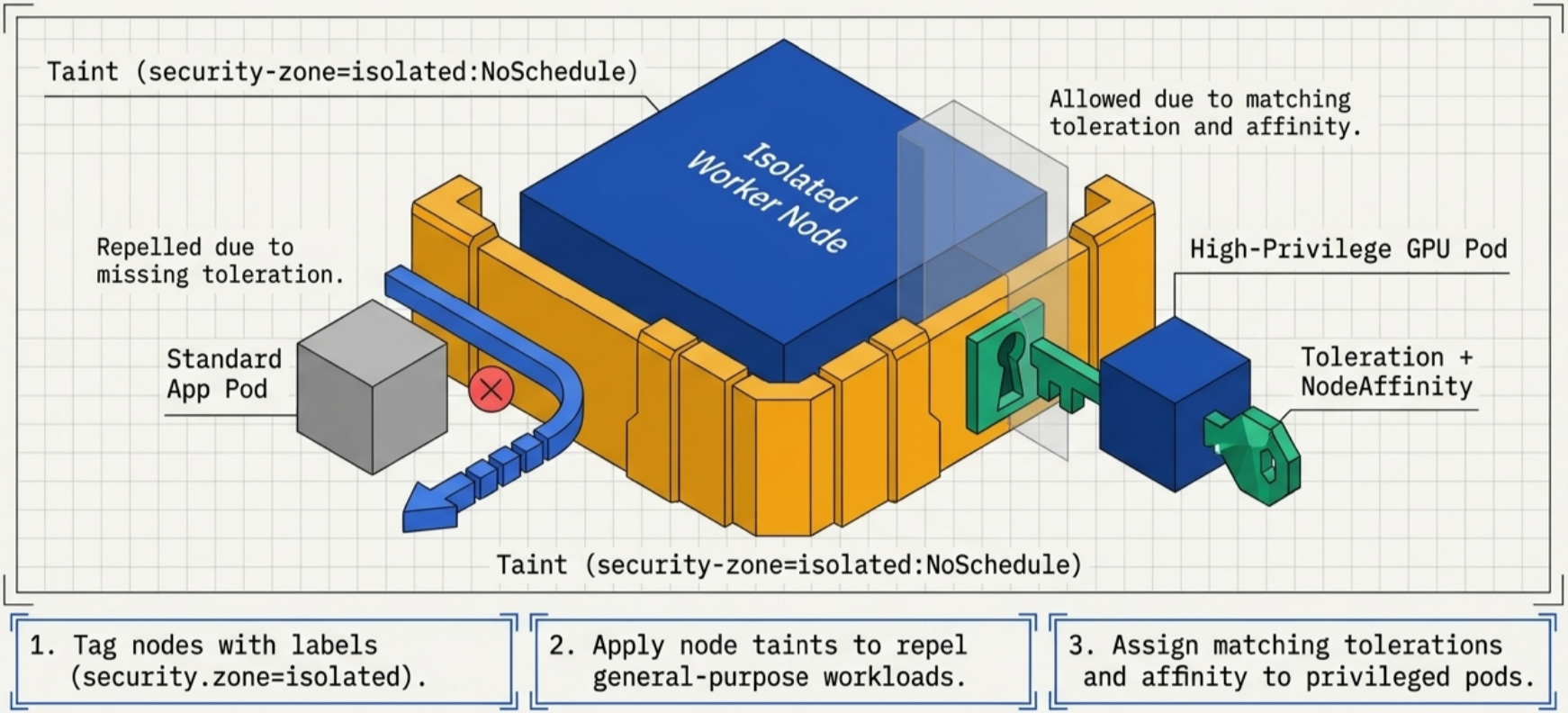
Ring-fenced nodes should run with heightened audit logging, strict host firewall rules, and tight Mandatory Access Control (MAC) policies to prevent container escapes from compromising adjacent infrastructure.
Runtime isolation spectrum
Section titled “Runtime isolation spectrum”Standard containers share the host Linux kernel. Runtimes provide varying degrees of isolation along a spectrum balancing performance overhead against security boundaries:
| Isolation level | Runtime mechanism | Security boundary | Performance overhead |
|---|---|---|---|
| Standard namespaced containers | containerd, CRI-O (runc) | Shared kernel; Linux namespaces and cgroups | Minimal; near bare-metal speed |
| Userspace kernel sandboxing | gVisor (runsc) | Intercepts syscalls in a userspace Sentry application kernel | Low to moderate; syscall interception latency |
| MicroVM sandboxing | Kata Containers | Lightweight dedicated hardware-isolated VM per Pod | Moderate memory footprint; sub-second boot |
| WebAssembly runtime | Wasm host runtimes (e.g., Spin, WasmEdge) | Deny-by-default capability-based bytecode sandbox | Extremely low memory; millisecond startup |
| Full virtual machines | KubeVirt, separate cloud VMs | Dedicated hypervisor-enforced guest kernel | High resource footprint; slowest startup |
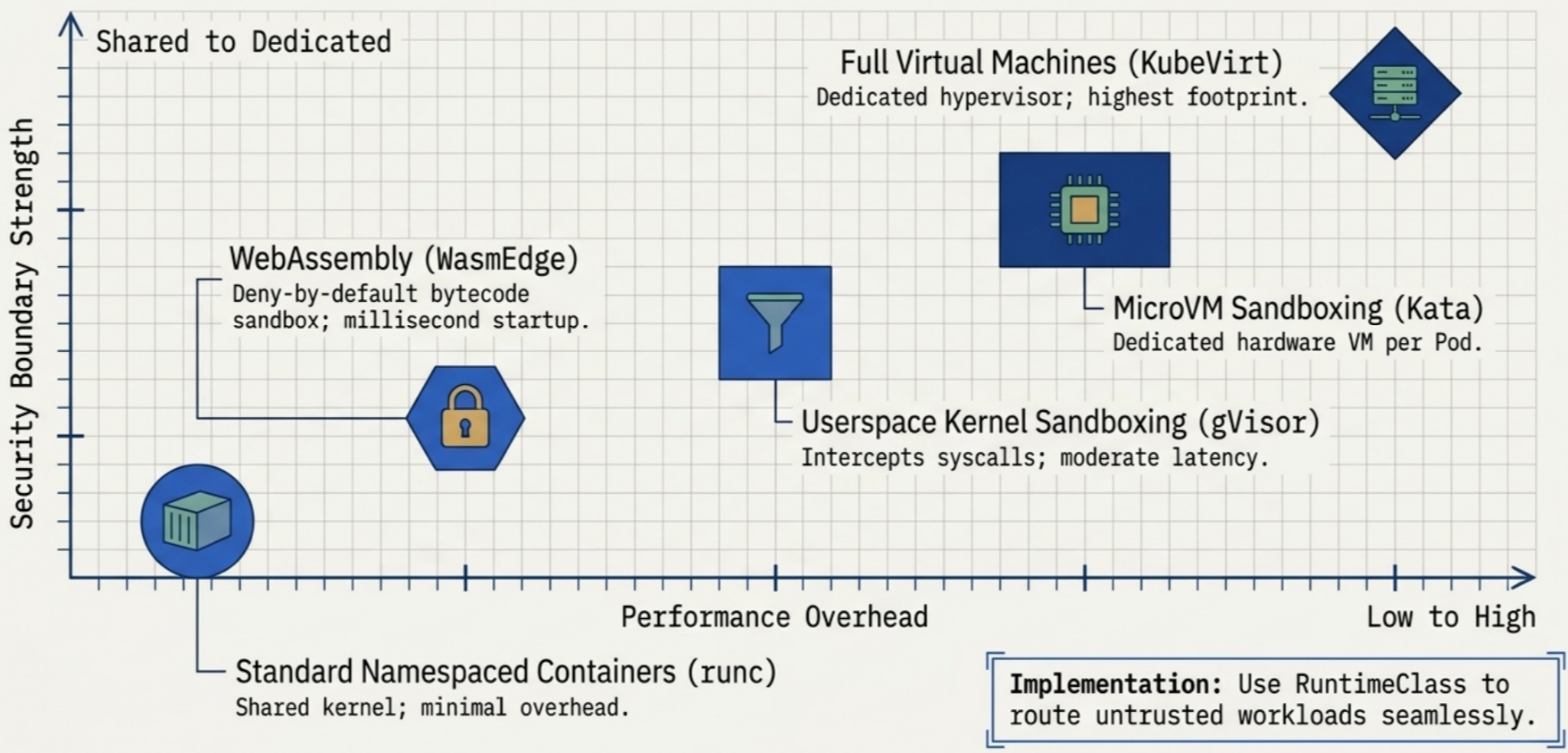
To route untrusted workloads to a sandboxed runtime, define a RuntimeClass and reference it in the Pod specification:
apiVersion: node.k8s.io/v1kind: RuntimeClassmetadata: name: gvisorhandler: runsc # matches container runtime handler on worker nodes---apiVersion: v1kind: Podmetadata: name: untrusted-workloadspec: runtimeClassName: gvisor # runs pod inside gVisor userspace sandbox containers: - name: parser image: registry.example.com/untrusted-parser:v1.2.0Network isolation implications
Section titled “Network isolation implications”Pod network traffic is handled by Container Network Interface (CNI) plugins, falling into two primary architectural patterns:
- Overlay networks (VXLAN) - wrap pod-to-pod IP packets inside outer host-to-host UDP packets. Physical network firewalls and intrusion detection systems outside the cluster only see host IP addresses and cannot inspect or filter pod-level communications without deep packet inspection.
- BGP routed networks - advertise pod IP ranges directly to physical network routers without packet encapsulation. External network firewalls see genuine pod source and destination IPs, allowing direct perimeter filtering.
Because pods are ephemeral, static IP addresses churn continuously as workloads reschedule. Network forensic tools must correlate raw IP traffic back to Kubernetes metadata (namespace, Pod name, container ID) rather than relying on static IP audit logs.
Pod Security Standards (PSS) and Admission (PSA)
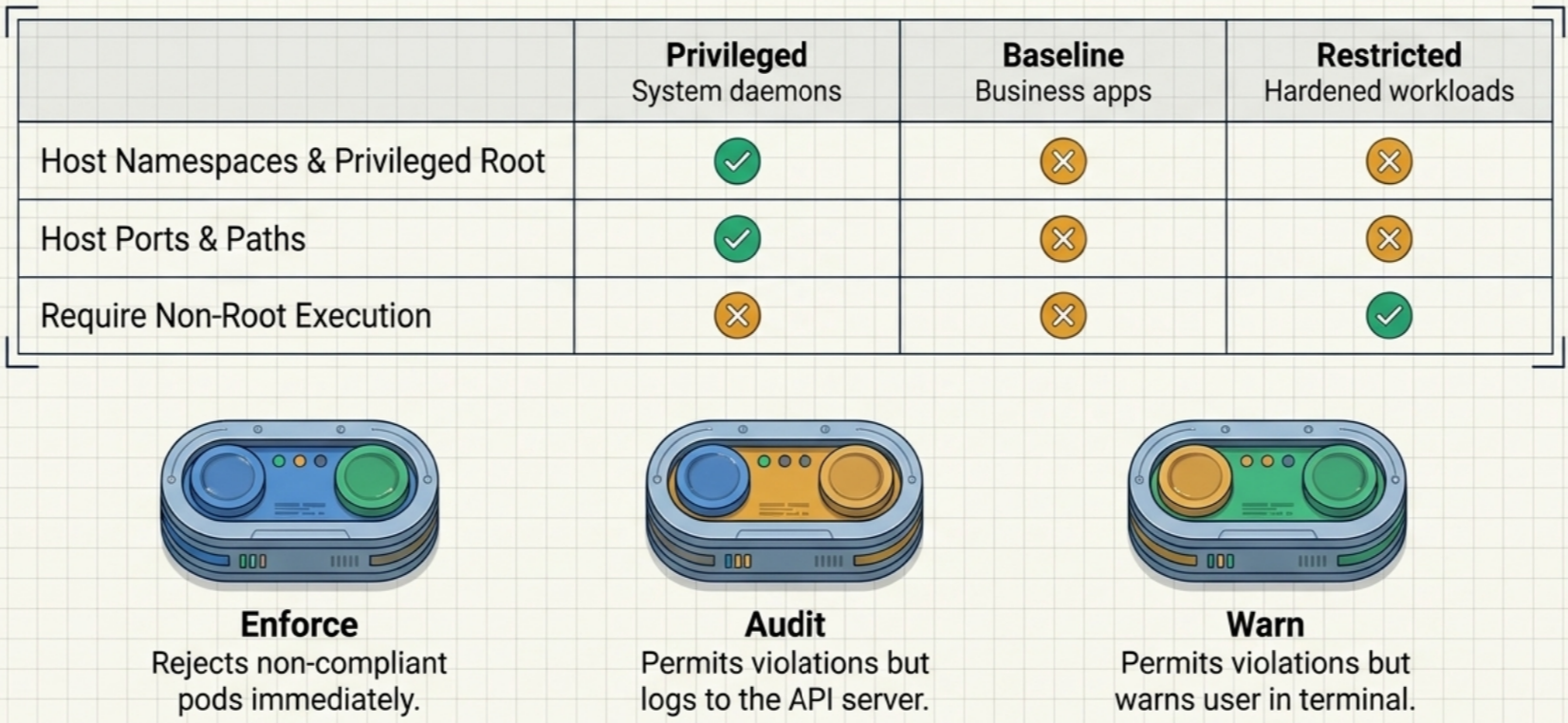
Section titled “Pod Security Standards (PSS) and Admission (PSA)”The built-in Pod Security Admission (PSA) controller evaluates Pod specifications against three standardized Pod Security Standards (PSS) levels defined by the Kubernetes project. PSA replaced the deprecated PodSecurityPolicy (PSP) mechanism in Kubernetes 1.25+.
PSS policy levels
Section titled “PSS policy levels”| Profile | Target workloads | Restrictions enforced |
|---|---|---|
Privileged | System daemons, CNI/CSI plugins | Unrestricted. Permits privileged containers, host namespaces (hostPID, hostIPC, hostNetwork), host path volume mounts, and arbitrary root capabilities. |
Baseline | General-purpose business applications | Prevents known privilege escalations. Forbids privileged: true, host namespaces, host port mappings, and volume types other than standard persistent volumes and config primitives. |
Restricted | Hardened, security-critical workloads | Heavily hardened. Enforces runAsNonRoot: true, drops all capabilities except NET_BIND_SERVICE, enforces read-only root filesystems, restricts volume types, and mandates seccomp profiles. |
PSA enforcement modes
Section titled “PSA enforcement modes”Each PSS level can be enforced through three distinct modes applied via namespace labels:
enforce- policy violations cause the API server to reject the Pod creation request immediately with an error.audit- policy violations are permitted, but an audit event is recorded in the API server audit log for compliance tracking.warn- policy violations are permitted, but a warning message is returned directly to the user executing thekubectlcommand.
Configuring PSA on a namespace
Section titled “Configuring PSA on a namespace”PSA is configured declaratively using namespace labels. Multiple modes can be active simultaneously, allowing administrators to enforce baseline while auditing or warning against restricted:
apiVersion: v1kind: Namespacemetadata:  name: payment-processing  labels:    # Strictly reject any Pod that violates the Baseline profile    pod-security.kubernetes.io/enforce: baseline    pod-security.kubernetes.io/enforce-version: latest
    # Warn developers in kubectl output if their manifest violates Restricted    pod-security.kubernetes.io/warn: restricted    pod-security.kubernetes.io/warn-version: latest
    # Log Restricted violations into the API server audit log for compliance    pod-security.kubernetes.io/audit: restricted    pod-security.kubernetes.io/audit-version: latest
Workload securityContext
Section titled “Workload securityContext”The securityContext field defines privilege and access control settings for Pods and individual containers. Settings configured at the container level override identical settings defined at the Pod level.
Key security context attributes
Section titled “Key security context attributes”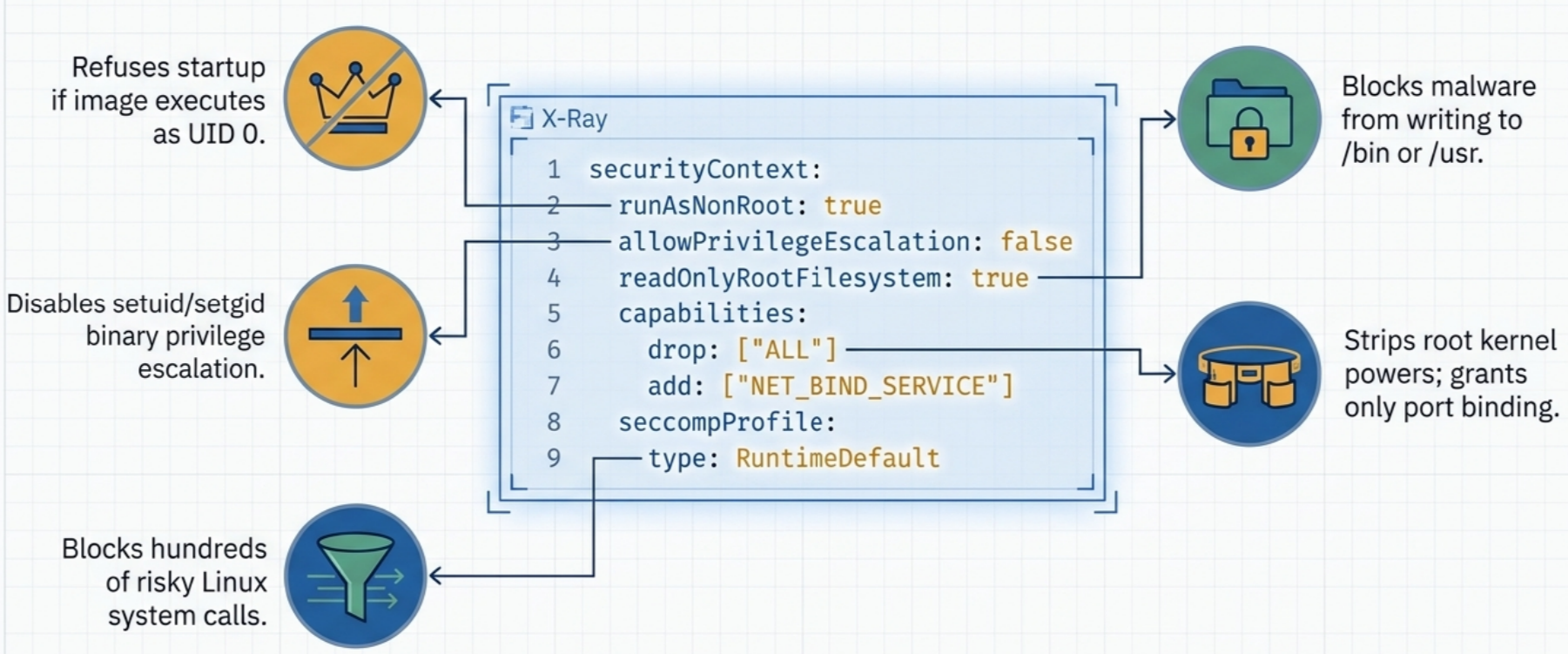
runAsNonRoot: true- forces the container runtime to verify that the container image does not execute as UID 0 (root). If the image defaults to root and no non-zero UID is specified, the runtime refuses to start the container.runAsUserandrunAsGroup- explicitly assigns an unprivileged UID and GID to all processes executed inside the container.allowPrivilegeEscalation: false- prevents child processes from acquiring more privileges than their parent process, disabling setuid and setgid binary execution.readOnlyRootFilesystem: true- mounts the container’s root filesystem as read-only. Any attempt by an attacker or compromised process to write binaries, scripts, or malicious payloads to/tmp,/bin, or/usrfails immediately. Temporary write locations must use mountedemptyDirvolumes.capabilities.drop: ["ALL"]- strips all default Linux root capabilities from the process, granting back only specific capabilities strictly required by the service (such asNET_BIND_SERVICEfor binding to ports below 1024).seccompProfile.type: RuntimeDefault- applies the container runtime’s default secure computing mode filter, blocking hundreds of risky and obsolete Linux system calls.
Hardened production Pod manifest
Section titled “Hardened production Pod manifest”apiVersion: v1kind: Podmetadata: name: secure-web-service namespace: payment-processingspec: # Pod-level security context applies to all containers in the Pod securityContext: runAsNonRoot: true # prevent any container from running as root runAsUser: 10001 # dedicated unprivileged service UID runAsGroup: 10001 # dedicated unprivileged service GID fsGroup: 10001 # ownership for mounted persistent volumes seccompProfile: type: RuntimeDefault # enforce runtime default syscall filtering
containers: - name: web image: registry.example.com/payment-service:v2.4.1 imagePullPolicy: Always
# Container-level security context enforces granular restrictions securityContext: allowPrivilegeEscalation: false # blocks setuid binary privilege escalation readOnlyRootFilesystem: true # immutable root container filesystem capabilities: drop: - ALL # strip all kernel capabilities add: - NET_BIND_SERVICE # permit binding to port 80/443 only
volumeMounts: - name: tmp-dir mountPath: /tmp # writable scratch space for ephemeral data - name: cache-dir mountPath: /var/cache/app
volumes: - name: tmp-dir emptyDir: {} # ephemeral writable volume - name: cache-dir emptyDir: {}Node access control and administrative hygiene
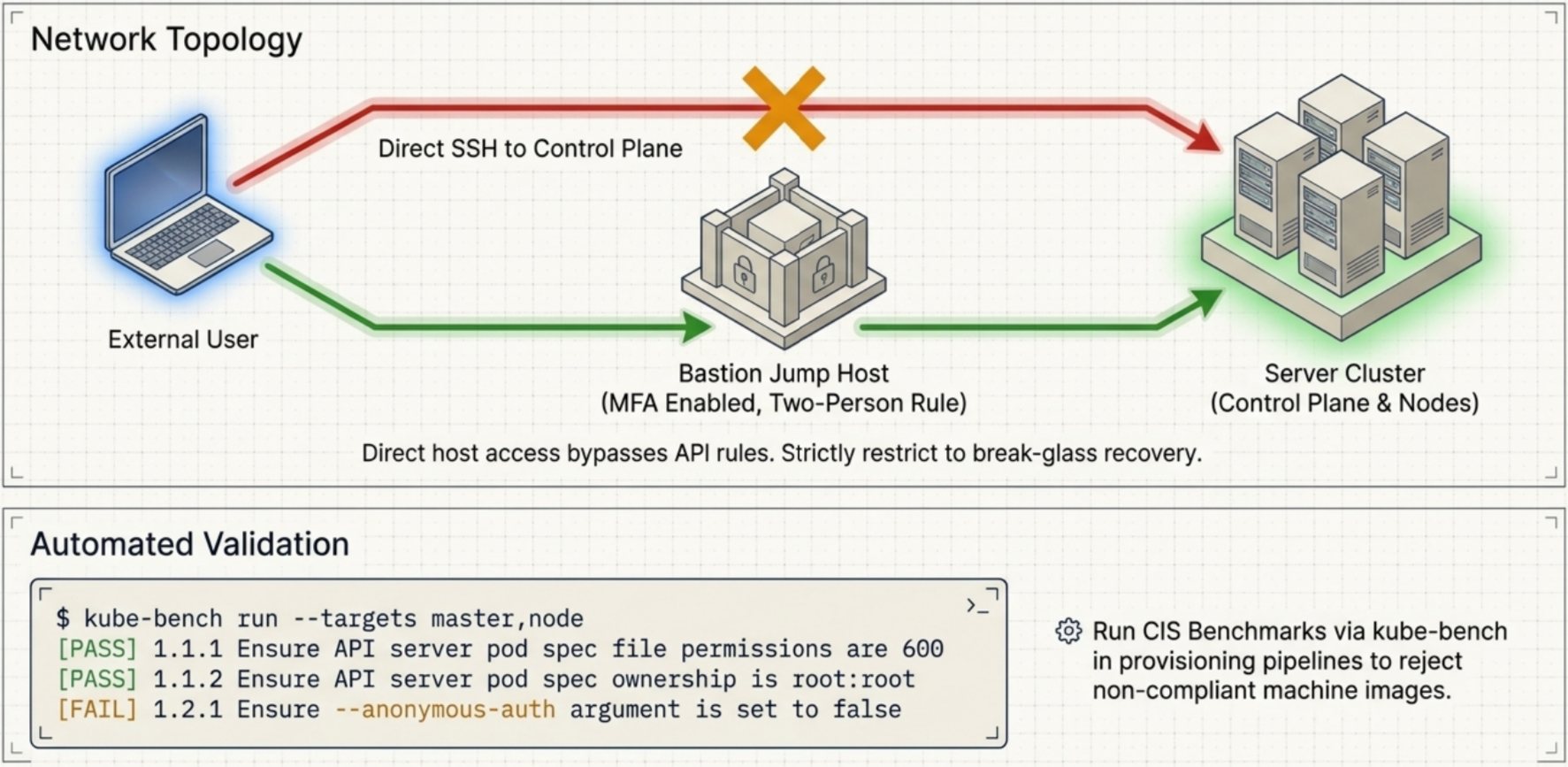
Section titled “Node access control and administrative hygiene”Administrative access must prioritize the Kubernetes API server. Direct access to underlying host operating systems bypasses API validation, RBAC rules, and admission controllers.
Minimizing remote SSH access
Section titled “Minimizing remote SSH access”Direct SSH access to control-plane and worker nodes introduces severe security risks. Control-plane node compromise grants direct read and write access to etcd, which holds the cluster’s entire unencrypted desired and active state.
Remote SSH access must be restricted to three exceptional scenarios:
- Non-API host maintenance - low-level operating system patching, physical storage configuration, or container runtime daemon troubleshooting that cannot be performed through Kubernetes APIs.
- Break-glass recovery - emergency intervention when the API server is completely offline or unreachable.
- Deep kernel diagnostics - low-level hardware diagnostics or kernel crash investigations.
All SSH sessions must be routed through bastion jump hosts, authenticated with hardware Multi-Factor Authentication (MFA), and logged to immutable, centralized log aggregators. Organizations managing critical clusters should enforce a two-person rule for control-plane SSH access.
CIS Kubernetes Benchmarks and kube-bench
Section titled “CIS Kubernetes Benchmarks and kube-bench”The Center for Internet Security (CIS) maintains industry-standard benchmarks specifying secure configuration parameters for Kubernetes components, covering:
- Control plane component flags (
kube-apiserver,kube-scheduler,kube-controller-manager,etcd). - Worker node configuration (
kubeletpermissions, anonymous auth disabled, cert validation). - File permissions and ownership on configuration manifests and TLS certificates.
The open-source tool kube-bench executes automated tests checking host nodes against CIS benchmarks:
# Run CIS benchmark tests on the active nodekube-bench run --targets master,node
# Expected output structure:# [PASS] 1.1.1 Ensure that the API server pod specification file permissions are set to 600# [PASS] 1.1.2 Ensure that the API server pod specification file ownership is set to root:root# [FAIL] 1.2.1 Ensure that the --anonymous-auth argument is set to false
Organizations should integrate kube-bench into automated node provisioning pipelines to reject non-compliant machine images before they join the cluster, and establish known-good configuration baselines for drift detection.
Security monitoring and incident response
Section titled “Security monitoring and incident response”Security teams must adopt an assume breach mindset: controls may fail, and rapid detection and forensic reconstruction are critical for containment.
Real-time security alerts
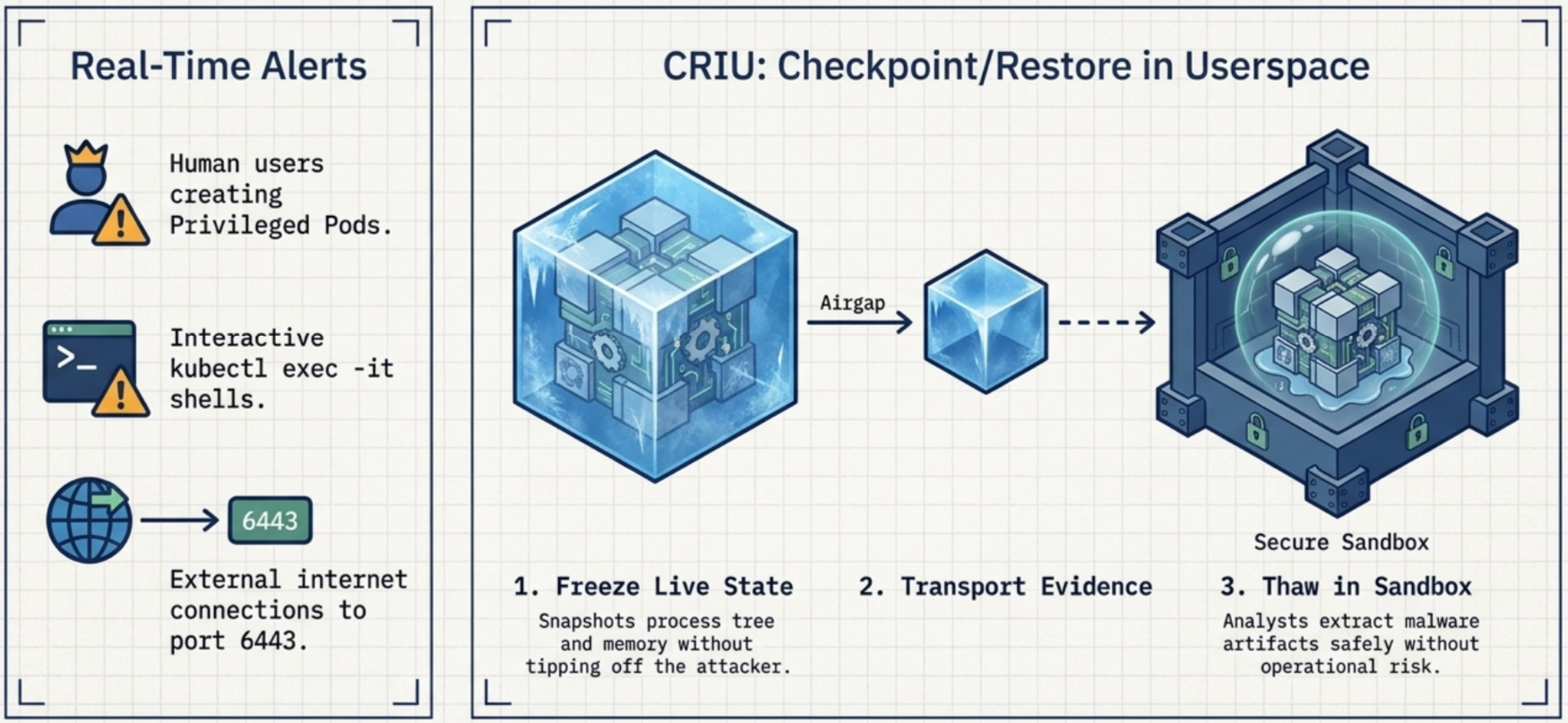
Section titled “Real-time security alerts”Rather than relying purely on passive log retention, clusters should configure real-time alerts on high-risk lifecycle events:
| Event | Security risk | Recommended response |
|---|---|---|
| Human user creates a privileged Pod | Privileged pods bypass container isolation and gain host root access. | Alert on any privileged Pod created by a human identity (CN or OIDC user) rather than an automated CI/CD service account. |
Human operator executes an interactive exec shell | Shell access allows interactive tampering, secret exfiltration, and manual binary execution. | Alert on kubectl exec -it sessions. Cross-reference sessions against active emergency incident tickets; terminate unauthorized sessions. |
| External internet connection to control plane | API server should never be open to the public internet without IP whitelisting or private network tunneling. | Trigger critical alert on direct external internet connections to port 6443. |
| Unexpected container breakout or root execution | Potential zero-day or runtime exploit attempting privilege escalation. | Alert via runtime security agents (e.g., Falco, Cilium Tetragon) on anomalous kernel syscalls or sensitive file access (/etc/shadow). |
Ephemeral log retention
Section titled “Ephemeral log retention”Containers are short-lived. By default, container log files stored on node filesystems are permanently deleted when a Pod is rescheduled or destroyed.
To preserve an immutable audit trail for post-mortem forensics:
- Centralized log shipping - deploy a DaemonSet (such as Fluent Bit or Vector) that streams
stdoutandstderrlogs to an external log aggregation backend in real time. - Trapping internal filesystem logs - identify legacy applications that write logs to internal container filesystem paths rather than standard streams, and mount shared
emptyDirvolumes or sidecar log forwarders to capture them. - API server audit logging - configure
--audit-log-pathand an audit policy onkube-apiserverto record every REST request, the authenticated subject, the target URI, and the response code.
Forensic checkpointing with CRIU
Section titled “Forensic checkpointing with CRIU”Historically, terminating a compromised container destroyed volatile memory evidence, while leaving it running risked further lateral movement.
Checkpoint/Restore in Userspace (CRIU) technology enables cluster operators to freeze and snapshot the entire running process tree and memory state of a live container without terminating it:
- Capture live checkpoint - a container checkpoint command generates an immutable snapshot of container process memory and open file descriptors.
- Quarantine or terminate active workload - the compromised container can be safely stopped on the live node.
- Restore into isolated sandbox - forensic analysts restore the saved checkpoint inside a secure, disconnected sandbox cluster to inspect memory, examine loaded rootkits, and extract malware artifacts without operational risk.
Application migration: crawl, walk, run
Section titled “Application migration: crawl, walk, run”A primary cause of post-migration failures is modifying an application’s baseline security posture at the exact same moment it is ported to Kubernetes. When failures occur, it becomes impossible to determine whether the issue was caused by container orchestration or new security restrictions.
Organizations should adopt a three-phase migration model:
flowchart LR
    Phase1["1️⃣ CRAWL<br/><i>Threat-model & baseline</i><br/>Audit current legacy state, TLS usage, and permissions"]
    Phase2["2️⃣ WALK<br/><i>Lift-and-shift posture</i><br/>Migrate to K8s with security settings unchanged"]
    Phase3["3️⃣ RUN<br/><i>Iterative hardening</i><br/>Apply non-root, read-only rootfs, and mTLS"]

    Phase1 --> Phase2 --> Phase3
- Crawl (threat-model and baseline) - document the legacy application’s existing posture. Identify which ports are open, whether internal communications use TLS, what service accounts are used, and whether the service runs as root.
- Walk (lift-and-shift with identical posture) - deploy the application into Kubernetes keeping its operational security characteristics identical to the legacy environment. If the legacy app did not use TLS, do not force TLS during initial containerization. This isolates infrastructure and scheduling bugs from security misconfigurations.
- Run (incremental hardening) - once the application is stable and proven in the cluster, systematically layer on security enhancements. Start with low-risk controls (disabling token automounting, applying
readOnlyRootFilesystem), progress to PSSRestrictedcompliance, and finally layer mutual TLS (mTLS) through a service mesh or Gateway API.
Defense-in-depth: container breakout case study
Section titled “Defense-in-depth: container breakout case study”A real-world illustration of multi-layer security is container runtime binary overwrite attacks (such as the historical CVE-2019-5736 flaw in runc). In this vulnerability, a malicious process executing inside a container as root could overwrite the host’s runc binary on the worker node, obtaining root-level execution across the host and all neighboring containers.
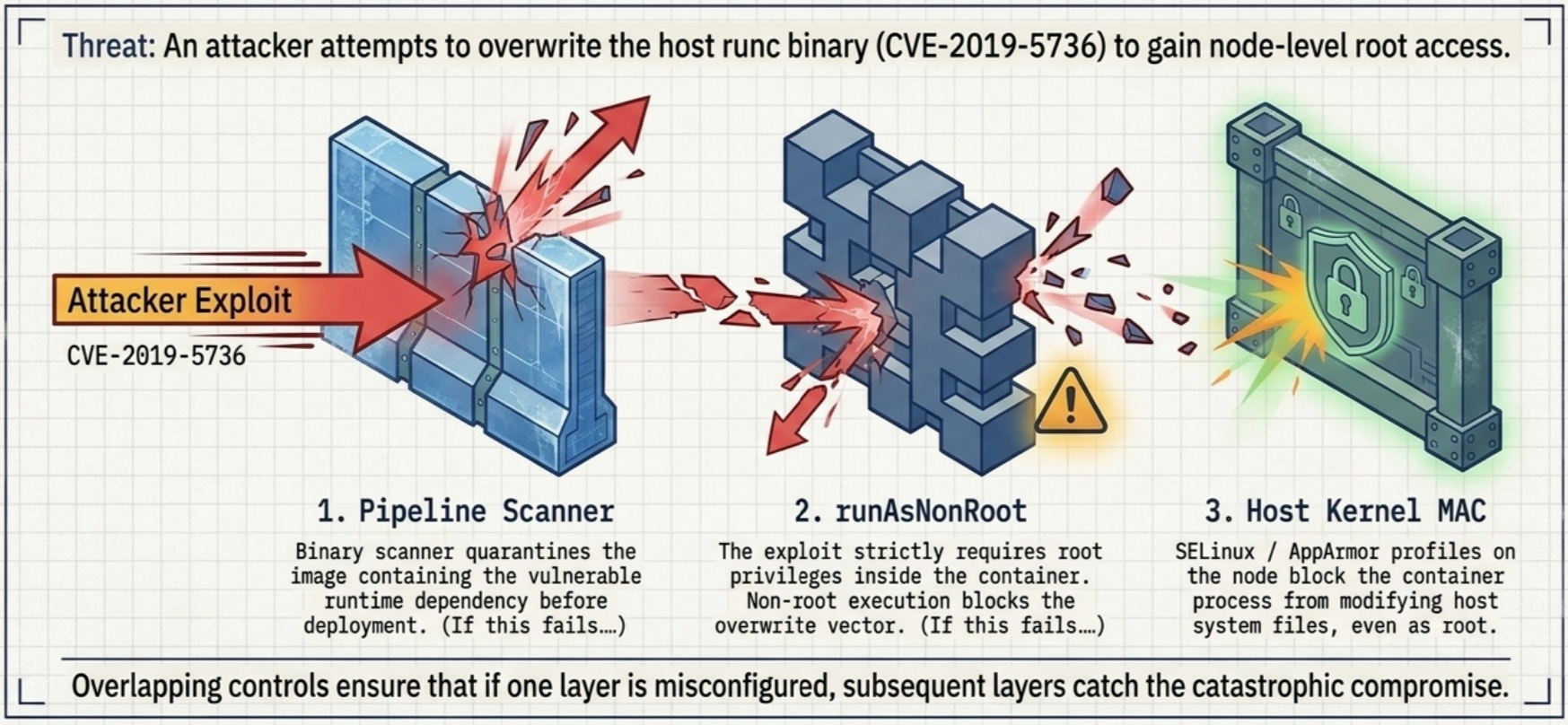
A layered defense-in-depth architecture completely neutralizes the threat at multiple stages:
| Defense layer | Security control | Exploit prevention mechanism |
|---|---|---|
| 1. Pipeline scanning | Binary CVE scanner in CI/CD | Scans image layers, flags vulnerable runtime dependencies, and quarantines the image before deployment. |
| 2. Workload hardening | runAsNonRoot: true in securityContext | The exploit strictly requires root privileges inside the container to overwrite host binaries. Denying root execution completely blocks the exploit vector. |
| 3. Host kernel defense | SELinux / AppArmor MAC profiles | Even if a vulnerable container executes as root, Mandatory Access Control policies on the node block the container process from modifying host system files. |
Relying on any single control leaves clusters vulnerable if that control is misconfigured or bypassed. Layering pipeline checks, workload privilege minimization, and kernel-level MAC enforcement ensures that if one defense fails, subsequent layers prevent catastrophic compromise.
Quick reference
Section titled “Quick reference”Pod Security Standards profiles
Section titled “Pod Security Standards profiles”| Rule category | Privileged | Baseline | Restricted |
|---|---|---|---|
| Privileged containers | Allowed | Disallowed | Disallowed |
Host namespaces (PID, IPC, Net) | Allowed | Disallowed | Disallowed |
| Host path volumes | Allowed | Disallowed | Disallowed |
| User execution | Any user (root allowed) | Any user (root allowed) | Must be non-root (runAsNonRoot: true) |
| Capabilities | Unrestricted | Default set allowed | Drops all; only NET_BIND_SERVICE allowed |
| Root filesystem | Writable | Writable | Read-only (readOnlyRootFilesystem: true) |
| Seccomp profile | Unrestricted | Unrestricted | RuntimeDefault or Localhost required |
Essential securityContext fields
Section titled “Essential securityContext fields”| Field | Scope | Purpose |
|---|---|---|
runAsNonRoot: true | Pod or Container | Rejects container startup if image executes as UID 0 |
runAsUser: <uid> | Pod or Container | Explicit numeric UID for container processes |
allowPrivilegeEscalation: false | Container | Disables setuid binaries from gaining elevated privileges |
readOnlyRootFilesystem: true | Container | Mounts container rootfs as read-only; prevents malware writes |
capabilities.drop: ["ALL"] | Container | Strips all default Linux kernel capabilities |
seccompProfile.type: RuntimeDefault | Pod or Container | Enforces standard syscall restrictions |
Troubleshooting
Section titled “Troubleshooting”| Symptom | Likely cause | Fix |
|---|---|---|
Pod rejected: violates PodSecurity "baseline:latest" | The namespace has PSA enforce: baseline, and the Pod manifest requests host namespaces, host ports, or privileged: true | Remove privileged settings or host paths; if system-level access is required, move the workload to a namespace labeled with enforce: privileged |
container has runAsNonRoot and image will run as root | The container image specifies USER 0 or omits the USER instruction while runAsNonRoot: true is set | Add an unprivileged USER <uid> instruction in the Dockerfile, or set runAsUser: <uid> explicitly in the Pod manifest |
Read-only file system errors during container startup | The application attempts to write logs, temp files, or lock files to its internal filesystem while readOnlyRootFilesystem: true is enabled | Mount an emptyDir volume at the required write path (e.g., /tmp, /var/run, /var/log) |
Permission denied when binding to port 80 or 443 | The container runs as an unprivileged user (non-root) without the NET_BIND_SERVICE capability | Add capabilities.add: ["NET_BIND_SERVICE"] to the container’s securityContext, or change the application port to 8080+ |
kube-bench reports FAIL on anonymous authentication | The kubelet or API server configuration permits unauthenticated access | Edit the static pod manifest or kubelet config file to set --anonymous-auth=false |