
RBAC and the API security pipeline
Every action in a Kubernetes cluster - from a human operator running kubectl to a Pod calling the API directly - is an HTTP request to the API server. To protect cluster state, each request traverses a mandatory three-stage security pipeline before it can be executed.
API request lifecycle
Section titled “API request lifecycle”flowchart TD
Req["📥 Incoming API Request"]
APIServer["☸️ API Server"]
subgraph Pipeline["Mandatory Three-Stage Security Pipeline"]
direction TB
AuthN["1️⃣ Authentication (authN)<br/><i>Who is making the request?</i>"]
AuthZ["2️⃣ Authorization (authZ)<br/><i>Is the action permitted? (RBAC)</i>"]
Adm["3️⃣ Admission Control<br/><i>Mutating & validating controllers</i>"]
AuthN -->|"Identity verified"| AuthZ
AuthZ -->|"Authorized"| Adm
end
Exec["✅ Approved & Executed<br/><i>Persisted to etcd</i>"]
Err401["❌ HTTP 401 Unauthorized<br/><i>Unverified credentials / token</i>"]
Err403["❌ HTTP 403 Forbidden<br/><i>Denied by RBAC policy</i>"]
ErrAdm["❌ Request Rejected<br/><i>Policy check fails (writes only)</i>"]
Req -->|"TLS connection"| APIServer
APIServer --> AuthN
AuthN -->|"Unverified"| Err401
AuthZ -->|"Unauthorized"| Err403
Adm -->|"Policy fails"| ErrAdm
Adm -->|"Passed (or read-only)"| Exec
The three stages are sequential and non-negotiable. A request that fails any stage is rejected immediately; the remaining stages are not evaluated.
Stage 1: Authentication (authN)
Section titled “Stage 1: Authentication (authN)”Authentication proves who is making the request. If credential verification fails, the API server returns HTTP 401 Unauthorized and halts.
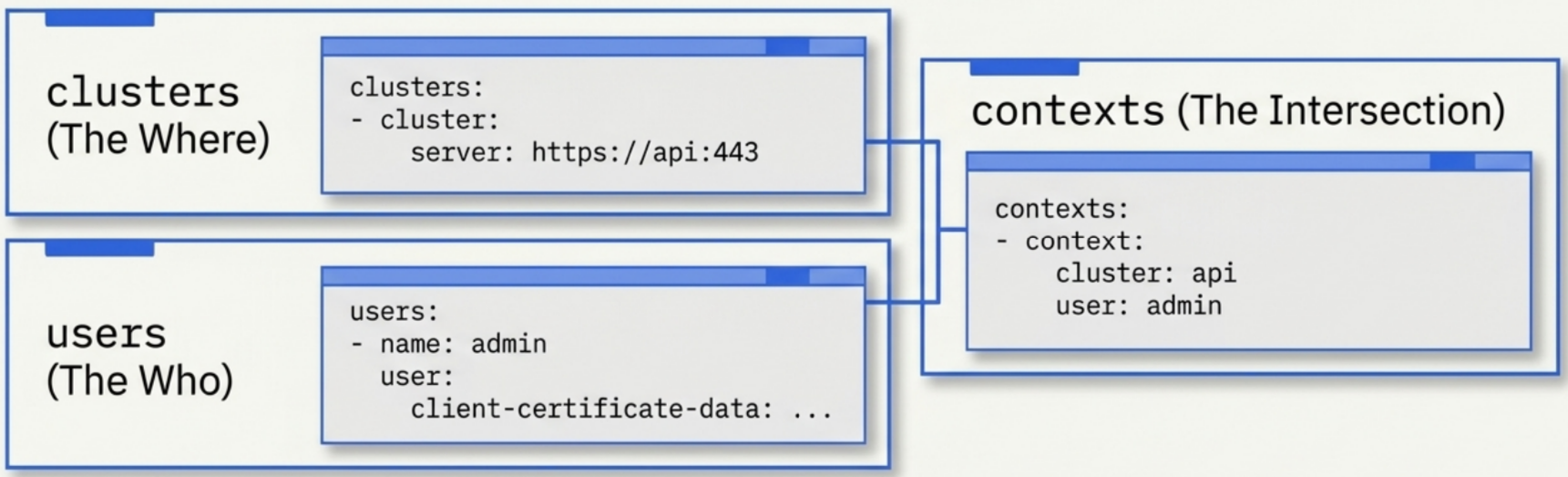
Kubernetes has no built-in user database. Identity management is fully offloaded to external systems. Supported mechanisms:
- X.509 client certificates - the default for most cluster bootstrapping tools and local dev environments (Docker Desktop,
kubeadm) - Webhook tokens - the API server forwards tokens to an external HTTP endpoint for verification
- Enterprise/cloud IAM - Active Directory, AWS IAM, Google Cloud IAM, Azure AD; managed services (EKS, GKE, AKS) provide out-of-the-box integration
Once identity is verified, the request advances to authorization.
The kubeconfig file
Section titled “The kubeconfig file”kubectl and other clients read API server endpoints and user credentials from a kubeconfig file (~/.kube/config on Linux/macOS, %USERPROFILE%\.kube\config on Windows). It has four top-level sections:
| Section | Purpose |
|---|---|
clusters | API server URL and the cluster’s CA public key (certificate-authority-data) |
users | User credentials: bearer tokens or base64-encoded X.509 certificate data |
contexts | Named user + cluster + namespace combinations |
current-context | The active context kubectl targets for all commands |
apiVersion: v1kind: Configclusters:- cluster: certificate-authority-data: LS0tLS1C... # cluster CA public key server: https://<api-server-url>:443 name: prod-clusterusers:- name: ops-user user: token: eyJhbGciOiJSUzI1NiIs... # bearer token credentialcontexts:- context: cluster: prod-cluster namespace: default user: ops-user name: ops-contextcurrent-context: ops-contextManaging kubeconfig with kubectl config
Section titled “Managing kubeconfig with kubectl config”kubectl config subcommands let you inspect and modify kubeconfig files without editing YAML directly.
| Command | What it does |
|---|---|
kubectl config view | Display the merged, active configuration across all loaded kubeconfig files |
kubectl config current-context | Print the name of the active context |
kubectl config use-context <name> | Switch current-context to a different cluster, user, or namespace target |
kubectl config set-credentials <user> --client-key=... --client-certificate=... --embed-certs=true | Add or update a user credential entry in the kubeconfig file |
The --embed-certs=true flag writes raw base64-encoded certificate data directly into the kubeconfig instead of storing file paths, making the file portable across machines.
X.509 certificate identity decoding
Section titled “X.509 certificate identity decoding”When client certificates are used, the API server extracts identity directly from the certificate fields signed by the cluster’s CA:
CN(Common Name) maps to the Kubernetes usernameO(Organization) maps to Kubernetes group memberships
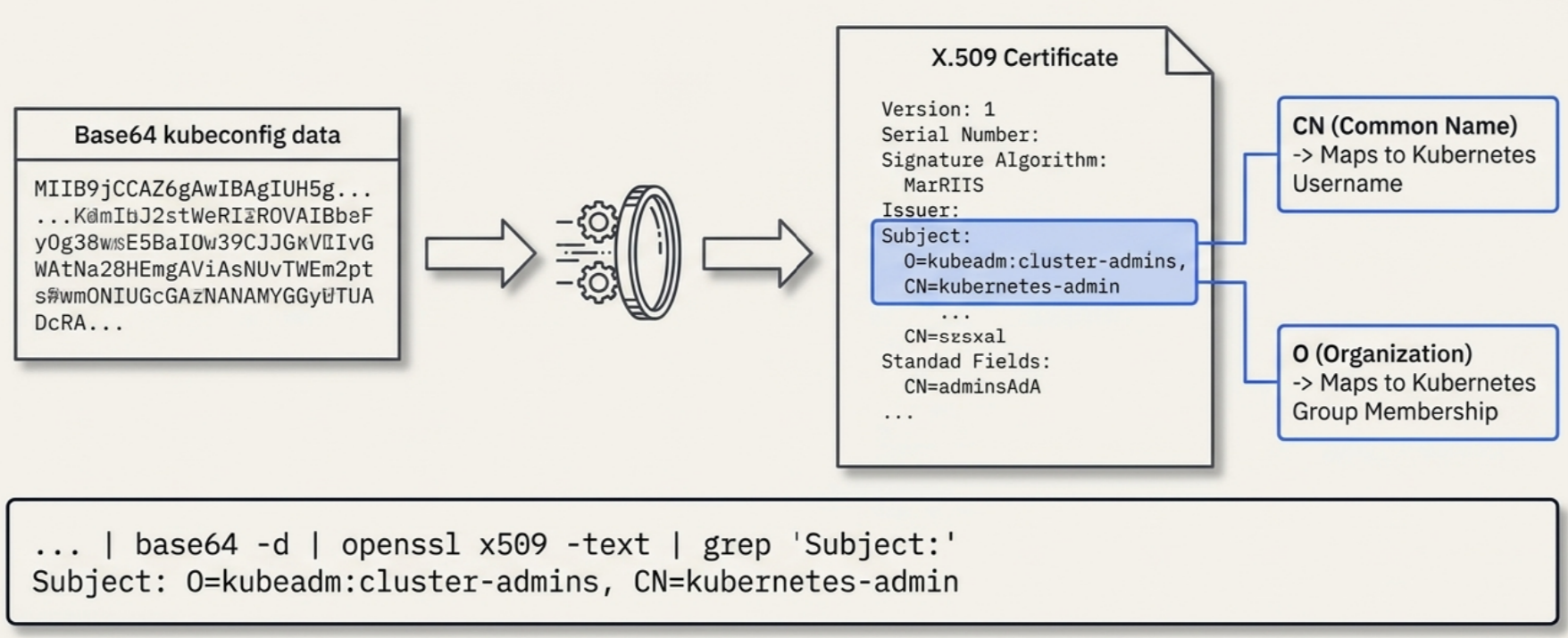
To decode embedded identity from a running kubeconfig:
kubectl config view --raw -o json \  | jq ".users[] | select(.name==\"ops-user\")" \  | jq -r '.user["client-certificate-data"]' \  | base64 -d | openssl x509 -text | grep "Subject:"
# Expected output:# Subject: O=kubeadm:cluster-admins, CN=kubernetes-admin
The ops-user label is just a friendly config alias. The actual username and group evaluated by the API server are embedded inside the certificate itself.
Stage 2: Authorization (RBAC)
Section titled “Stage 2: Authorization (RBAC)”Authorization determines what an authenticated identity can do. Kubernetes uses Role-Based Access Control (RBAC) with a strict deny-by-default posture: a freshly authenticated user has zero permissions until explicit allow rules are defined.
RBAC supports only allow rules. There are no explicit deny rules. Any action not covered by an allow rule is automatically forbidden (HTTP 403 Forbidden). This additive model eliminates rule-conflict resolution, simplifies auditing, and prevents accidental exposure from conflicting policies.
Kubernetes also supports multiple authorization modules simultaneously (RBAC, ABAC, Webhook). As soon as any module approves a request, evaluation stops and the request advances to admission control.
The RBAC triad
Section titled “The RBAC triad”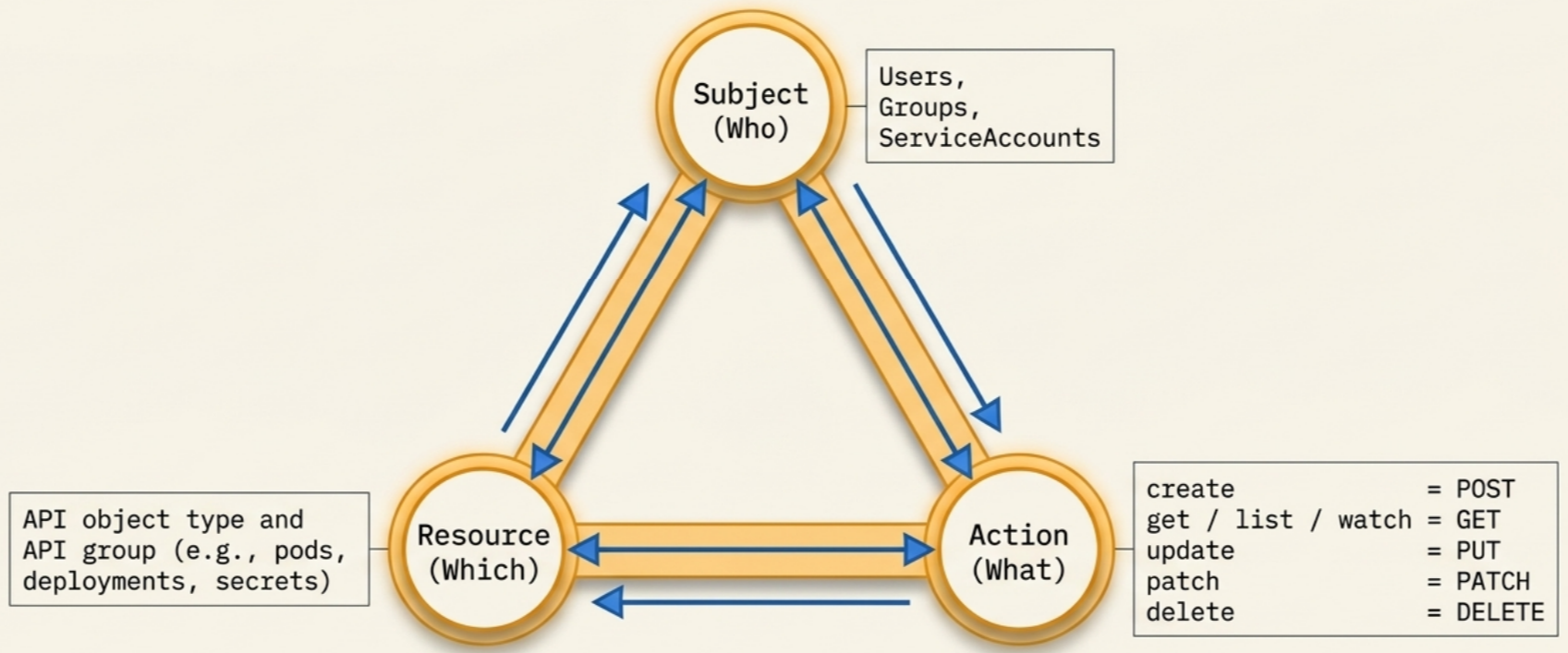
Every permission evaluation resolves three dimensions:
| Element | Description | Examples |
|---|---|---|
| Subject (who) | The authenticated entity making the request | Users, Groups, ServiceAccounts |
| Action (what) | The REST verb describing the operation | get, list, create, update, patch, delete, watch |
| Resource (which) | The API object type and its API group | pods, deployments, secrets |
Because the Kubernetes API is REST-based, RBAC verbs map directly to HTTP methods:
| Verb(s) | HTTP method | Common response |
|---|---|---|
create | POST | 201 Created |
get, list, watch | GET | 200 OK |
update | PUT | 200 OK |
patch | PATCH | 200 OK |
delete | DELETE | 200 OK |
All verbs return 403 Access Denied when the subject lacks permission.
RBAC objects and scope
Section titled “RBAC objects and scope”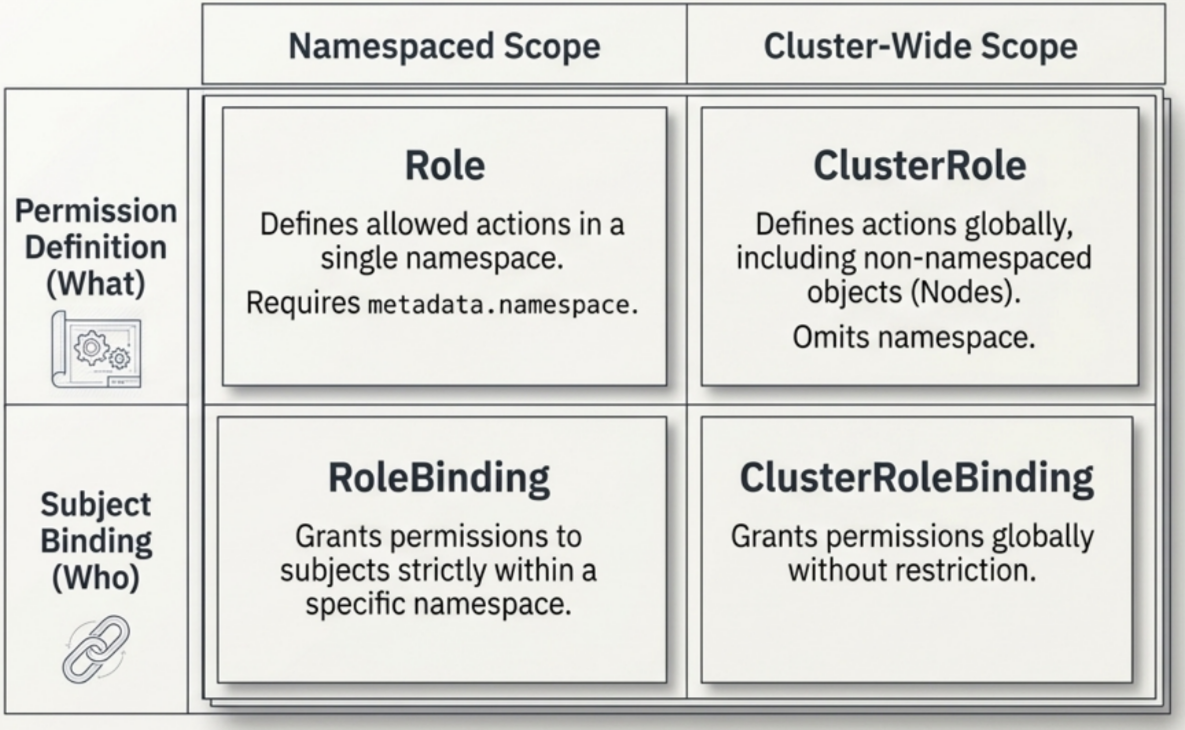
RBAC uses four API objects under rbac.authorization.k8s.io/v1:
| Scope | Permission definition | Subject binding |
|---|---|---|
| Namespaced | Role | RoleBinding |
| Cluster-wide | ClusterRole | ClusterRoleBinding |
Role and RoleBinding
Section titled “Role and RoleBinding”A Role defines allowed verbs on resources within a single namespace. It must declare metadata.namespace. A Role object alone has no effect until a RoleBinding assigns it to a subject.
apiVersion: rbac.authorization.k8s.io/v1kind: Rolemetadata: namespace: backend # scope is limited to this namespace name: read-deploymentsrules:- verbs: ["get", "watch", "list"] apiGroups: ["apps"] resources: ["deployments"]A RoleBinding grants the permissions from a Role (or ClusterRole) to subjects within a specific namespace:
apiVersion: rbac.authorization.k8s.io/v1kind: RoleBindingmetadata: name: read-deployments namespace: backendsubjects:- kind: User name: dev-user apiGroup: rbac.authorization.k8s.ioroleRef: kind: Role name: read-deployments apiGroup: rbac.authorization.k8s.ioClusterRole and ClusterRoleBinding
Section titled “ClusterRole and ClusterRoleBinding”A ClusterRole defines permissions at the cluster level, covering all namespaces and non-namespaced objects such as Nodes and StorageClasses. It omits metadata.namespace.
apiVersion: rbac.authorization.k8s.io/v1kind: ClusterRolemetadata: name: read-deployments # no namespace field — cluster-wide scoperules:- verbs: ["get", "watch", "list"] apiGroups: ["apps"] resources: ["deployments"]A ClusterRoleBinding grants a ClusterRole to subjects across every namespace in the cluster without restriction.
ClusterRole + RoleBinding pattern
Section titled “ClusterRole + RoleBinding pattern”A ClusterRole can be referenced by a namespace-scoped RoleBinding. This avoids duplicating identical Role definitions across namespaces while still scoping each binding’s effect to its own namespace:
flowchart TD
    CR["🌐 ClusterRole<br/><code>read-deployments</code><br/><i>(Single cluster-wide definition)</i>"]

    subgraph nsA["📁 Namespace A"]
        RB_A["📄 RoleBinding<br/><code>roleRef:</code><br/><code>read-deployments</code>"]
    end

    subgraph nsB["📁 Namespace B"]
        RB_B["📄 RoleBinding<br/><code>roleRef:</code><br/><code>read-deployments</code>"]
    end

    CR -->|"referenced via roleRef"| RB_A
    CR -->|"referenced via roleRef"| RB_B
The bound subject receives permissions only inside the namespace that holds the RoleBinding. Other namespaces remain inaccessible.
Rule anatomy
Section titled “Rule anatomy”Inside a Role or ClusterRole, each entry under rules ties together three fields:
rules:- verbs: ["get", "watch", "list"] # allowed operations apiGroups: ["apps"] # API group that owns the resource resources: ["deployments"] # target object typeThe apiGroups field identifies which API group owns the resource:
- Core group (
"") - early Kubernetes resources:pods,secrets,services. Written as an empty string in YAML. - Named groups - all other resources require an explicit group name.
apiGroup | resource | API path |
|---|---|---|
"" (core) | pods | /api/v1/namespaces/{ns}/pods |
"" (core) | secrets | /api/v1/namespaces/{ns}/secrets |
"apps" | deployments | /apis/apps/v1/namespaces/{ns}/deployments |
"storage.k8s.io" | storageclasses | /apis/storage.k8s.io/v1/storageclasses |
To discover all available resources, their API groups, and supported verbs on a live cluster:
kubectl api-resources --sort-by name -o wide
# Expected output (truncated):# NAME APIGROUP KIND VERBS# deployments apps Deployment [create delete get list patch update watch]# pods Pod [create delete get list patch update watch]# secrets Secret [create delete get list patch update watch]Default user-facing ClusterRoles
Section titled “Default user-facing ClusterRoles”Kubernetes ships with four pre-defined ClusterRoles for common access profiles. Bind them with a RoleBinding for namespace-scoped access or a ClusterRoleBinding for cluster-wide access.
| ClusterRole | Read | Write | Roles/RoleBindings | Secrets |
|---|---|---|---|---|
cluster-admin | All namespaces | All namespaces | Yes | Yes |
admin | Namespace | Namespace | Yes (within namespace) | Yes |
edit | Namespace | Namespace | No | Yes |
view | Namespace | No | No | No |
Key distinctions:
adminvsedit:admincan modifyRolesandRoleBindings, which means it can grant or escalate permissions within the namespace.editwithholds that access deliberately.editvsview:editgrants access toSecretsso workloads can mount credentials during deployment.viewexcludesSecretsto prevent read-only accounts from inspecting sensitive data.
Aggregated ClusterRoles
Section titled “Aggregated ClusterRoles”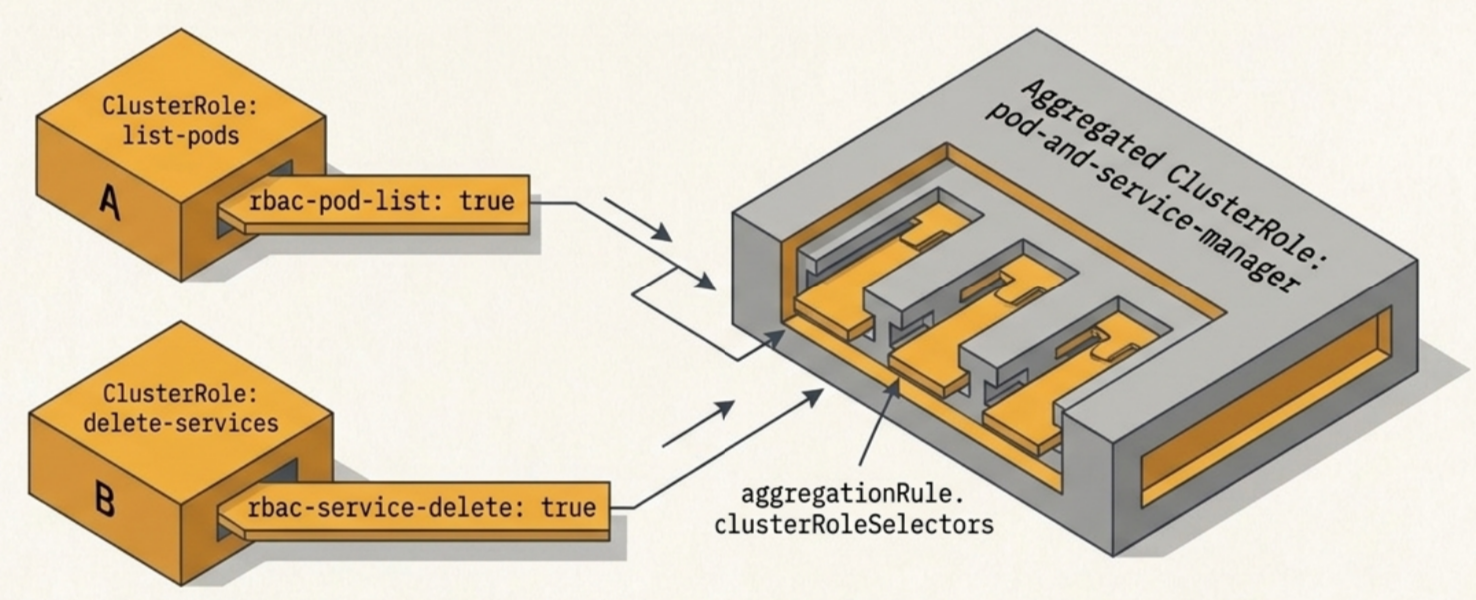
An aggregated ClusterRole composes rules from multiple existing ClusterRoles using label selectors, avoiding duplicated rules entries when you need to combine permission sets.
# Source role 1: grants pod listingapiVersion: rbac.authorization.k8s.io/v1kind: ClusterRolemetadata: name: list-pods labels: rbac-pod-list: "true" # label that the aggregator selects onrules:- apiGroups: [""] resources: ["pods"] verbs: ["list"]---# Source role 2: grants service deletionapiVersion: rbac.authorization.k8s.io/v1kind: ClusterRolemetadata: name: delete-services labels: rbac-service-delete: "true"rules:- apiGroups: [""] resources: ["services"] verbs: ["delete"]---# Aggregated role: inherits rules from both sources via label selectionapiVersion: rbac.authorization.k8s.io/v1kind: ClusterRolemetadata: name: pod-and-service-manageraggregationRule: clusterRoleSelectors: - matchLabels: rbac-pod-list: "true" - matchLabels: rbac-service-delete: "true"rules: [] # populated automatically from matching ClusterRoleskubectl describe clusterrole pod-and-service-manager resolves the selectors and renders the merged PolicyRule matrix. Any ClusterRole you add with a matching label is picked up automatically without editing the aggregated role.
Verifying permissions
Section titled “Verifying permissions”kubectl auth can-i
Section titled “kubectl auth can-i”kubectl auth can-i is the canonical tool for testing whether a subject has a specific permission without executing the actual operation.
# Test whether a user can list pods in the default namespacekubectl auth can-i list pods --as dev-user -n default# yes
# Test a service accountkubectl auth can-i list pods --as system:serviceaccount:monitoring:metrics-reader -n monitoring# no
# List all permissions granted to a subject in a namespacekubectl auth can-i --list --as dev-user -n default
# Expected output structure:# Resources           Non-Resource URLs   Resource Names   Verbs# pods                []                  []               [list get watch]# deployments.apps    []                  []               [list get watch]
The --list flag outputs the full permission matrix for the subject in the specified namespace, including non-resource URL paths.
Inspecting roles and bindings
Section titled “Inspecting roles and bindings”kubectl get roles and kubectl get rolebindings show only metadata. Use kubectl describe to see rules and bound subjects:
kubectl describe role pod-reader -n monitoring
# PolicyRule:# Resources Non-Resource URLs Resource Names Verbs# --------- ----------------- -------------- -----# pods [] [] [get list watch]kubectl describe rolebinding metrics-reader-binding -n monitoring
# Role:# Kind: Role# Name: pod-reader# Subjects:# Kind Name Namespace# ---- ---- ---------# ServiceAccount metrics-reader monitoringPractical walkthrough: cluster-admin
Section titled “Practical walkthrough: cluster-admin”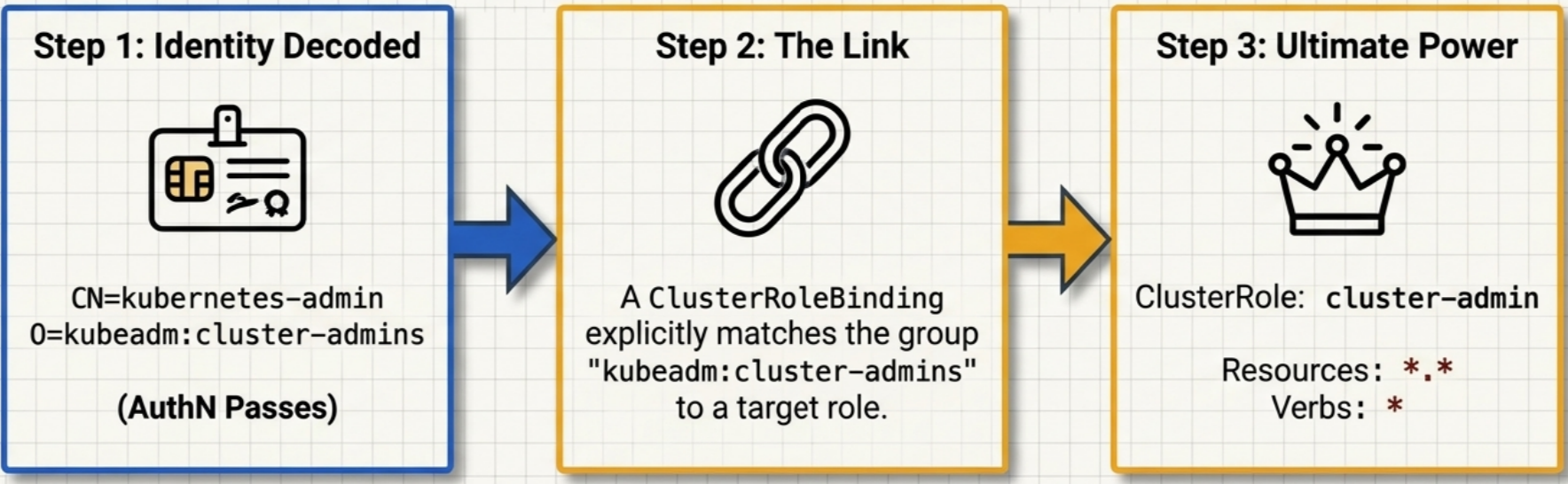
Most kubeadm-bootstrapped clusters ship with a pre-configured cluster-admin ClusterRole and binding. Tracing an admin request end-to-end illustrates how the pieces connect.
Step 1 — Decode the certificate identity:
kubectl config view --raw -o json \  | jq ".users[] | select(.name==\"ops-user\")" \  | jq -r '.user["client-certificate-data"]' \  | base64 -d | openssl x509 -text | grep "Subject:"
# Subject: O=kubeadm:cluster-admins, CN=kubernetes-admin
The user is kubernetes-admin; the group is kubeadm:cluster-admins.
Step 2 — Inspect the ClusterRole:
kubectl describe clusterrole cluster-admin
# PolicyRule:#   Resources  Non-Resource URLs  Resource Names  Verbs#   ---------  -----------------  --------------  -----#   *.*        []                 []              [*]#   [*]        []                 []              [*]
Wildcards on all dimensions grant complete control over every object in every namespace.
Step 3 — Locate the binding:
kubectl get clusterrolebindings | grep cluster-adminkubectl describe clusterrolebindings kubeadm:cluster-admins
# Subjects:#   Kind   Name#   ----   ----#   Group  kubeadm:cluster-admins
The ClusterRoleBinding links the group kubeadm:cluster-admins to ClusterRole/cluster-admin.
Full pipeline:
flowchart TD
    Kubeconfig["🔑 1. kubeconfig file<br/><i>Client credentials</i><br/><code>CN=kubernetes-admin</code> · <code>O=kubeadm:cluster-admins</code>"]
    CRB["🔗 2. ClusterRoleBinding<br/><i>Links group to cluster-wide role</i><br/><code>group: kubeadm:cluster-admins</code> ➔ <code>cluster-admin</code>"]
    CR["👑 3. ClusterRole: cluster-admin<br/><i>Full cluster administrator privileges</i><br/><code>*</code> verbs on <code>*</code> resources across all namespaces"]

    Kubeconfig -->|"authN pass (identity extracted)"| CRB
    CRB -->|"authZ pass (permissions matched)"| CR
Stage 3: Admission control
Section titled “Stage 3: Admission control”Admission control enforces organizational and operational policies on write requests after they pass authN and authZ. Read operations (get, list, watch) bypass admission control entirely because they do not alter cluster state.
Two categories of admission controller run in sequence:
| Type | Modifies request? | Execution order | Typical use |
|---|---|---|---|
| Mutating | Yes | First | Inject defaults, add sidecars, set imagePullPolicy: Always |
| Validating | No | Second | Block non-compliant manifests, enforce security constraints |
flowchart TD
    AuthZ["🛡️ Approved by authZ"]

    Phase1["✏️ Phase 1: Mutating Admission<br/><i>Modifies payload to meet cluster standards</i><br/><code>e.g., AlwaysPullImages, sidecar injection</code>"]
    Phase2["🔍 Phase 2: Validating Admission<br/><i>Inspects finalized payload; approves or rejects</i><br/><code>e.g., NodeRestriction, PodSecurity constraints</code>"]

    Etcd["💾 Persisted to etcd<br/><i>Object written to cluster state</i>"]

    AuthZ -->|"write requests only"| Phase1
    Phase1 -->|"mutated payload"| Phase2
    Phase2 -->|"all checks pass"| Etcd
Mutating controllers run first so that all payload modifications are in place before validation. If any single controller in either phase rejects the request, the API server aborts immediately without evaluating the remaining controllers. All enabled admission controllers must approve a request for it to succeed.
Built-in examples
Section titled “Built-in examples”AlwaysPullImages (mutating) sets spec.containers.imagePullPolicy: Always on every new Pod. This forces the container runtime to pull images from the registry on every start, preventing use of stale or unauthorized locally cached images.
NodeRestriction (validating) restricts a node’s kubelet to modifying only its own Node and Pod objects, preventing a compromised node from escalating access to other nodes.
To verify which plugins are enabled on the API server control plane Pod:
kubectl describe pod kube-apiserver-desktop-control-plane \  --namespace kube-system | grep admission
# --enable-admission-plugins=NodeRestriction
Mutating vs. validating: the env label example
Section titled “Mutating vs. validating: the env label example”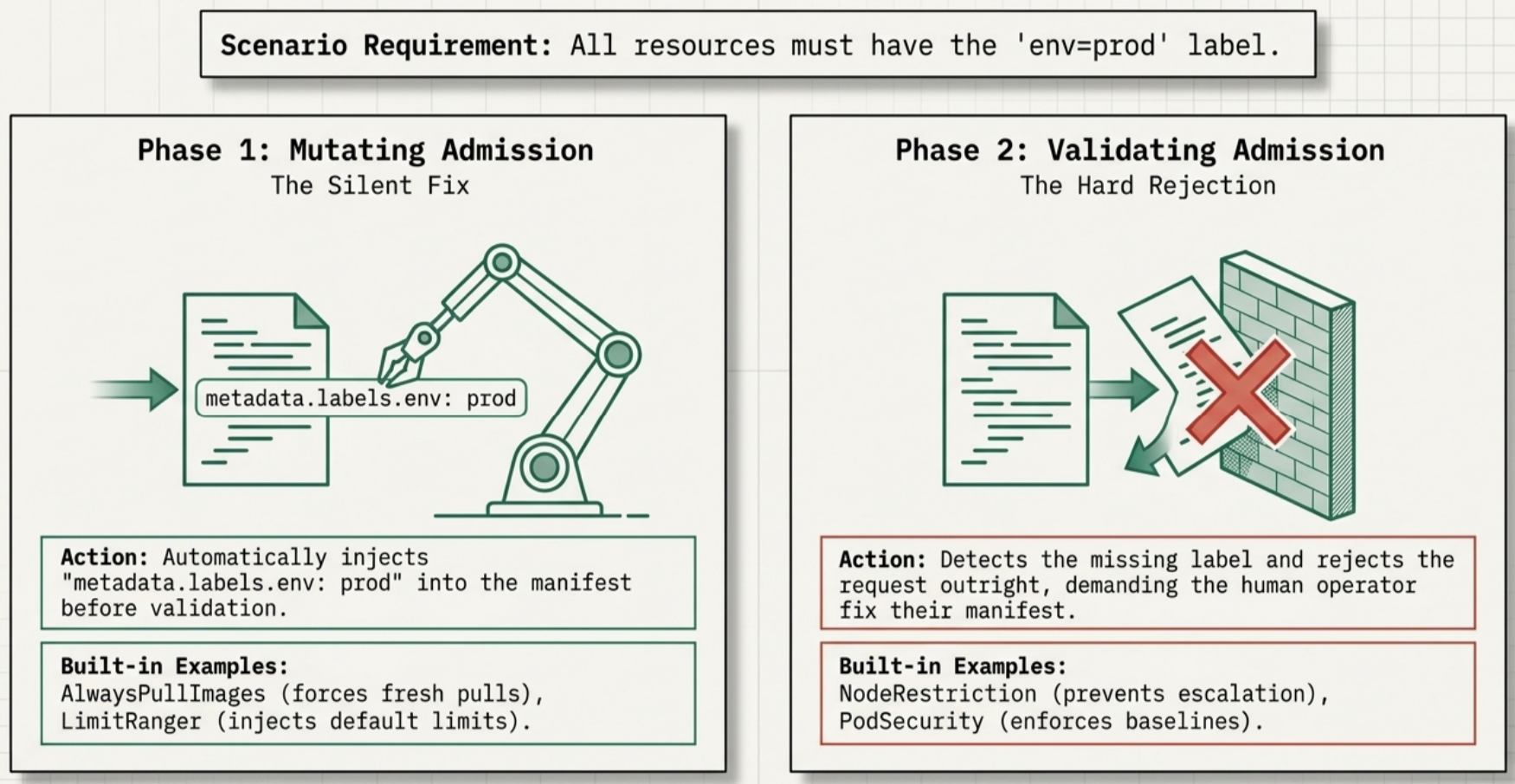
Consider a policy requiring all resources in a production namespace to carry env=prod:
- Mutating approach: detects the missing label and automatically injects
metadata.labels.env: prodbefore the object reaches validation. - Validating approach: detects the missing label and rejects the request outright with an error.
Both approaches enforce the policy. The mutating controller applies a silent fix; the validating controller demands the submitter fix the manifest themselves.
Built-in admission plugins
Section titled “Built-in admission plugins”Plugins are enabled on the API server via the --enable-admission-plugins flag. In clusters bootstrapped with kubeadm, the API server runs as a static Pod; edit its manifest at /etc/kubernetes/manifests/kube-apiserver.yaml to add or remove plugins.
# Verify which plugins are currently activekubectl describe pod kube-apiserver-<node> -n kube-system | grep admissionCommon built-in plugins and their purpose:
| Plugin | Type | Purpose |
|---|---|---|
NamespaceLifecycle | Validating | Prevents object creation in terminating namespaces; protects default, kube-system, and kube-public from deletion |
PodSecurity | Validating | Enforces Pod Security Standards (Privileged, Baseline, Restricted) against the Pod’s security context fields |
LimitRanger | Mutating + validating | Applies default resource requests/limits when omitted; rejects Pods that exceed the namespace’s defined ranges |
ResourceQuota | Validating | Tracks aggregate resource consumption per namespace and rejects requests that would exceed the quota |
AlwaysPullImages | Mutating | Sets imagePullPolicy: Always on every new Pod, preventing stale or unauthorized locally cached images |
NodeRestriction | Validating | Restricts a node’s kubelet to modifying only its own Node and Pod objects |
Service accounts
Section titled “Service accounts”Service accounts are the identity mechanism for workloads running inside Pods. Where human users authenticate with X.509 certificates or external tokens, Pods authenticate with a service account bearer token that Kubernetes manages automatically.
The API server identifies an in-cluster caller as system:serviceaccount:<namespace>:<serviceaccount-name> and evaluates its RBAC permissions like any other subject.
Default service account
Section titled “Default service account”Every namespace gets a default ServiceAccount automatically. When a Pod does not declare spec.serviceAccountName, Kubernetes assigns it to default.
Outside kube-system, the default ServiceAccount carries only the system:discovery ClusterRole, which grants access to basic API discovery endpoints and nothing else. Any attempt to list, create, or modify cluster resources returns HTTP 403 Forbidden. The default ServiceAccount is re-created immediately if deleted.
Custom service accounts
Section titled “Custom service accounts”Create a dedicated ServiceAccount for any workload that needs specific API access:
# Imperativekubectl create serviceaccount metrics-reader -n monitoring# DeclarativeapiVersion: v1kind: ServiceAccountmetadata: name: metrics-reader namespace: monitoringAttach it to a Pod via spec.serviceAccountName:
spec: serviceAccountName: metrics-readerThen bind a Role or ClusterRole to that ServiceAccount using a RoleBinding or ClusterRoleBinding:
apiVersion: rbac.authorization.k8s.io/v1kind: RoleBindingmetadata: name: metrics-reader-binding namespace: monitoringsubjects:- kind: ServiceAccount name: metrics-reader namespace: monitoringroleRef: kind: Role name: pod-reader apiGroup: rbac.authorization.k8s.ioIn-cluster API access
Section titled “In-cluster API access”Containers inside a Pod connect to the API server at the internal DNS address https://kubernetes.default.svc. Kubernetes automatically mounts the ServiceAccount token at a well-known path:
/var/run/secrets/kubernetes.io/serviceaccount/tokenWorkloads attach the token to API calls via the Authorization header:
# From inside a container shellTOKEN=$(cat /var/run/secrets/kubernetes.io/serviceaccount/token)curl -s -k \ -H "Authorization: Bearer $TOKEN" \ https://kubernetes.default.svc/api/v1/namespaces/monitoring/podsIf the ServiceAccount has no permission for the requested verb, the API server returns HTTP 403 Forbidden.
Quick reference
Section titled “Quick reference”kubectl config commands
Section titled “kubectl config commands”| Command | Effect |
|---|---|
kubectl config view | Show merged kubeconfig |
kubectl config current-context | Print active context name |
kubectl config use-context <name> | Switch active context |
kubectl config set-credentials <user> --client-key=... --client-certificate=... --embed-certs=true | Register user credentials |
Object scope summary
Section titled “Object scope summary”| Object | Scope | Defines | Binds |
|---|---|---|---|
Role | Single namespace | Allowed actions | via RoleBinding |
RoleBinding | Single namespace | subjects to a Role or ClusterRole | |
ClusterRole | Cluster-wide | Allowed actions | via ClusterRoleBinding or RoleBinding |
ClusterRoleBinding | Cluster-wide | subjects to a ClusterRole |
Binding scope combinations
Section titled “Binding scope combinations”| Role type | Binding type | Effective scope |
|---|---|---|
Role | RoleBinding | Permissions apply only within the namespace where both objects reside |
ClusterRole | RoleBinding | ClusterRole rules apply, but restricted to the RoleBinding’s namespace only |
ClusterRole | ClusterRoleBinding | Permissions apply across all namespaces and non-namespaced resources |
Pipeline scope summary
Section titled “Pipeline scope summary”| Stage | Handles read requests? | Failure response |
|---|---|---|
Authentication (authN) | Yes | HTTP 401 Unauthorized |
Authorization (authZ) | Yes | HTTP 403 Forbidden |
| Mutating admission | No | Immediate abort |
| Validating admission | No | Immediate abort |
Troubleshooting
Section titled “Troubleshooting”| Symptom | Likely cause | Fix |
|---|---|---|
HTTP 401 from kubectl | Credentials in kubeconfig are invalid or expired | Rotate/reissue the client certificate or token; run kubectl config view to verify the user entry |
HTTP 403 on a specific resource | No Role/ClusterRole grants the requested verb | Inspect bindings with kubectl describe rolebinding; add a rule for the missing verb and resource |
HTTP 403 even after adding a Role | RoleBinding is in the wrong namespace, or the subject name does not match the CN in the certificate | Verify metadata.namespace on the binding and that subjects[].name matches the decoded CN |
HTTP 403 for a ServiceAccount | ServiceAccount has no RoleBinding, or the binding references the wrong namespace or name | Check kubectl auth can-i --list --as system:serviceaccount:<ns>:<sa> to see granted permissions |
| Admission webhook rejection | A mutating or validating webhook is blocking the request | Check the error message for the controller name; inspect it with kubectl describe validatingwebhookconfigurations |
imagePullPolicy: Always applied unexpectedly | AlwaysPullImages mutating controller is enabled | Expected behavior; confirm with kubectl describe pod kube-apiserver-<node> -n kube-system | grep admission |