
Services
Every Pod gets an IP address but Pod IPs are volatile. Pods are recreated during rolling updates, scale-downs, node evictions, and crashes. If client code hardcodes a Pod IP, it breaks the moment that Pod is replaced.
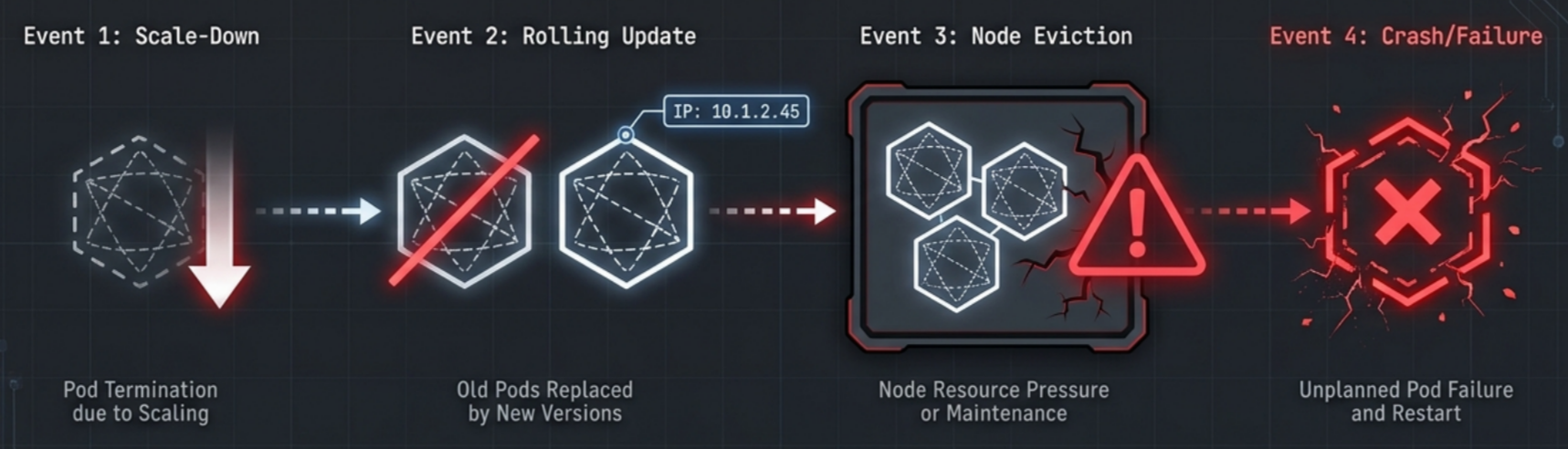
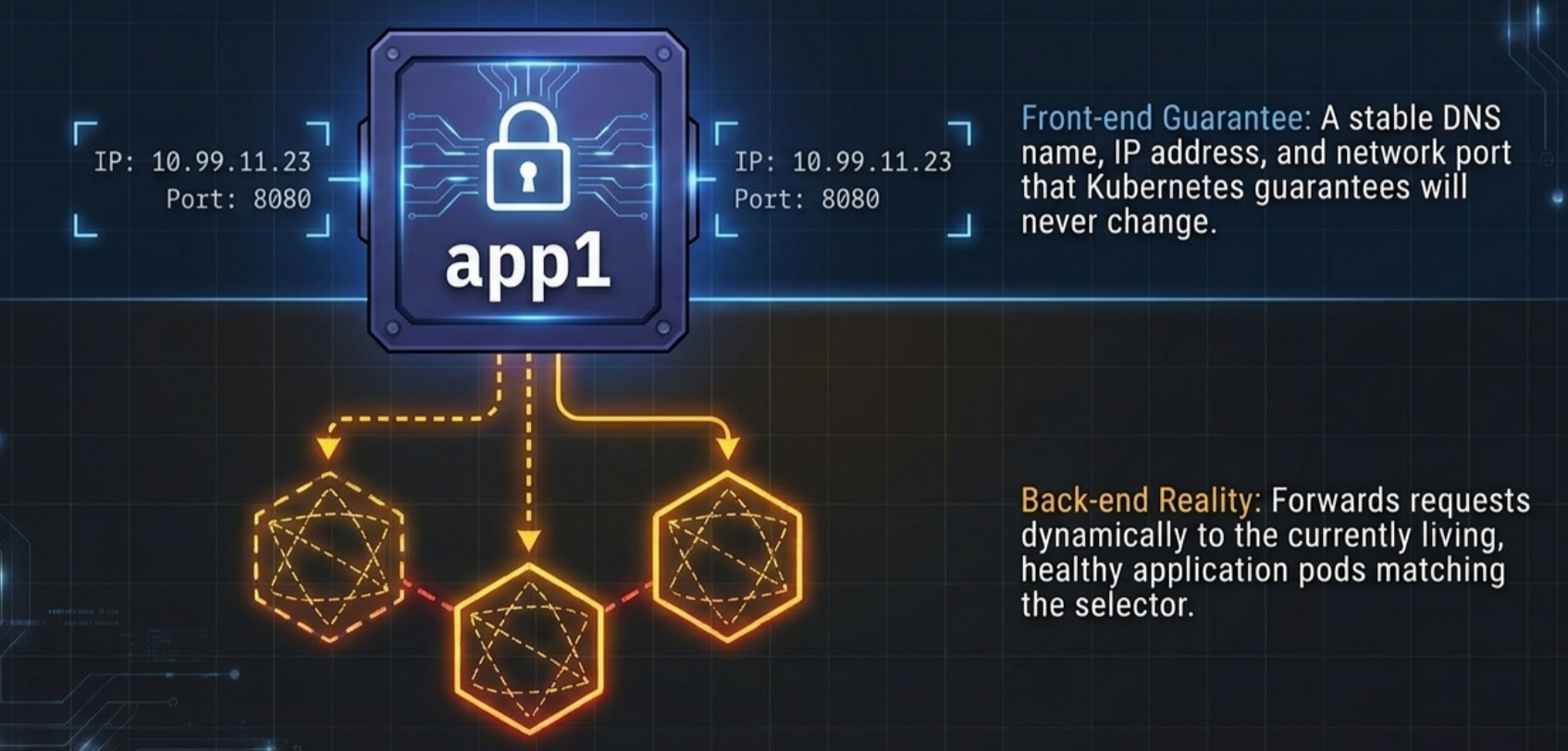
Services solve this by providing a stable, permanent network endpoint in front of a dynamic group of Pods. The client talks to the Service; the Service talks to whatever Pods are healthy right now.
| Direct Pod access | Via a Service | |
|---|---|---|
| Client IP target | Pod IP - changes on every restart | Cluster IP / DNS name - permanent |
| Load distribution | Manual | Automatic across healthy Pods |
| Pod failure handling | Client gets connection refused | Service silently reroutes to healthy Pods |
| Rolling update visibility | Client sees old Pod disappear | Client is unaware - traffic shifts transparently |
Why Pods Are Unreliable Network Targets
Section titled “Why Pods Are Unreliable Network Targets”Pods are ephemeral by design. Kubernetes actively replaces them during:
- Rolling updates - old Pods are terminated as new ones come up
- Scale-down - excess replicas are removed to meet desired count
- Rollbacks - the pod template reverts, tearing down the current set
- Node maintenance or eviction - Pods on pressured or cordoned nodes are rescheduled elsewhere
- Container crashes - the pod is deleted and recreated (with a new IP) by the controller
Because Pods are continuously created, destroyed, and rescheduled, their IP addresses change constantly. Any direct Pod-to-Pod connection breaks as soon as one side is replaced.
The Service Object
Section titled “The Service Object”A Service is a first-class Kubernetes API resource that sits in front of one or more Pods and provides a permanent network endpoint.
Every Service is split into two halves:
| Half | What it is | Stability |
|---|---|---|
| Front-end | DNS name + ClusterIP + port | Permanent - never changes for the lifetime of the Service |
| Back-end | Label selector → matching Pods | Dynamic - continuously updated as Pods come and go |
The front-end never changes. The back-end is automatically kept in sync by the control plane.
Label Selectors: Loose Coupling
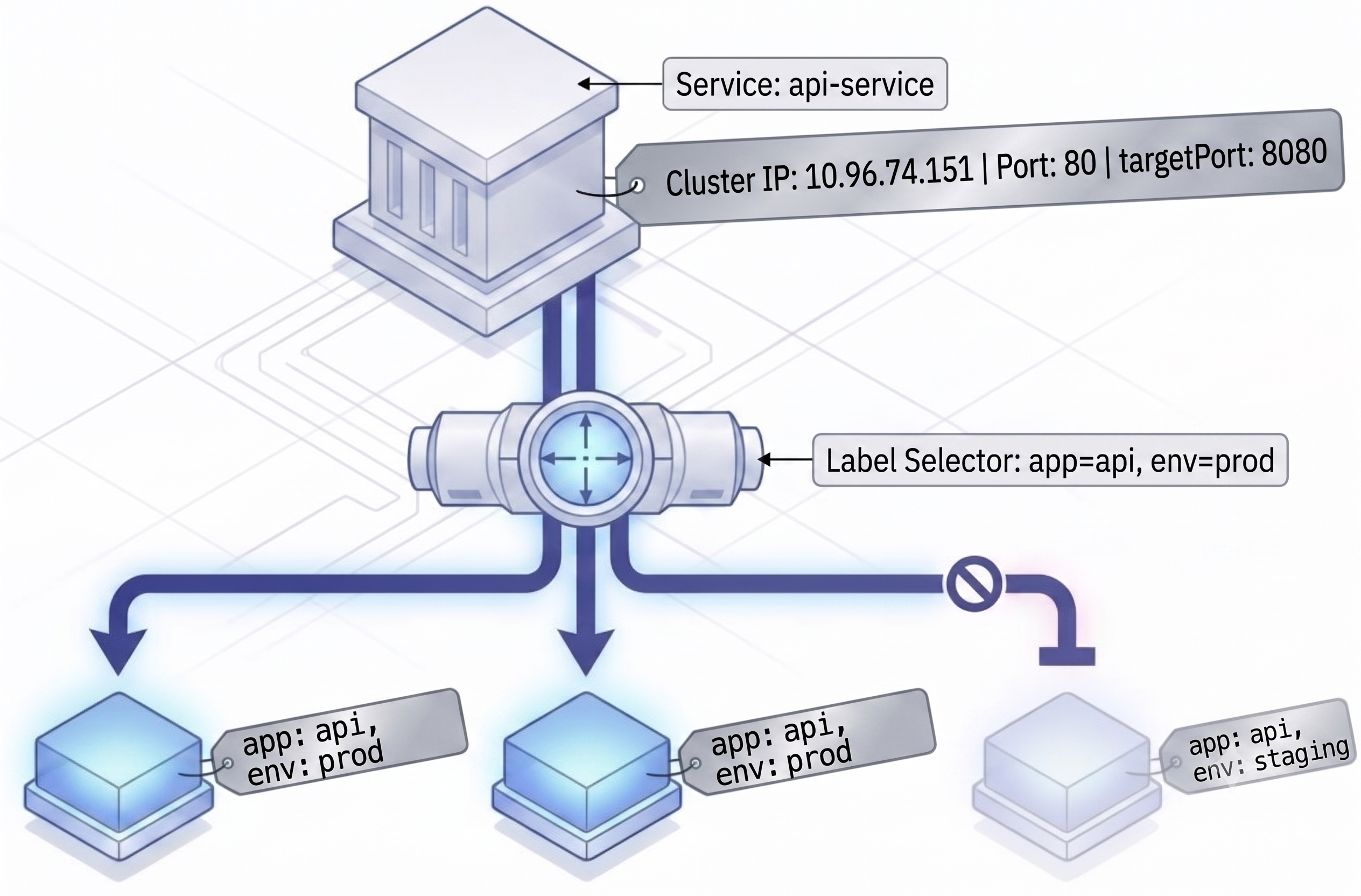
Section titled “Label Selectors: Loose Coupling”Services do not maintain hardcoded links to specific Pods. They use label selectors - the same mechanism that Deployments use to manage their Pods.
Matching Rules
Section titled “Matching Rules”- AND logic - a Pod must match all labels in the selector to be included
- Extra labels are ignored - a Pod with additional labels beyond the selector still qualifies
- Missing one label = excluded - a Pod missing even one required label receives zero traffic
Example
Section titled “Example”apiVersion: apps/v1kind: Deploymentmetadata: name: web-serverspec: replicas: 4 selector: matchLabels: app: web env: prod template: metadata: labels: app: web # ← Service will match on this env: prod # ← Service will match on this version: "2.1" # ← ignored by the Service selector spec: containers: - name: app image: company/web:2.1 ports: - containerPort: 8080---apiVersion: v1kind: Servicemetadata: name: web-servicespec: selector: app: web # ← routes to Pods with BOTH of these labels env: prod ports: - port: 80 targetPort: 8080Given this setup:
| Pod labels | Selected? | Reason |
|---|---|---|
app: web, env: prod | ✅ Yes | Exact match |
app: web, env: prod, version: 2.1 | ✅ Yes | Extra label ignored |
app: web | ❌ No | Missing env: prod |
app: web, env: staging | ❌ No | env value doesn’t match |
Advantages of Loose Coupling
Section titled “Advantages of Loose Coupling”- Zero-downtime rollouts - during a rolling update, old and new Pods share the same labels; the Service automatically shifts traffic as old Pods terminate and new ones become ready
- Seamless scaling - add or remove replicas; the Service load-balances across all matching Pods without any manual update
- Blue/Green deployments - patch the Service selector to instantly switch traffic from one Deployment to another
- Canary deployments - two Deployments share a label; the Service distributes traffic by replica ratio
Pod Network Model
Section titled “Pod Network Model”The foundation every Service builds on is the flat pod network:
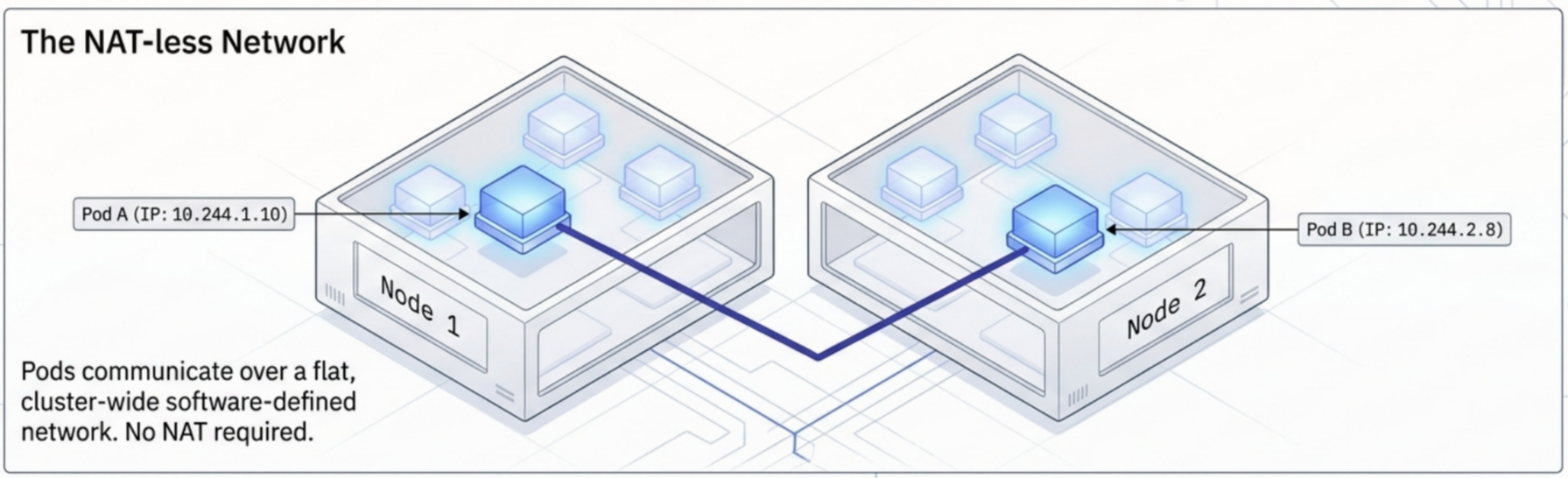
- One IP per Pod - every Pod gets its own unique private IP and dedicated network interface
- Flat address space - every Pod can address every other Pod directly by IP, with no routing boundaries between them; the virtual overlay network abstracts the physical topology completely
- NAT-less communication - direct Pod-to-Pod packets are never SNAT’d or DNAT’d; the receiving Pod always sees the sender’s true IP
- Plugin-agnostic - all CNI plugins (Calico, Cilium, Flannel, etc.) are required to honour the NAT-less model regardless of implementation
The flat model makes Pod networking trivially simple, but it makes Pod IPs fragile network targets - hence Services.
EndpointSlices: The Live Routing Table
Section titled “EndpointSlices: The Live Routing Table”The Service front-end (ClusterIP/DNS) is static. But the set of healthy backing Pods is always changing. EndpointSlices bridge the gap by maintaining a real-time list of healthy Pod IPs that match the Service’s selector.
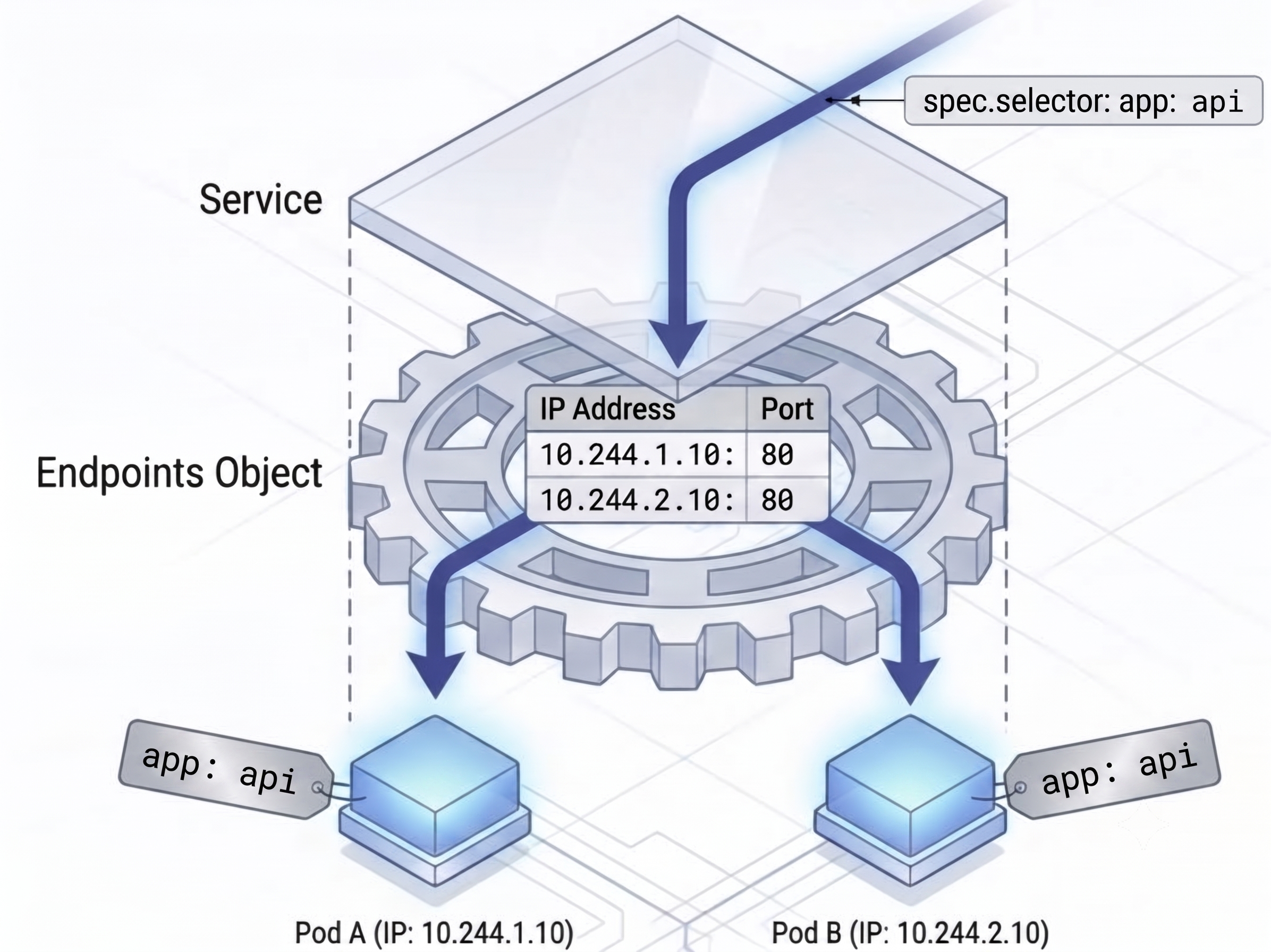
How It Works
Section titled “How It Works”- When a Service is created, the EndpointSlice controller automatically provisions an associated
EndpointSliceobject - The controller continuously watches the cluster for Pods matching the selector
- New matching Pods are immediately added to the EndpointSlice; terminated or deleted Pods are immediately pruned
- When a Service is deleted, Kubernetes automatically deletes all associated EndpointSlices
Traffic Flow
Section titled “Traffic Flow”
flowchart TD
    Client["Client Container"]
    DNS["Cluster DNS (CoreDNS)"]
    Service["Service (ClusterIP Intercept)"]
    EPS[("EndpointSlice<br/>(Healthy Pod Registry)")]
    Pod["Active Pod<br/>(10.42.1.16:8080)"]
    Client -->|"1. DNS query: 'web-service'"| DNS
    DNS -.->|"Resolves to ClusterIP (10.96.45.12)"| Client
    Client -->|"2. Sends traffic to ClusterIP"| Service
    Service -.->|"3. Lookup backend"| EPS
    Service ==>|"Routes packet"| Pod
Inspecting EndpointSlices
Section titled “Inspecting EndpointSlices”# List EndpointSlices in the current namespacekubectl get endpointslices
# Full details - shows addresses, conditions, node assignmentskubectl describe endpointslice <name>Unlike Endpoints objects (which share the exact name of their Service), each EndpointSlice has a randomly generated suffix appended to the service name (e.g. my-svc-x4k9p). This is intentional - multiple slices can exist for one Service when Pod count exceeds 100. To list only the slices belonging to a specific Service, use the auto-applied kubernetes.io/service-name label:
# Filter EndpointSlices by Service namekubectl get endpointslices -l kubernetes.io/service-name=<service-name>A typical describe output exposes:
| Field | What it shows |
|---|---|
AddressType | IPv4 or IPv6 |
Ports | Protocol + port number the container listens on |
Addresses | Dynamic Pod IP (e.g. 10.42.1.16) |
Conditions | Ready: true - only ready Pods receive traffic |
TargetRef | The specific Pod object backing this endpoint |
NodeName | Which worker node the Pod is scheduled on |
EndpointSlices vs. the Legacy Endpoints Object
Section titled “EndpointSlices vs. the Legacy Endpoints Object”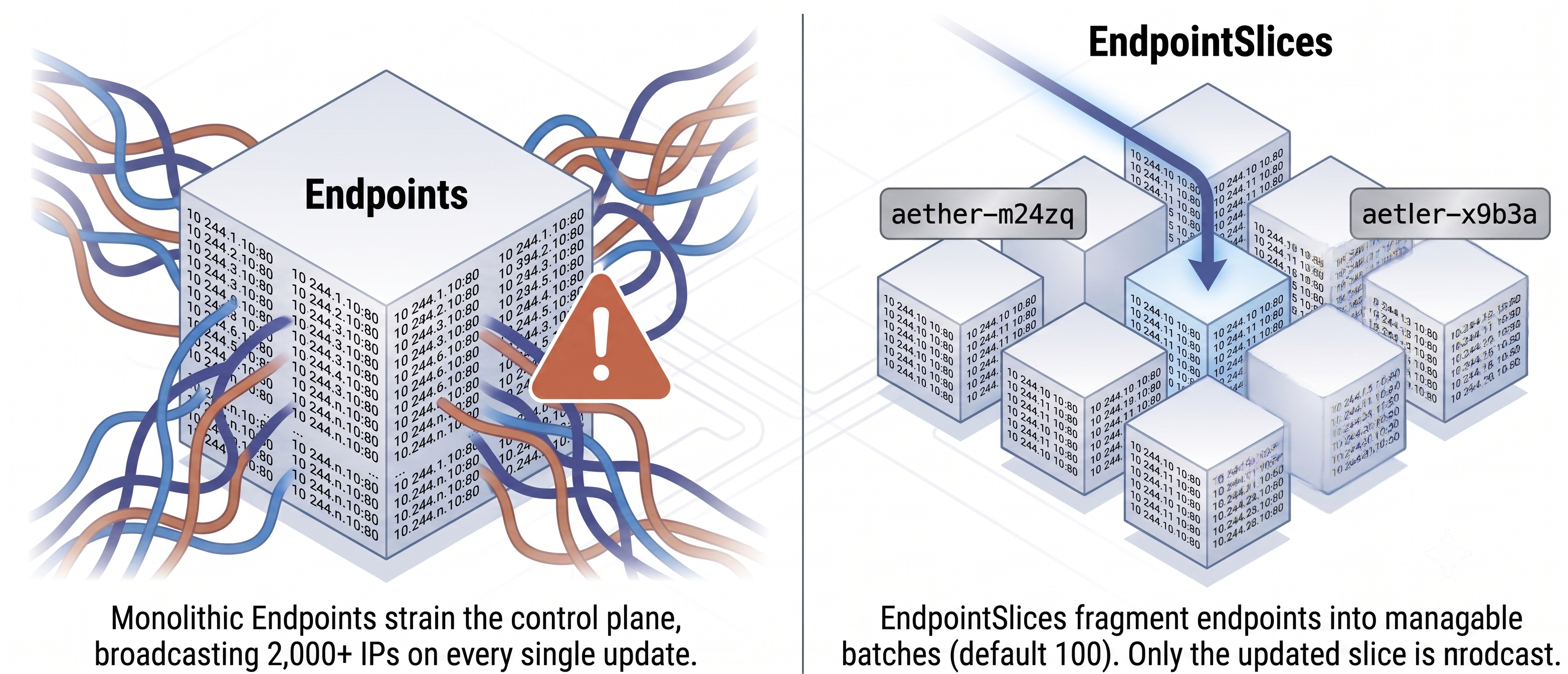
Endpoints (legacy) | EndpointSlices (current) | |
|---|---|---|
| Structure | Single monolithic object | Split into chunks of ≤ 100 Pods each |
| Scalability issue | Any Pod state change forces a full re-send of the entire object across the control plane | Only the affected slice is updated - drastically less API churn |
| Dual-stack | Not supported cleanly | Auto-creates separate slices for IPv4 and IPv6 |
Service Types
Section titled “Service Types”Kubernetes provides three primary Service types. They are not separate architectures - they use a stacked design where each type builds on the one below it.
flowchart TD
    subgraph LB ["fa:fa-cloud <b>LoadBalancer</b> (Cloud Integration)"]
        direction TB
        LB_DESC["Public IP & cloud provider LB (AWS NLB, GCP LB, Azure LB)"]

        subgraph NP ["fa:fa-network-wired <b>NodePort</b> (Node Interface)"]
            direction TB
            NP_DESC["Opens port 30000–32767 on every cluster worker node"]

            subgraph CIP ["fa:fa-shield-halved <b>ClusterIP</b> (Base Layer)"]
                direction TB
                CIP_DESC["Internal virtual IP & CoreDNS name (routes to Pods)"]
            end
        end
    end
When you create a LoadBalancer Service, Kubernetes automatically allocates a NodePort and a ClusterIP in the background. You get all three layers.
| Type | Access Level | Mechanism | EXTERNAL-IP | Primary Use Case |
|---|---|---|---|---|
| ClusterIP (default) | Internal only | Stable virtual IP on the cluster network; DNS name auto-registered | <none> | Pod-to-Pod communication - backend DBs, caches, internal APIs |
| NodePort | Internal + External | Opens a static port (30000-32767) on every node’s physical IP | <none> | Basic external access in bare-metal or dev clusters; underlies LoadBalancer |
| LoadBalancer | Public (cloud) | Provisions a cloud LB (AWS NLB, GCP LB, Azure LB) targeting the NodePorts | Cloud IP | Standard production ingress for web traffic on ports 80/443 |
| ExternalName | Internal → Outbound | DNS CNAME alias - no proxying, no ClusterIP, no Pods selected | <none> | Aliasing an external service (e.g., external-service.example.com) behind a stable name |
| Headless | Internal (direct) | clusterIP: None - DNS returns all Pod IPs directly, no virtual IP | <none> | StatefulSets, client-side LB, peer discovery (Cassandra, Mongo replica sets) |
ClusterIP: Internal Access Only
Section titled “ClusterIP: Internal Access Only”ClusterIP is the default type. It provides a stable IP and DNS name that are only reachable from inside the cluster.
apiVersion: v1kind: Servicemetadata: name: postgres # DNS name: postgres.default.svc.cluster.localspec: type: ClusterIP # default - can be omitted selector: app: postgres ports: - port: 5432 # port the Service listens on targetPort: 5432 # port the container listens onkubectl get svc postgres# NAME TYPE CLUSTER-IP EXTERNAL-IP PORT(S) AGE# postgres ClusterIP 10.96.45.12 <none> 5432/TCP 2mUse when: a backend service (database, internal API, cache) only needs to be reachable by other workloads inside the cluster - not the internet.
Limitation: completely unreachable from outside the cluster. External clients receive no route to the ClusterIP.
Session Affinity
Section titled “Session Affinity”By default Services distribute connections randomly across all healthy Pods. Session affinity enables sticky routing so a specific client always lands on the same Pod.
spec: sessionAffinity: ClientIP # None (default) | ClientIP sessionAffinityConfig: clientIP: timeoutSeconds: 10800 # 3 hours - how long stickiness persistsNone- each connection is routed to a randomly selected PodClientIP- all connections from the same source IP are consistently routed to the same Pod
NodePort: Basic External Access
Section titled “NodePort: Basic External Access”NodePort builds on ClusterIP. It opens a dedicated high-numbered port on the physical IP of every cluster node, making the Service reachable from outside the cluster.
apiVersion: v1kind: Servicemetadata: name: web-nodeportspec: type: NodePort selector: app: web ports: - port: 80 # internal ClusterIP port targetPort: 8080 # container port nodePort: 31080 # external port on every node (30000–32767); omit to auto-assignTraffic path for an external client:
flowchart LR
subgraph External["🌐 EXTERNAL NETWORK"]
Client["👤 External Client"]
end
subgraph Cluster["☸️ KUBERNETES CLUSTER"]
direction LR
subgraph NodeLayer["🖥️ Worker Node"]
NodePort["🚪 NodePort<br/><code><any-node-IP>:31080</code>"]
end
subgraph ServiceLayer["⚙️ ClusterIP Service"]
ClusterIP["🔌 Service Port<br/><code>ClusterIP:80</code>"]
end
subgraph PodLayer["📦 Application Pod"]
PodPort["📥 Container Port<br/><code>Pod:8080</code>"]
end
end
%% Traffic Flow Steps
Client -->|"1. Request"| NodePort
NodePort -->|"2. Forward"| ClusterIP
ClusterIP -->|"3. Route"| PodPort
Use when: you need basic external access in a non-cloud environment (bare metal, on-premises) and can expose node IPs directly.
Limitations:
| Limitation | Detail |
|---|---|
| Non-standard ports | Clients must connect on ports 30000–32767 - not usable for HTTP/HTTPS on port 80/443 without a load balancer in front |
| Node awareness required | Clients must know the node IPs; they must handle node failures themselves |
| No HA | If a node goes down, clients targeting that node’s IP lose connectivity until they retry another node |
LoadBalancer: Production External Access
Section titled “LoadBalancer: Production External Access”LoadBalancer is the recommended way to expose applications to the internet. It builds on NodePort and ClusterIP, then integrates with the underlying cloud platform to automatically provision a public load balancer.
apiVersion: v1kind: Servicemetadata: name: web-publicspec: type: LoadBalancer selector: app: web ports: - port: 443 # public-facing port on the load balancer targetPort: 8080 # container portkubectl get svc web-public# NAME TYPE CLUSTER-IP EXTERNAL-IP PORT(S) AGE# web-public LoadBalancer 10.96.12.34 34.90.120.55 443:31234/TCP 3m# ↑ cloud LB IP automatically assignedFull traffic path:
flowchart TD
    Client(["fa:fa-globe <b>Internet Client</b>"])

    subgraph Cloud [" <b>Cloud Provider Infrastructure</b> "]
        LB["fa:fa-cloud <b>Cloud Load Balancer</b><br/>AWS ALB / GCP LB / Azure LB<br/><small>Public IP: 34.90.120.55:443</small>"]
    end

    subgraph Cluster [" <b>Kubernetes Cluster</b> "]
        direction TB
        Node["fa:fa-server <b>Cluster Worker Node</b><br/><code>NodePort 31234</code> (kube-proxy)"]
        Svc["fa:fa-network-wired <b>Service</b> (ClusterIP 10.96.12.34)<br/>+ <b>EndpointSlice</b> lookup"]
        Pod["fa:fa-cube <b>Healthy Pod</b><br/>Target Container: <code>port 8080</code>"]

        Node -->|"3. Translates to ClusterIP"| Svc
        Svc -->|"4. Selects active endpoint"| Pod
    end

    Client -->|"1. HTTPS request to :443"| LB
    LB -->|"2. Forwards to NodePort :31234"| Node
Use when: you need production-ready, highly available external access on standard ports (80, 443).
On-Premises: MetalLB
Section titled “On-Premises: MetalLB”Kubernetes has no native LoadBalancer implementation for bare-metal or on-premises clusters - the LoadBalancer type is a cloud-provider integration. On non-cloud clusters, EXTERNAL-IP stays <pending> forever.
MetalLB fills this gap by acting as a software load balancer controller:
- Watches for
LoadBalancerServices and allocates IPs from a configured address pool - Announces those IPs to the network via ARP (Layer 2 mode) or BGP (Layer 3 mode)
- Works on any bare-metal node, VM cluster, or local development cluster
Cost/architecture alternative: A single Ingress controller (one LoadBalancer Service) routes external traffic to many internal ClusterIP Services by hostname/path rules - far cheaper than provisioning one cloud LB per Service.
LoadBalancer Spec Fields
Section titled “LoadBalancer Spec Fields”Four additional optional fields in spec control how the cloud LoadBalancer is provisioned:
| Field | Type | Description |
|---|---|---|
loadBalancerClass | string | Selects which LB controller handles this Service when multiple controllers are installed (e.g. metallb.universe.tf/metallb) |
loadBalancerSourceRanges | []string | Restricts inbound traffic to the listed CIDRs at the LB level - not supported by all providers |
allocateLoadBalancerNodePorts | boolean | If false, skips NodePort allocation - for LB implementations that forward directly to Pod IPs without NodePorts (default: true) |
spec: type: LoadBalancer loadBalancerClass: metallb.universe.tf/metallb # pick a specific LB controller loadBalancerIP: 203.0.113.10 # request a static IP (if provider supports it) loadBalancerSourceRanges: - 10.0.0.0/8 # allow only internal corporate network - 203.0.113.5/32 # plus one specific external IP allocateLoadBalancerNodePorts: false # skip NodePorts; LB routes directly to PodsExternalName: DNS Alias for External Resources
Section titled “ExternalName: DNS Alias for External Resources”An ExternalName Service maps an internal cluster DNS name to an external FQDN via a CNAME record. No ClusterIP is allocated, no Pods are selected, and no proxy is involved.
apiVersion: v1kind: Servicemetadata: name: time-svc # internal name pods usespec: type: ExternalName externalName: external-service.example.com # target FQDNDNS resolution path when a Pod calls http://time-svc:
time-svc.backend.svc.cluster.local → CNAME → external-service.example.com → A → 213.188.196.246The Pod connects directly to the external IP. No kube-proxy, no virtual IP.
Why use it:
- Abstract external dependencies behind a stable internal name
- Swap from dev API to production by updating
externalNamealone - no app redeployment needed - Clean migration: start with ExternalName pointing to an external host; later add a selector to switch to internal Pods
Headless Services: Direct Pod IP Access
Section titled “Headless Services: Direct Pod IP Access”Setting spec.clusterIP: None creates a headless Service - no virtual IP is allocated.
apiVersion: v1kind: Servicemetadata: name: db-headlessspec: clusterIP: None # disables virtual IP selector: app: postgres ports: - port: 5432 targetPort: 5432kubectl get svc db-headless# NAME TYPE CLUSTER-IP EXTERNAL-IP PORT(S) AGE# db-headless ClusterIP None <none> 5432/TCP 1mDNS behaviour changes completely:
| Standard ClusterIP Service | Headless Service | |
|---|---|---|
| DNS A record returns | Single ClusterIP | Multiple A records - one per ready Pod IP |
| Client connects to | Virtual proxy IP | Pod IP directly |
| Ping works? | No - virtual IP, no interface | Yes - real Pod IP |
# Standard service - single IPnslookup postgres# Address: 10.96.45.12    ← virtual ClusterIP
# Headless - multiple IPs, one per Podnslookup db-headless# Address: 10.244.1.10    ← Pod 1 IP# Address: 10.244.2.3     ← Pod 2 IP# Address: 10.244.1.14    ← Pod 3 IP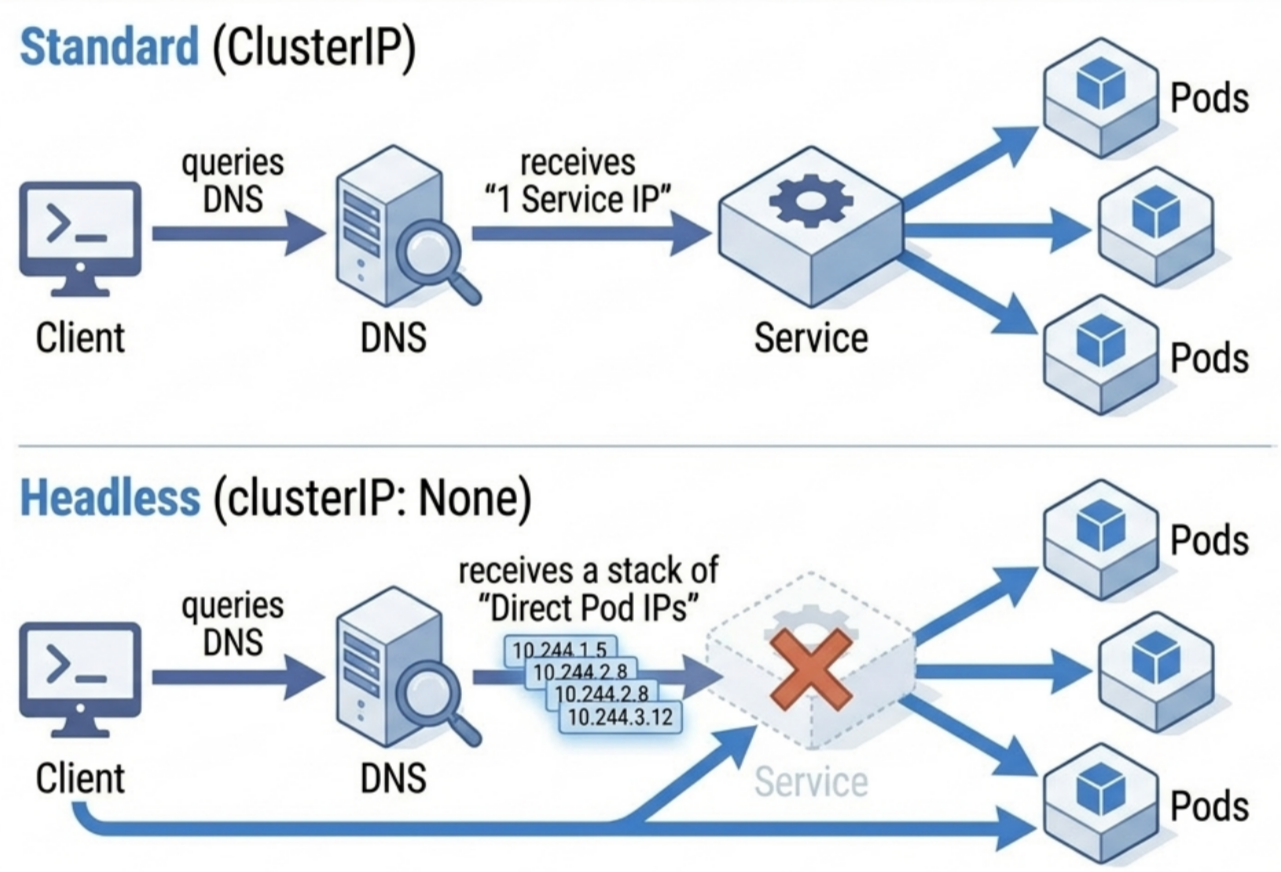
When to use headless Services:
- StatefulSets - each Pod needs a stable direct address (the StatefulSet controller creates a headless Service automatically)
- Client-side load balancing - smart clients (e.g. database drivers, gRPC) read all Pod IPs and implement their own routing logic
- Peer discovery - distributed systems (Cassandra, MongoDB replica sets) need pods to connect directly to each other
publishNotReadyAddresses
Section titled “publishNotReadyAddresses”By default, unready Pods are excluded from DNS records. Setting spec.publishNotReadyAddresses: true forces DNS to include all Pods regardless of readiness state. Useful for clustered databases that can’t pass readiness until they’ve found their peers - the bootstrap paradox.
Manual Endpoints: Services Without Selectors
Section titled “Manual Endpoints: Services Without Selectors”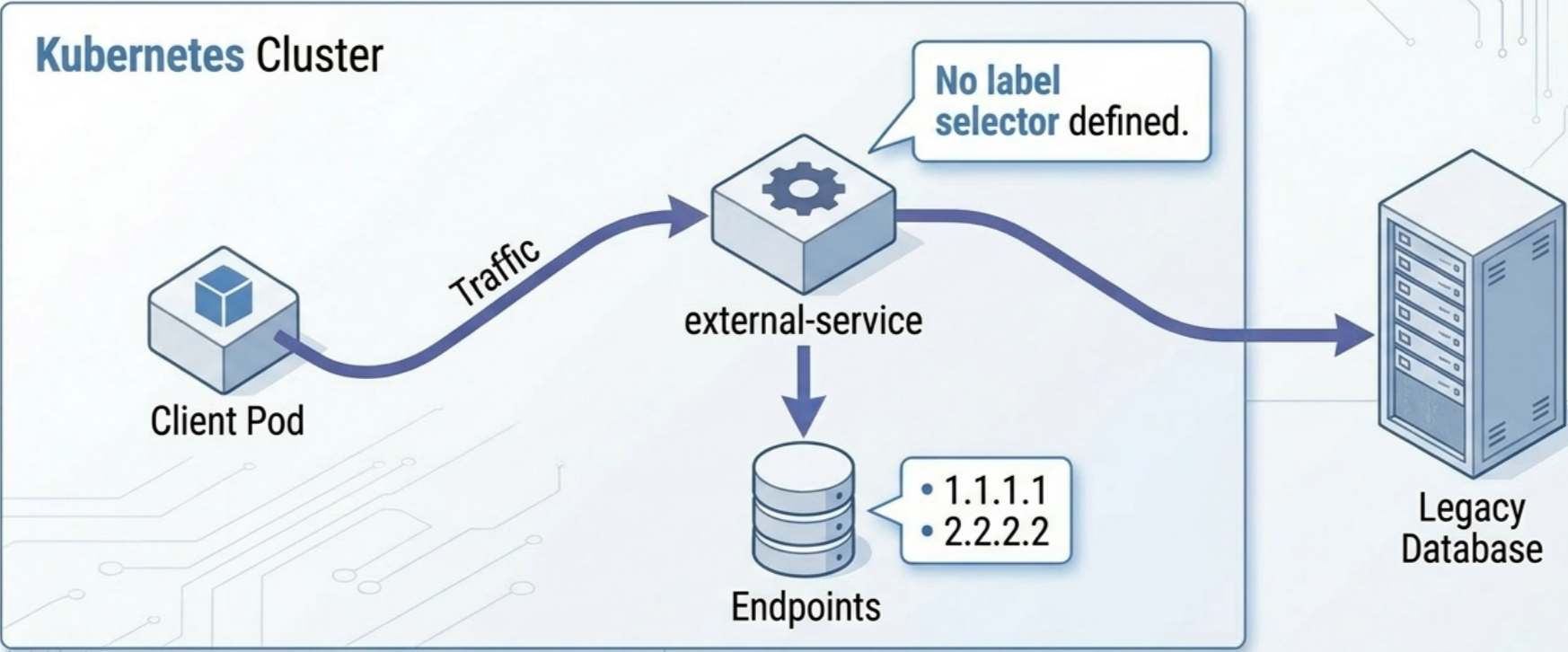
Omitting spec.selector lets you point a Service at any IP addresses manually - inside or outside the cluster.
Step 1 - Selectorless Service:
apiVersion: v1kind: Servicemetadata: name: external-dbspec: ports: - name: postgres port: 5432 # no selectorStep 2 - Manual Endpoints object (same name):
apiVersion: v1kind: Endpointsmetadata: name: external-db # must match Service name exactlysubsets: - addresses: - ip: 192.168.10.20 # external DB server 1 - ip: 192.168.10.21 # external DB server 2 ports: - name: postgres port: 5432Use cases:
- External databases / VMs / third-party APIs - expose them behind a stable cluster-internal DNS name without changing any client code
- Zero-downtime migration - update the Endpoints IPs to shift traffic between external and internal backends without touching any client configuration
- Transitioning to Pods - add a
spec.selectorto the Service and the control plane takes over Endpoints management automatically; remove the manual object
Port Fields and Traffic Flow
Section titled “Port Fields and Traffic Flow”Traffic from a client to a Pod traverses three distinct port layers that must be correctly aligned:
flowchart TD
    subgraph ClientLayer["🌐 CLIENT LAYER"]
        Client["👤 External / Internal Client"]
    end

    subgraph ServiceLayer["⚙️ KUBERNETES SERVICE"]
        ServicePort["🔌 Service Port<br/><code>spec.ports[].port</code>"]
        TargetPort["🎯 Target Port<br/><code>spec.ports[].targetPort</code>"]
        ServicePort -->|"forwards to"| TargetPort
    end

    subgraph PodLayer["📦 POD / CONTAINER"]
        ContainerPort["📥 Container Port<br/><code>containers[].ports[].containerPort</code>"]
    end

    %% Traffic Flow
    Client -->|"connects to"| ServicePort
    TargetPort -->|"routes to"| ContainerPort

    %% Port Matching Relationship
    TargetPort -.->|"must match ⚡"| ContainerPort
port- the port the Service exposes on its ClusterIP; what clients connect totargetPort- the port the Service forwards traffic to on the Pod; defaults toportif omittedcontainerPort- the port the application inside the container actually listens on
ports: - port: 80 # Service listens on this (ClusterIP port) targetPort: 8080 # Forwards to this port on the Pod nodePort: 31080 # Opened on every node (NodePort/LoadBalancer only; auto-assigned if omitted) protocol: TCP # TCP (default), UDP, or SCTP name: http # Optional; required when multiple ports are declared| Field | Who uses it | Required? |
|---|---|---|
port | Clients → Service | ✅ Always |
targetPort | Service → Pod | Defaults to port value if omitted |
nodePort | External → Node | Auto-assigned if omitted (NodePort/LoadBalancer) |
Creating Services: Imperative Commands
Section titled “Creating Services: Imperative Commands”For quick creation (CKA exam, prototyping, debugging) prefer imperative commands over writing YAML from scratch.
Create a standalone Service
Section titled “Create a standalone Service”# ClusterIP - --tcp flag format is <service-port>:<target-port>kubectl create service clusterip my-svc --tcp=80:8080
# NodePort (port auto-assigned from 30000-32767)kubectl create service nodeport my-svc --tcp=80:8080
# LoadBalancerkubectl create service loadbalancer my-svc --tcp=443:8443Expose an existing workload
Section titled “Expose an existing workload”# Expose a Deployment - inherits its labels as selector automaticallykubectl expose deployment my-app --port=80 --target-port=8080
# Expose as NodePort with a specific node portkubectl expose deployment my-app --port=80 --target-port=8080 --type=NodePort
# Expose a specific Podkubectl expose pod my-pod --port=80 --target-port=8080 --name=my-pod-svcCreate Pod + Service simultaneously
Section titled “Create Pod + Service simultaneously”# --expose creates the Service in one shot; --port sets both containerPort and service portkubectl run echoserver --image=k8s.gcr.io/echoserver:1.10 --port=8080 --expose# Output: service/echoserver created + pod/echoserver createdChange selector on a live Service
Section titled “Change selector on a live Service”# Instantly redirect traffic (e.g., canary cutover, blue/green)kubectl set selector service my-svc app=new-versionService Discovery
Section titled “Service Discovery”DNS Service Discovery
Section titled “DNS Service Discovery”Kubernetes runs an internal DNS server (CoreDNS by default) that automatically registers records for every Service.
Resolution Hierarchy
Section titled “Resolution Hierarchy”A Service named web in namespace backend is resolvable under four names, in order of specificity:
| Name | Usable from |
|---|---|
web | Same namespace only |
web.backend | Any namespace |
web.backend.svc | Any namespace |
web.backend.svc.cluster.local | Any namespace (FQDN) |
Pods in the same namespace can use the bare name because the Kubelet injects a /etc/resolv.conf search path:
search backend.svc.cluster.local svc.cluster.local cluster.localnameserver 10.96.0.10options ndots:5The DNS resolver appends the search domains in order until a match is found, making web resolve transparently to the FQDN.
Pod DNS Policy
Section titled “Pod DNS Policy”The Pod’s DNS server can be configured if needed using the dnsPolicy field in the Pod spec. spec.dnsPolicy controls how Kubernetes writes a Pod’s /etc/resolv.conf - it defaults to ClusterFirst if omitted.
| Value | Behaviour | When to use |
|---|---|---|
ClusterFirst (default) | Queries CoreDNS first; falls back to the node’s upstream DNS for non-cluster names | All standard workloads |
Default | Uses the node’s DNS config directly - CoreDNS is not queried | Pods that must resolve external names the same way nodes do |
None | Kubernetes writes no DNS config at all; you must supply it via spec.dnsConfig | Custom DNS setups, sidecar DNS proxies |
ClusterFirstWithHostNet | Same as ClusterFirst but for Pods running with hostNetwork: true | DaemonSets or system Pods that share the host network stack |
spec.dnsConfig lets you append extra search domains, nameservers, or resolver options on top of whatever dnsPolicy sets:
spec: dnsPolicy: ClusterFirst dnsConfig: nameservers: - 1.1.1.1 # additional upstream, queried after CoreDNS searches: - extra.domain.com # appended to the search list in resolv.conf options: - name: ndots value: "3" # override the default ndots:5DNS Record Types
Section titled “DNS Record Types”For every standard Service, CoreDNS generates:
- A / AAAA records - map the Service name to its
ClusterIP(or IPv6 equivalent). Even forLoadBalancerorNodePortServices, internal DNS always returns the internalClusterIP- internal traffic never leaves the SDN - SRV records - one record per named port, format:
_<port-name>._<protocol>.<svc>.<ns>.svc.cluster.local. Lets smart clients discover ports dynamically without hardcoding them
# Verify DNS resolution from inside a Podkubectl exec <pod> -- nslookup web.backend
# Query a SRV record for port discoverykubectl exec <pod> -- nslookup -query=SRV _http._tcp.web.backend
# Discover all services in a namespacekubectl exec <pod> -- nslookup -query=SRV any.backend.svc.cluster.localService Discovery via Environment Variables (Legacy)
Section titled “Service Discovery via Environment Variables (Legacy)”When a container starts, the Kubelet injects environment variables for every Service active in that namespace at startup time.
For a Service named web on port 80:
WEB_SERVICE_HOST=10.96.45.12WEB_SERVICE_PORT=80WEB_PORT=tcp://10.96.45.12:80WEB_PORT_80_TCP=tcp://10.96.45.12:80WEB_PORT_80_TCP_PROTO=tcpWEB_PORT_80_TCP_PORT=80WEB_PORT_80_TCP_ADDR=10.96.45.12Critical limitations:
- Race condition - variables are injected at container start only. If the Service is created after the Pod, the Pod has no vars for it. Restart the container (
kubectl exec <pod> -- kill 1) to refresh - Scale bottleneck - in large namespaces with hundreds of Services, injecting thousands of variables at container startup can exceed the OS argument list limit, crashing the container with:
exec user process caused: argument list too long
Mitigation - disable injection for Pods that don’t need it:
spec: enableServiceLinks: false # Pod spec fieldDNS is the preferred discovery method. Env vars exist for backward compatibility only.
External Traffic Policies
Section titled “External Traffic Policies”When external traffic arrives via NodePort or LoadBalancer, the receiving node may or may not host the destination Pod. The spec.externalTrafficPolicy field controls this.
Cluster (default) | Local | |
|---|---|---|
| Routing scope | Any Pod anywhere in the cluster | Only Pods on the node that received the connection |
| Extra network hop | Possible - node forwards to a remote Pod | None - connection stays node-local |
| Client IP visible to Pod | No - SNAT replaces client IP with node IP | Yes - client IP is preserved |
| Traffic distribution | Even across all Pods | Uneven - depends on Pod placement per node |
| If node has no local Pods | Forwards to another node | Connection fails/hangs |
spec: externalTrafficPolicy: Local healthCheckNodePort: 32100 # LB uses this port to health-check nodesLocal policy: two problems to know
-
Problem 1 - dead-end nodes: if the node that received the connection has no local backend Pods, the connection hangs. Mitigate with
healthCheckNodePortso the external LB health-checks nodes and stops routing to empty ones (see Caution above). -
Problem 2 - uneven Pod traffic: the external LB distributes connections evenly across nodes, but Pods are not always spread evenly across nodes. A node running 1 Pod receives the same share of node-level traffic as a node running 3 Pods - so the single Pod on the sparse node gets 3x the load per Pod.
Node A: 1 Pod → receives 33% of node traffic → Pod A gets 33%Node B: 3 Pods → receives 33% of node traffic → each Pod gets 11%
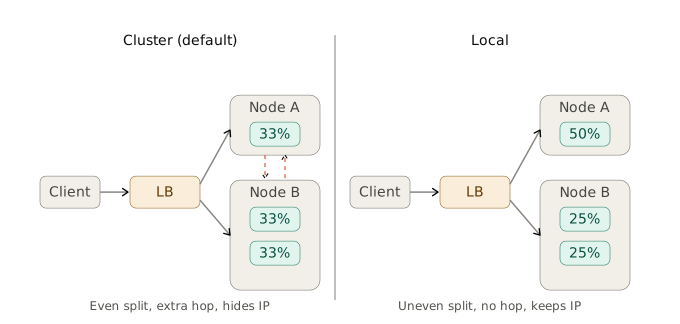
With Cluster policy, kube-proxy load-balances across all 4 Pods equally (each gets 25%). With Local, distribution depends entirely on how many Pods happen to land on each node.
When to choose Local:
- You need the client’s true source IP in application logs (web servers, audit logging)
- Pods are evenly spread across nodes (so problem 2 is negligible) and latency matters
When to stay with Cluster:
- Pods are not evenly distributed across nodes
- Even per-Pod traffic distribution is more important than source IP visibility
Internal Traffic Policy
Section titled “Internal Traffic Policy”spec.internalTrafficPolicy governs pod-to-pod traffic inside the cluster (as opposed to traffic from external clients).
spec: internalTrafficPolicy: Local # Cluster (default) | LocalCluster(default) - internal traffic is load-balanced across all healthy backend Pods cluster-wideLocal- internal traffic is routed only to Pods on the same node as the calling Pod; if no local Pods exist, the connection fails immediately
Primary use case - DaemonSet device managers: a DaemonSet runs one device-controller Pod per node. Client Pods on the same node must send commands only to the local agent (not cross-node), since the commands are tied to that node’s physical hardware. internalTrafficPolicy: Local enforces this without custom routing.
Topology-Aware Routing (trafficDistribution)
Section titled “Topology-Aware Routing (trafficDistribution)”In multi-zone clusters, cross-zone traffic adds latency and cloud egress costs. The trafficDistribution field steers Service traffic to endpoints in the same availability zone preferentially.
Enable:
apiVersion: v1kind: Servicemetadata: name: web-zone-awarespec: trafficDistribution: PreferClose selector: app: web ports: - port: 80Prerequisites:
- All nodes must have the
topology.kubernetes.io/zonelabel set - The Service must have enough endpoints (the controller skips hint generation for very small pools to avoid overloading one Pod)
How it works:
- The EndpointSlice controller reads node
topology.kubernetes.io/zonelabels and allocates endpoints to zones proportional to the zone’s total CPU capacity – a zone with more allocatable CPU cores is assigned more endpoints than a smaller zone - Hints are injected into each EndpointSlice entry as a
hints.forZonesfield:
# EndpointSlice entry with topology hint injected by the controllerendpoints: - addresses: - 10.244.2.2 conditions: ready: true hints: forZones: # zones that should consume this endpoint - name: zone-a nodeName: node-worker-1 zone: zone-a # zone where this Pod is runningkube-proxy(or Cilium) on each node reads the hints and programs routing rules to send traffic only to endpoints whoseforZonesincludes that node’s zone – endpoints without the node’s zone in their hints are ignored
When hints are absent: if no hints exist in the EndpointSlice (e.g. the Service has too few endpoints), nodes fall back to cluster-wide routing and all endpoints receive traffic regardless of zone.
Readiness Probes and Service Endpoints
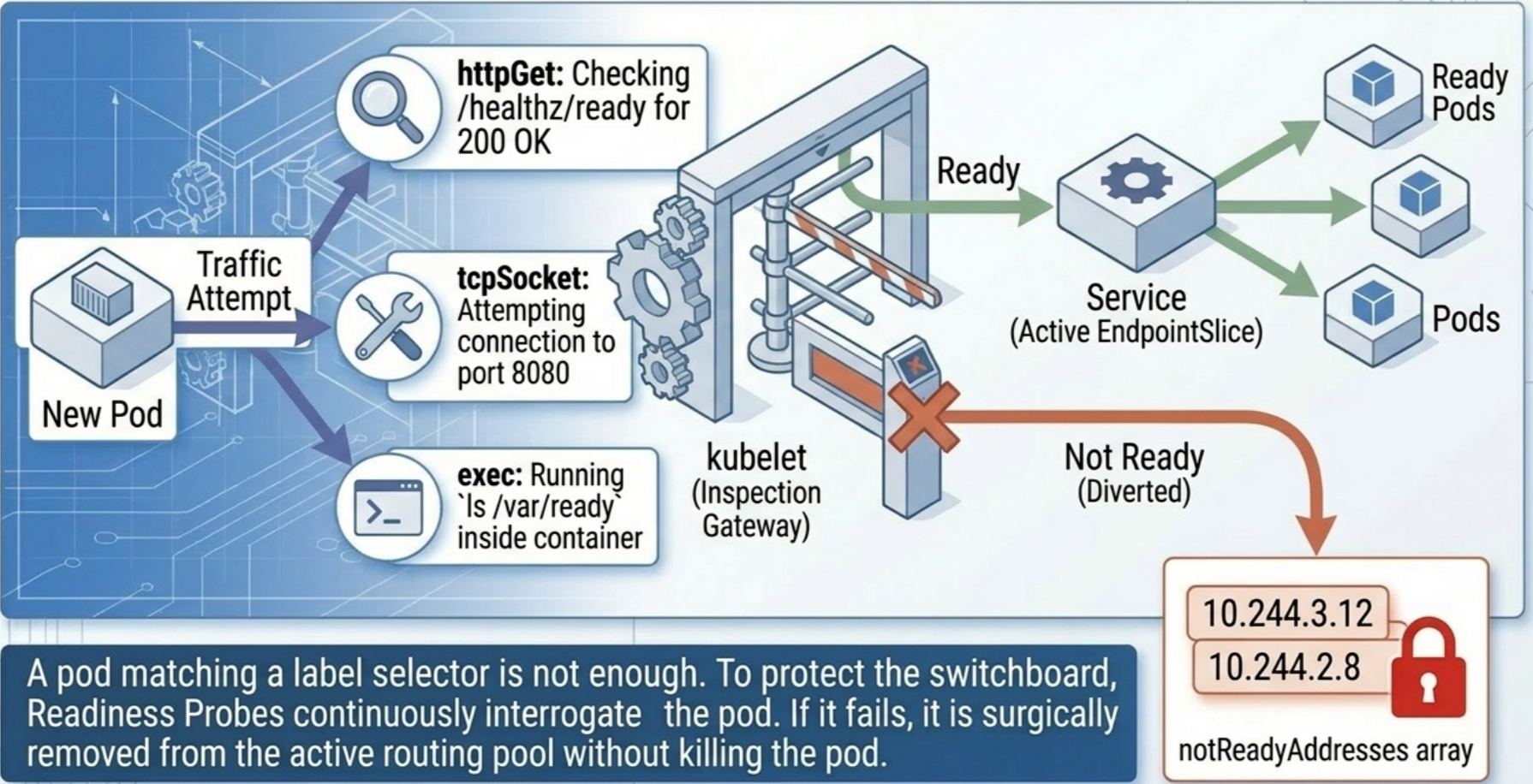
Section titled “Readiness Probes and Service Endpoints”A Pod matching a Service’s selector is only added to the EndpointSlice when it passes its readiness probe. This tightly couples Service traffic routing to application health.
How Readiness Affects Endpoints
Section titled “How Readiness Affects Endpoints”| Pod state | Endpoints object | EndpointSlice | Traffic received? |
|---|---|---|---|
| Readiness probe passing | In addresses list | conditions.ready: true | Yes |
| Readiness probe failing | In notReadyAddresses | conditions.ready: false | No |
| Pod being deleted | Removed immediately | Removed immediately | No |
Containers without a readiness probe are considered ready as soon as they start. This means the Pod is immediately added to the Service endpoints and begins receiving traffic - even if the application inside hasn’t finished initialising.
Inspecting readiness status:
# Check which Pod IPs are ready vs not-ready in the Endpoints objectkubectl get endpoints <service-name> -o yaml# Ready IPs appear under addresses:, not-ready under notReadyAddresses:
# Check conditions.ready per endpoint in the EndpointSlicekubectl get endpointslices -l kubernetes.io/service-name=<service-name> -o yaml# Look for conditions.ready: false to find unhealthy endpointsProbe Types
Section titled “Probe Types”| Type | Mechanism | Success condition | Best for |
|---|---|---|---|
exec | Runs a command inside the container | Exit code 0 | File-based flags, CLI utilities |
httpGet | HTTP GET to a path:port | Response code ≥ 200 and < 400 | REST APIs, web apps |
tcpSocket | TCP connection attempt | Port opens successfully | Databases, message queues, non-HTTP |
Configuration Fields
Section titled “Configuration Fields”readinessProbe: # --- Option 1: HTTP GET (most common for web apps / REST APIs) --- httpGet: path: /healthz/ready # dedicated readiness endpoint recommended port: 8080
# --- Option 2: Exec (run a command; exit code 0 = ready) --- # exec: # command: # - cat # - /tmp/ready # app writes this file when it is ready
# --- Option 3: TCP Socket (port must accept a connection) --- # tcpSocket: # port: 5432 # useful for databases, message queues, non-HTTP services
# Timing fields apply to all probe types initialDelaySeconds: 10 # wait before first check (after container starts) periodSeconds: 5 # how often to probe timeoutSeconds: 2 # max time to wait for a response (default: 1s) successThreshold: 1 # consecutive successes to mark ready failureThreshold: 3 # consecutive failures to mark not-ready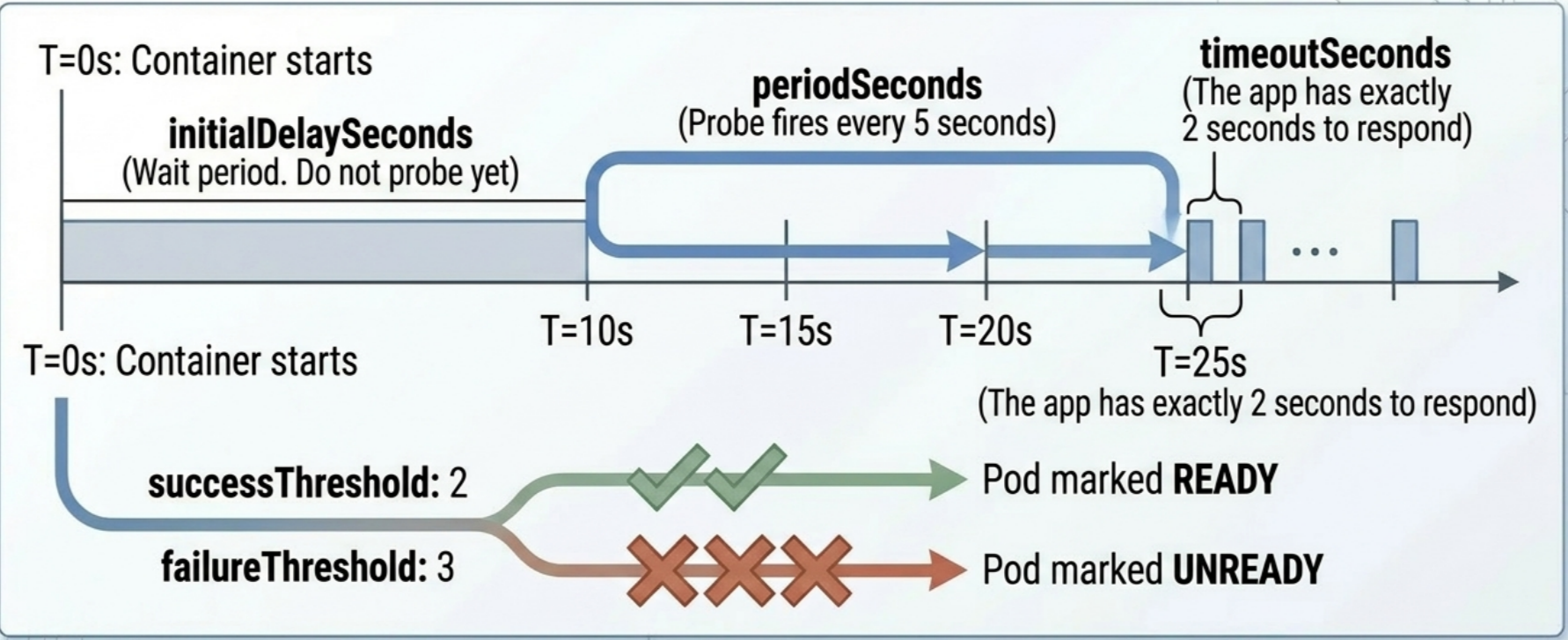
# View probe config in a condensed formatkubectl describe pod <name># delay=10s timeout=2s period=5s #success=1 #failure=3Best Practices
Section titled “Best Practices”- Always define a readiness probe on user-facing containers. Without one, Kubernetes assumes the container is ready as soon as the process starts - traffic is immediately forwarded to the new Pod even if the application hasn’t finished initialising, causing connection failures until it catches up
- Use a dedicated
/healthz/readyendpoint that checks only internal dependencies (local DB socket, shared volume, local sidecar) - not external Services - Never test external dependencies in readiness probes. A 1-second timeout default means any brief network jitter can simultaneously fail all replicas, taking the entire service offline. Recovery requires
successThreshold*periodSecondsseconds to restore - easily dozens of seconds for a subsecond glitch
Dual-Stack Networking
Section titled “Dual-Stack Networking”Kubernetes supports IPv4/IPv6 dual-stack natively. The ipFamilyPolicy field controls how a Service is assigned addresses:
| Policy | Behaviour |
|---|---|
SingleStack (default) | One IP family, matching the cluster’s primary family |
PreferDualStack | Both IPv4 and IPv6 if the cluster supports it; falls back to single-stack |
RequireDualStack | Both families required; Service creation fails if cluster is single-stack |
spec: type: ClusterIP ipFamilyPolicy: RequireDualStack ipFamilies: - IPv6 # primary family listed first - IPv4For dual-stack Services, spec.clusterIP holds the primary IP only; spec.clusterIPs holds both. The order of clusterIPs matches the order of ipFamilies. The EndpointSlice controller creates separate slices for IPv4 and IPv6.
End-to-End Traffic Flow
Section titled “End-to-End Traffic Flow”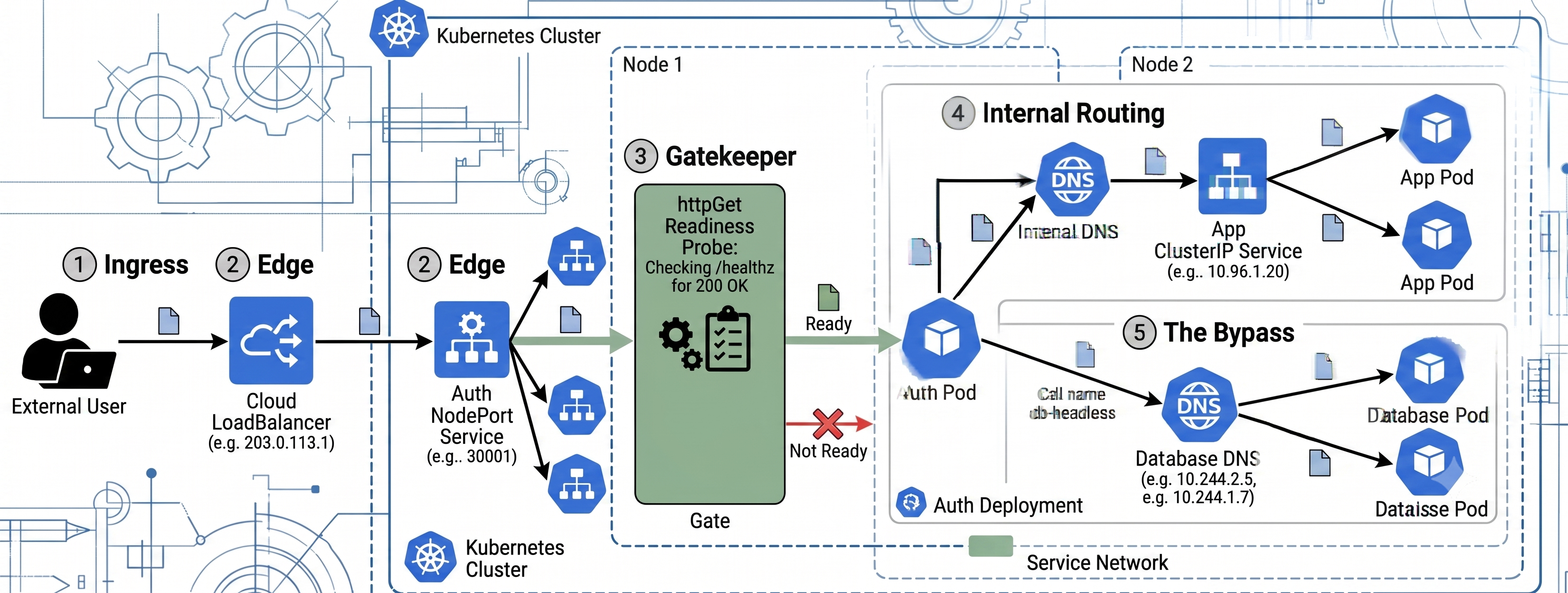
Quick Reference
Section titled “Quick Reference”# List / inspectkubectl get svckubectl get svc -o wide # shows selectorkubectl describe svc <name> # selector, ports, endpoints, events
# Createkubectl create service clusterip my-svc --tcp=80:8080 # --tcp format: <port>:<targetPort>kubectl expose deployment my-app --port=80 --target-port=8080kubectl expose deployment my-app --port=80 --target-port=8080 --type=NodePortkubectl run my-pod --image=nginx --port=80 --expose # Pod + Service in one shot
# EndpointSliceskubectl get endpointslices -l kubernetes.io/service-name=<svc>kubectl describe endpointslice <name> # ready status, node, zone
# Local access (no LB needed)kubectl port-forward svc/<name> 8080:80
# Live connectivity test from inside clusterkubectl run tmp --image=busybox:1.36.1 --restart=Never -it --rm -- wget <svc-name>:<port>
# Selector / env var inspectionkubectl set selector service <svc> app=new-versionkubectl exec <pod> -- env | grep -i <SERVICE_NAME>kubectl get pods --show-labelsTroubleshooting
Section titled “Troubleshooting”Five-Field kubectl describe svc Triage
Section titled “Five-Field kubectl describe svc Triage”When a Service is misbehaving, kubectl describe svc <name> is always the first step. These five fields tell the full story:
| Field | What to check |
|---|---|
Selector | Must exactly match the labels on target Pods |
IP | The stable ClusterIP - use this for direct verification, not ping |
Port | What clients connect to on the Service |
TargetPort | Must match containerPort in the Pod spec |
Endpoints | Pod IPs currently receiving traffic; <none> = selector mismatch or no ready Pods |
Symptom → Cause → Fix
Section titled “Symptom → Cause → Fix”| Symptom | Likely cause | Diagnostic | Fix |
|---|---|---|---|
EXTERNAL-IP stuck at <pending> | No cloud LB integration (bare-metal cluster) | kubectl describe svc <name> → Events | Install MetalLB; use port-forward for local dev |
Endpoints shows <none> | Selector mismatch - no matching Pods | kubectl describe svc <name> → Selector; kubectl get pods --show-labels | Align Service selector with Pod labels |
| Endpoints populated but traffic refused | targetPort / containerPort mismatch | kubectl describe svc → TargetPort; check app port in container | Fix targetPort to match the port the app actually listens on |
Some Pod IPs show Ready: false in EndpointSlice | Pod failing readiness probe | kubectl describe endpointslice <name> | Fix readiness probe; check app startup time |
| Client gets 502 / connection refused | No healthy Pods receiving traffic | kubectl get endpointslices -l kubernetes.io/service-name=<svc> | Check readiness probes, Pod logs |
| DNS name doesn’t resolve | Cross-namespace resolution using bare name | kubectl exec <pod> -- nslookup <svc> | Use FQDN: <svc>.<namespace>.svc.cluster.local |
ping <svc-name> → 100% loss | ClusterIP is virtual - no ICMP interface | Expected; not an error | Use curl or wget to test connectivity |
| New Pod can’t see Service via env vars | Service created after Pod started | kubectl exec <pod> -- env | grep <SVC> | Kill container to restart: kubectl exec <pod> -- kill 1; or use DNS |
| Local traffic policy: connection hangs | No backend Pods on receiving node | kubectl get pods -o wide | Set healthCheckNodePort so LB skips empty nodes |
Live Connectivity Test
Section titled “Live Connectivity Test”The fastest way to verify Service routing from inside the cluster:
# Spin up a temporary Pod and hit the Service by DNS namekubectl run tmp --image=busybox:1.36.1 --restart=Never -it --rm -- wget -qO- <svc-name>:<port>
# Test cross-namespacekubectl run tmp --image=busybox:1.36.1 --restart=Never -it --rm -- wget -qO- <svc>.<namespace>:<port>
# Use curl for HTTP status code detailskubectl run tmp --image=curlimages/curl --restart=Never -it --rm -- curl -sv http://<svc-name>:<port>
If the DNS resolution succeeds and the response comes back, CoreDNS, EndpointSlices, and kube-proxy are all working correctly.